📕 Introduction
Discover in this diagnosis how to build a training path on Mayday Academy
Visit your Mayday Academy admin interface to build your path!
✍ How to add modules to a path?
Building a training path on Mayday Academy
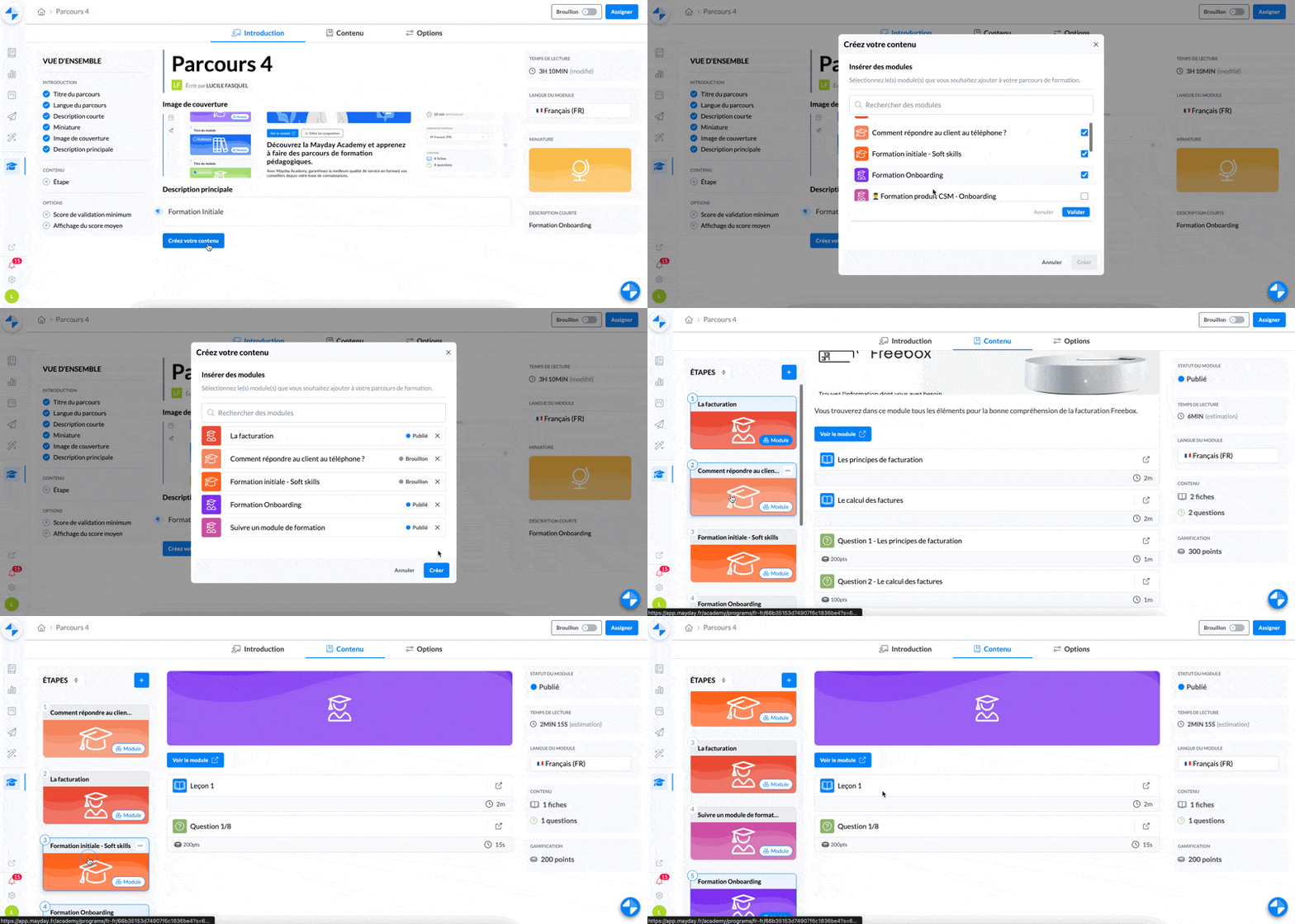
Click on the path
Click on the "Content" tab or "Create your content"
Select the modules you wish to add within your path
Once added to the path, view all the modules that make up your path on the left side
You can view the content of the modules from this page and modify it if you wish by clicking "View the module" in the central part.
And that's it! Your modules are added to your path!
Remember to publish and assign the modules you add to your path. Otherwise, they will not be visible to your learners even if the path is assigned to them.
✍ How to sequence a path?
Paths are sequenced and the order of modules within the path orchestrates the progression of the path.
The next module is only unlocked when the previous one is completed.
By default, the order is set according to the order of selection of the modules within the modal but you can modify it in the "Content" tab of the path.
As you can see in the GIF above, you can quickly sequence your modules and set an order in your training structure.
Select the module you want to move, hold down the mouse
Drag it up or down, above or below other modules