📕 Introduction
Discover in this content how to track the performance of a SCORM format module
Go to your Mayday Academy interface to track the performance of your SCORM format module!
✍ How to track the performance of a SCORM module?
Like customized modules, the performance of SCORM modules will be available on the "Performance" tab of the module and you will be able to download them.
📸 Screenshot
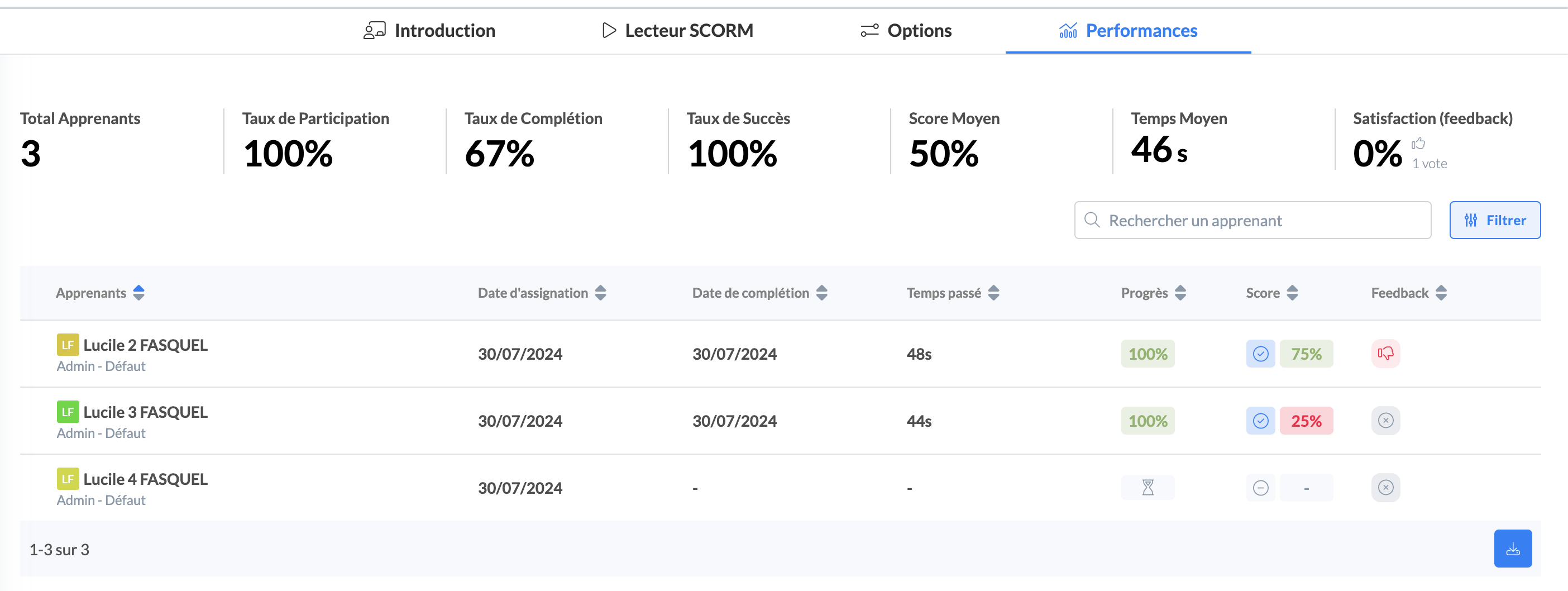
Unlike customized modules, the performance of the SCORM module does not go to the level of the module step but to the level of the whole SCORM module.
Unlike customized modules, precise learner progress data for a SCORM module is not accessible:
You can view an hourglass indicating that it has been started and then the final score once it is completed but you cannot view the ongoing progress score.
The results obtained by your consultants and the analytics depend on the configuration carried out on the SCORM editor:
Via the tracking option:
based on Completion
based on Quiz Result
Via the success option:
passed / failed
completed / failed
completed / incomplete
passed / incomplete
Via the validation score option:
activated or not
% defined if activated
These options also define the module result page obtained by your consultants and the validation or not of their module.