Discover how to analyze and track the results of your Ask Mayday to optimize its effectiveness and measure its impact on your customer support.
To learn more about Ask Mayday, its benefits, and how it works, check out our dedicated article:
📊 Dedicated Dashboard for Tracking Ask Mayday
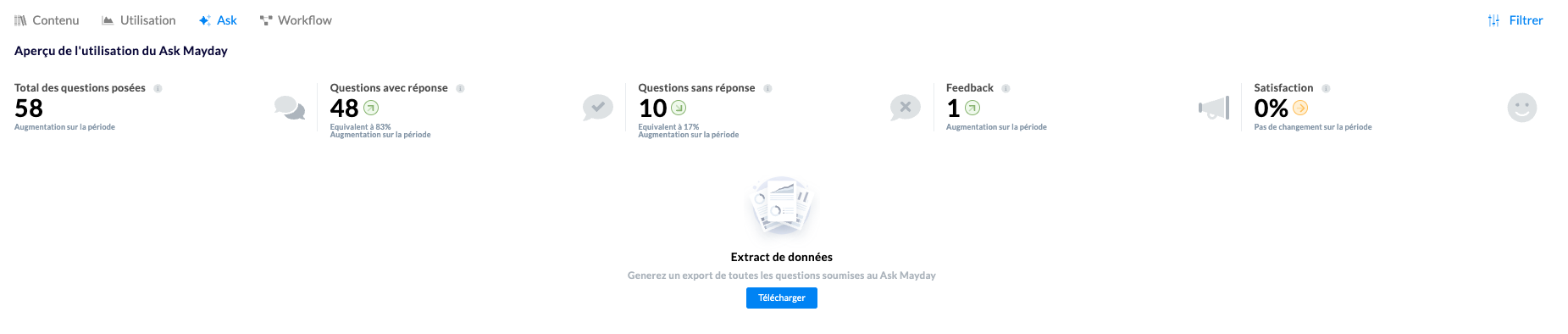
Mayday provides you with a new specialized tab in your dashboards to track the usage and performance of your AI assistant in real time.
📈 Global Metrics
Access a complete overview with the key performance indicators:
Total number of questions asked
Rate of successfully provided answers
Average user satisfaction
Usage trends over time
💾 Detailed Data Export
Download a complete export of all interactions with Ask Mayday, including:
Exact date and time of each question asked
User identification who made the request
Original question as entered
Full answer generated by the assistant
Source documents used to build the answer
Answer status (with or without answer provided)
User feedback and quality ratings
Access point used (sidebar, search bar, extension)
Original interface from which the question was asked
Processing time in seconds to generate the answer
🎯 Optimize Using Data
These metrics allow you to:
Identify the most frequently asked topics
Detect gaps in your knowledge base
Improve the relevance of the answers provided
Measure tool adoption by your teams
📸 Illustration