👋 Introduction
Knowing where and how a shared element is used is essential for:
Measuring the impact of a change before making it
Identifying highly used content (to maintain as a priority)
Spotting unused content (potentially obsolete)
Making informed decisions about archiving or deletion
🤔 How does it work?
📊 Visualizing references for a shared element
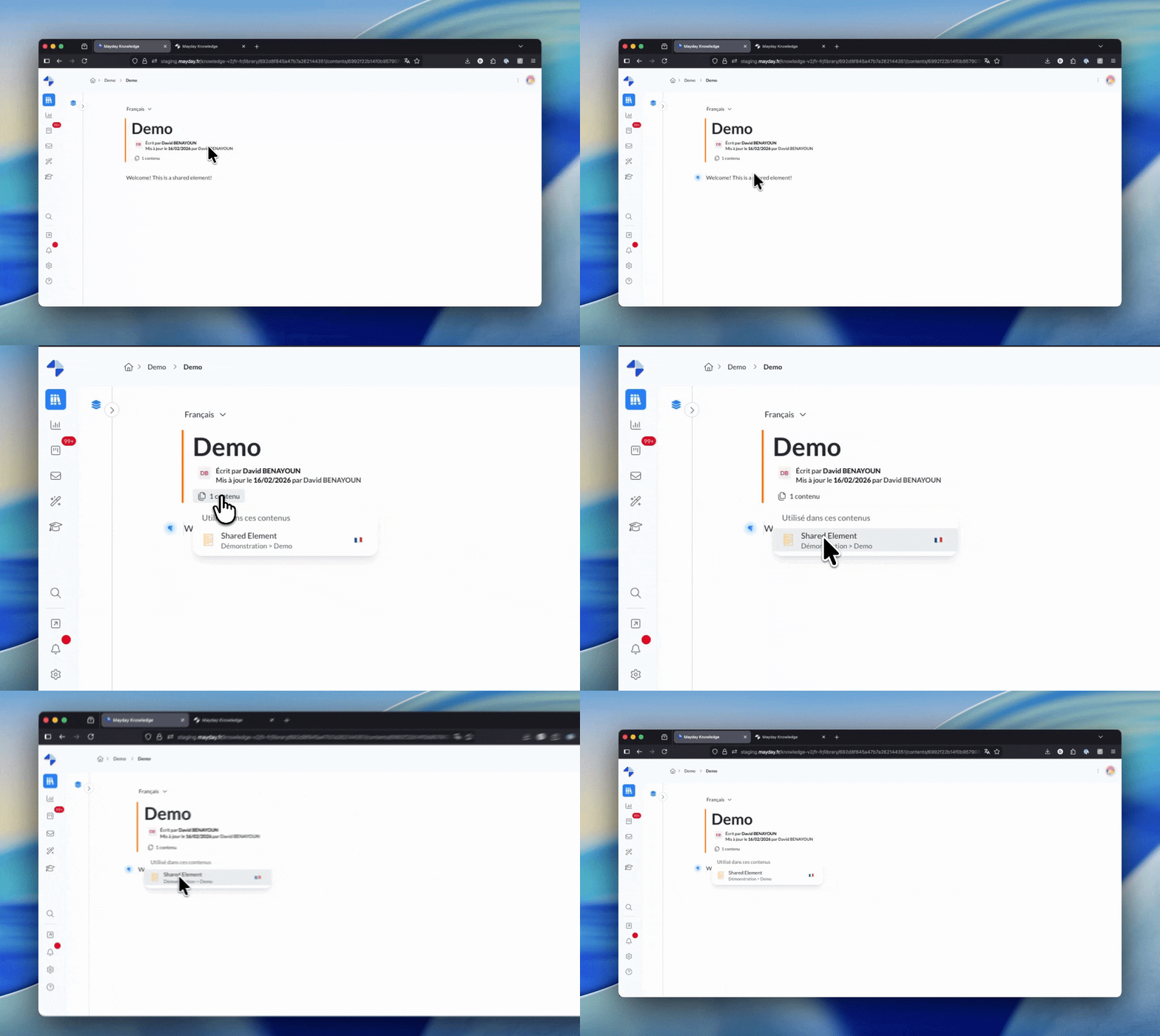
On the page of a shared element, the user can view the list of content that uses this element. This list is also accessible from the element inserted within the content.
An "X content" button displays the total number of content items using this element, as well as a list of content items with their titles and locations. You can click on an item in the list to open it directly.
💡 Tip
Use Ctrl+click (or Cmd+click on Mac) to open an item in a new page while keeping the shared element page open.
🔐 Visibility based on access rights
Only pages to which the user has access rights are displayed in the list.
In practice, an administrator with access to all knowledge bases and collections will see all uses, whereas a user with limited access will see only the uses in the content they have access to.
🔜 Coming soon
The total number of uses will be displayed, including content that you do not have access to (shown as "Inaccessible content" to comply with access restrictions).
You now have a handle on tracking the usage of your shared elements! 📊
ℹ To learn more, check out the documentation dedicated to shared elements: