👋 Introduction
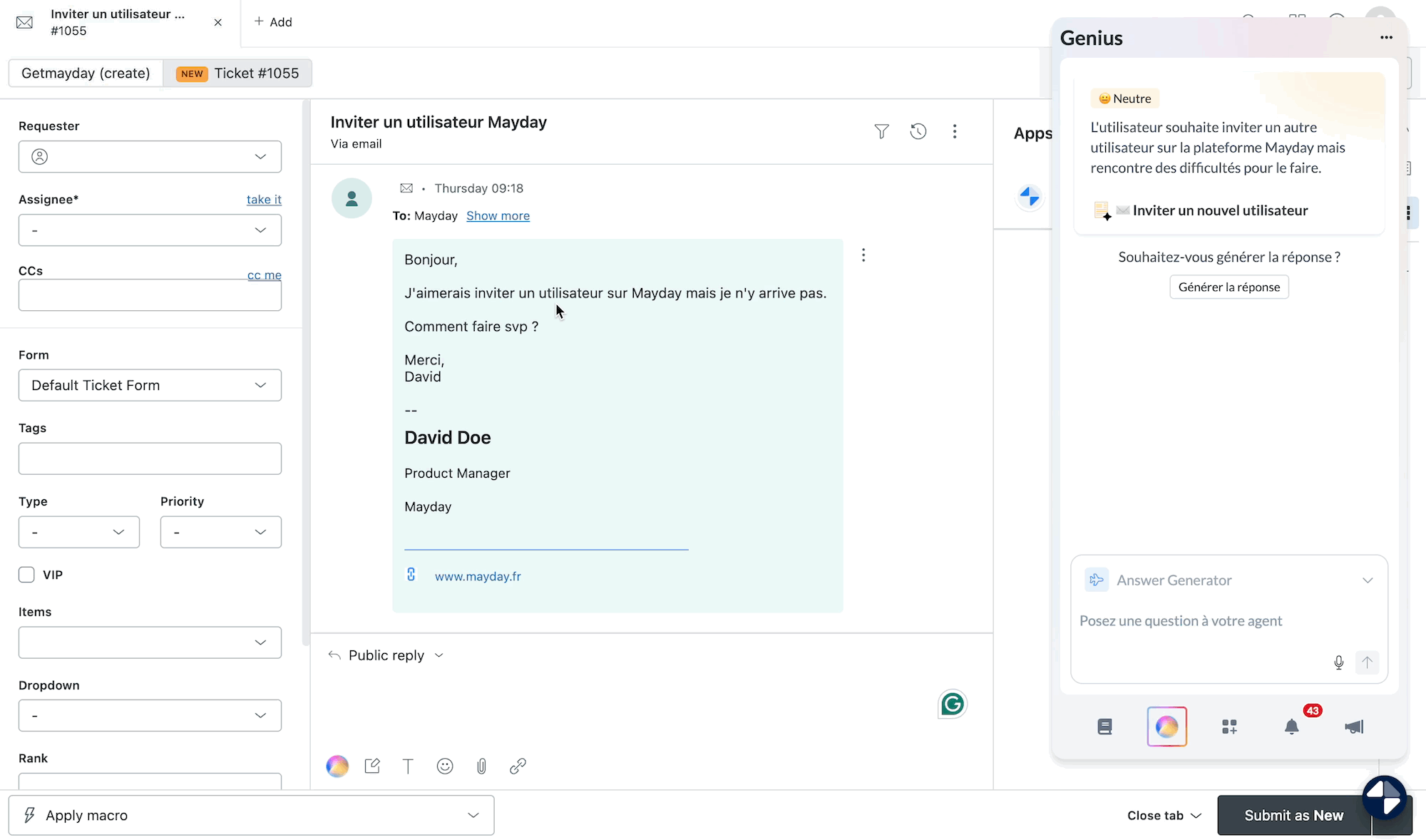
The Answer Generator agent is a groundbreaking innovation from Mayday Genius, designed to streamline the daily tasks of support advisors.
Seamlessly integrated into your ticketing tools (Zendesk, Intercom, Salesforce, iAdvize…), this AI agent automatically drafts responses to customer tickets in just seconds.
All of this is based on Mayday's content and connected sources (SharePoint, internal files, etc.), ensuring reliable, coherent, and ready-to-send responses.
To learn more about Mayday Genius, we invite you to consult this document:
🎥 Presentation Video
🚀 Presentation of the Answer Generator agent
The new Answer Generator agent is available to all companies that have access to Mayday Genius and have connected their ticketing platforms to Mayday.
🎯 Its Promise: Automatically draft a contextualized response to the current ticket with a single click, without leaving your support tool.
👉 The objective? Save valuable time, ensure consistency in responses, increase your DMT, and create a unique customer experience.
🤖 Operation
💡 Ultra Simple Usage
No need to type a question. The agent uses the content of the current ticket to propose a suitable response directly in your interface with a single click.
📚 Sources Used
The Answer Generator agent retrieves information from:
The Mayday knowledge base, filtered according to the advisor's access rights.
Sources connected to Mayday (SharePoint, Drive, internal files…).
👉 This ensures a response based on reliable and up-to-date sources.
⚙ Operation Steps
The agent automatically reads the ticket content.
It analyzes the customer's request.
It searches for relevant information in accessible sources.
It drafts a response, ready to be sent.
🤩 You then have several options:
➡ Insert it directly into the ticket.
➡ Respond to the AI to adjust the message.
➡ Copy the response to use elsewhere.
✨ Bonus: the Genius Button
The Answer Generator agent can be triggered from:
The Genius button, integrated into the response area in Zendesk, Intercom, Salesforce…
The Mayday Widget (Chrome extension)
The applications Zendesk or iAdvize
👏 No change of tool, no time wasted.
🤩 Use Cases and Examples
📨 Reply to a customer in one click
Examples of tickets on which the agent can assist you:
“I would like to cancel my order placed 2 months ago.”
“I don't understand why my card was charged twice.”
The Answer Generator agent drafts a professional, contextualized response with the correct information.
🛠 Customization possible
As with other AI agents, it is possible to customize this agent.
For more information, please see:
👌 Usage Tips
✅ Let the agent analyze the ticket as is
You have nothing more to do: the ticket's context is enough.
✅ Correct or adjust if needed
The agent offers you a response: you can edit it, refine the tone, or make a new request to reformulate.
✅ Use it as soon as possible
With each ticket, the Answer Generator saves you precious minutes — without compromising on quality.
✅ Keep control
The agent does not replace the human. It assists you, but you decide the final response.