👋 Introduction
Managing artificial intelligence within your customer service requires clear visibility on the adoption and efficiency of your tools. Mayday's new AI dashboard is designed to provide administrators with a precise overview of your AI agents usage, enabling you to identify usage trends and optimize your AI agents continuously.
📝 AI Dashboard Presentation
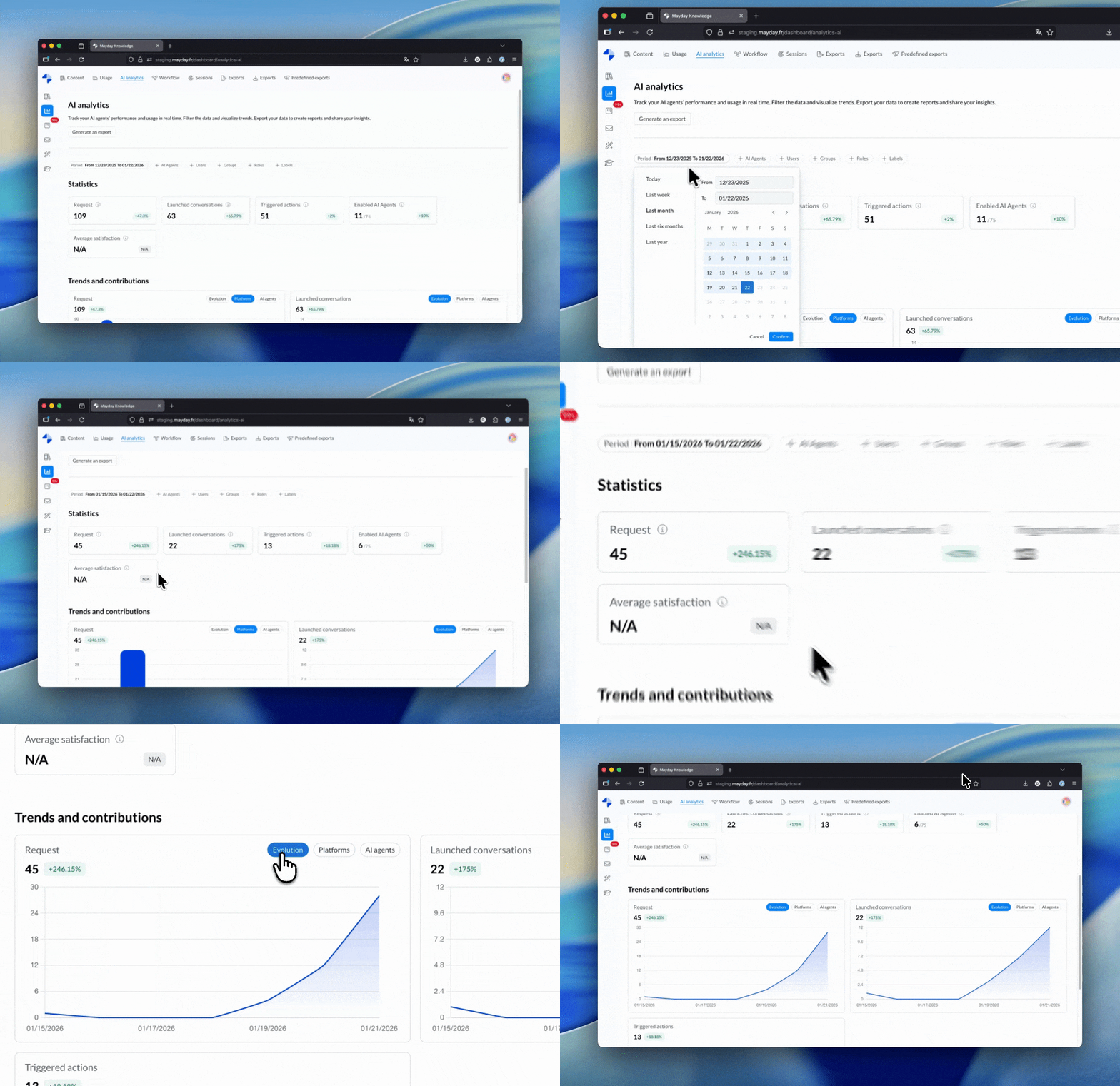
This dashboard is the central tool for measuring the impact of AI on your users. It allows tracking user engagement with AI agents, analyzing the volume of requests, and ensuring the relevance of the provided responses.
The Dashboard compiles key indicators (KPIs) and graphic visualizations to transform raw data into actionable decision tools.
🤔 How does it work?
The AI Dashboard consists of three main elements for easy data analysis:
Filtering and Export Options
A dedicated button allows you to generate a complete Export of the data for external analyses.
The Period filter lets you set the time range (by default, the displayed data pertains to the last week).
The AI Agent filter allows isolating data for a specific agent.
The Users filter provides the ability to segment results by group, role, or user label.
Key Performance Indicators (KPIs)
Total number of requests: Indicates the overall volume of messages sent to AI agents based on the selected filters.
Number of conversations initiated: Counts the opening of new chat sessions with an AI agent.
Actions triggered: Measures the number of actions triggered by users from AI agents.
Number of AI agents activated: Displays the total of operational AI agents during the period.
Average satisfaction on responses: Reflects the average satisfaction score attributed to generated responses.
Graphic Visualizations
The Dashboard displays this data as detailed graphs:
Requests: Three views available (time evolution, distribution by platform, and volume by AI agent).
Conversations initiated: Revisits the same three views (evolution, platform, AI agent).
Actions triggered: Displays the most used actions, in order.
📍 Where and for whom?
The AI Dashboard is accessible under the following conditions:
Location: Available directly in the Dashboard of the administration center.
Target: Accessible to all administrators with dashboard access rights.
Activation Condition: The feature is visible as soon as Mayday AI is activated for your company, even if the user does not have direct access to the use of AI agents.