Introduction
Hey there! 👋
Q2 has started, and we're excited to share a major announcement with you in the coming days and weeks. We've been hard at work on the Mayday Academy, our new learning platform designed to help you transform knowledge into skills for all your agents.
Stay tuned for more details very soon! In the meantime, we've also been busy working on brand new features, including some that many of you have been eagerly anticipating!
Without further ado, here is what we’re happy to release today:
👇 Let's dive in a bit deeper!
✨ New features
🔎 Major Improvements in our Search Algorithm
✨ NEW FEATURE | Find documents quicker with a more accurate and powerful search engine
In the last sprint, we began making big improvements to our search engine. This time around, we've continued this work and made even more significant upgrades. We understand that the search engine is crucial for you, and we've made it a priority to enhance its performance. We know that in the past, it wasn't always as precise as we'd like it to be. That's why we've decided to revamp it entirely. Our goal is to deliver a more refined search experience, ensuring that only the most accurate documents are returned, ranked from most to least accurate.
🪄 Available Improvements
Reviewed weights:
Title: If the search query is in the title of a document.
Body: If the search query is in the body of a document.
Attachments: If the search query is in one of the attachments within a document.
User Boost: If the document is boosted as a top consulted document.
Less results, improved accuracy: Our search engine now always returns the most accurate documents first.
Reduced user boost: If a document is boosted as a top consulted document, it will now have less impact on the order of the results, as we want to prioritize a document’s relevance.
No stop words: Words such as "The", "they", "and" are no longer considered when matching a query with search results.
No more fuzzy matches with attachments: Now, we only consider attachments that perfectly match a search query, with no fuzziness allowed. This will bring more accuracy to attachment-matching in the search engine.
Capital letters are managed: Acronyms tend to be written in capital letters. As we want to consider acronyms in search results, we now match capital letters.
👩💻 How to use it?
All these improvements are available on all search engines, whether it’d be Mayday Admin, Desk, Widget, and all other platforms.
All you have to do is start typing and enjoy a brand new search experience!
🖌 Search Keywords are now Highlighted in Documents
✨ NEW FEATURE | View your search terms highlighted when opening a document from the search engine
In the last sprint, we introduced the feature of bolding search terms in the search engine results. Now, we're excited to announce a new enhancement to this feature: when you open a document from the search engine, those search terms will be highlighted, making it easier for you to find exactly what you're looking for in the document!
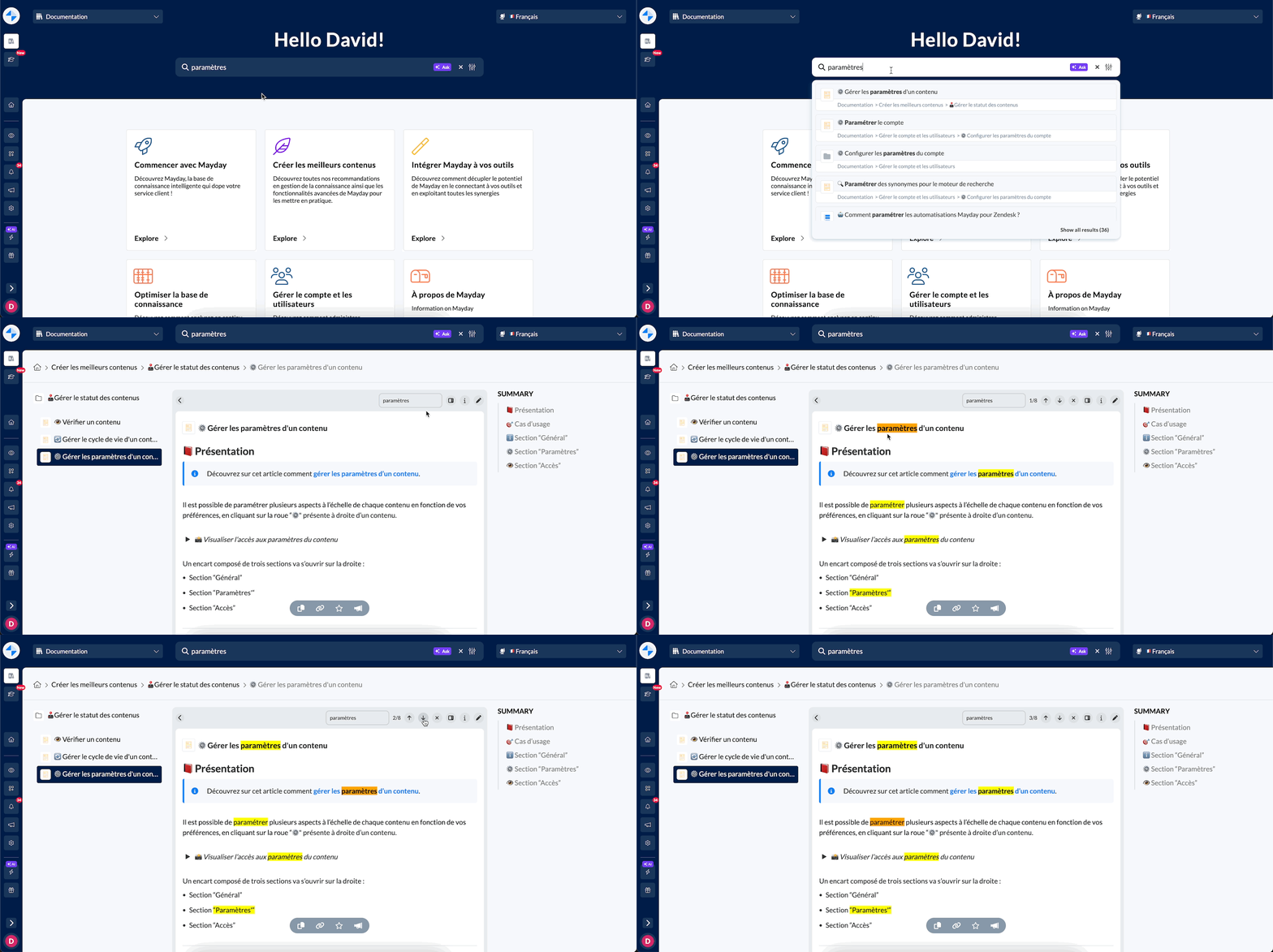
The search term “Paramètres” is highlighted and I can navigate through the 8 occurrences in the document
🪄 Use cases
⚡ You want to quickly find the information you’re looking for in a document
😖 You sometimes stumble upon long, heavy documents and can’t understand why this document was listed as relevant based on your search query
👩💻 How to use it?
Use the search bar on Mayday Desk and open a document.
View in the document header the number of occurrences your search query has in this document.
Navigate through the occurrences using the arrows.
⚡ Ask Mayday available in Mayday Widget, on any website
✨ NEW FEATURE | Enjoy Ask Mayday in Mayday Widget
Mayday Widget serves as your all-around assistant, accessible on any website. Its purpose is to provide you with instant access to the knowledge you require, no matter where you are. Now, with the addition of Ask Mayday, you can ask questions in natural language and receive AI-generated answers within seconds, all directly within the Mayday Widget, on any website you visit!
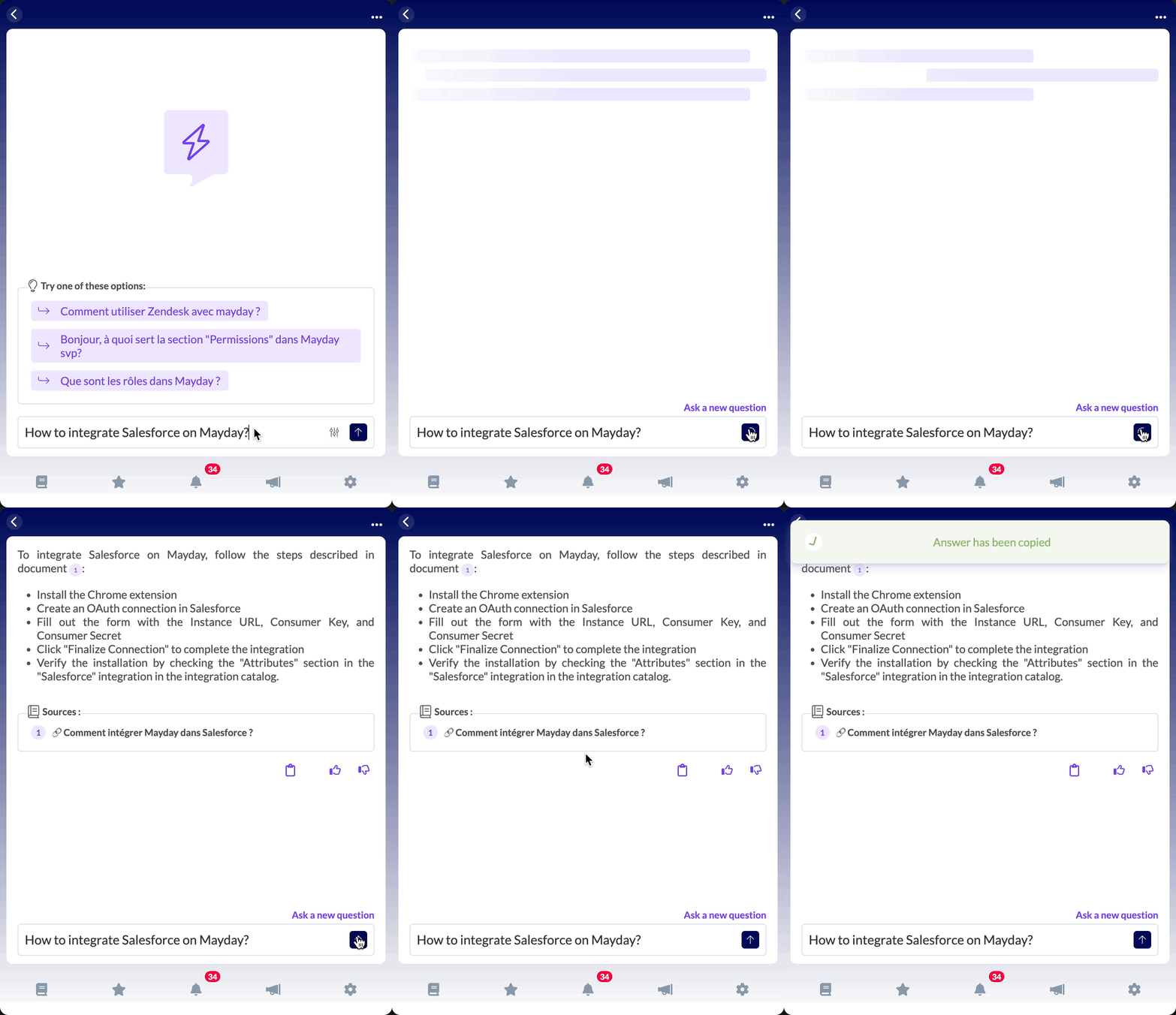
Ask a question to Ask Mayday on Mayday Widget and receive an answer in just a few seconds
🪄 Use cases
⚡ You are currently viewing a customer ticket on a third-party website (Intercom, Zendesk, etc.) and need some information to quickly provide to your customer
🤔 You have a question and need to ask it as soon as possible — you don’t want to have to open Mayday Desk
👩💻 How to use it?
Click on the 🔍 button at the right of the search bar
Ask a question to Ask Mayday, in natural language
Receive an answer in just a few seconds, based on all the documents you have access to
You can also use filters, view the sources, copy the answer, and send some feedback
The Ask is exactly the same as on Desk
✍ Improvements to tables on Mayday
✨ NEW FEATURE | Improvements to the table-viewing experience
We've heard your requests for new features in our Mayday Editor. This quarter, our focus is on enhancing the Editor by addressing past issues and introducing fresh features. Today, we're thrilled to announce updates centered around improvements to the table-viewing experience on Mayday!
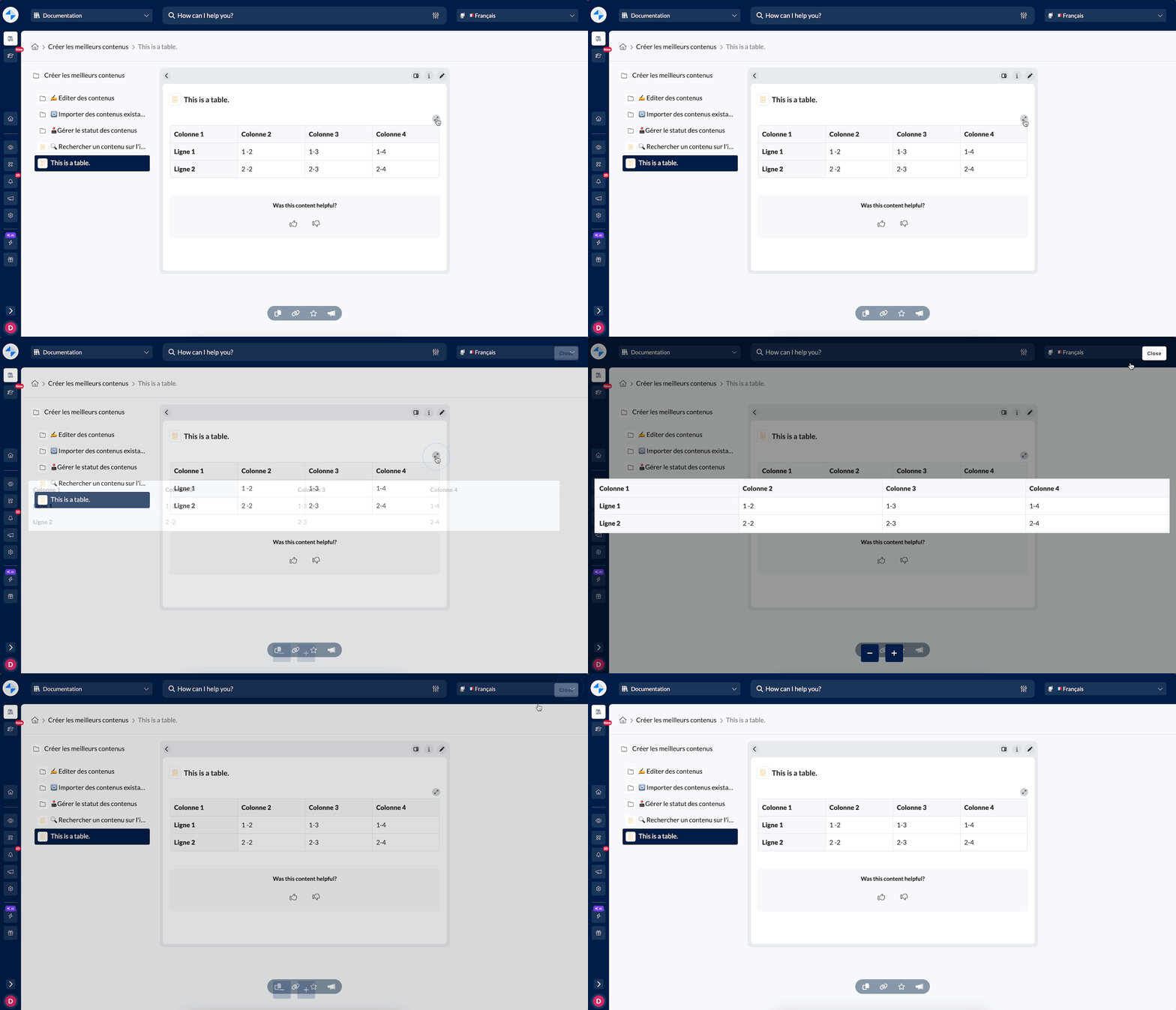 Open a table in a bigger view using the enlarge icon over the table (available on Desk)
🪄 Use cases
↔ You want to have more room to read a table on Mayday Desk.
👩💻 How to use it?
Click on the ↔ button over a table.
Enjoy a full-page view of the table.
🚀 Optimizations and Improvements
Mayday Editor | Embed Word, PowerPoint and Excel Documents
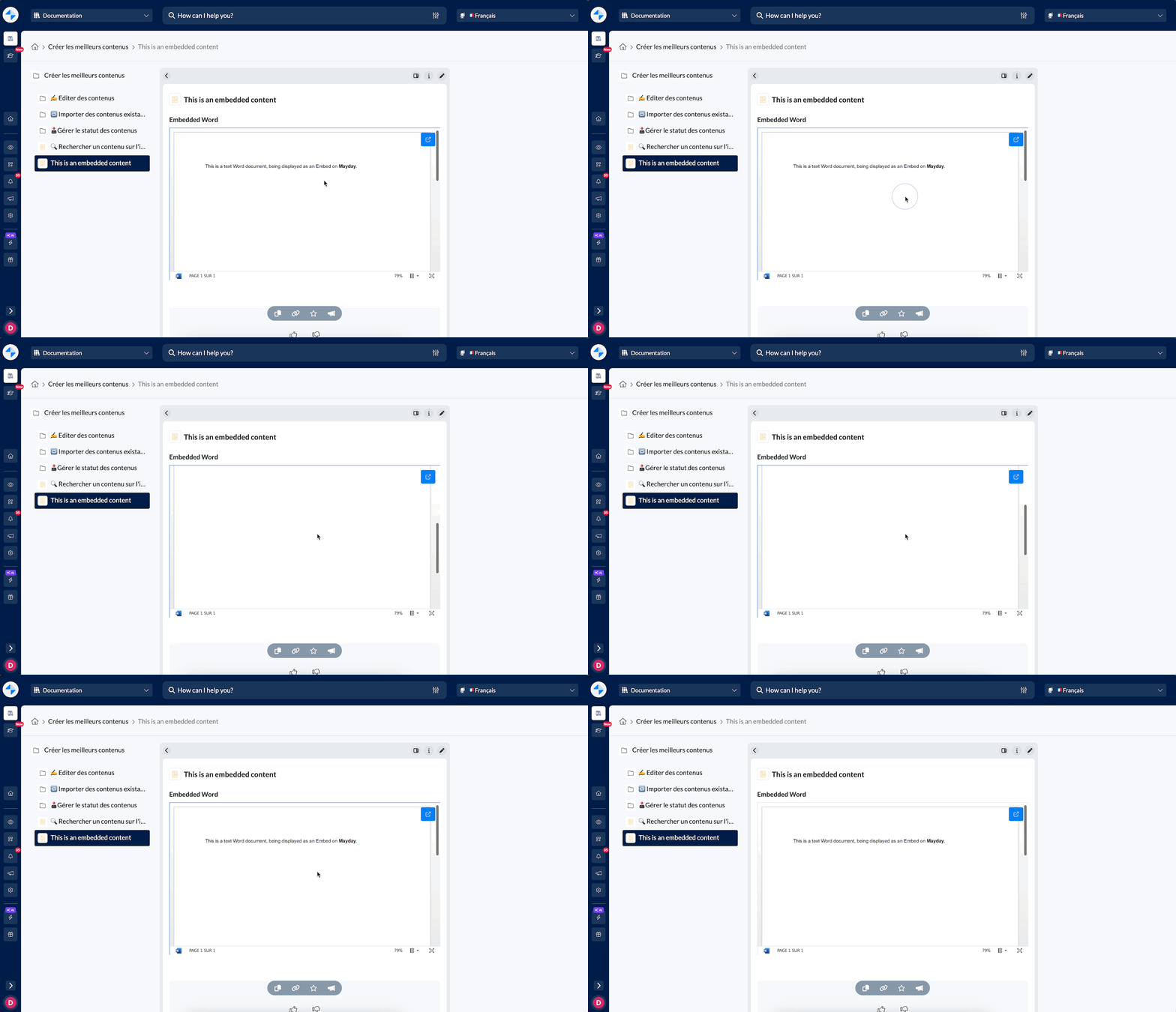
In our editor, you can embed both internal and external documents, such as Mayday content and PDFs.
Now, we've expanded this capability to include embedding:
Word documents
PowerPoint documents
Excel documents
Mayday Admin | Search a user or role in the verification process
When establishing a verification process for a Mayday document, it's crucial to identify a verifier who will be notified when the document becomes obsolete.
To simplify this process, we've added a search bar where you can easily find and select a user or role to be designated as the verifier.
Mayday Admin | View the name of the document being deleted in the deletion modale
Currently, when deleting a Mayday document, a confirmation modal appears. We've enhanced this by including the name of the document being deleted. This ensures that the confirmation modal effectively prevents accidental deletion of the wrong document.
Mayday Desk | Navigator Tabs are now the name of the Mayday document
We understand that agents often have multiple tabs open, including several Mayday documents. To enhance their productivity and help them find the right document quickly, the navigator tabs (Chrome, Firefox, etc.) will now show the document's name instead of just "Mayday Desk."
🪲 Bug Fixes
👉 We have fixed all of the following issues:
Table Headers: Previously, there was a UI overlap issue with table headers. While scrolling within a table, the header column and line would sometimes overlap.
Notifications and toasts in Mayday Widget: We've addressed initial issues, but some may persist. Let us know if you're still experiencing problems.
Search Engine: Exact matches weren't always giving the right results.
Ask Mayday Sources: Some showed a 404 error.
Guide Links in Desk & Admin: Some links didn't open properly.
Language Switching on Selfcare Portal: Document title switched, but body didn't.
Public URL for Private Documents: Generated URL sometimes didn't work as expected.