Introduction
Hey everyone 👋
The beginning of summer marks the start of exciting projects ☀
We are currently finalizing many new features for the Mayday Academy, and we can't wait to share them with you very soon 👀
However, we are excited to announce several new features that are now available:
A brand new interface to manage Mayday archives, allowing you to find and manage your archives more efficiently.
The ability to schedule the date of sending and withdrawing a counselor notification, making it easier to manage information to share with your counselors.
The ability to change the status of a content or modify its title via Mayday API.
Display of tooltips in Ask Mayday! responses
And this is just the beginning of an exciting summer at Mayday 🤯
We can't wait to announce even more exciting news very soon:
Even more features on Mayday archives.
A brand new interface for sending and managing counselor notifications.
A complete redesign of the Mayday Hub interface.
The ability to automatically translate all your Mayday content!
The ability to create training paths on the Mayday Academy to sequence your modules!
Gamification of your training on the Mayday Academy through the obtaining of various badges by your learners.
Stay tuned, more information coming soon 👀
And in the meantime, let's discover all these new features 👇
✨ New features
🎨 Discover the new Mayday Archives interface
✨ NEW FEATURE | Finding and managing your Mayday archives has never been easier!
As always, our goal is to ensure that Mayday fully meets your needs. We understood that Mayday archives were not ideal for efficiently managing your knowledge bases. That's why we're excited to announce that a brand new interface is now available, with many new features to come 👀.
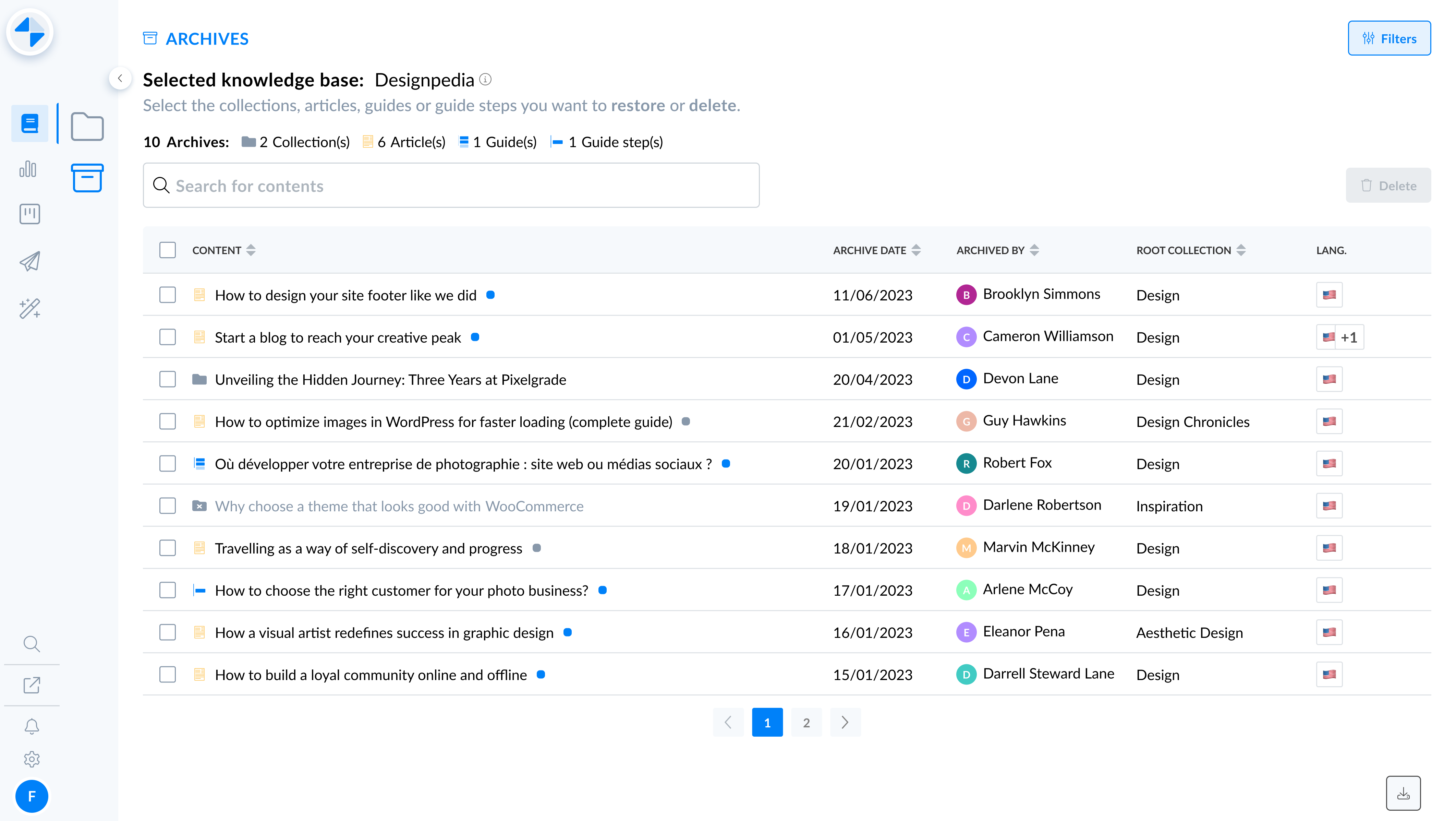
The final interface of the new Mayday archives
🪄 Improvements available
Already available 🥳
Display of the list of archived documents in a table: find the type of content, its title, its status, its archiving date, the author of its archiving, its original root collection, or its language, in a table.
Display of an archived collection in a table: click on an archived collection and view all the archived contents within this collection, directly in the table.
Search bar: find any archived content or collection from the search bar.
Coming soon 🤯
Smart filters: filter the list of archived documents to quickly view only the documents you want.
New interface for reading an archived document: benefit from a new interface for reading an archived content, with all the elements available on an unarchived content.
Sorting within the table: sort the rows of the table by column.
Bulk deletion: select multiple contents and delete them with a single click.
Autonomous export: export your list of archived documents to CSV format at any time.
🤔 How to use them?
Go to Mayday archives: in the same place as before.
Enjoy this new interface 🥳
📤 Schedule the sending and withdrawal of a Mayday notification
✨ NEW FEATURE | Set a start and end date for a counselor notification
We know that the counselor notification plays a crucial role in Mayday, allowing you to keep your counselors informed at all times of important information. To facilitate the sending and organization of these notifications, it is now possible to schedule their sending and withdrawal on a specific date.
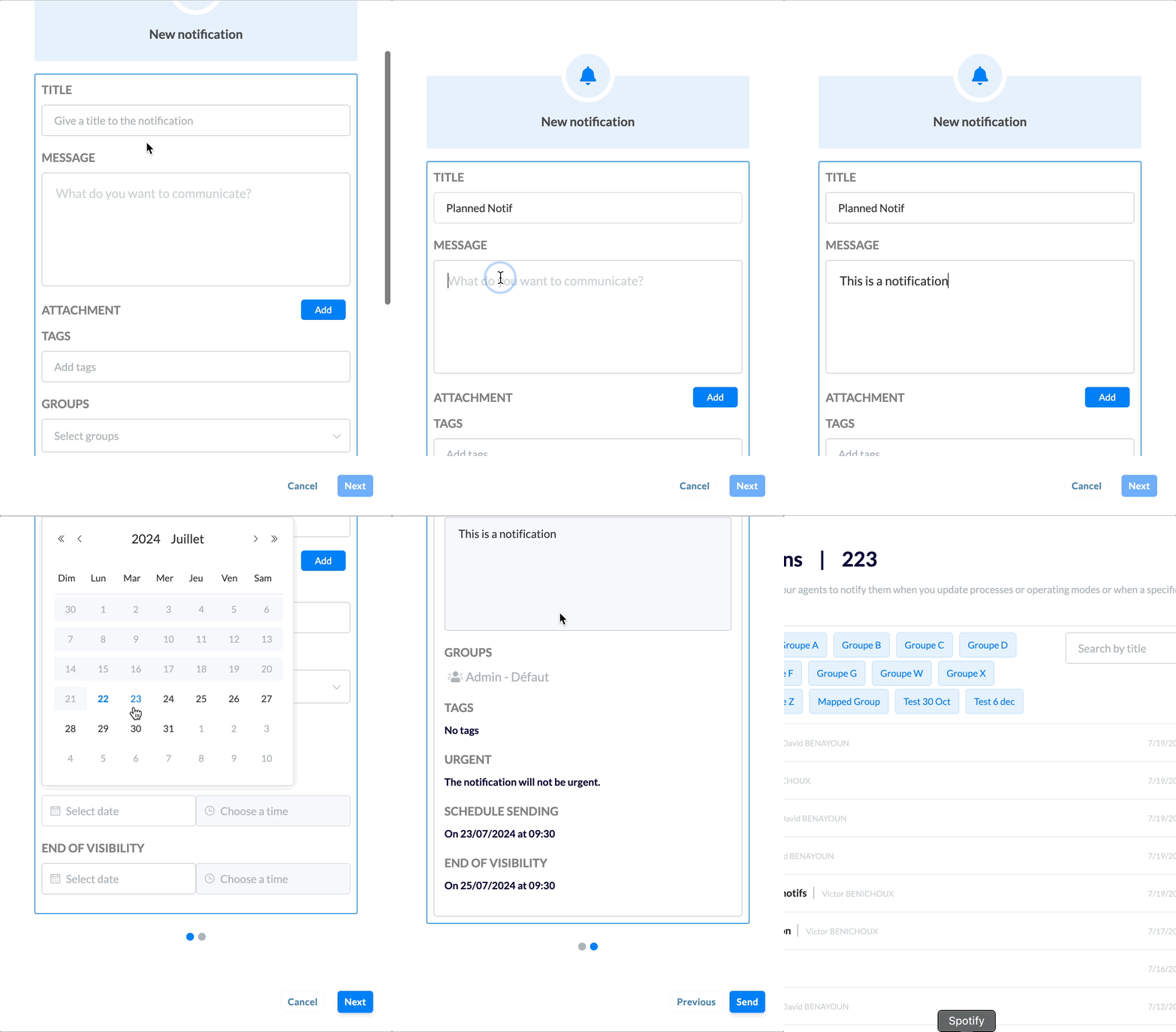
Choose a start and end date for your counselor notification
🪄 Use cases
📆 You want to schedule a notification in advance to inform your counselors in a timely manner.
🤖 You want to intelligently send and withdraw a notification at specific dates and times.
💪 You want to make life easier for your counselors by allowing them to receive only the necessary notifications at any time in their notification center.
🤔 How to use it?
Open the notification sending modal.
Select, if necessary, a start date and time as well as an end date and time for the notification.
This step is optional.
Make sure these dates and times are in the future.
The end date and time must be after the start date and time.
You can set a start date without an end date, or vice versa.
That's it! Your notification will be sent and removed at the dates and times you specified.
⏭ What's next?
This is just the beginning! Very soon, a brand new interface for sending and managing advisor notifications will be available 👀
🔌 New possibilities with the Mayday API
✨ NEW FEATURE | Change the status or title of a content from the Mayday API!
As you know, the Mayday API is constantly evolving! Now, it is possible to modify the status of a Mayday content (published, draft) or to change its title directly via the Mayday API.
🤔 How does it work?
Two new endpoints are now available in the Mayday API:
1. Change the status of a content: You can now publish or draft a content using the ID and language of the content via an endpoint in the Mayday API.
2. Modify the title of a content: You can now modify the title of a content using the ID and language of the content via an endpoint in the Mayday API.
⚠ Tooltips within Ask Mayday
✨ NEW FEATURE | View tooltips within Ask Mayday responses
Ask Mayday uses the contents of your knowledge bases to generate intelligent responses. However, some of these contents may include tooltips containing more or less important information. Now, these tooltips are clearly indicated in the Ask's responses, providing you with all the necessary context to understand the response.
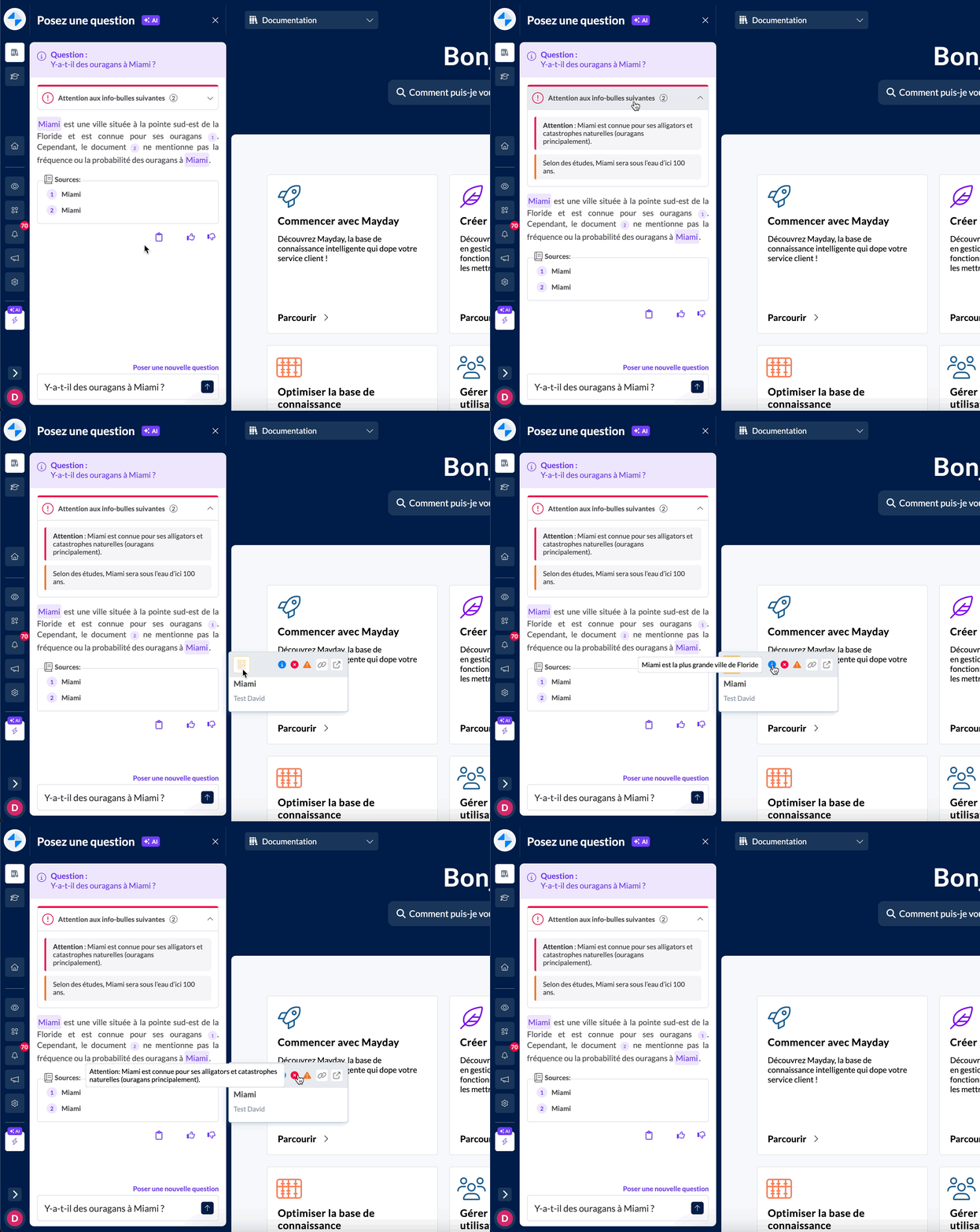
View "Error" and "Danger" callouts above the response, and all callouts at the relevant sources
🪄 Use case
⚠ You receive an Ask response, but a danger or error tooltip may call into question the information given.
✅ You want to make sure that the provided response takes into account all the information within the sources, including relevant tooltips.
🤔 How to use it?
Ask Mayday a question
If one or more tooltips are present in one or more sources, they will be displayed:
Above the response if they are danger or error tooltips
At the level of each relevant source for all tooltips
🚀 Import your SCORM training modules to the Mayday Academy
✨ NEW FEATURE | Import, configure and track the performance of your SCORM modules from the Mayday interface
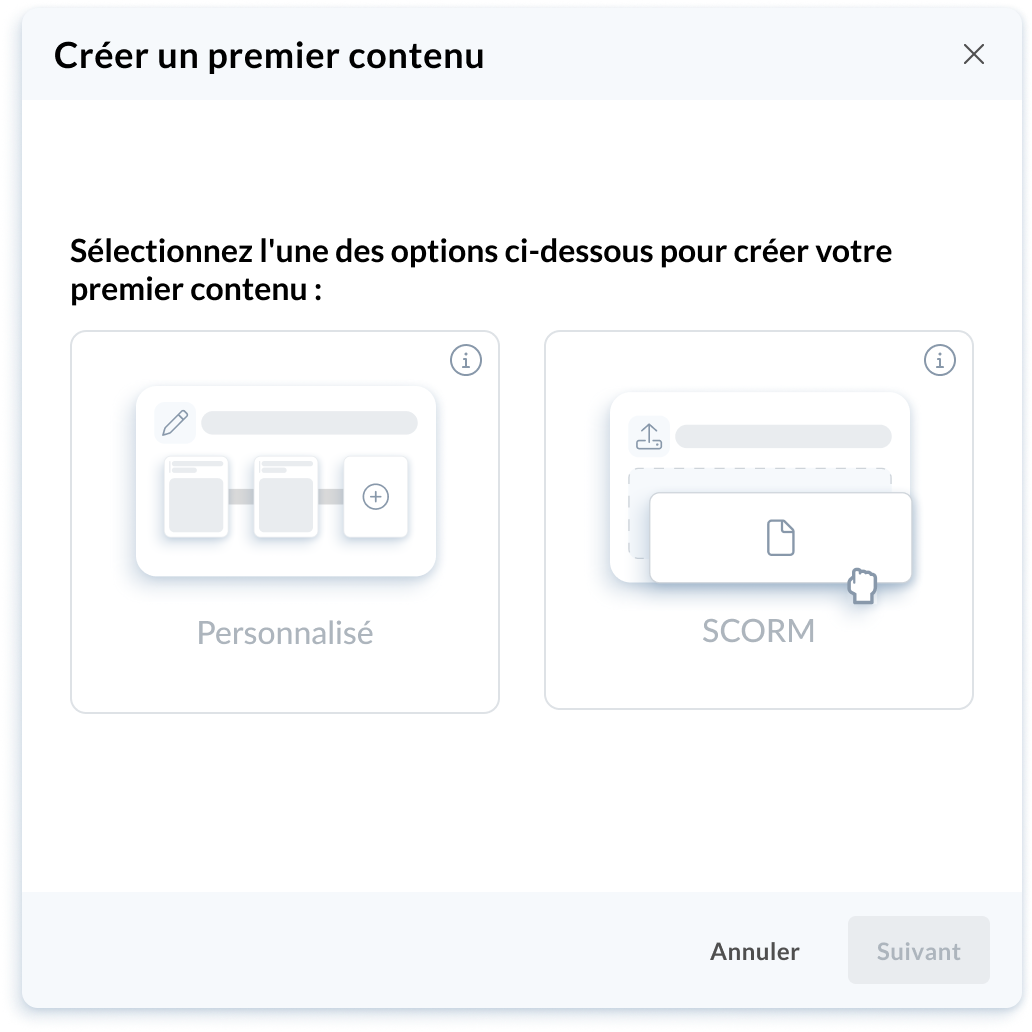
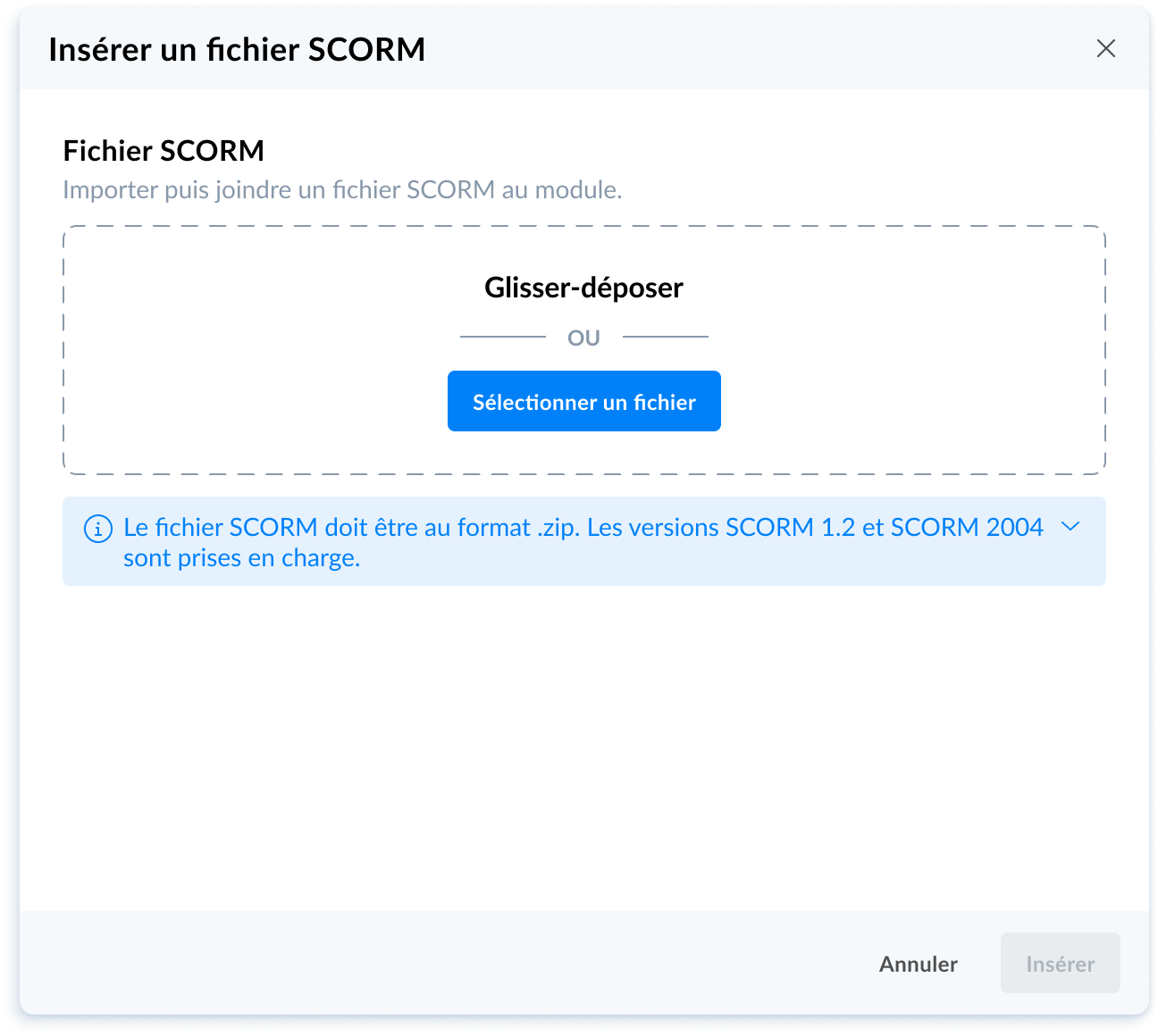
Choose the SCORM format when creating your module on the Mayday interface and import your existing modules
🪄 Use case
🤖 You want to import training modules that you have already created on the SCORM editor to the Mayday Academy in order to benefit your learners without effort.
🤔 How to use it?
The SCORM file must be in .zip format. SCORM 1.2 and SCORM 2004 versions are supported.
From the Mayday Academy, create a new module and select the "SCORM" module, drag and drop your SCORM file and you're done!
You can then:
Configure the introduction of your module on the Mayday interface by adding the estimated reading time, a short description, modifying the imported thumbnail or long description.
View the content of your module via the SCORM player.
Define the options of your SCORM module such as feedback collection, associated labels or display of the average score to learners.
Assign and publish your module when you're ready.
Finally, track the performance of your learners and help them learn better!
🚀 Optimizations & Improvements
File Upload | Security
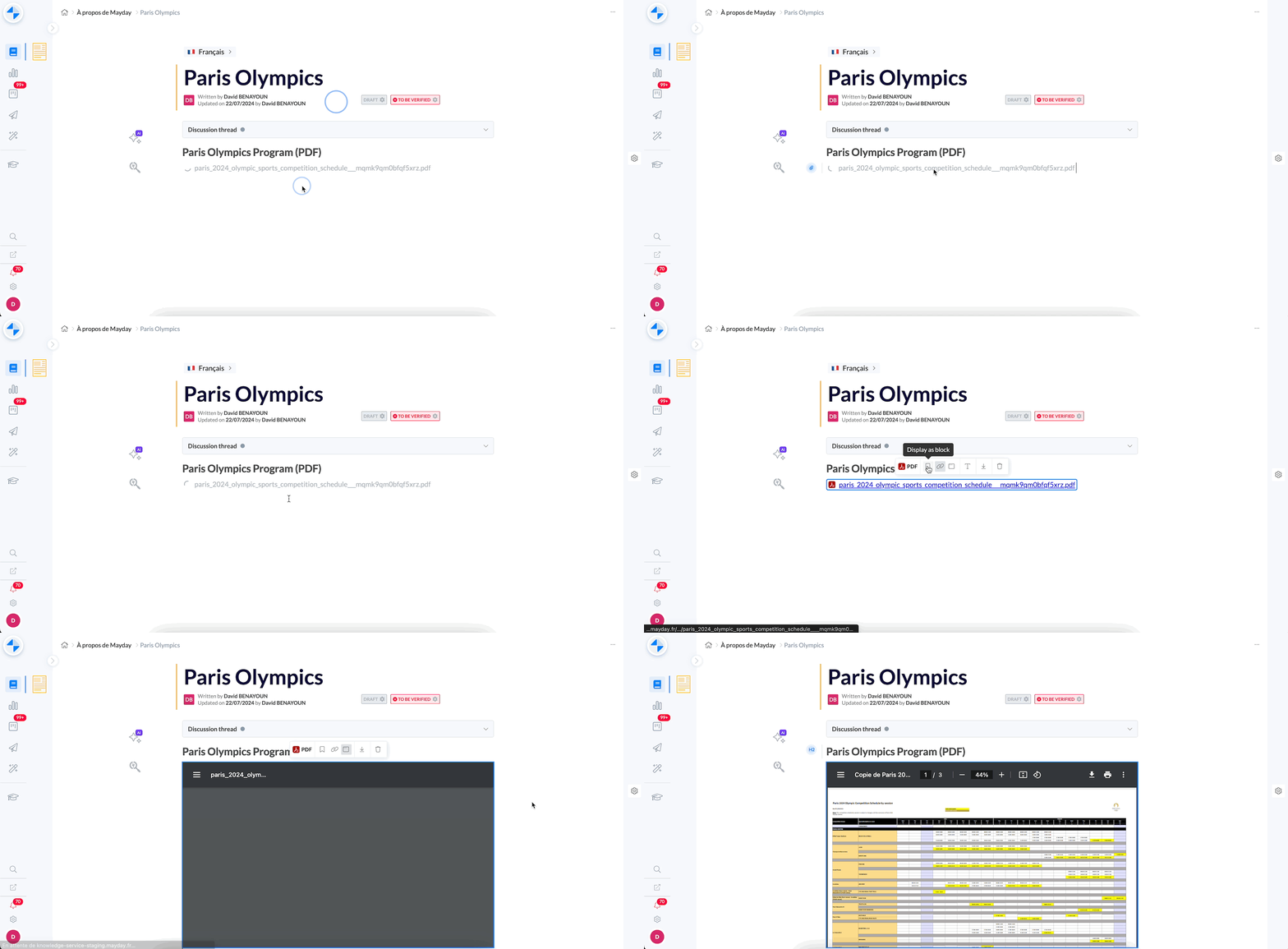
Many files (PDF, Word, Excel, images, etc.) are uploaded to Mayday content. To optimize the security of your knowledge bases, we have integrated a verification process for each file uploaded to Mayday.
Now, as soon as a file is uploaded, a verification process ensures that it is not malicious or carrying a virus.
Once the verification is complete, you have two options:
The file is malicious: It is marked as such and cannot be opened for security reasons.
The file is secure: It is accessible and can be opened normally.
During the verification, you will see a loading bar on the file.
New Users | Notifications
Historically, new Mayday users received all previous notifications intended for their group, which was reported as a disadvantage by many customers. Now, each new user will have an empty notification center upon arrival on Mayday and will only receive notifications sent after the creation of their account.
Mayday Academy | Modules | Feedback Collection
We have optimized the feedback collection option on Mayday Academy modules. This option allows you to give your learners the opportunity to give you feedback on the training.
Now, you can activate or deactivate this option. If activated, it will allow you to collect feedback at each step and at the end of your module. If not, no feedback request will be offered during or at the end of the module.
🪲 Bug Fixes
👉 We fixed the following bugs:
Mayday Hub: Task statuses were not updating correctly. Additionally, sometimes when opening a task in the Hub, the wrong task would be displayed. Finally, it was sometimes necessary to refresh the page to be able to open a task in the Hub.
Zendesk & Notion Importer: The importer only took into account the title and not the body of a content.
Copy Paste: The copy-paste function was not working for some content on Mayday Desk.
Real-time Avatars: When multiple users were viewing content simultaneously, it could happen that the avatars of other users were not displayed correctly.
Content not found in feedback (to be confirmed): On the advisor side, the linked content of a recently sent feedback was sometimes displayed as "Content not found" in the feedback history.
Code block within the editor: Code blocks in the Mayday editor had display issues when they spanned multiple lines.
Entering linked content: When typing a keyword after an "@" to mention content or a user in the Mayday editor, some characters were sometimes added after the mention.
Entering a search on a table (to be confirmed): When starting to type a search in a table, the cursor sometimes returned above the table.
Filters within the Mayday Dashboard: Filters for knowledge bases in the Mayday Dashboard were no longer working correctly.
Filters within the user center: Filters in the Mayday user management center were no longer working correctly.
Deleting a user: Deleting a user was not being saved correctly.
Deleting a step within a diagnostic: It was sometimes impossible to delete a step from a diagnostic.
Inconsistencies on the satisfaction rate of a content: Sometimes, the satisfaction rate displayed on a content was different between that displayed on the content itself and that displayed in the Mayday Dashboard.
Managing a custom font on public Selfcare content: Integrating a new font via custom code did not apply to all text in the content.