Introduction 👋
Welcome everyone 👋
For the past few weeks, we have been mentioning the beautiful new features in preparation on the Mayday Academy 👀
We are therefore delighted to announce that many new features are available on the Mayday Academy 🤩
Among these, you will find:
The ability to create training courses on the Mayday Academy to sequence your modules!
The gamification of your training on the Mayday Academy thanks to the obtaining of various badges for your learners.
The ability to configure, send, and receive notifications to be alerted of key actions around the Mayday Academy (administrators and learners).
And that's not all 🤯 Many new features are in preparation!
As for the Mayday knowledge base, we are just as happy to announce many new features:
The views on the Mayday Hub allow you to save filters on the Hub.
The complete redesign of the archives.
The clone of multilingual content
And various optimizations on the Mayday API!
Without further ado, let's discover all these new features 👇
Mayday Academy News 🎓
✨ New features
🎨 Discover the Mayday Academy training courses
✨ NEW FEATURE | Sequence your training modules within Training Courses and optimize the skills development of your agents
🌟 With this new feature, create personalized, tailor-made and sequenced training for your agents for gradual and optimal learning.
🔥 Gamify and energize your agent training with a visual and playful interface that, we hope, will appeal to your agents!
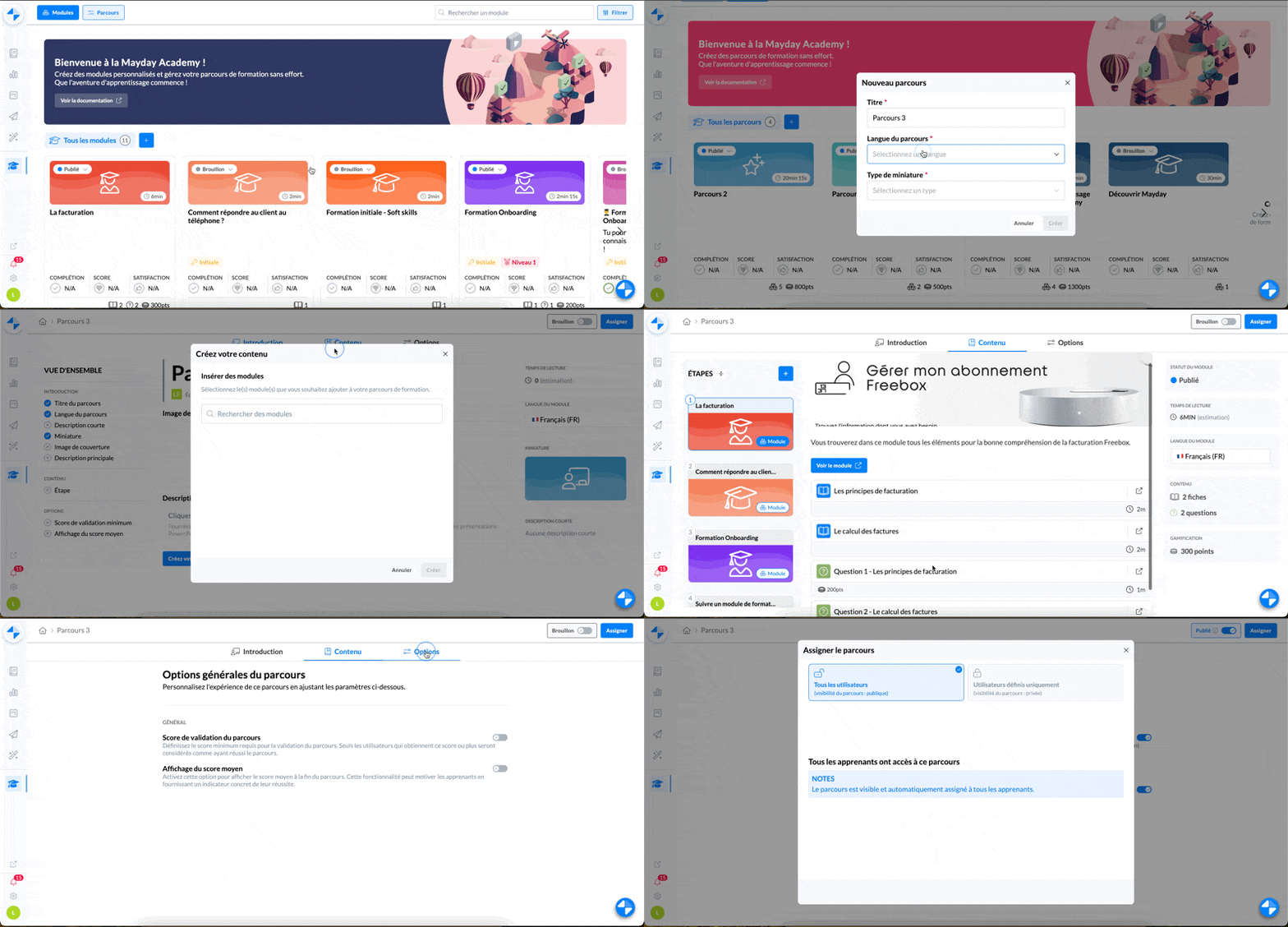
Create a training course on the Mayday Academy - admin interface
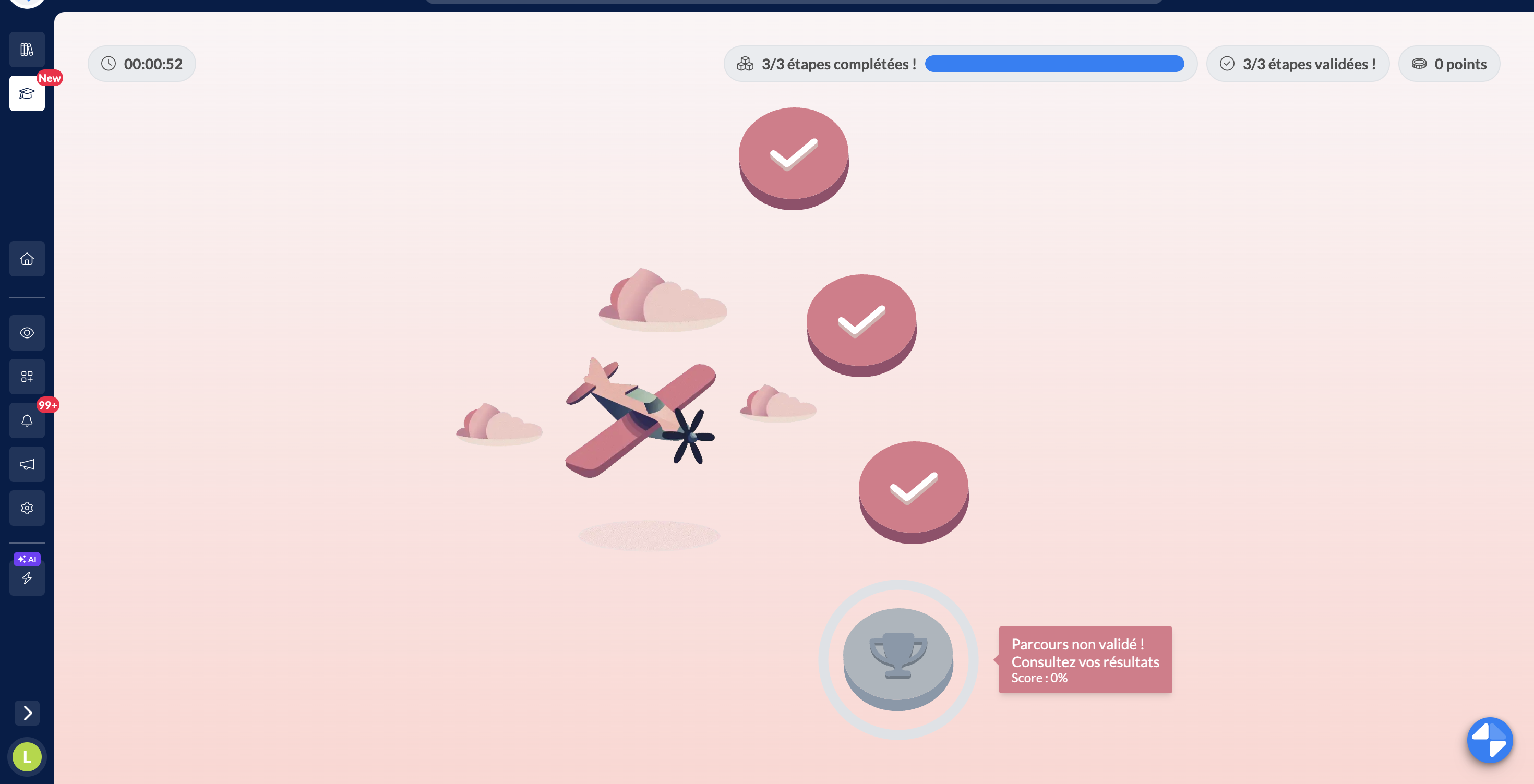
The new "Courses" interface of the Mayday Academy for learners
🪄 Use cases
You want to ensure a logical pedagogical progression by sequencing learning to facilitate understanding of subjects and develop a set of interdependent skills.
You want to create personalized training, tailored to the needs and objectives of each learner and maintain their engagement with clear objectives and milestones to achieve.
✨ What do Mayday training courses offer you?
The ability to assemble a series of training modules, Mayday content, taking into account the progression of agents.
The conditioned progress of a course allows personalized progression based on the performance of agents.
A playful interface to structure learning and mark out training to keep your agents motivated in the long term!
🤔 How to use it?
Create your training courses in just a few clicks from the Mayday Academy admin interface, in the new "Courses" tab
Select the modules that make it up, orchestrate their sequencing as you wish, and configure the course options if necessary
Define who you want to assign it to, publish it and you're done!
👨🎓 Your agents will find them on their Mayday Academy home page and enter a new universe when they start it!
🗾 They can view within a map the different stages of the course that await them and the path to follow!
🔗 Link to Mayday documentation for more information:
⏩ What's next?
Great things are coming to perfect the feature and meet your needs as best as possible!
🎊 Gamify your internal training with the Mayday Academy
✨ NEW FEATURE | Your agents now earn badges based on their progress and involvement in training!
Boost your agents to exceed themselves and encourage them to stay motivated in their training! 🕹
🥳 We have created a badge system to gamify the learning experience within the Mayday Academy!
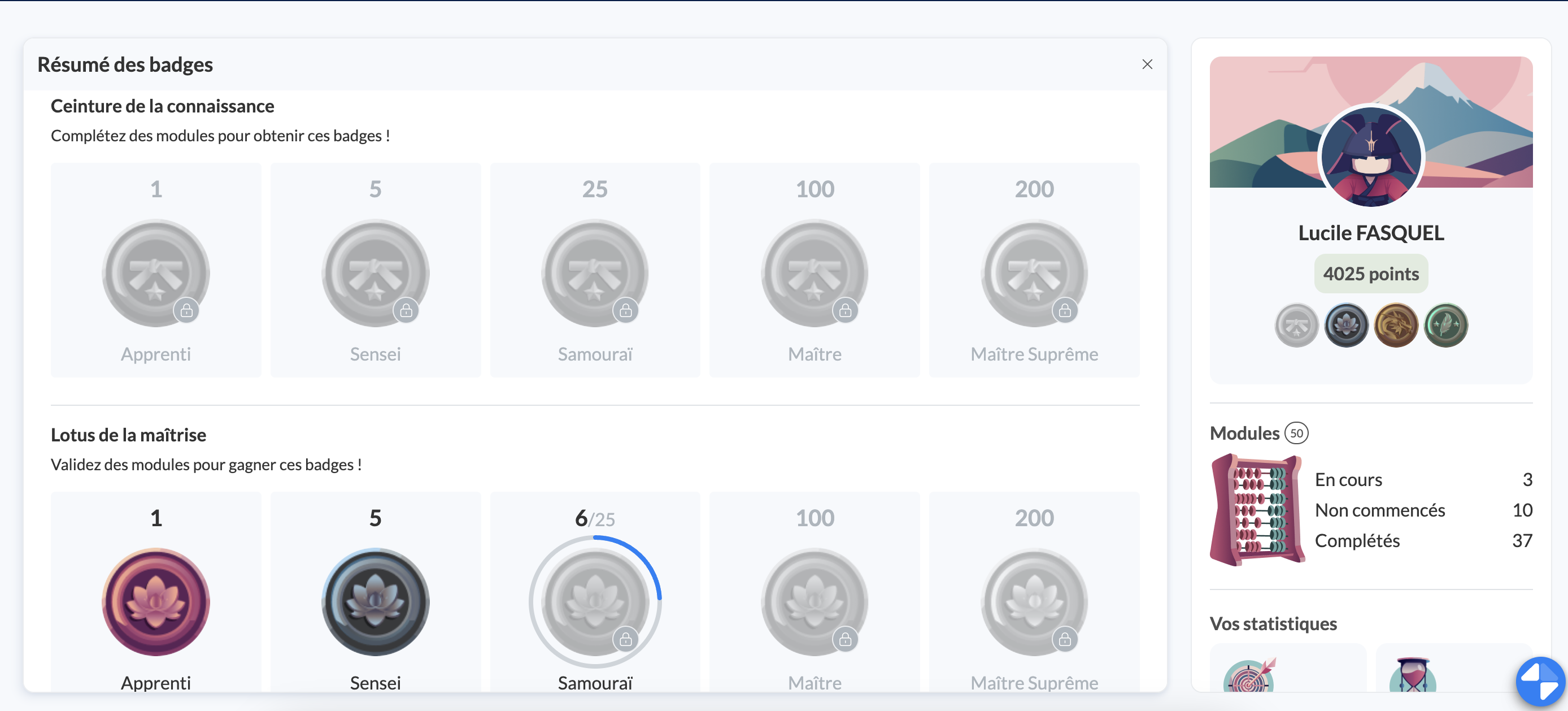
Mayday Academy Home page - visualization of earned or to-be-earned badges
🪄 Use cases
You want to maintain the motivation of your agents to actively progress in training and stimulate their learning in the long term!
You want to encourage your agents by giving them immediate and tangible recognition of their progress and achievements.
🎉 What badges are available?
Your agents can now earn badges when they:
Send you feedback on your training (modules/courses)
Complete training (modules/courses)
Validate training (modules/courses)
🔗 Link to Mayday documentation for more information:
⏩ What's next?
Other types of badges will be available soon! Stay tuned!
📩 Configure and receive key notifications on the Mayday Academy
✨ NEW FEATURE | Inform your agents when they are assigned to a course
💬 Like Mayday Knowledge, you can now configure notifications to inform and be informed of major actions around training content.
🪄 What notifications are available?
Your agents can now be notified when they are assigned to a course
🤔 How to use it?
In the "notifications" section of the Mayday settings, activate or not the notification in question and the communication channel you want
Everything is ready! The people concerned will receive notifications in the notification section of the admin
⏩ What's next?
More notifications will be available soon!
Mayday Knowledge News 📚
👁 Discover "views" within the Mayday Hub
✨ NEW FEATURE | Define which tasks a user can view in the Mayday Hub!
We understand that one of your main goals with the Mayday Hub is to control user access to available tasks. You want to customize what a user can see to manage access restrictions according to your needs.
Now, with views, you can limit what a user can view in the Mayday Hub! 💫
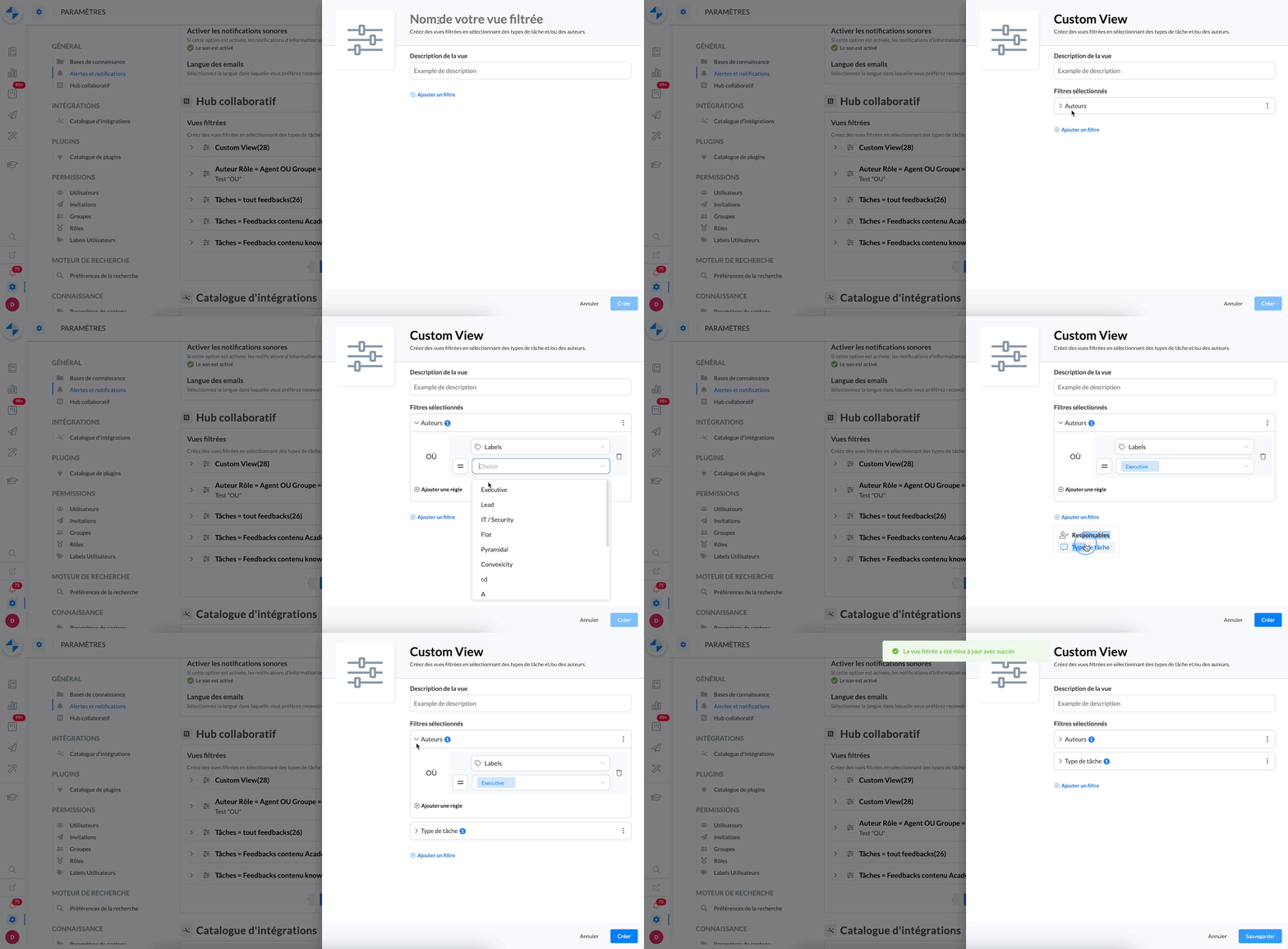
Creating a view in the administration center preferences
🪄 Use cases
⛔ You want to restrict access for certain users in the Hub.
⚡ You want each team member to save time by accessing only the tasks that concern them.
🤝 You want to clarify each person's responsibilities for task processing in the Hub.
🤔 How to use them?
1. Go to the administration center preferences.
2. Go to the "Collaborative Hub" section
3. Create a view and apply specific filters:
By task authors
By task managers
By task type
4. Save the view
5. You can now select a view in the Hub
That's it! ✅ Users who have a Hub access will be able to choose which view they’d like to see.
⏭ Next step:
It will soon be possible to limit access to specific views in the Hub from Mayday roles. In other words, a user will only have access to the views defined in their role.
🎨 Benefit from the finalized redesign of Mayday Archives
✨ NEW FEATURE | Use advanced filters and perform bulk actions within Mayday Archives.
Three weeks ago, we presented you with the brand new archives interface. Today, it is fully deployed, with many new features!
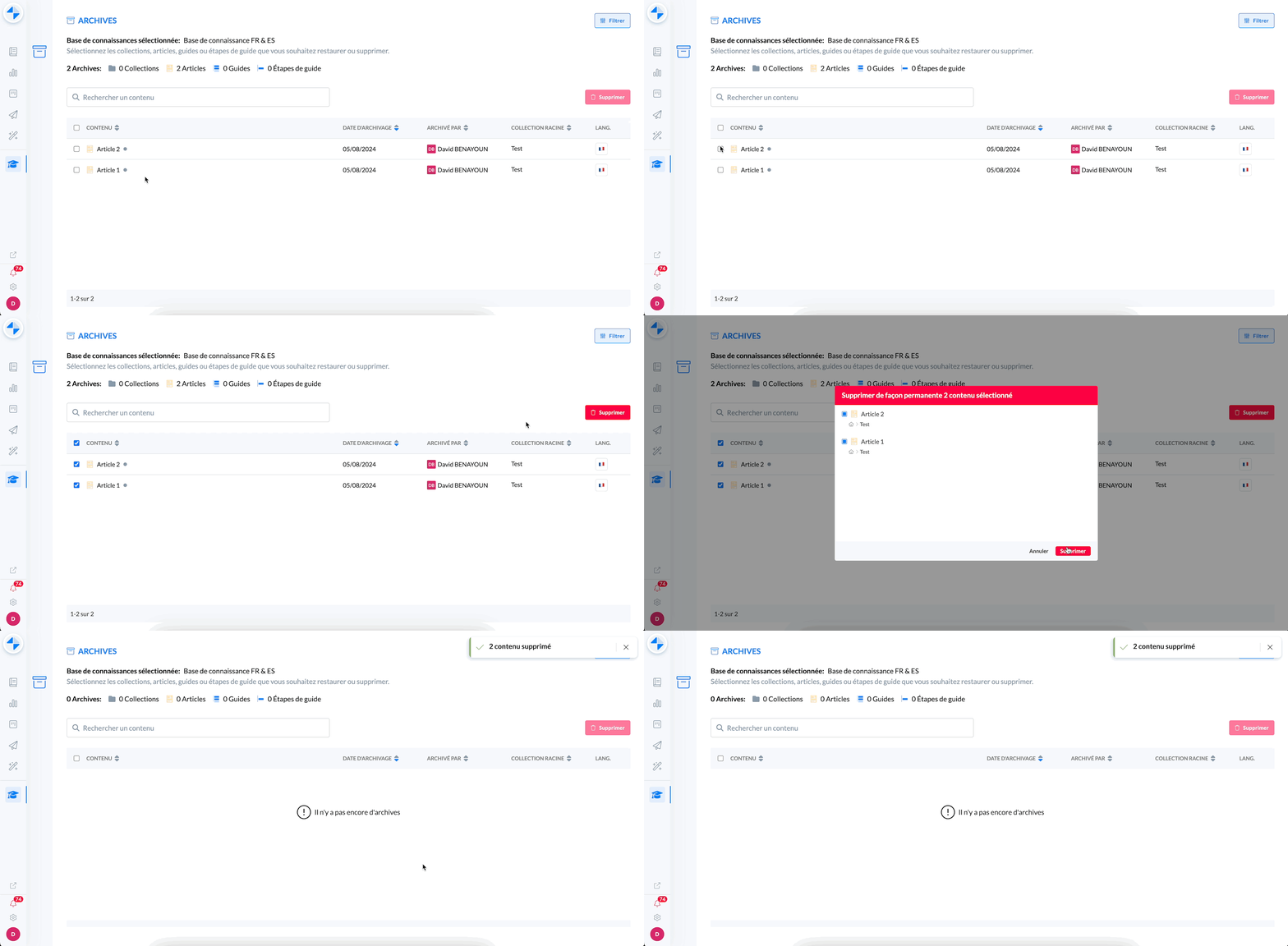
Multiple contents were permanently deleted at the same time thanks to bulk deletion
🪄 Use cases
🔎 You want to find archived content based on specific criteria.
❌ You want to delete multiple contents at once permanently.
🤔 How to use them?
To filter the archives, click on the "Filter" button at the top right and select the desired filters.
To delete multiple contents simultaneously, check the corresponding lines, click "Delete" and confirm.
🚀 Optimizations & Improvements
🌍 Clone within multilingual knowledge bases
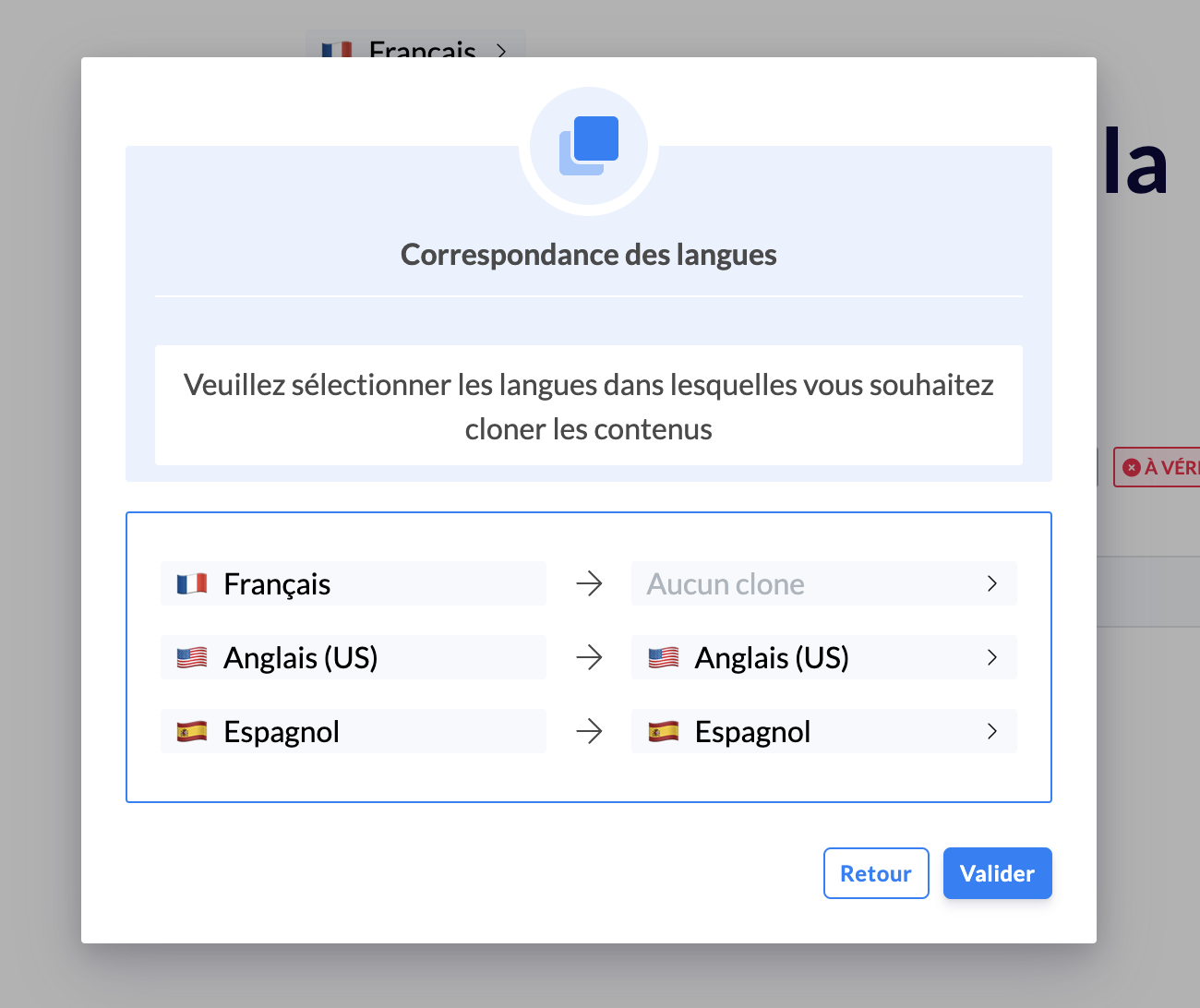
A few months ago, we introduced multilingual knowledge bases 🌍
Now, it is possible to clone multilingual content to other knowledge bases.
If the languages of the knowledge bases do not match, the system will ask you to confirm or choose the original and target languages for each available version.
Example:
If content in French and English is cloned to a base in French and Spanish, you will need to decide if the English version should be cloned into Spanish.
🔌 Mayday API
As a reminder, the Swagger documentation for the Mayday API is available here: API Service Documentation
We have added several endpoints to the Mayday API:
GET / content-labels: to retrieve the list of available content labels on your Mayday accountGET / collections / {locale} / {id}: to retrieve a Mayday collection by providing its ID and language
In addition, we have added a filter to the GET / contents endpoint to be able to filter on content labels.
👉 Thus, it is now possible to retrieve the ID of a content label via the new endpoint GET / content-labels and then filter on one or more content labels via the GET / contents endpoint.
🪲 Bug fixes
👉 We have fixed the following bugs:
Selfcare: CSS code changes were loading slowly.
Editor: When canceling a text color change, the initial color was incorrectly modified.
Favorites order: In some cases, the order of favorites was not saved for agents.
Translated content: The icon indicating that the content was not translated sometimes appeared even though it was.
Opening a task in the Hub: Clicking on a task sometimes opened another task.
Cmd + Click to open in a new tab: This feature was no longer working after the last production release.
Archiving guides: It was impossible to archive a guide.
Option to enlarge a PDF: The "Click here to enlarge" button had disappeared from most PDFs.
Setting content to public: The button to make private content public had disappeared.