Introduction 👋
Welcome everyone 👋
We hope you are doing well and wish you an excellent month of November! 🍂 We are excited to introduce you to new features on our Mayday products. Some of these improvements were highly anticipated 👀, and we can't wait to show them to you starting today!
Without further ado, here's a preview of the new features on 📚 Mayday Knowledge:
With the " Ask AI " feature, you can assign the writing and editing of your content to Mayday AI, which allows you to write, optimize, translate, and much more!
Edit a notification that has already been sent by simply adjusting its title and content, or changing its recipients.
⏭ Coming very soon: the new Mayday homepage!
As for the 🎓 Mayday Academy:
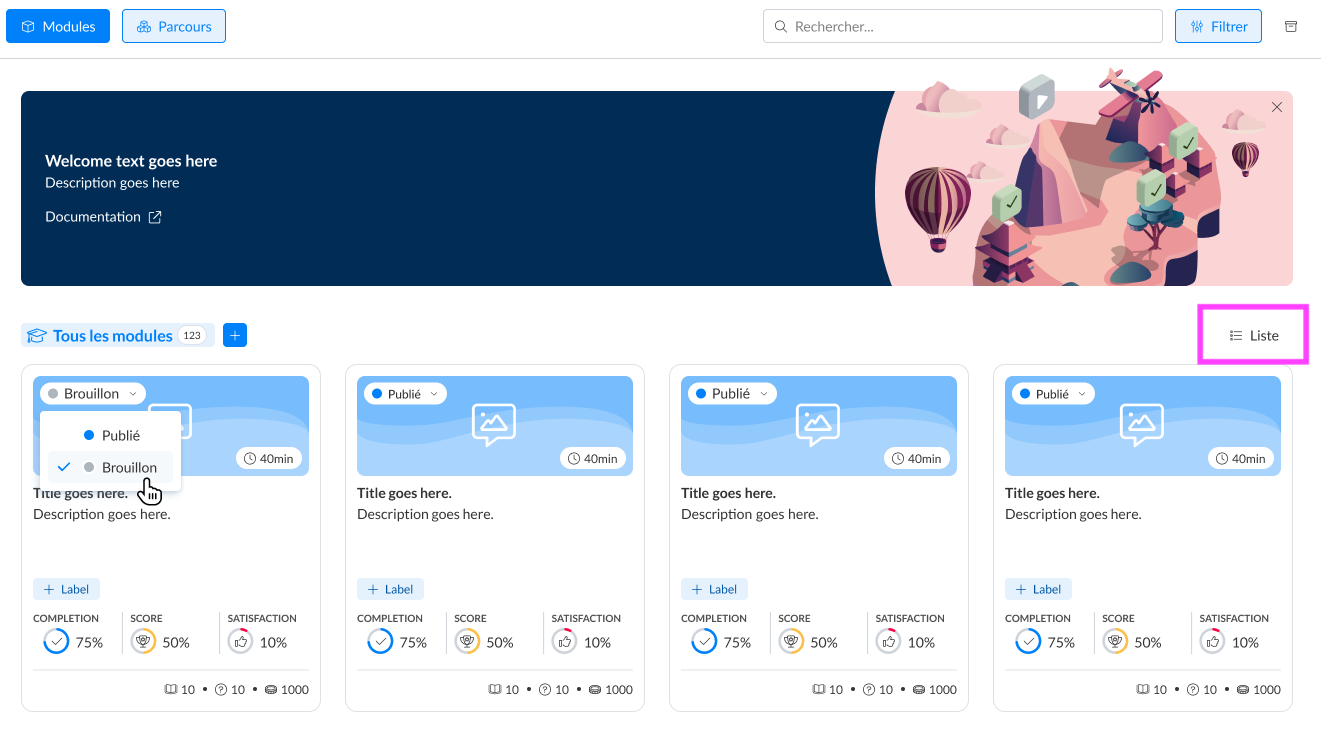
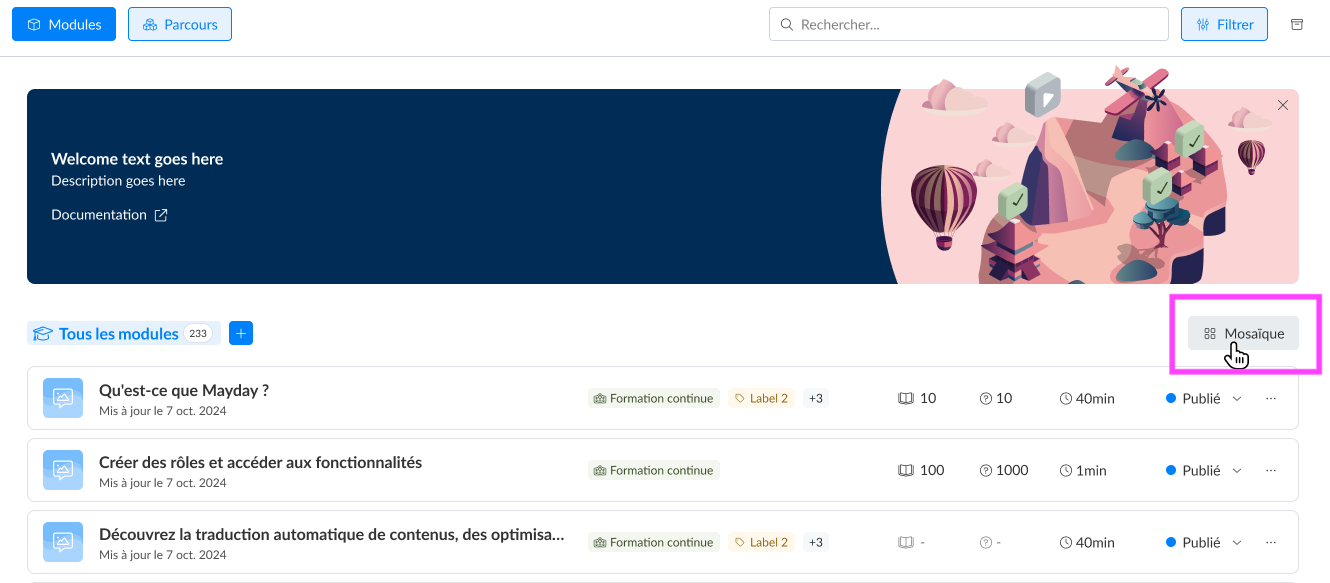
New display of modules and courses on the administrator interface with a "List" view that makes it easy to read for an overview
Academy search bar for agents: they can now filter their training search
Assign and publish all the modules included in a course simultaneously for the publication and assignment of your courses
It is now possible to duplicate a module!
Let's discover all these new features without further delay 👇
The new Mayday Knowledge features 📚
⚙ Mayday Admin
⚡ Assign writing and editing of your content to Mayday AI!
✨ NEW FEATURE | Now, you can ask Mayday AI for anything you need to optimize the writing of your content!
Last year, we launched the first features of Mayday AI to help you in writing your content: translation, format improvement, and much more. Now, you can customize your requests to Mayday AI to improve your content freely and tailored!
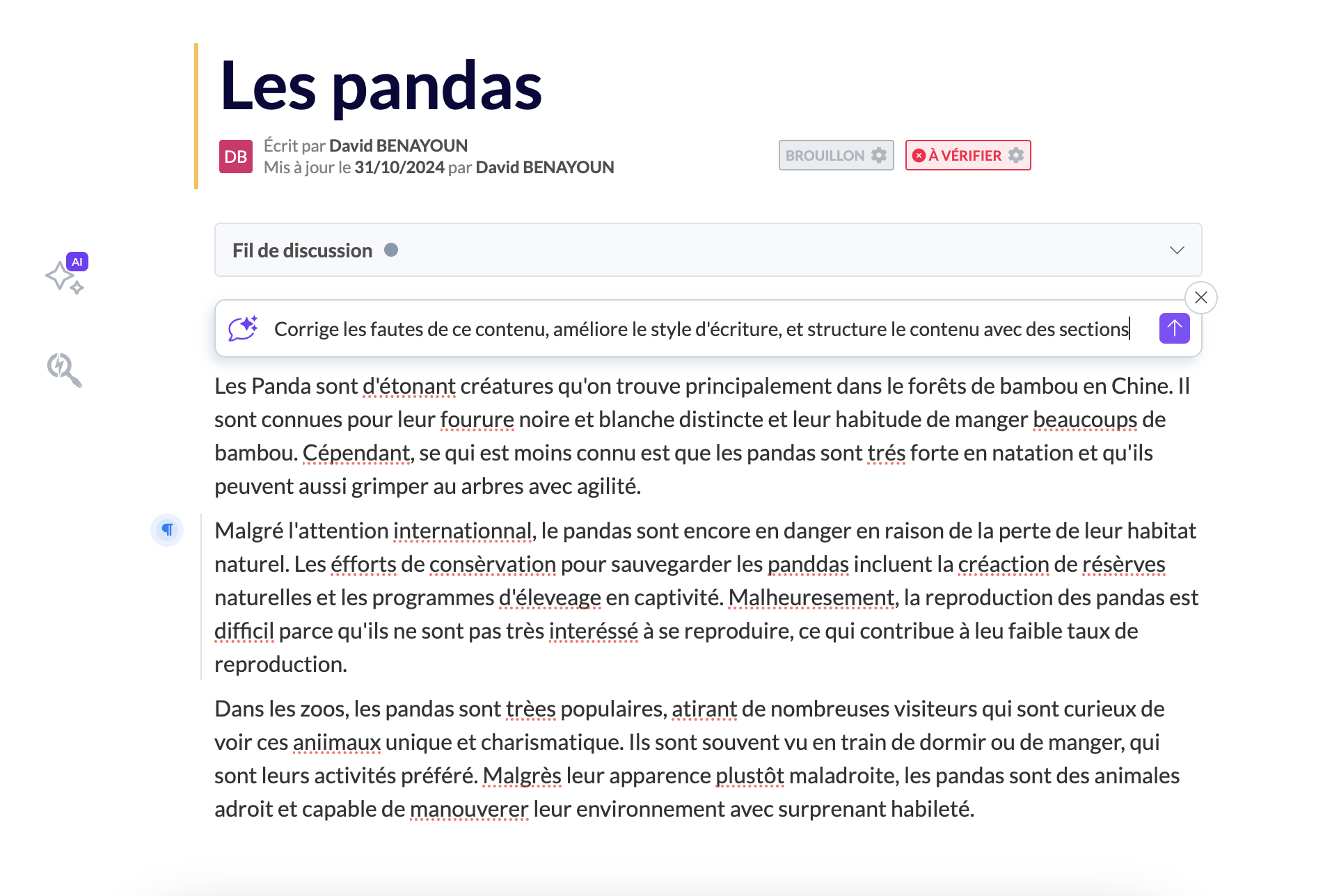
Request for proofreading, style improvement, structuring, etc.
🎯 Why use the "Ask AI" feature?
✍ Ask Mayday AI to write content or create a first draft for you.
💫 Improve content with the help of Mayday AI: format, style, spelling, structure—everything is there!
❓ Ask a question about the whole or a specific part of the content.
🤔 How to use the feature?
You have three ways to access this feature:
Select the text and click on "Ask AI": your request will be applied only to the selected text.
Type "/" and choose "Ask AI": the request will be applied to the entire content.
Use the AI menu on the left of the content and select "Ask AI": here too, the request will be applied to the entire content.
Once you click on "Ask AI", follow these steps:
Write your request.
Send it.
Review the suggestion from Mayday AI and choose to replace the text, insert the proposal under the existing text, or cancel the request.
✏ Edit an agent notification
✨ NEW FEATURE | It is now possible to edit an agent notification after its creation.
A few weeks ago, we introduced the new notification center on Mayday. Following your requests, we are pleased to announce that it is now possible to modify a notification that has already been created.
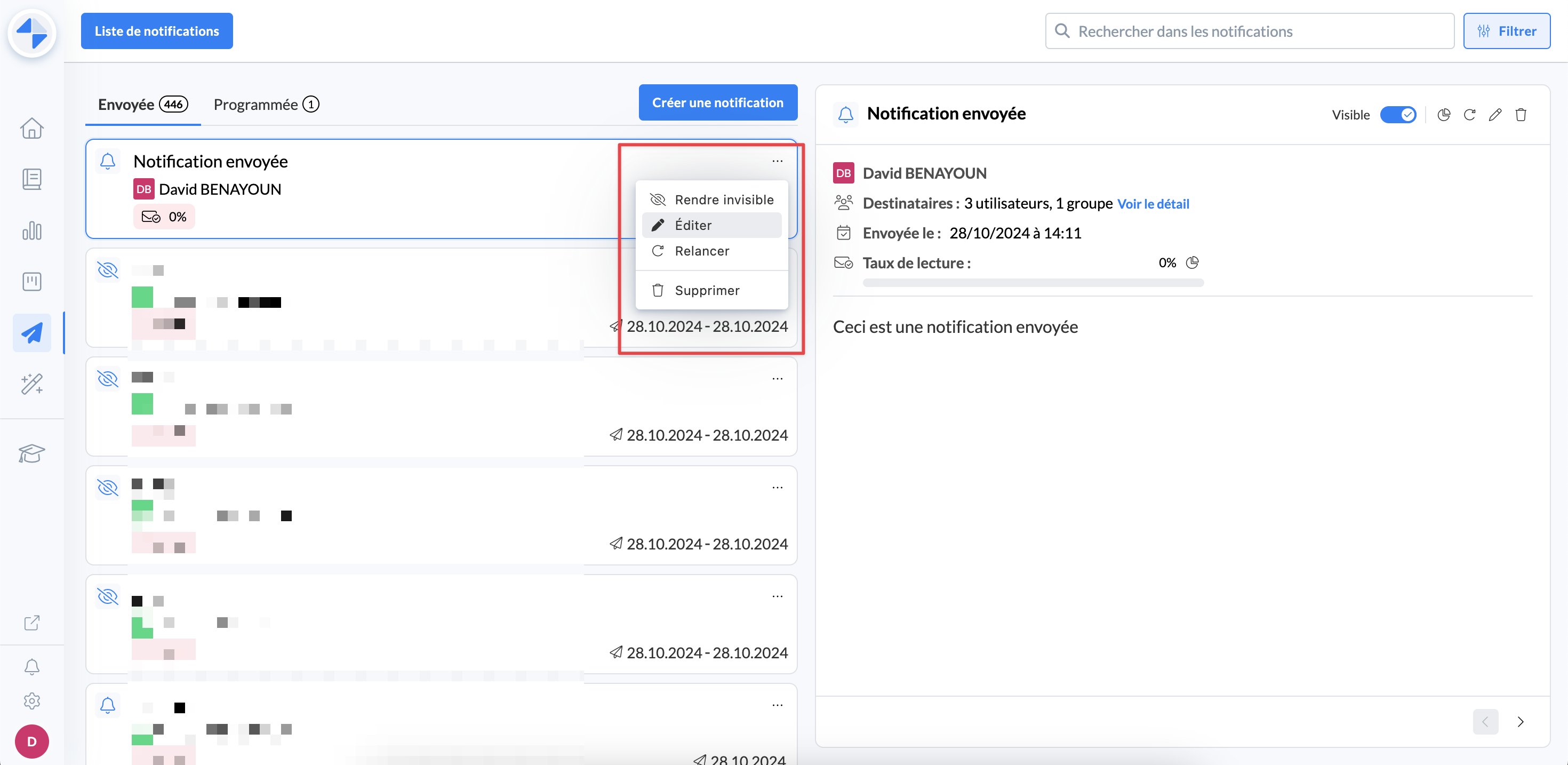
Editing an existing notification
🎯 Why modify a notification?
✍ To modify the title or content of this notification (new feature, spelling mistake, attachments, etc.).
📅 To modify the sending date (only if it has not passed yet) or the end visibility date of a notification.
👥 To modify the recipients of this notification (add, remove).
🤔 How to use the feature?
From the administrator notification center, you can edit a notification by clicking on the ✏ button from:
The view of a notification
The "..." button on the notification in question, from the list of notifications
Then, editing a notification is similar to the process of creating a notification.
Finally, once you validate these modifications, they will be effective immediately.
⚠ Attention: It is impossible to change a sending date that has already passed.
⏭ Coming soon

Soon, Mayday administrators will discover a personalized homepage, with practical shortcuts, the latest announcements from Mayday, and much more!
Details are coming soon, so stay tuned!
🚀 Optimizations & Improvements
Mayday Hub | Author Information
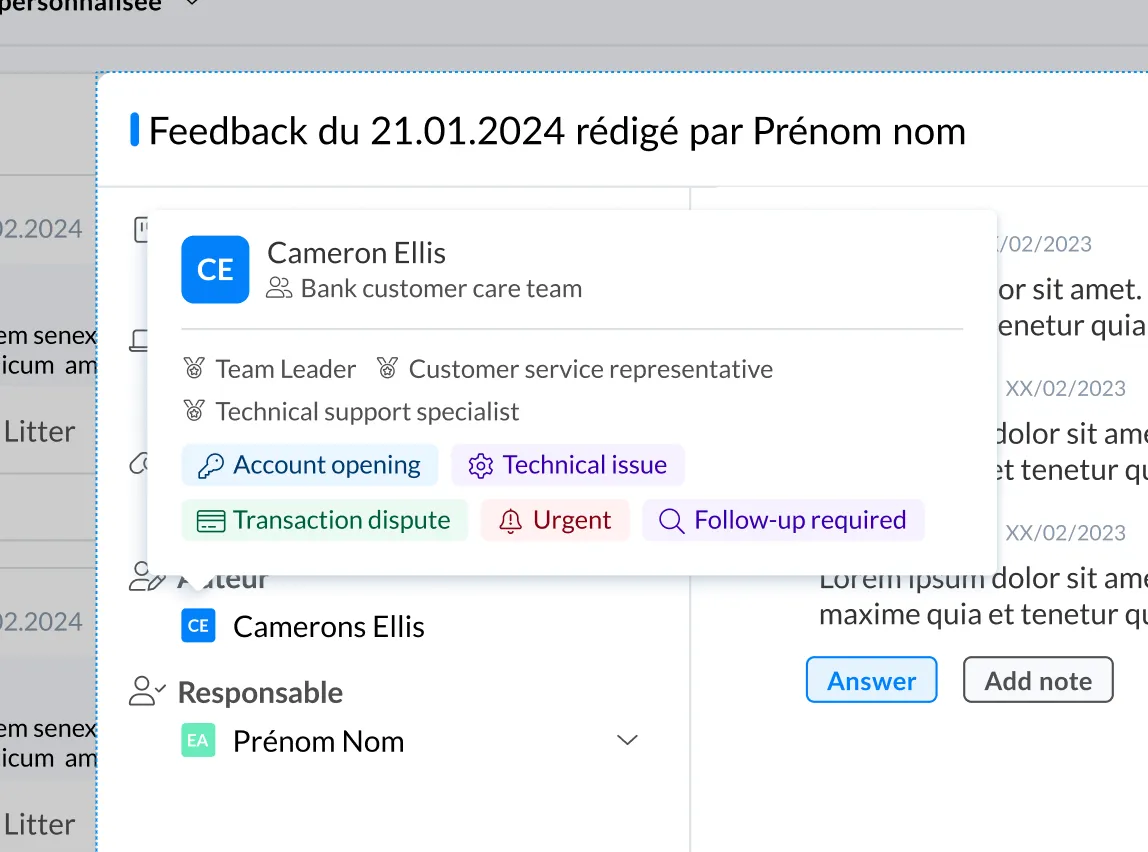
Recently, we introduced the new Mayday Hub. In response to your requests, we have added the ability to view the author information for each task.
Here are the details you can now check:
The group to which the user belongs
The roles assigned to the user
The labels associated with the user
To do this, simply hover your mouse over the author's name.
Mayday API | New Endpoints
As a reminder, the complete Mayday API documentation is available here: Mayday API Documentation
Three new endpoints are now available:
GET/ Knowledges: to retrieve the list of knowledge bases on your Mayday account.GET/ Collections: to retrieve the list of collections on your Mayday knowledge bases.GET/ Deleted Content: to retrieve the list of deleted content on your Mayday knowledge bases.
🪲 Bug Fixes
👉 We have fixed the following bugs:
Hub: Selecting specific roles in the Hub sometimes caused some tasks to be displayed unexpectedly.
Mayday Editor: Titles that were supposed to be bolded were not displayed in bold in the admin interface.
Mayday Editor: An article link that was copied and pasted into another article would turn into plain text.
Scheduled notification date: For a notification already sent according to a schedule, the displayed date and time were those of the scheduled notification creation rather than the actual send date.
Collections and content: Collections and content sometimes appeared empty when they were not empty.
Obsolete alert owners: Owners designated for an obsolete alert were not properly identified in Mayday Hub tasks.
Linked content of feedback: The content linked to feedback did not open correctly.
Mention in a task: Users without access rights to the admin center preferences were unable to mention other users in Mayday Hub tasks.
👥 Mayday Agent
🪲 Bug Fixes
👉 We have fixed the following bugs for agents:
Chrome Extension: The Mayday extension was not functional on the beta version of Google Chrome.
Highlighted Words: Highlighted words in content from a search were sometimes not retained when the window was resized. Also, sometimes the highlighted words were not part of the keywords used in the search.
What's New on the Mayday Academy 🎓
⚙ Mayday Admin
📃 Displaying modules and courses in "list view"
✨ NEW FEATURE | Choose to display all your modules and courses in a "List" format for better visibility
We offer the list view to provide better readability of all your courses when you need an overview.
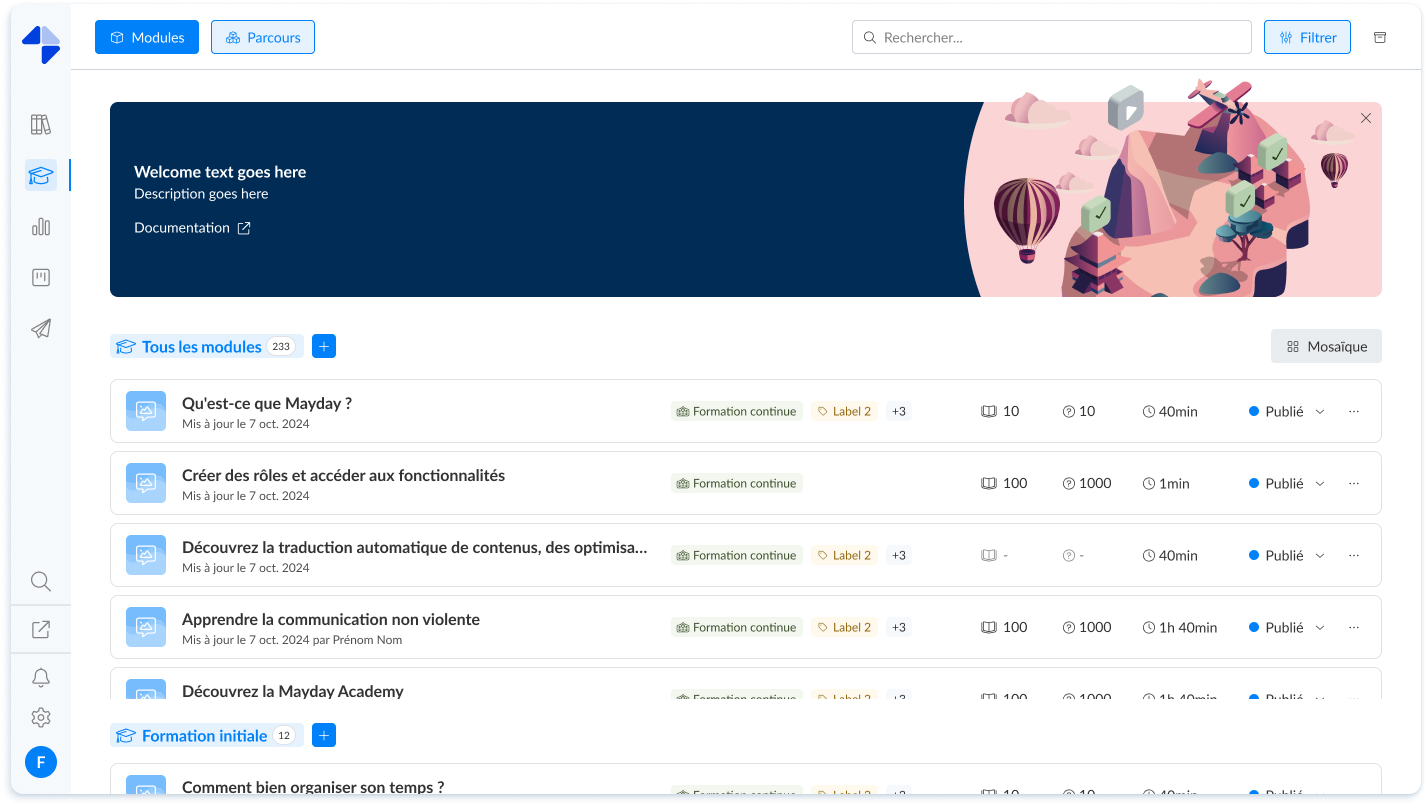
Mayday Academy Admin Interface - List View
🤔 How to use the feature?
Click on the "List" button to change the display
📸 Screenshot:
To switch back to the display with large cards, click on the "Mosaic" button
📸 Screenshot:
🪄 Simultaneous Assignment and Publishing of Modules within a Course
✨ NEW FEATURE | Assign and publish all modules included in a course simultaneously when publishing and assigning your courses
When publishing and assigning a course, you now have the option to assign and publish the modules that compose it at the same time.
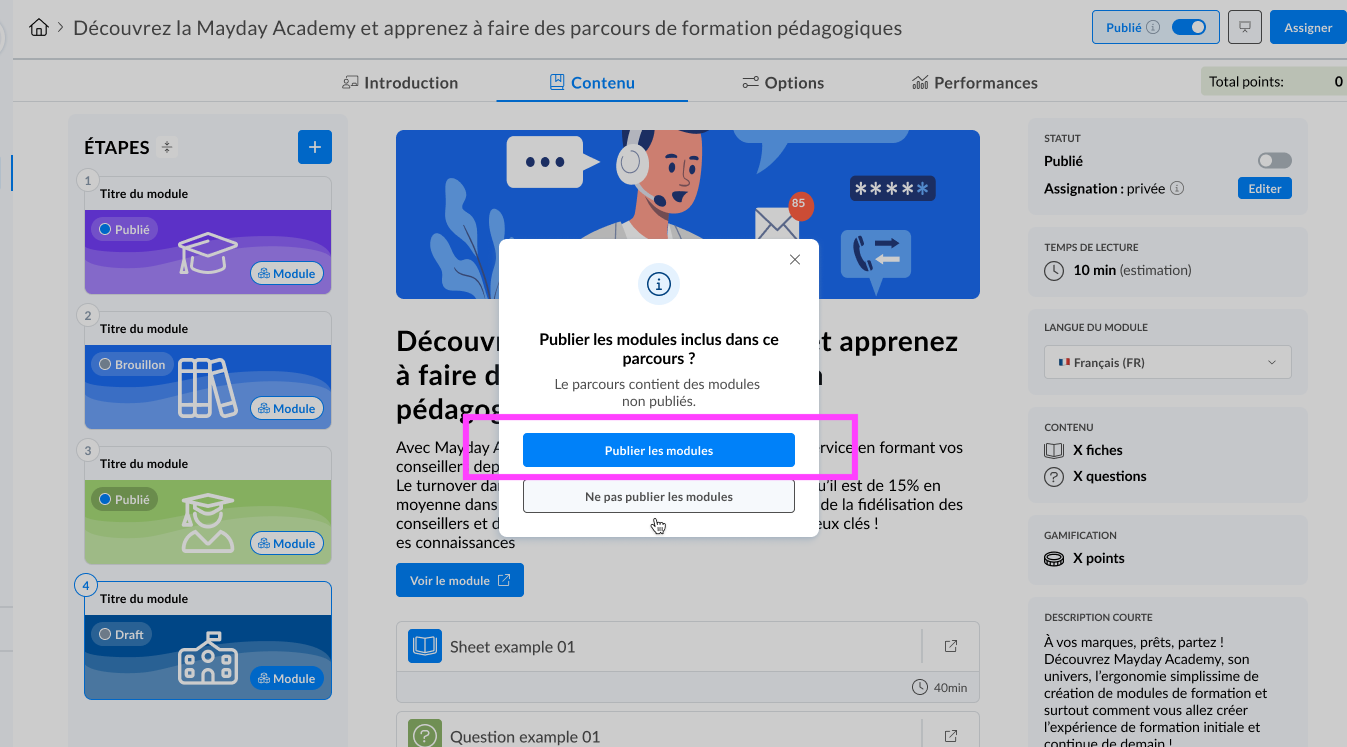
Mayday Academy Admin Interface - Publish all modules of a course
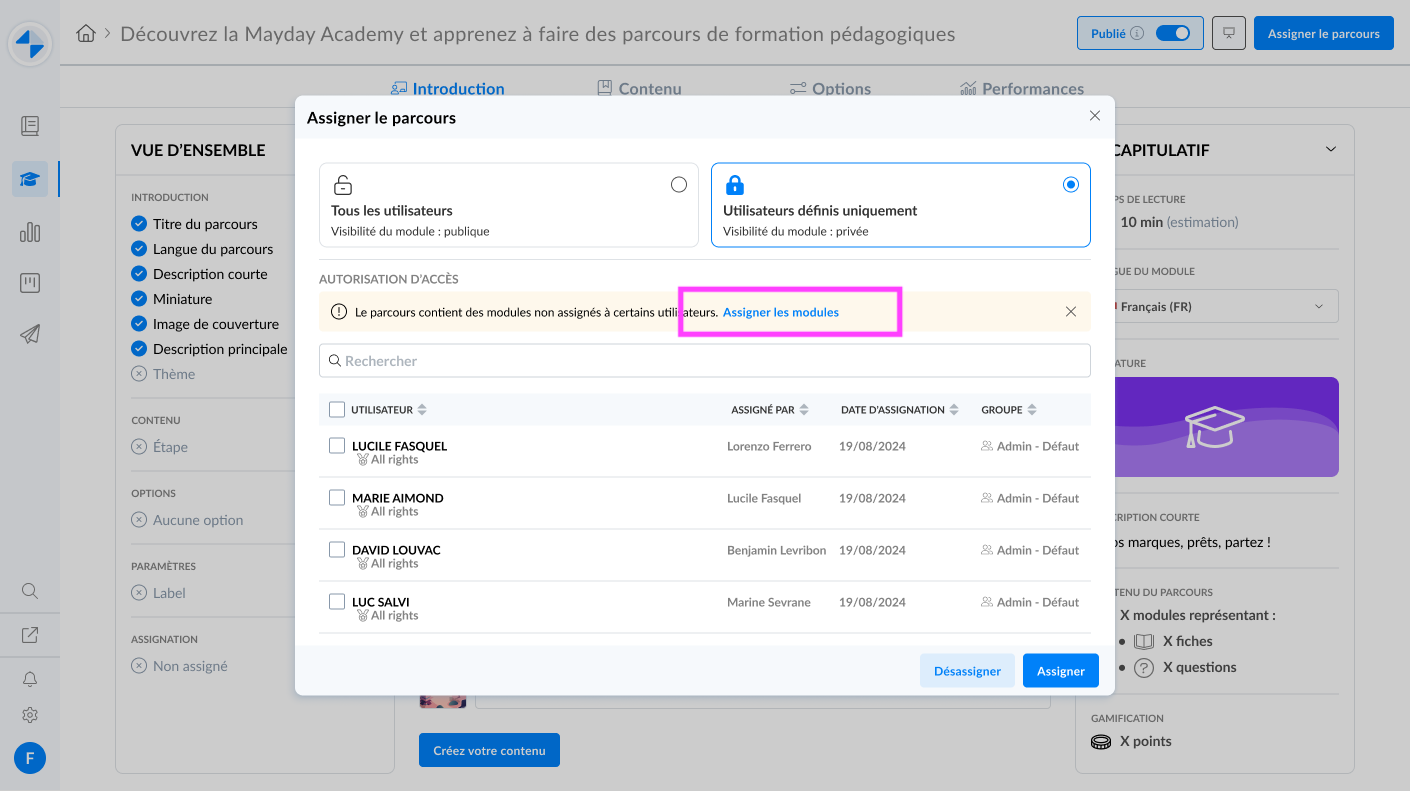
Mayday Academy Admin Interface - Assign all modules of a course
🤔 How to use the feature?
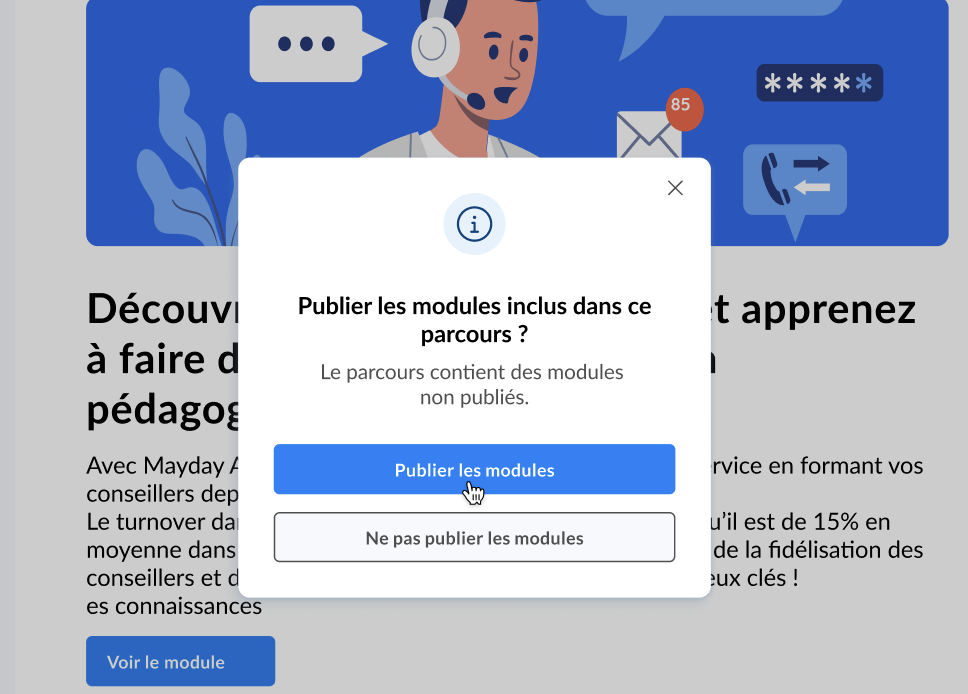
When publishing your courses, click on "Assign Modules" from the modal that appears
📸 Screenshot:
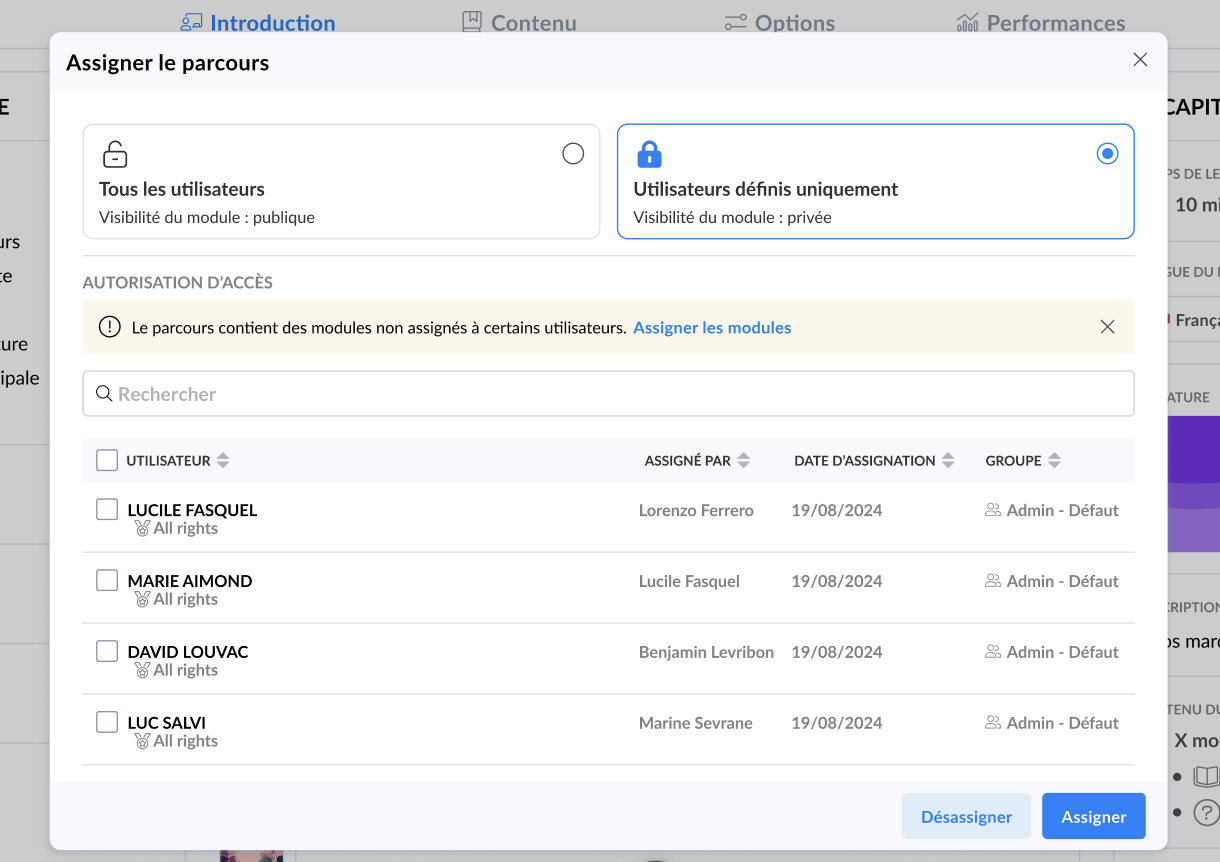
When assigning your courses, click on "Assign Modules" displayed in a block within the assignment modal
📸 Screenshot:
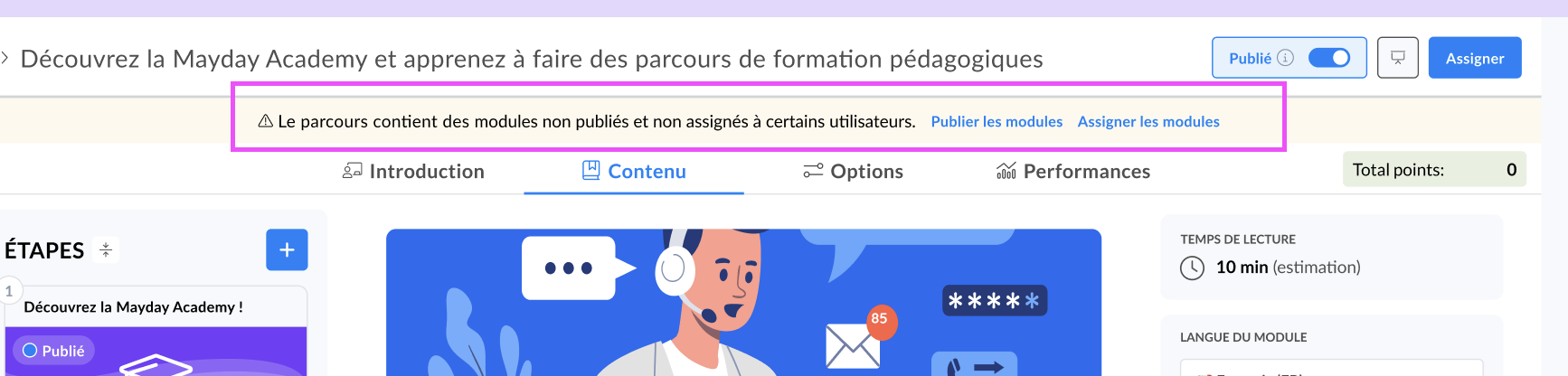
If you have decided not to assign or publish the modules at a given time, you can perform this action later by clicking on "Assign Modules" or "Publish Modules" from the orange information block at the top of the page on the contents of your courses
📸 Screenshot:
The modules published from the courses modal will correspond to the latest published version of these modules.
The latest updates of a module will not be published through this action if they have not been published from the module using the "save and publish" button.
🪄 Duplicate Your Training Modules!
✨ NEW FEATURE | You can now save time and duplicate your training modules!
By clicking on the three small dots of a module card (in list view as well as in mosaic view), the "Duplicate Module" option is now available!
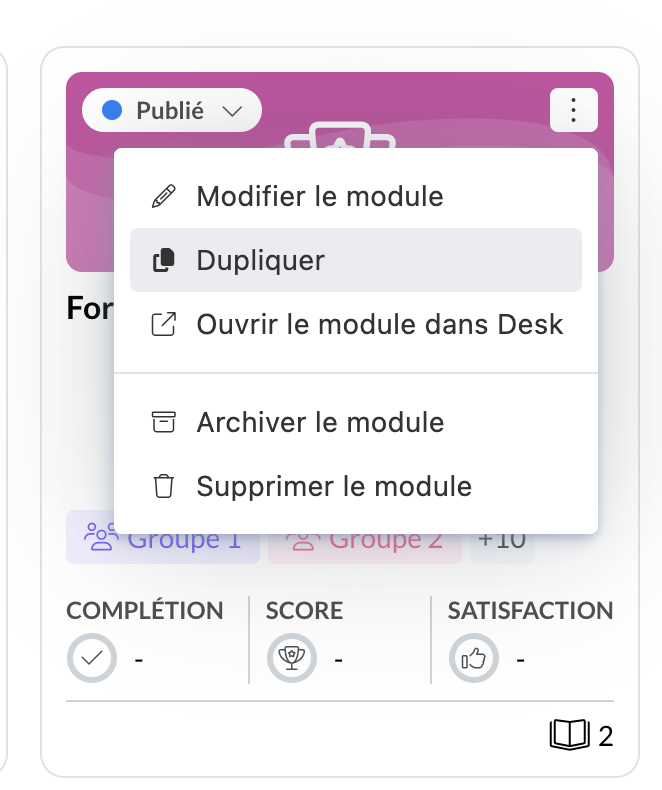
Mayday Academy Admin Interface - Duplicate a module
The duplicated module:
Will automatically switch to draft status to let you edit it
Will automatically switch to an unassigned module to let you assign it
Will have the same name as the initial module + the "copy" indicator at the end
🪲 Fixes
👉 We have fixed the following bugs:
SCORM File: the download of too-heavy SCORM files failed
👤 Mayday Agent
🎯 Filter a training using the search bar
✨ NEW FEATURE | Your agents can now filter their searches for modules and training courses from the Academy's search bar
We have recently provided agents with a search bar on their learner interface. It is now possible within this search bar to refine the search using filters.
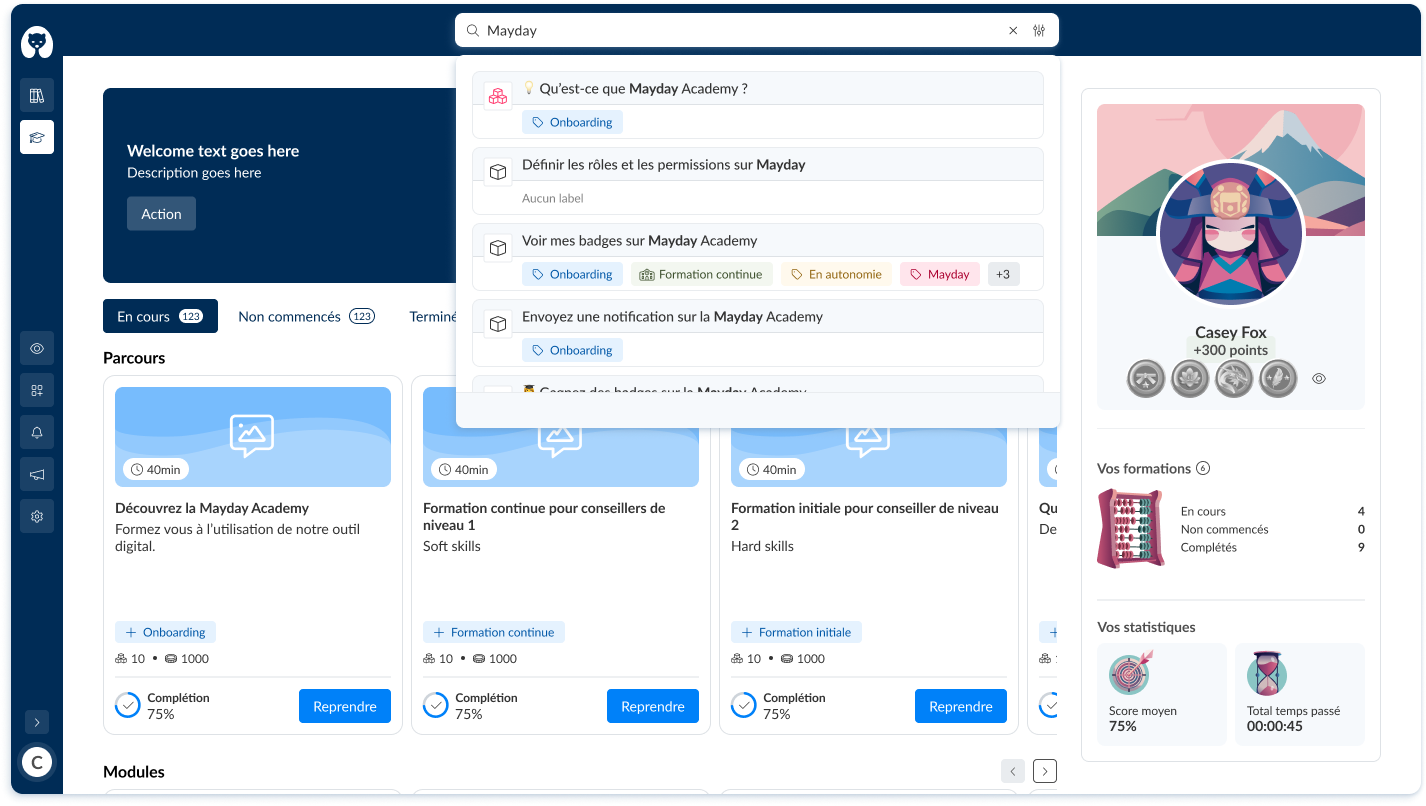
Learner interface Mayday Academy - Search bar - Filters
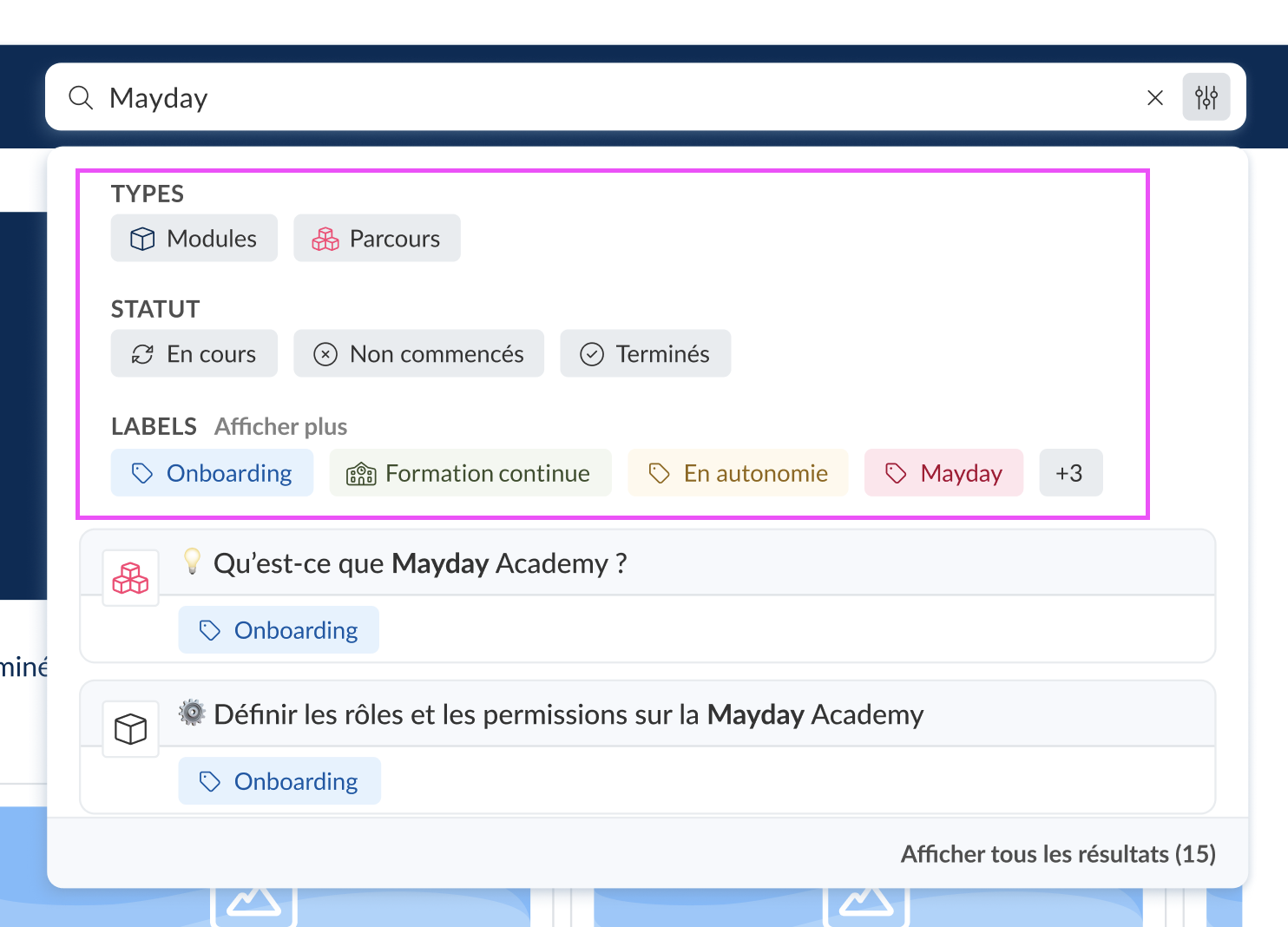
The filters feature allows you to filter training by:
Type (Modules or Courses)
Status (In progress, Not started, or Completed)
Labels
🤔 How to use the feature?
Search for a training module or path using the Academy's search bar by typing the title of the training or by clicking on the "Filters" icon next to the cross in the search bar
📸 Screenshot:

To use the filters:
click on "Modules" or "Courses" to filter by type
click on "In progress", "Not started", or "Completed" to filter by Status
Click on the labels that interest you to filter by labels
📸 Screenshot:
🚀 Optimizations & Improvements
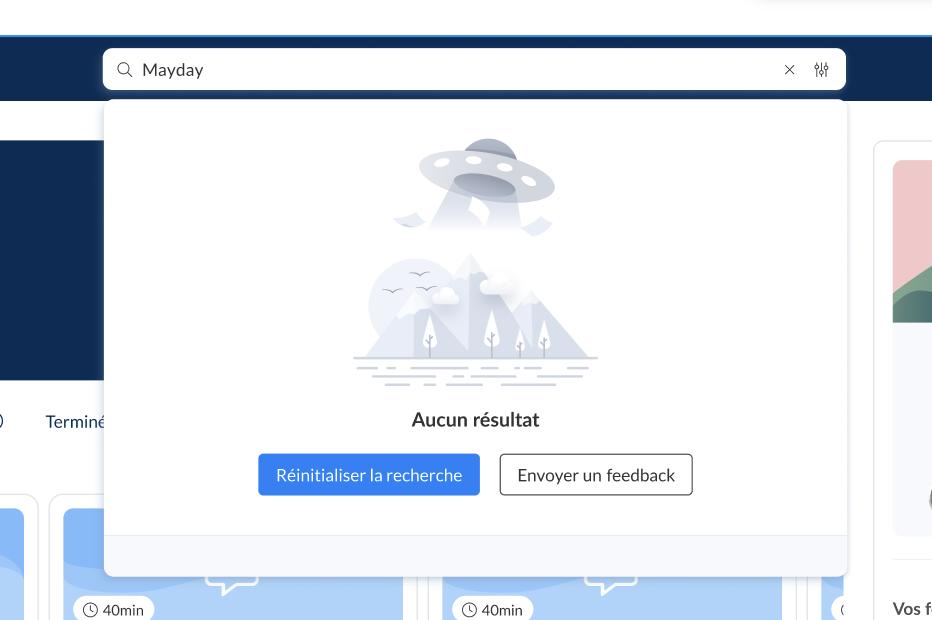
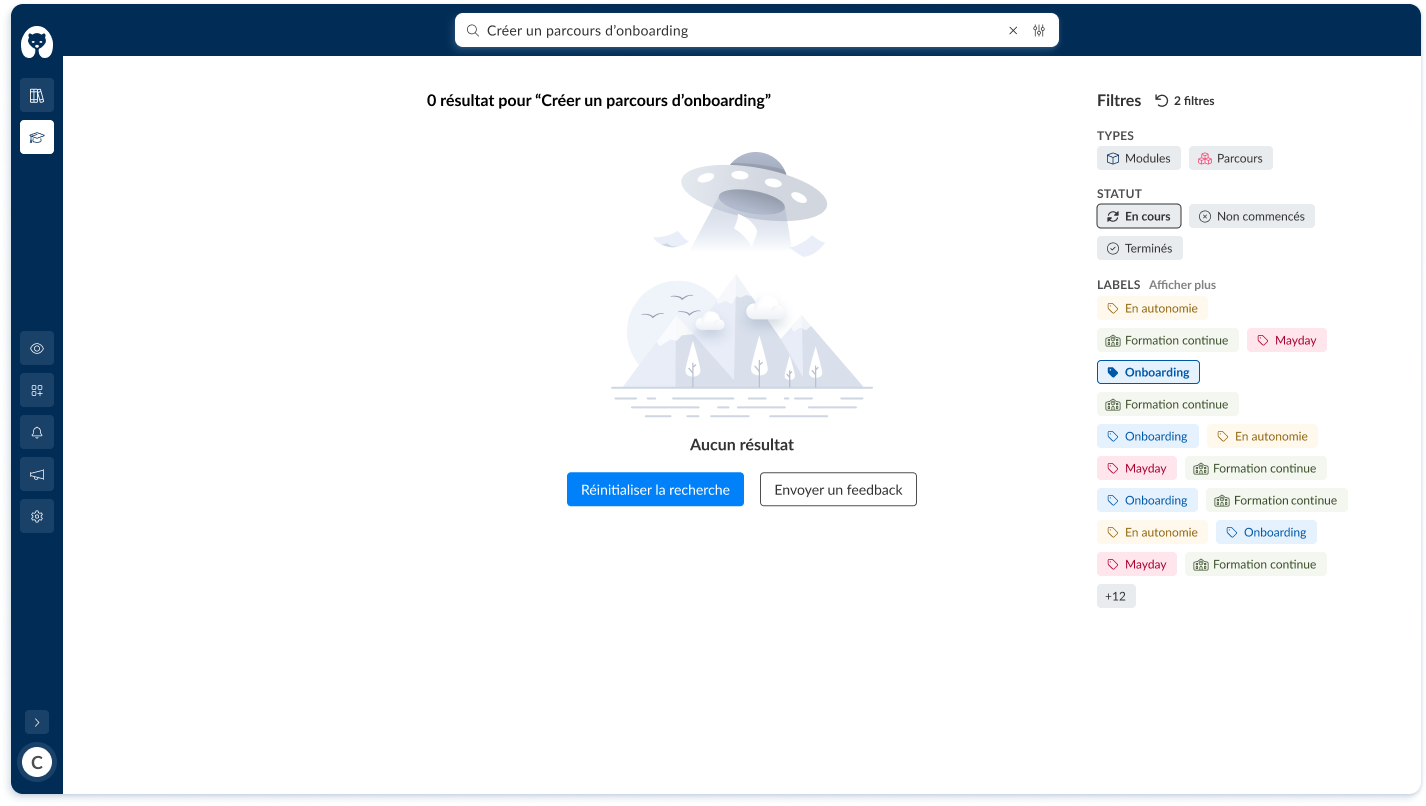
Search bar: It is now possible to leave feedback if your agents cannot find the desired training.
📸 Screenshots:
From the search bar
From the "View all results" view when filters are selected
🪲 Bug Fixes
👉 We have fixed the following bugs:
Display bug: The number of modules in progress, not started, or completed was not always visible, depending on the background color.
Selfcare News 🌐
🪲 Bug Fixes
👉 We have fixed the following bugs:
Inactive summary: after a change of language version, the summary became inactive.