Introduction
Welcome everyone 👋
For the past month, our efforts have been partly focused on the development of our new product, the Mayday Academy. If you haven't reserved your demo yet, get in touch with your Mayday contact to learn more, or reserve your demo here!
But that's not all! We have also focused on your needs, and we are happy to announce numerous long-awaited features and improvements:
Mayday API: Integrate Mayday with other tools and applications.
Search engine optimizations: Find information more quickly.
Table optimizations: Improved visualization and interaction with table data.
New plugins: Enhance your Mayday experience with customizable features.
New "Exports" section in the Dashboard: Easily manage all your exports.
🤩 Exciting things are coming soon, so stay tuned!
Let's discover all these new features 👇
✨ New features
🔌 Mayday API is now available
✨ NEW FEATURE | Discover the Mayday API to take advantage of your multi-channel knowledge base, accessible everywhere
Mayday provides the right information, at the right place and at the right time. Since day one, our goal has been to provide you with access to a multi-channel knowledge base, accessible everywhere and on all your applications. Now, thanks to the Mayday API, this is possible.
👉 Currently, 2 endpoints are available:
GET/contents: to get a list of contents according to defined parameters. This endpoint does not allow you to retrieve the content of an article or guide.GET/contents/{locale}/{id}: to retrieve all the information of an article or guide thanks to its ID, including its content.
🔜 However, many new endpoints are coming very soon:
User management: creation, deletion, update, retrieval of the list of users, etc.
Task management in the Hub: creation, deletion, update, retrieval of a task, etc.
🪄 Use cases
🔌 You want to retrieve information or perform actions on Mayday from a third-party application, such as your own.
⚡ You want to automate your processes on Mayday according to your needs.
🤔 How to use it?
If you want to access the Mayday API, please contact your CSM contact to submit your request.
Following this, we will accompany you in setting up the Mayday API and provide you with access to our technical documentation.
🔎 New Mayday search engine optimizations
✨ NEW FEATURE | Benefit from a revised search engine with more accurate results and more powerful filters
During the last sprint, we announced significant improvements to the search engine. This time, we have made new optimizations to offer you a completely redesigned search engine. Not only have the results been improved, but also the available filters, both for administrators and agents.
✍ Administrator search engine
As an administrator, you now have access to new filters to significantly refine your searches:
Filter by date: filter your results by creation or last edit date.
Filter by user: filter your results by creator or last editor.
Filter by verification policy: filter your results according to the presence or absence of a verification policy, and the possible next verification date.
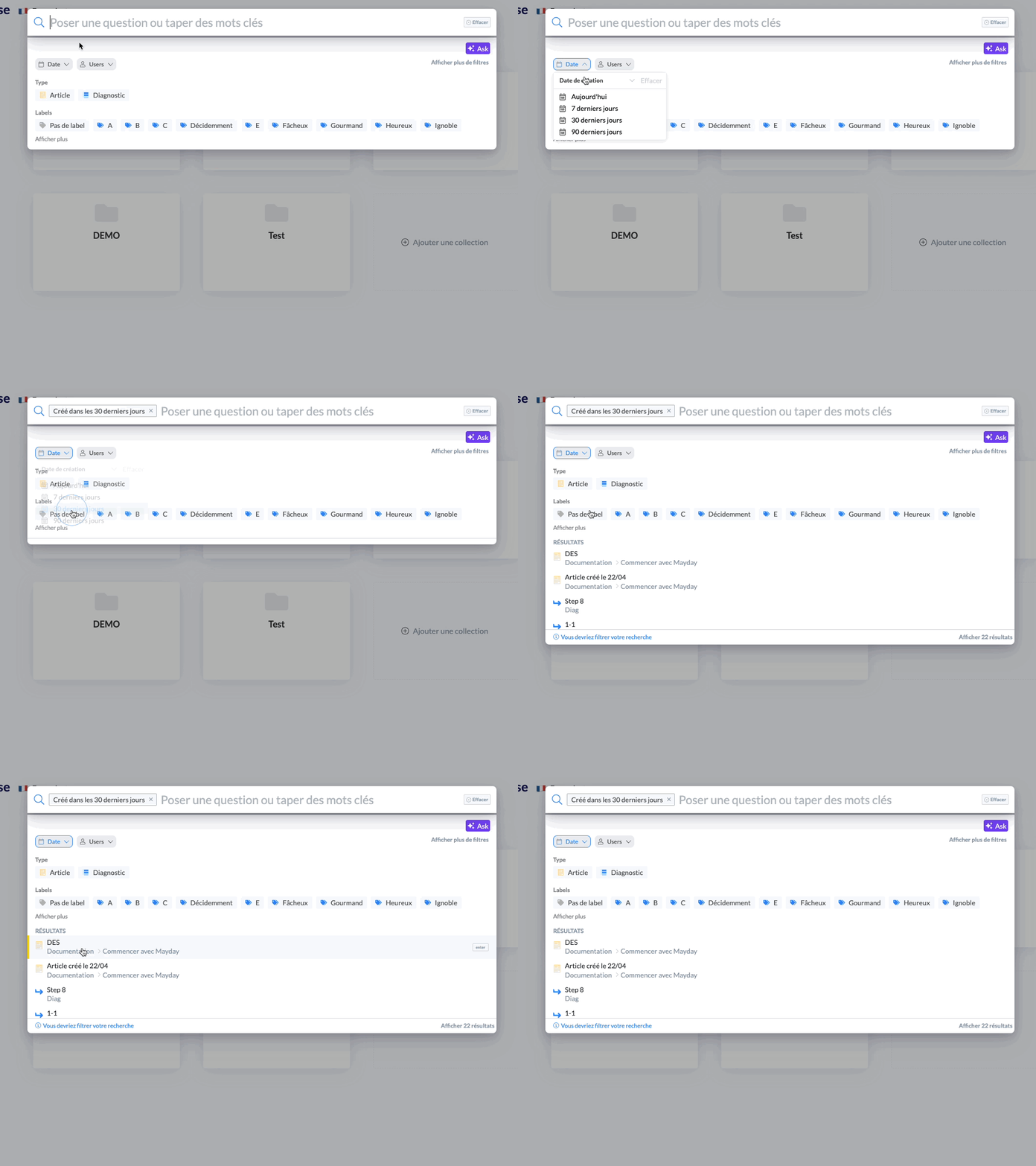 Filtered search on contents created in the last 30 days
Similarly, as an administrator, you can now disable content in the agent search engine:
Once disabled, this content will no longer be visible in the agent search engine
However, it will still be accessible in the administrator search engine
In addition, it will be accompanied by a visual indicator to signal its deactivation in the agent search engine
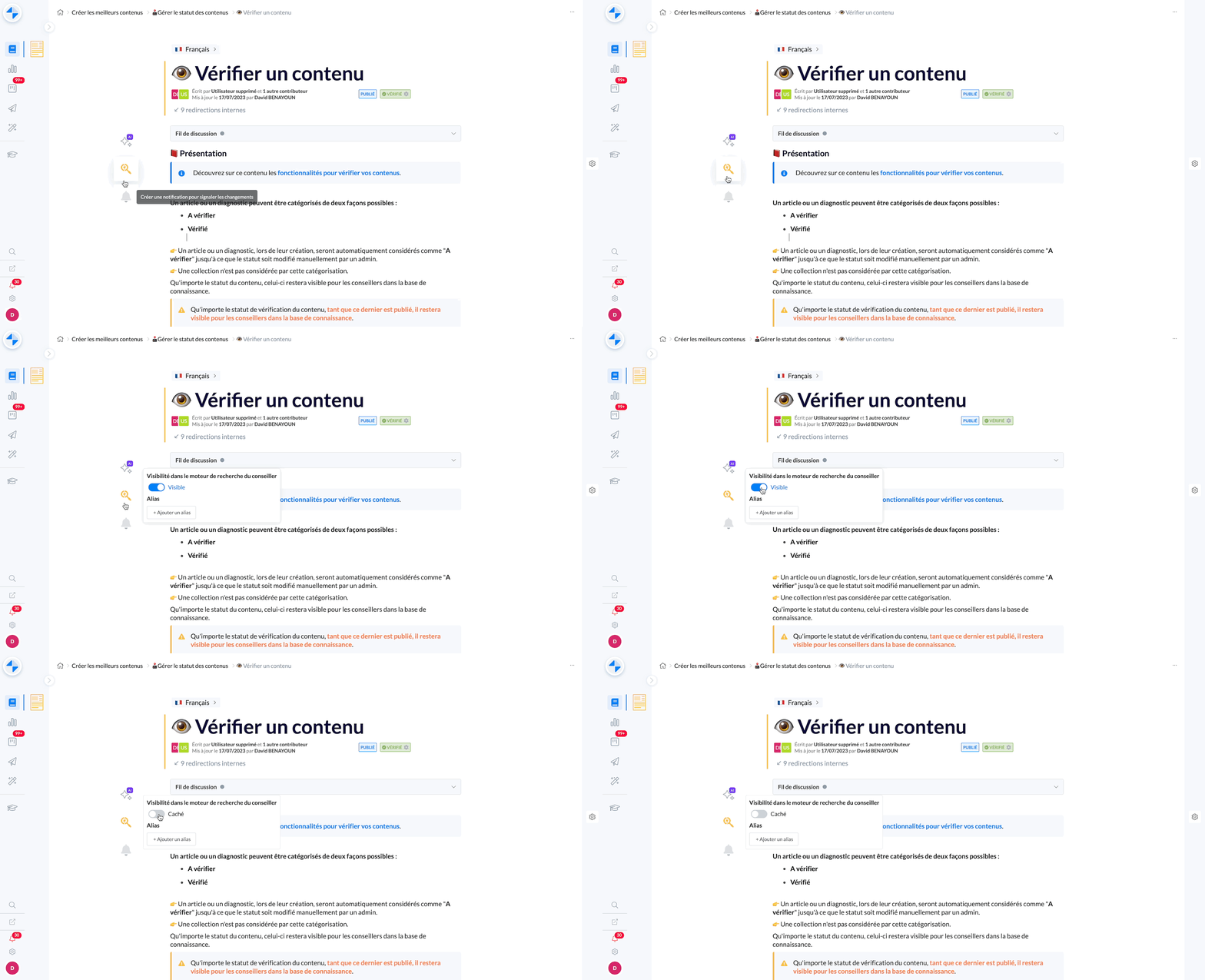
Disable content from the agent search engine
🪄 Use cases
📅 You want to find a list of documents based on a time characteristic.
👤 You want to find a list of documents related to one or more users.
✅ You want to find a list of documents to be checked soon, for example.
❌ You want to prevent content from resurfacing in the agent search engine
🤔 How to use it?
Filters :
Open the search engine in the administration center
Select one of the filters: Date, Users or Verification Policy
Choose the filtering criteria for your search
The displayed results correspond to the applied filter ✅
Disable content from the agent search engine:
In the menu to the left of a content, click on the 🔍 icon
Click on the displayed button to disable content from the agent search engine
The preference is applied immediately
🔎 Agent search engine
As an agent, you now benefit from two key improvements:
Search history: When you open the search engine, you can now access the list of contents you have consulted via the search engine, sorted from most recent to oldest, with a time indicator.
Filter backup: You now have the option to activate a preference in your options to keep the filters applied in the search engine. If this option is activated, the filters you apply during a search will be maintained for all your future searches, until you modify them.
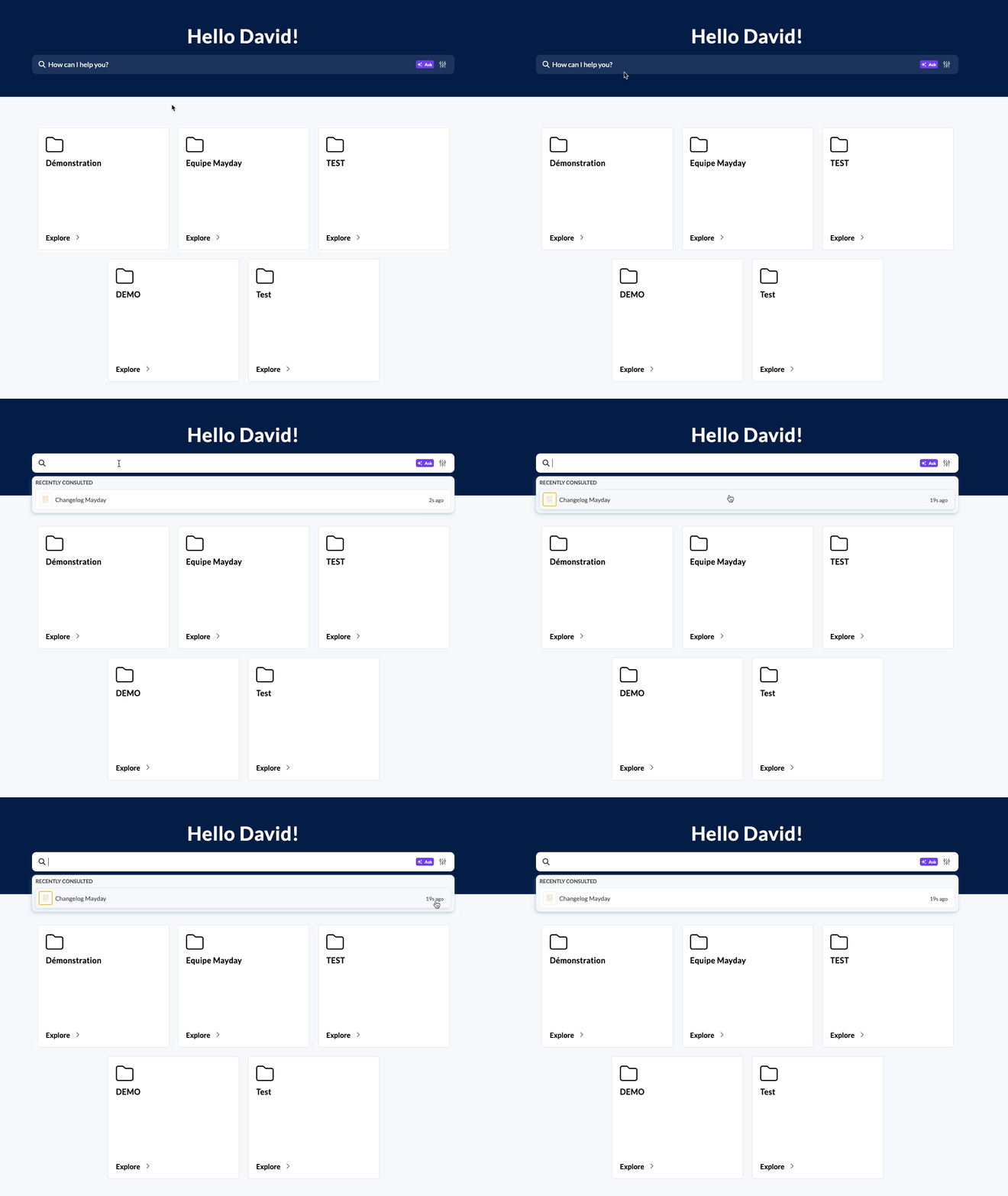
The search history is triggered as soon as the search engine is opened, with a time indicator
🪄 Use cases
🕓 You want to see or open a content that you recently searched for
🔙 You want to quickly find the list of contents you have consulted via the search engine
⚡ You want to quickly find what you are looking for without having to reapply the same filters that concern you each time
🤔 How to use it?
To view the search history, simply open your search engine (available on Mayday Desk and Mayday Widget for now)
The history is specific to the knowledge base and language you are browsing.
If you change knowledge base or language, the history will be readapted each time.
To activate filter backup, simply go to your preferences and activate the preference "Keep your search filters".
The saved filters will always be applied to the search engine, regardless of the knowledge base or language
You just need to remove them manually if you wish, or disable the preference
🔎 Search within Mayday tables
✨ NEW FEATURE | Search for text within a table on Mayday
During the last sprint, we made several improvements to Mayday tables. We are pleased to announce that a search bar is now available to search within a table on Mayday readers (Mayday Desk, Mayday Widget, etc.).
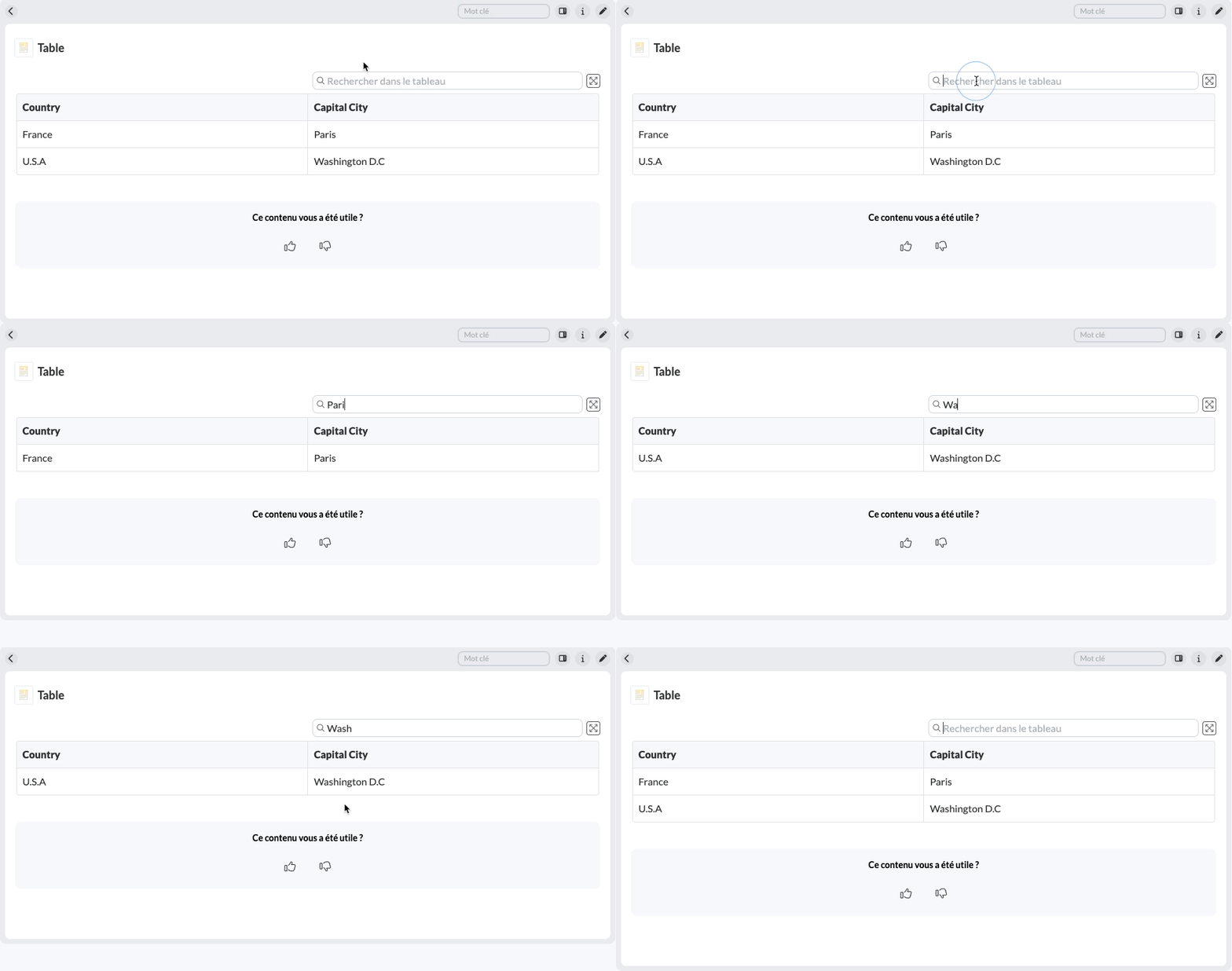
Use the search bar to quickly find information within a table
🪄 Use cases
😩 You are faced with a heavy and complex table and have difficulty finding the information you are looking for.
⚡You want to quickly find information within a table.
🤔 How to use it?
Above a table (on Mayday Desk, Widget), enter your search in the search bar.
The results are then displayed live on the table.
🧩 Introduction of new plugins and optimizations
✨ NEW FEATURE | Find trending content on your knowledge bases
For the past few weeks, we have launched agent plugins, a new feature that offers you the possibility to customize your Mayday experience and that of your agents by activating additional features. We are pleased to announce the arrival of new plugins, as well as improvements to existing plugins.
🆕 New plugin:
Trending content : find within the plugins section a list of trending content across all knowledge bases to which you have access. This content is scoped by language, and time filters are available:
Trending content last week
Trending content last month
Trending content last 3 months
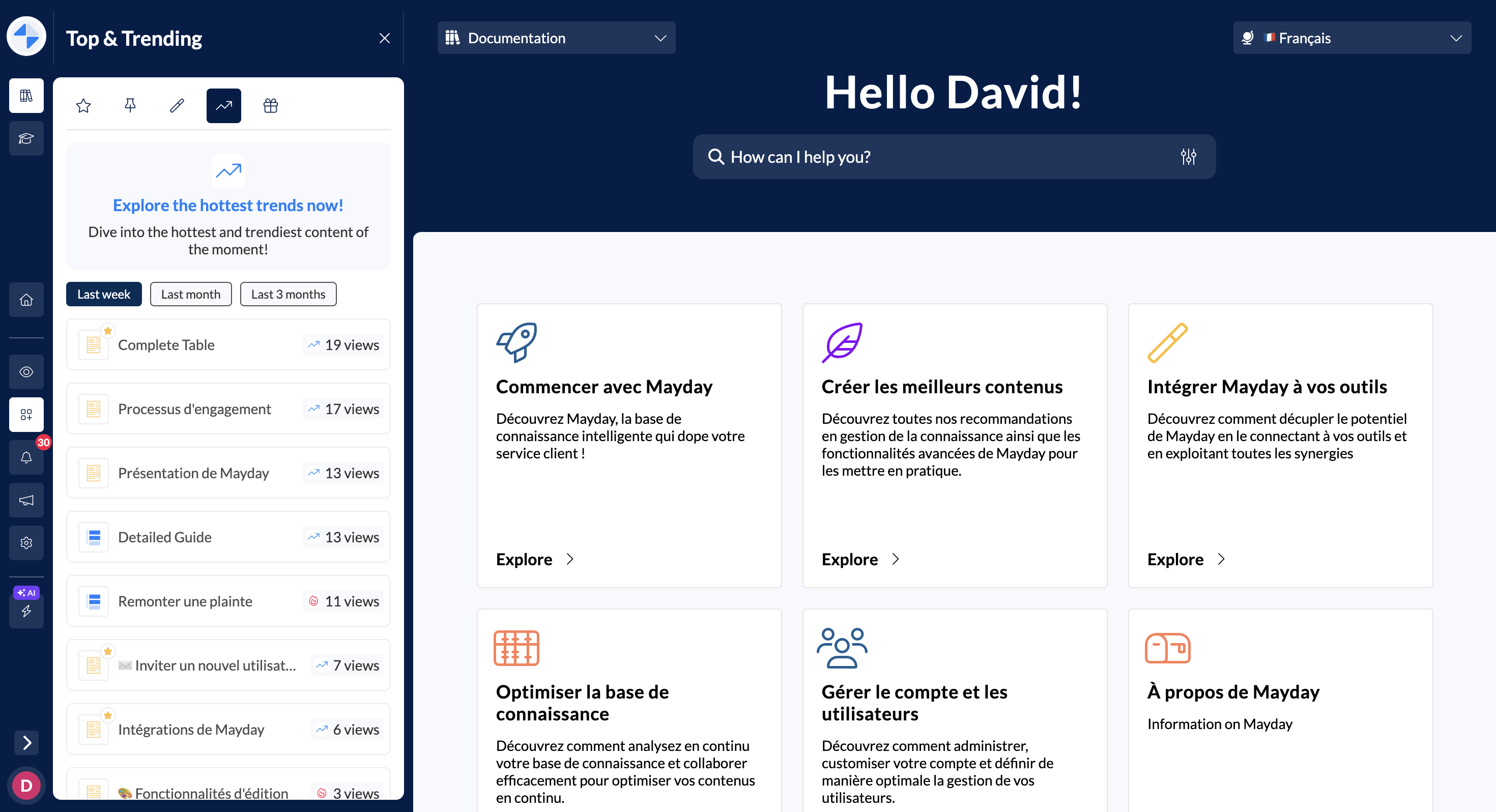
Find trending content according to a desired period and consult this content
🪄 Use cases
🔍 You want to quickly find a popular document
🤔 You are curious to know the most consulted content across all your knowledge bases
🤓 You always want to be up to date on the content other agents are recently consulting
🤔 How to use it?
In the administration center, activate the plugin "Trending content" in the plugins section, on all platforms you want
On these platforms, go to the "Plugins" section, where a new tab 📈 is available
And voila! You can find all the trending content and filter it according to the desired period
🪄 Optimizations:
The new content plugin is now available in the new dedicated plugins section.
All plugins are now available on all agents platforms: Mayday Desk, Mayday Widget, and the Mayday application on Zendesk.
📊 Mayday Dashboard | New "Exports" section
✨ NEW FEATURE | Find your Mayday exports in a dedicated section in the Dashboard
Mayday exports are frequent. Currently, requesting a Mayday export requires manual intervention. To avoid this loss of time, you can now find all your Mayday exports in a dedicated section of the Mayday Dashboard.
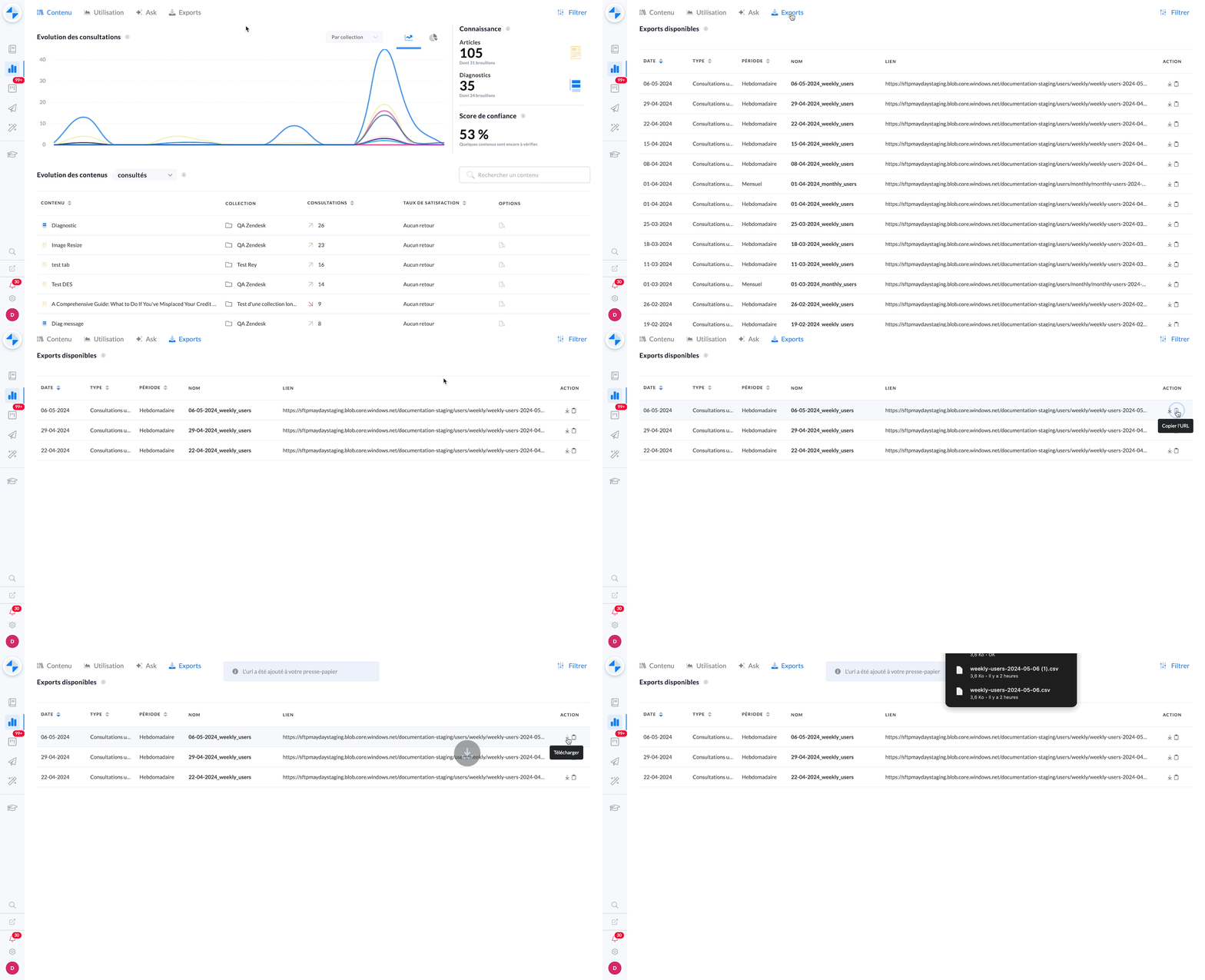
Find and download any Mayday export
🪄 Use cases
🤗 You want to find all your Mayday exports
⬇ You want to find and download a specific export
🤔 How to use it?
In the dashboard, a "Exports" section is now available.
Within this section, all exports are available: search engine, consultations, users, and many others.
Once on this section, you can find all your exports, categorized by date or export type.
You can copy the download link of the export, or download it directly.
Similarly, filters are available to refine your search!
🚀 Optimizations & Improvements
Mayday Widget | Performance improvement
Recently, many customers have complained about slowdowns caused by the Mayday Chrome extension (Mayday Widget). We have therefore worked on optimizations to eliminate these slowdowns and ensure optimal performance for agents using the Mayday Chrome extension.
Mayday Hub | Load optimization
We have optimized the Mayday Hub to efficiently manage a large number of tasks. Thus, even when receiving a large volume of tasks, you will still be able to collaborate effectively on the Mayday Hub. For example, if you receive a large number of feedbacks on Mayday, this will not be a problem on the Hub.
Adding External IDs for Users
In case you have external IDs for your Mayday users and you want to easily find them within Mayday (for example, to establish a Mayday ID <> external ID correspondence), they are now available everywhere on Mayday:
List of users
In exports
Search Engine | Content Labels on Guide Steps
Now, you can filter guide steps based on content labels if they are assigned to the guide as a whole. In addition, guide steps will display the content labels that are assigned to the guide globally in search results.
🪲 Bug Fixes
👉 We fixed the following bugs:
Feedbacks: Line breaks are now visible in Mayday Hub tasks, improving feedback readability for agents thanks to access to the Mayday editor.
Guide Steps: Some steps were not appearing on the agent side.
Multilingual: Some users lost their favorites when multilingual was introduced on certain knowledge bases.
Zendesk Macros: Macro triggering was not working for some users.
Content Update Date: Some content displayed a last update date of 01/01/1970.
Mayday Tables: There were differences in table size between Mayday Admin and readers (Mayday Desk, Widget, etc.).
Mayday Guides: Sometimes, steps would open at the bottom of the page on the administrator side.
Collection Navigation: Collections sometimes opened unexpectedly during navigation on the administrator side.
Text Color: Highlighted text colors were not displaying correctly on Mayday Desk.