👋 Introduction
Welcome everyone❄🎅
We hope that this December is going wonderfully for you! The entire Mayday team wishes you a very happy holiday season 🎄.
2024 has been a year rich in new features for Mayday and we are excited to start 2025 with even more exciting features 🎉.
But why wait? Some new features are already available, and we are pleased to present them to you today!
Here are the latest developments on 📚 Mayday Knowledge:
Generate articles with Mayday AI: Write complete content from external files (PDF, PPT, etc.) or existing Mayday content.
New homepage: The admin center homepage replaces the Mayday Knowledge homepage.
Pending Versions optimizations: Discover improvements for even more flexibility in your modifications of published content.
As for 🌐 Mayday Selfcare:
Mayday Selfcare Widget: Need help? Access Mayday's documentation directly from your admin sidebar at any time. Explore the content freely without leaving your workspace!
☄ Coming soon for integration on your websites. Offer your customers access to your Selfcare directly where they are!
"Ask AI" on your Selfcare: the button to access ASK Mayday is getting a new look. A more accessible and explicit design to better assist your customers and help them quickly find answers to their questions thanks to AI!
💫 Feel free to test the already available feature on our Mayday documentation.
Let’s discover all these new features 👇
Mayday Knowledge New Features 📚
⚙ Mayday Admin
 Generate your articles with Mayday AI
✨ NEW FEATURE | Let Mayday AI create a complete article from external files or already existing content on Mayday!
A few weeks ago, we launched the “Ask AI” feature, which allows you to submit any request to Mayday AI directly in the editor. Today, we are excited to present its new evolution: complete article generation.
From now on, Mayday AI can fully draft your articles, based on:
External files (PDF, PowerPoint, etc.)
Already existing content on Mayday
No need to start from scratch: your AI assistant becomes your writing collaborator, transforming your sources into adapted and personalized articles.
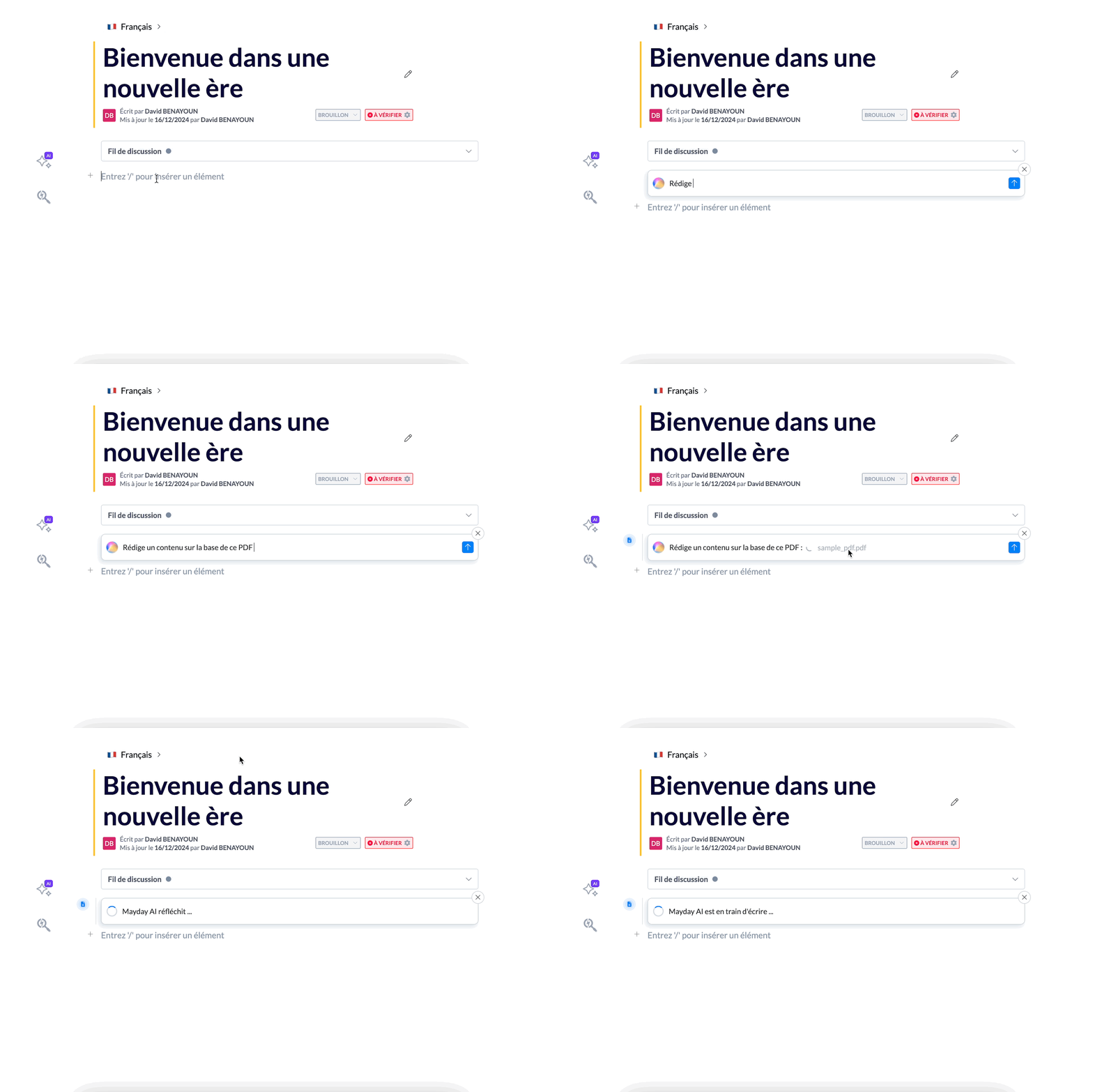
Ask Mayday AI to write content for you.
🎯 Why use this feature?
During conversations with our clients, a recurring challenge emerged: writing and validating content on Mayday can be time-consuming.
Generally, writers rely on shared resources, such as Word, PDF, or PPT files. However, the produced articles must be consistent with the rest of the knowledge base, in terms of format, structure, tone, or writing style.
📣 Mayday AI simplifies this process and saves you time.
You can now ask:
"Write an article from this PDF: {insert PDF}. The content should be formatted with a structure of headings, emojis in front of these headings, and using bullet points whenever possible."
"Here is a PPT document: {insert PPT}. Create a Mayday article based on this information."
"Optimize this content by adding headings, emojis, and bullet points."
"Write content on {subject} in the format of this Mayday article: {mention of existing content}."
A library of prompts will be available soon to guide you in your requests!
💡 Use cases
✍ Quickly create fully written content, requiring only a review.
🔗 Generate a Mayday article from one or more external files.
📄 Generate a Mayday article from one or more existing Mayday contents.
🔗 Supported file formats
For optimal results, the file format should be suitable for article writing. For example, a very complex Excel file will probably not yield relevant content.
All formats are supported: PDF, PPT, PPTX, DOCX, XLS, etc.
Exception: image formats (JPG, JPEG, PNG, etc.) are not compatible.
🤔 How to use this feature?
Access the Mayday editor.
Select "Ask AI" in the dedicated menu.
OR select text, then choose "Ask AI".
OR type "/", then choose "Ask AI".
Then:
Add your files directly in the editor through the "/" shortcut.
Insert Mayday content via the "@" shortcut.
Send your request.
🎉 In a few seconds, Mayday AI provides you with a ready-to-use article!
🚀 Optimizations & Improvements
The Homepage 📕 makes way for a brand-new homepage 🏠
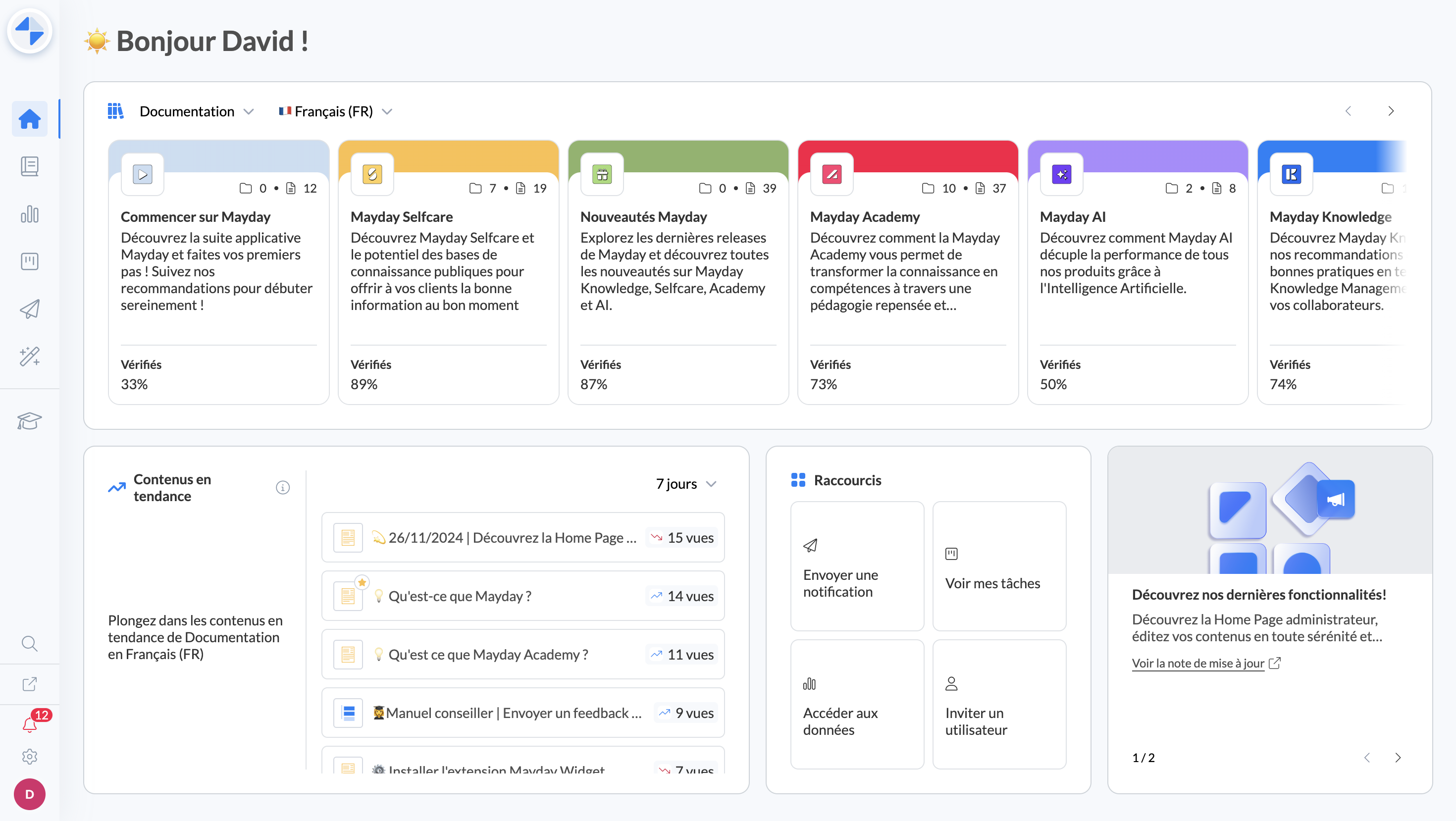
Launched three weeks ago, the administrator center homepage 🏠 now replaces the Mayday Knowledge homepage 📕.
Don't worry, the 📕 section is still accessible and continues to allow you to easily navigate your Mayday content!
Besides, it is now possible from the homepage to:
Create a new collection.
Edit an existing collection (title, description, icon, color, etc.).
✨ Content Pending Versions Optimizations
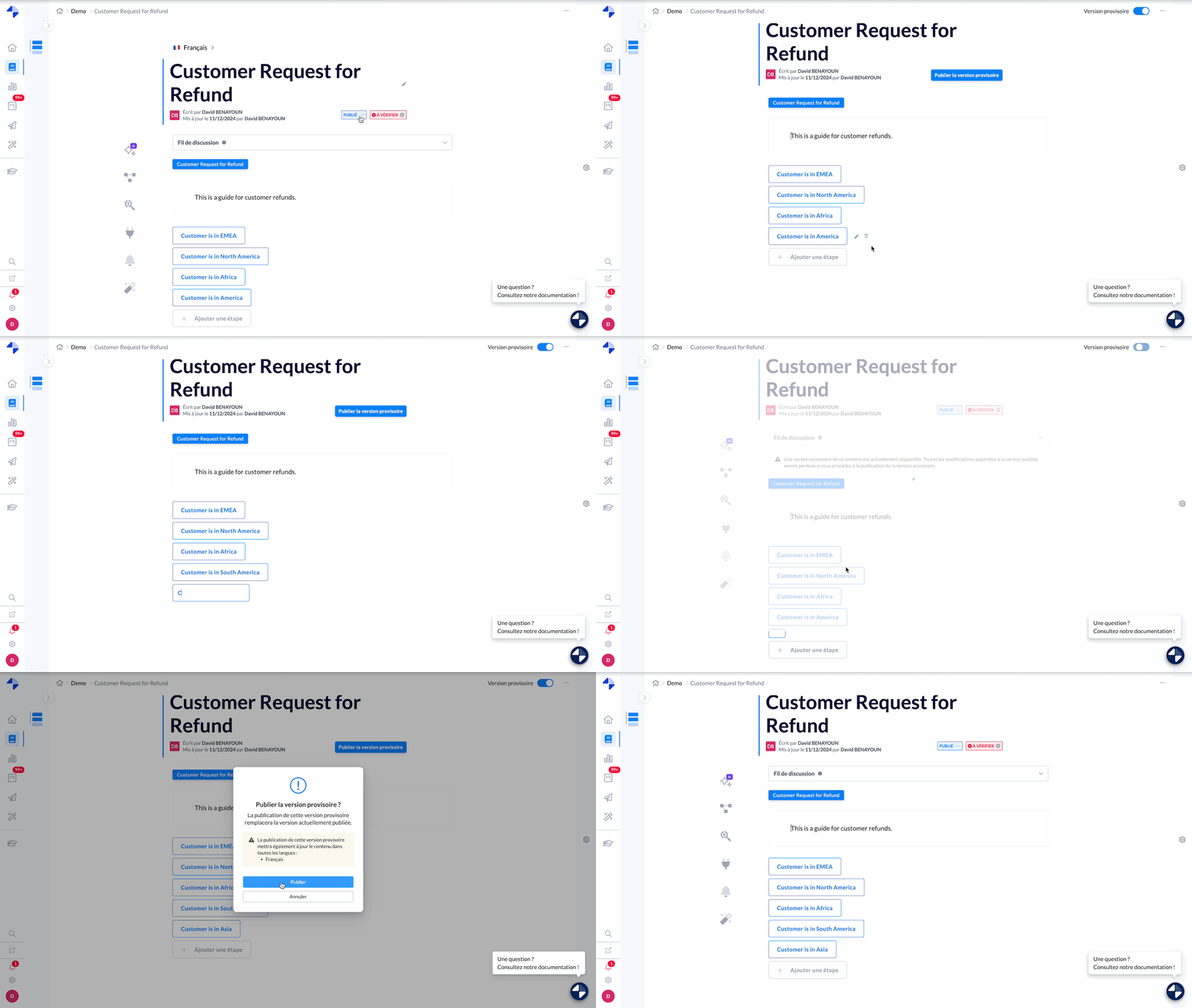
Introduced three weeks ago, pending versions allow you to modify published content without these changes being immediately visible to agents.
We are pleased to announce several specific optimizations for Mayday guides.
✅ Now available:
Add or archive steps directly in a pending version of a guide.
These changes will only take effect on the live version once the pending version is published.
When a step is archived, it will only be moved to the archives upon the publication of the pending version, marking its official archiving.
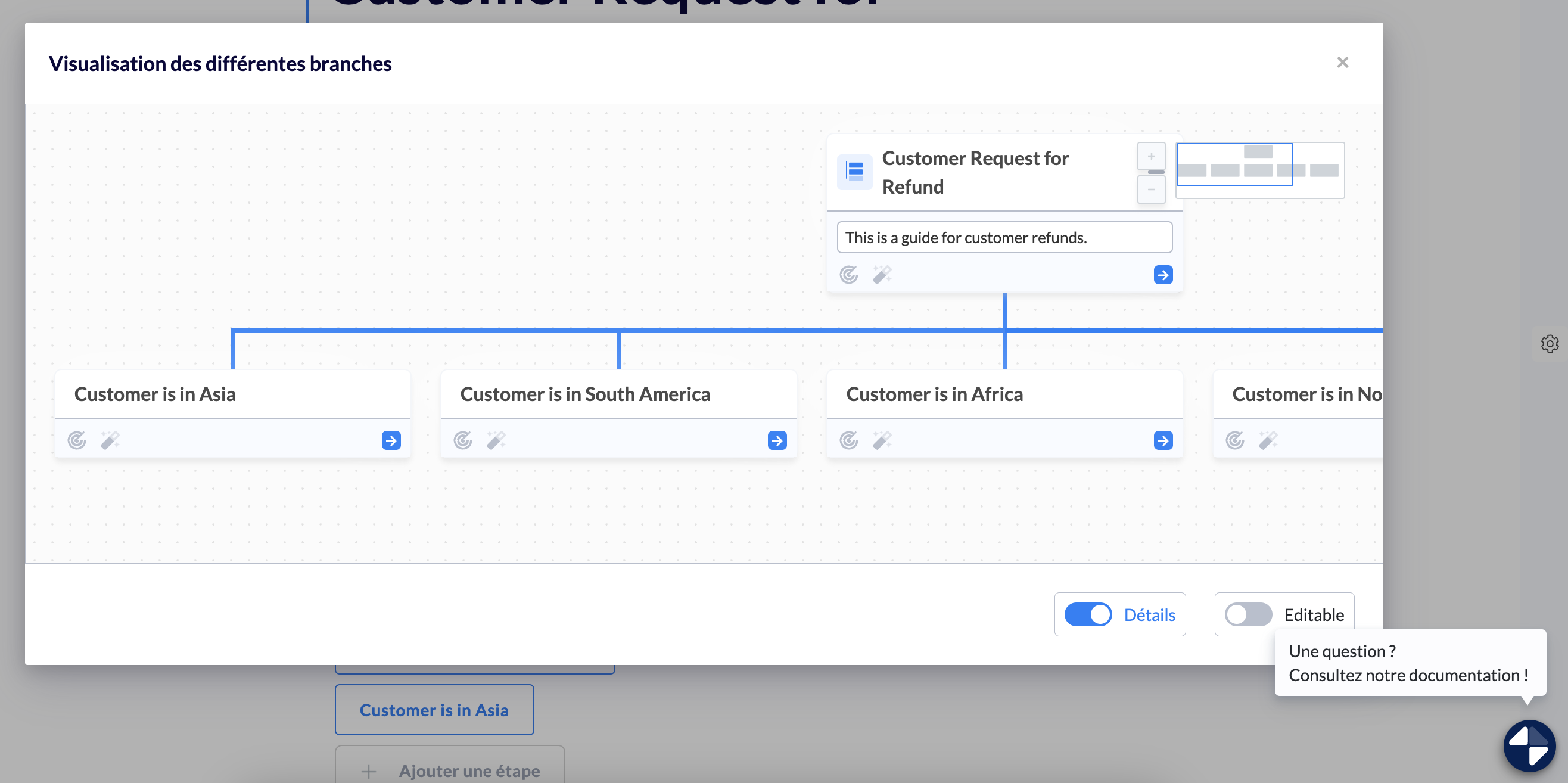
View the pending version structure of a guide.
This feature allows you to examine the new structure of the guide before applying the changes live.
⏭ Coming very soon:
Creation and modification of redirect steps directly in a pending version.
Move a step or a sub-step within a pending version to easily adjust the structure.
Dedicated search filter in the admin center, allowing you to quickly identify content with an existing pending version.
Version history in a guide, to view structure changes made across different pending versions and restore a previous version if necessary.
Preview pending versions directly on Mayday readers (Mayday Desk, Widget).
🎨 Visual Optimizations Across the Platform
The interface of the admin and agent spaces is undergoing a progressive modernization. These improvements aim to make your user experience on Mayday even smoother and more enjoyable!
🪲 Bug Fixes
👉 We have fixed the following bugs:
Receipt of notifications on Mayday Widget: Many agents were not always receiving notifications on Mayday Widget. This has been fixed.
Content alias: It was not possible to save aliases after adding them. This issue has been fixed.
Access to the admin center: Users with access to the Hub only could no longer access the admin center. Access has now been restored.
Trust score on the Dashboard: The “Trust score” section could sometimes appear empty when applying certain filters. This behavior has been adjusted.
Inactive users pagination: An error in pagination distorted the count of inactive users on the Dashboard. This problem has now been resolved.
New Features on the Mayday Academy 🎓
⚙ Mayday Admin
🎨 Optimizations
When adding modules to a course, the labels of these modules are now visible to help you easily identify them!
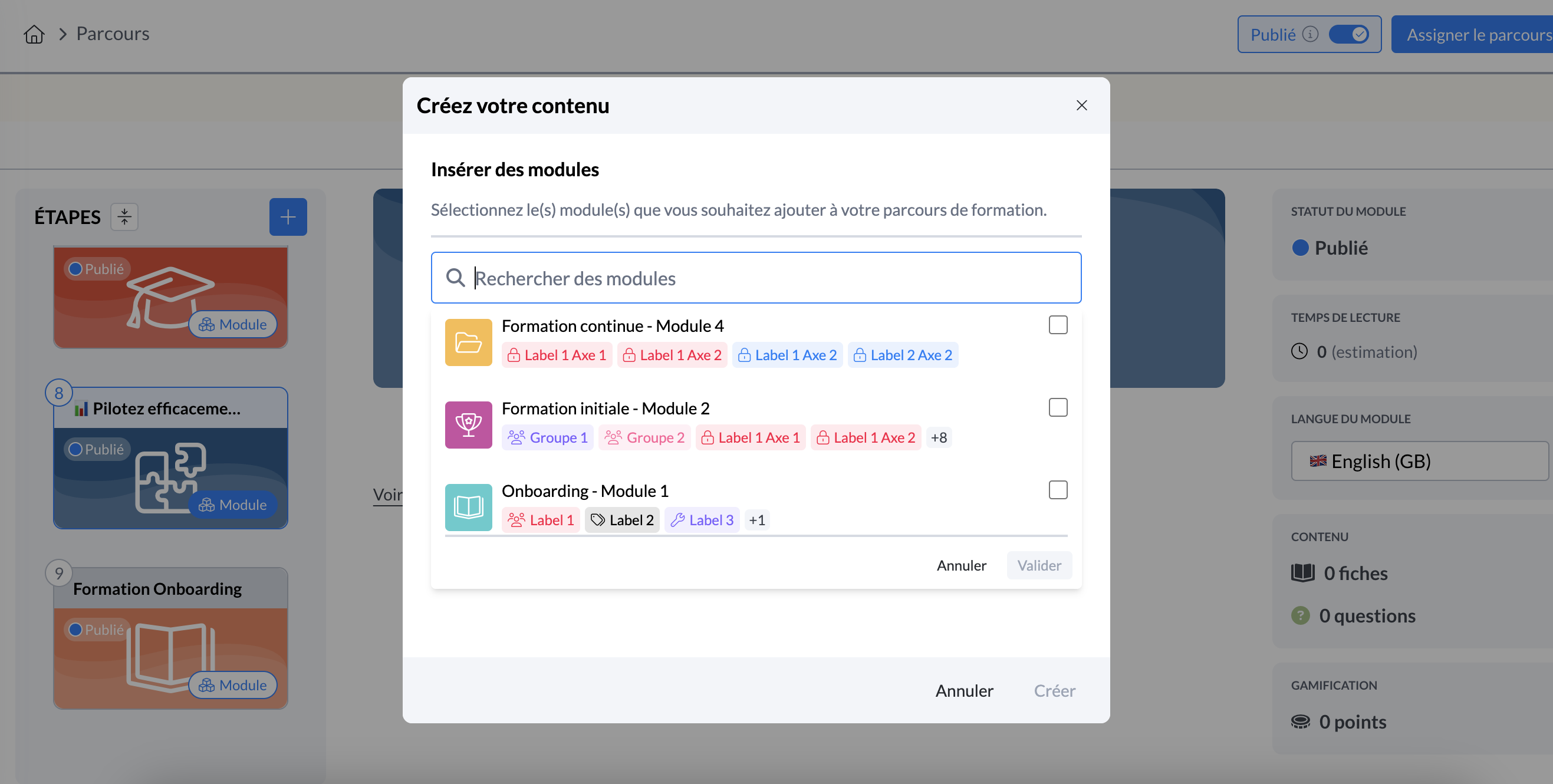
Admin interface - courses - insert modules
🪲 Bug Fixes
👉 We have fixed the following bugs:
Hub Academy: the redirect link to a module from the Mayday Hub is working again
Embedded content: you can again embed your content on the Academy editor
👤 Mayday Agent
🎨 Optimizations
The tag indicating the duration of your modules and courses on learners' thumbnails is now clearly readable when your images have a light background.
🪲 Bug Fixes
👉 We have fixed the following bugs:
Resume my last training: the redirect from the Desk homepage banner directly to the last module is fixed.
New Features on the Mayday Selfcare 🌐
🏥 Access Mayday documentation at any time from our new Selfcare widget!
✨ NEW FEATURE | Do you have a question while using Mayday? Access our documentation at any time from the sidebar of your admin interface. Explore the content freely without ever leaving your workspace!
Save time and be more efficient with our new Selfcare widget! Search directly for answers to your questions and access all our documentation and support content from your Mayday admin interface.
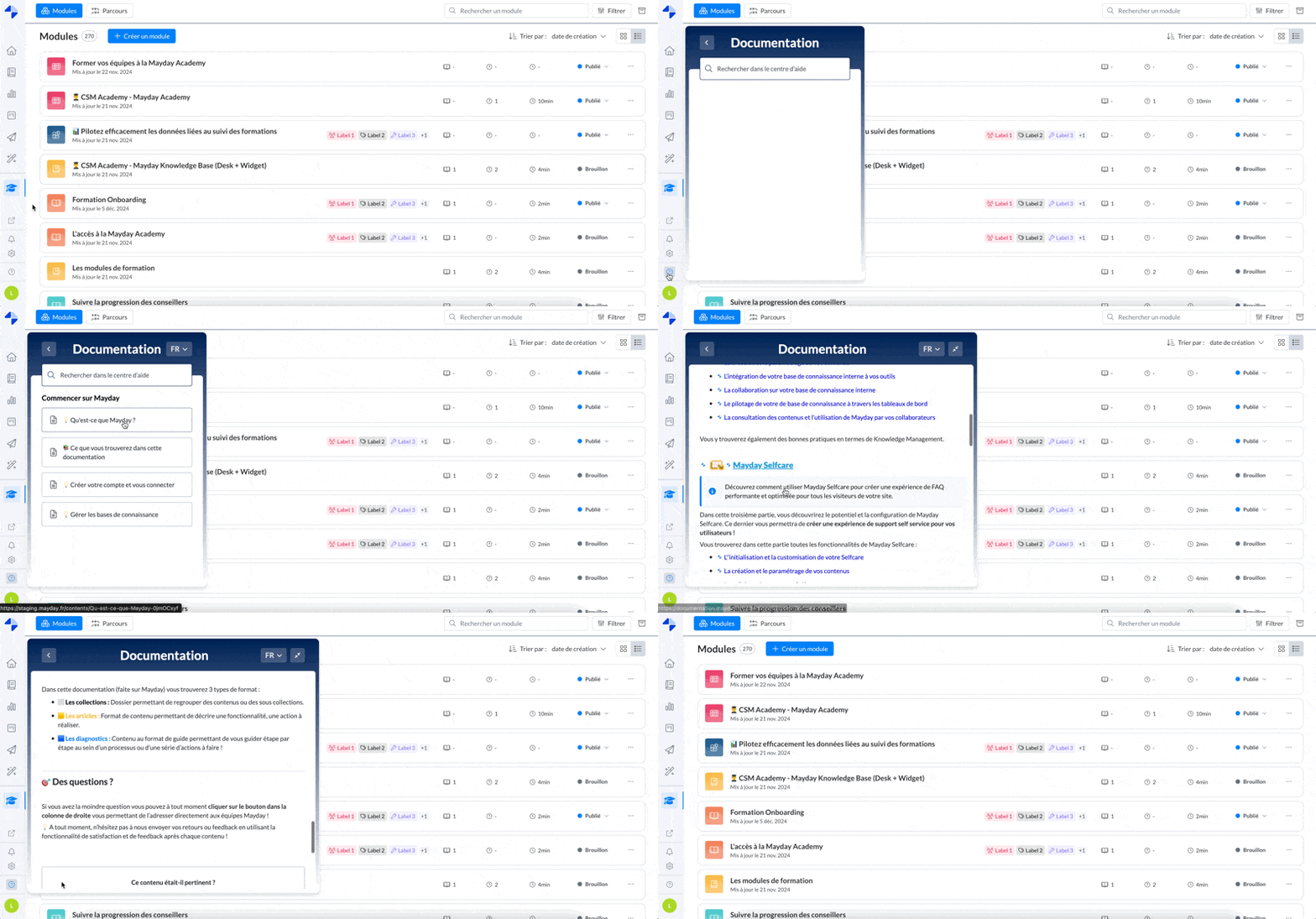
Mayday admin interface
☄ Widget soon available for integration on your websites.
Offer your clients access to your Selfcare directly where they are!
🪄 The ASK Mayday feature on your Selfcare has been revamped with a new "Ask the AI" design
✨ NEW FEATURE | A more accessible design on your Selfcare and explicit in its use to better support your clients and help them quickly find the answers to their questions with AI!
Offer your visitors the "Ask the AI" option directly from your Selfcare page, accessible at any time at the bottom right of their screen.
Thus, provide them with an interactive and smooth experience that reduces frustrations and promotes their autonomy in finding information.
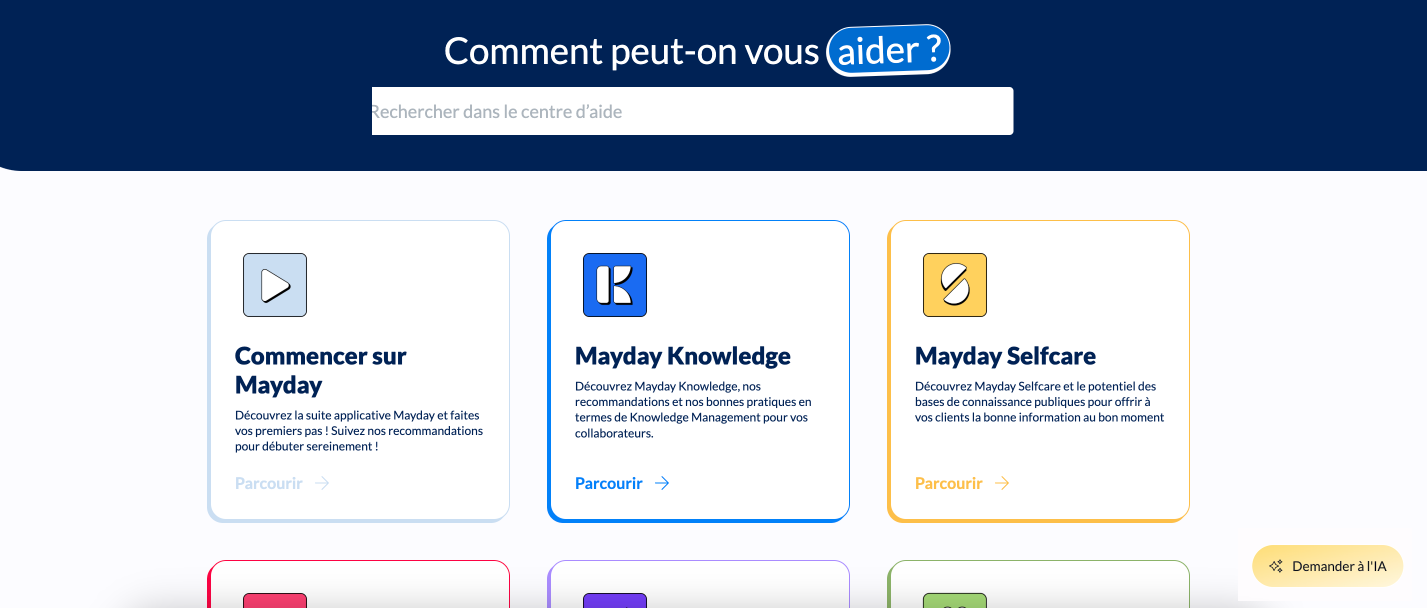
Mayday Selfcare interface
By clicking on the "Ask the AI" button, our ASK Selfcare opens and visitors can select one of the most frequently asked questions or ask their question directly in conversation mode:
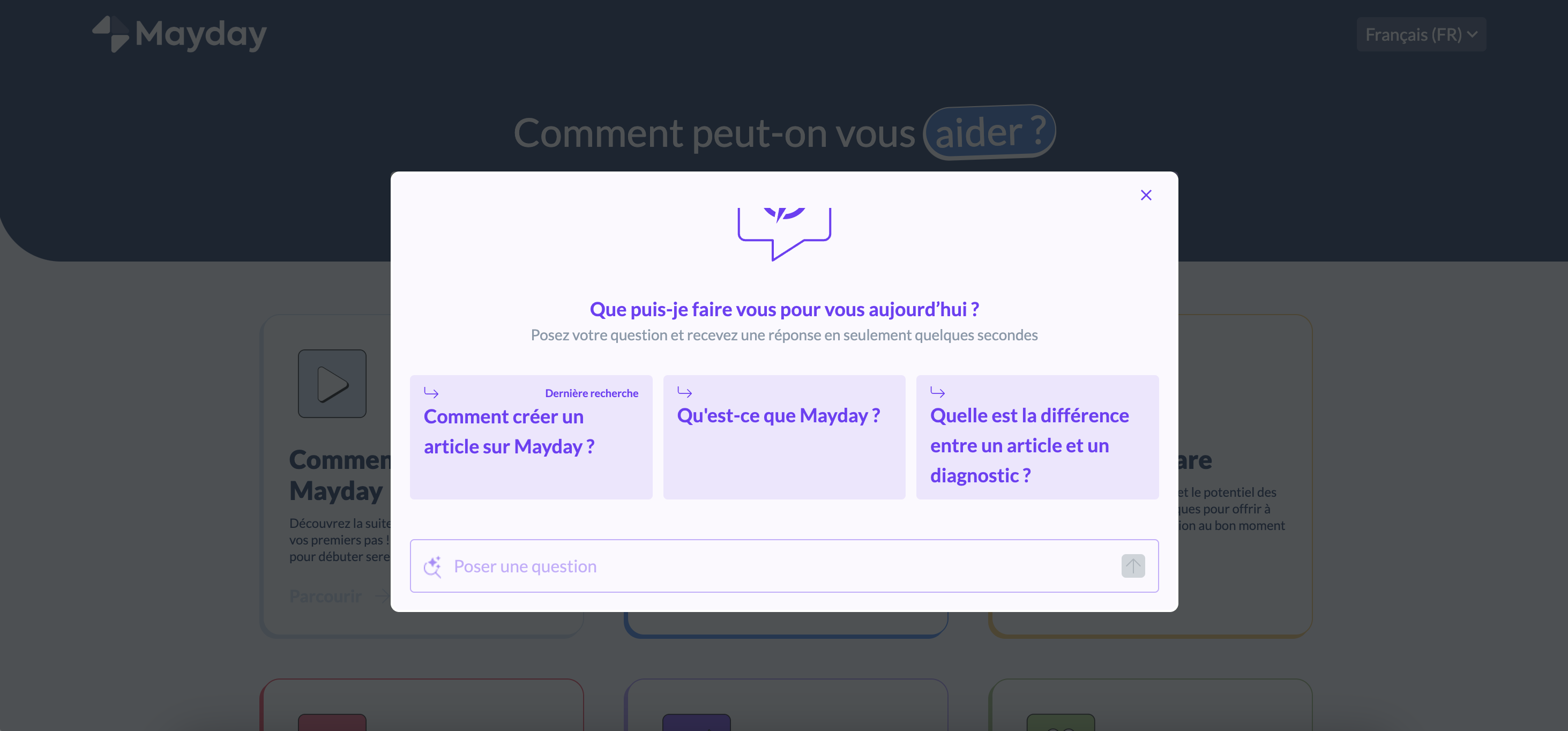
ASK Mayday Selfcare interface
💫 Don't hesitate to try the feature available on our Mayday Selfcare: Mayday documentation.