Introduction
Hey everyone 👋
Over the past three weeks, we have continued to develop the Mayday Academy.
Thanks to these developments, the Mayday Academy is now a gamified learning platform, created by and for customer service teams.
If you haven't yet booked your demo, contact your Mayday contact to learn more, or book your demo here!
In the meantime, we are excited to announce some new features that will transform your agents' daily lives :
Mayday AI Copilot : benefit from a generative AI copilot that accompanies you in resolving your customer tickets.
Real-time Editing Avatars: visualize users who are editing Mayday content at the same time as you to avoid conflicts of simultaneous editing.
Intelligent Button Plugin : trigger intelligent actions from a Mayday plugin to centralize your agents' tasks in a single tool.
And many optimizations!
Let's take a deep dive 👇
✨ New features
🤖 Mayday AI | Introducing the Mayday Copilot
✨ NEW FEATURE | The Mayday Copilot, the AI that makes your life as an agent easier
Our goal is simple: to provide you with the right information, at the right time, and in the right place. To achieve this, we are pleased to announce the arrival of the Mayday Copilot, accessible from the Mayday Widget. On any tab, the copilot automatically triggers to provide you with the right information, manually or automatically. This allows you to respond to your customers in just a few seconds.
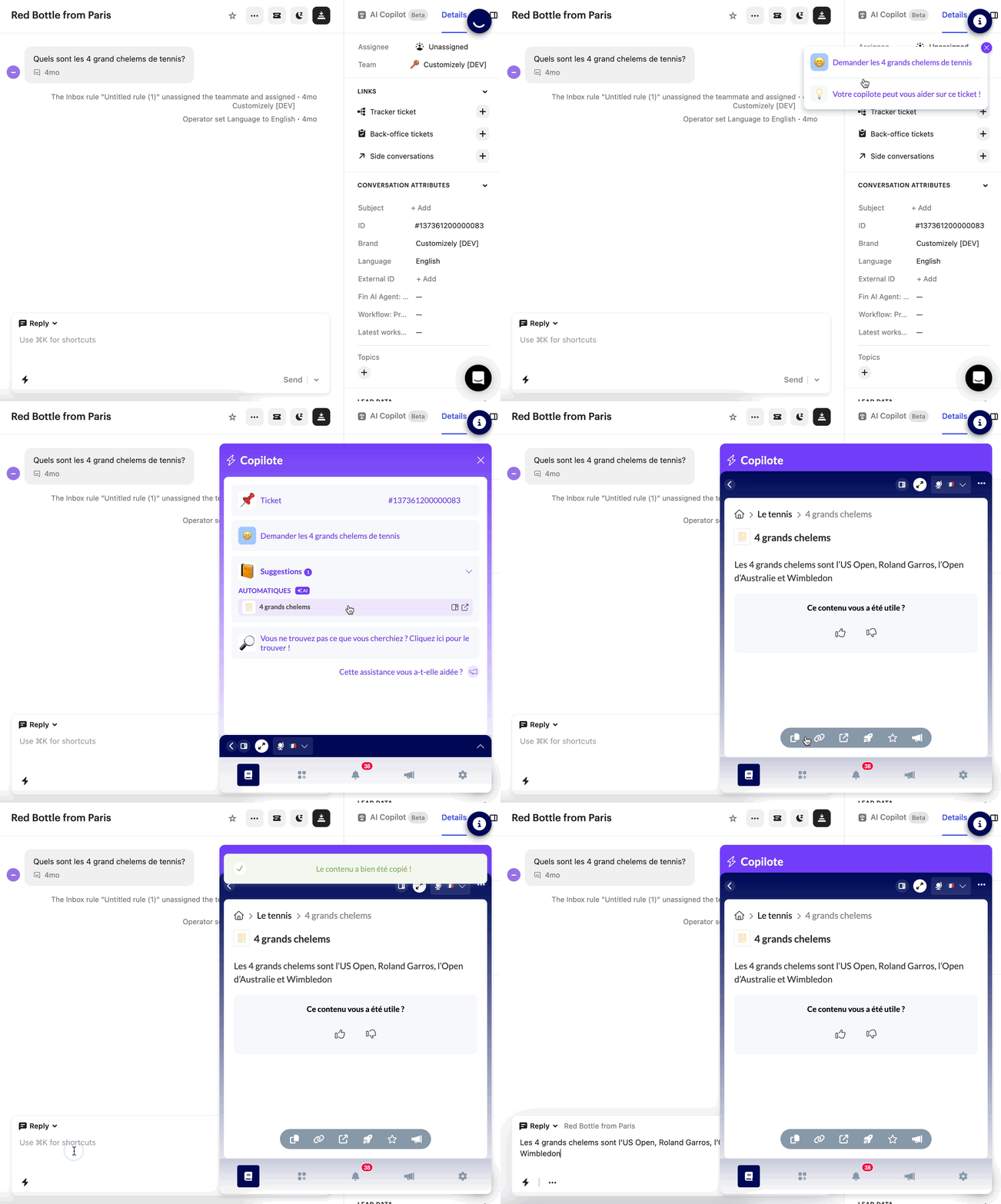
When the copilot detects the customer's request, it notifies the agent so that they can directly consult the Mayday content where the information is located
🤩 The Mayday Copilot contains:
The ID of the ticket concerned by the recommendations
The context of the request and the detected mood of the customer
Suggestions of relevant content to save time
Automatic suggestions detected by AI
Manual suggestions configured by administrators
The ability to trigger a manual search
🔌 The copilot works on the following integrations:
New integrations are coming soon
Intercom
Salesforce
Soon, it will be available on the following Mayday applications:
Zendesk
iAdvize
🪄 Use cases
💬 You handle a customer request by message (Intercom, Salesforce, etc.)
⚡ You want to quickly provide an answer
🤩 The copilot analyzes the ticket and recommends the relevant content to you in just a few seconds
🤔 How to use it?
Make sure Mayday AI is enabled on your account with your administrators
Activate the Mayday Widget (Chrome extension) on your browser
If you haven't installed it yet, it's available on the Chrome store: Mayday
Log in to your Mayday account
Go to an Intercom or Salesforce ticket
And voila ✅
On each viewed ticket, the Mayday Copilot will notify you once the ticket has been analyzed to help you, and only in a few seconds!
✍ Content editing | Real-time user avatars
✨ NEW FEATURE | Visualize users who are editing the same content as you in real-time on the Mayday editor.
We know that many of you are working on writing and maintaining a knowledge base. However, simultaneous real-time editing is not yet managed on Mayday. To avoid losing modifications due to simultaneous editing by multiple users, you can now see in real-time the users who are viewing the same content as you in the Mayday editor.
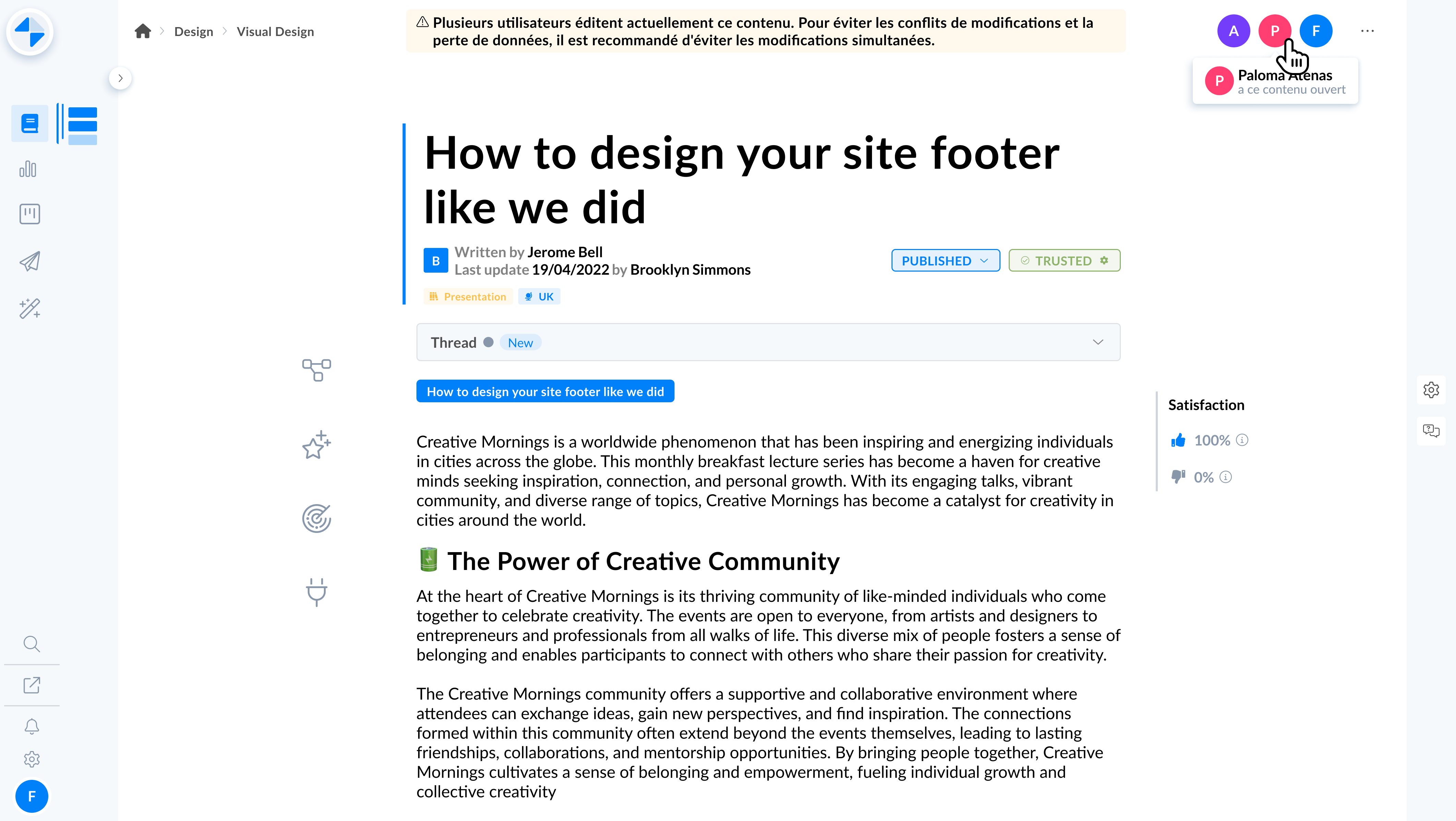
Visualize in real-time the users who are viewing the same content as you on the editor
🪄 Use cases
✍ You want to write or modify content on Mayday
💾 You want to make sure your modifications will be saved
⚠ You want to know if other people are editing the same content as you
💬 You want to contact these people to make sure only one person edits the content at a time
🤔 How to use it?
Go to content in the Mayday editor
Look at the top right corner of the content
You will see the users who are currently on the same content as you
If the user icon is grayed out, it means the user is inactive
Contact these people to make sure only one person edits the content at a time
🧩 New plugin: Intelligent Button
✨ NEW FEATURE | Integrate intelligent buttons directly into Mayday to allow your agents to trigger actions.
We know that your agents often have to use many tools to meet your customers' needs. To make their job easier, you can now integrate buttons that trigger actions directly within a Mayday plugin.
⚙ Configure intelligent buttons
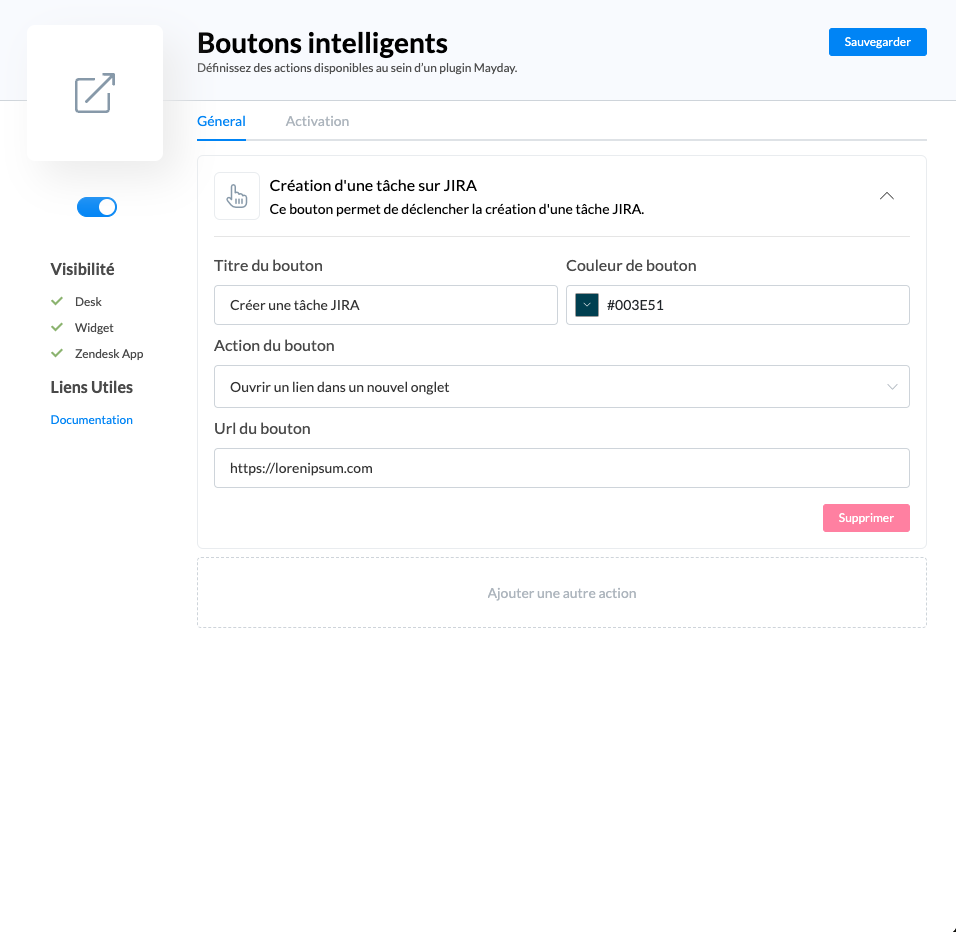
Configure your intelligent buttons from the plugin catalog
In the administration center, go to "Plugin Catalog" then "Intelligent Buttons"
Add an action
Define the action title, description, button label, color, associated action, and, in the case of a URL opening action, the URL to open
Add other actions if you wish
Save
For now, only the open a link in a new tab action is available. However, other types of actions will be added over time: API request, etc.
👇 Using intelligent buttons
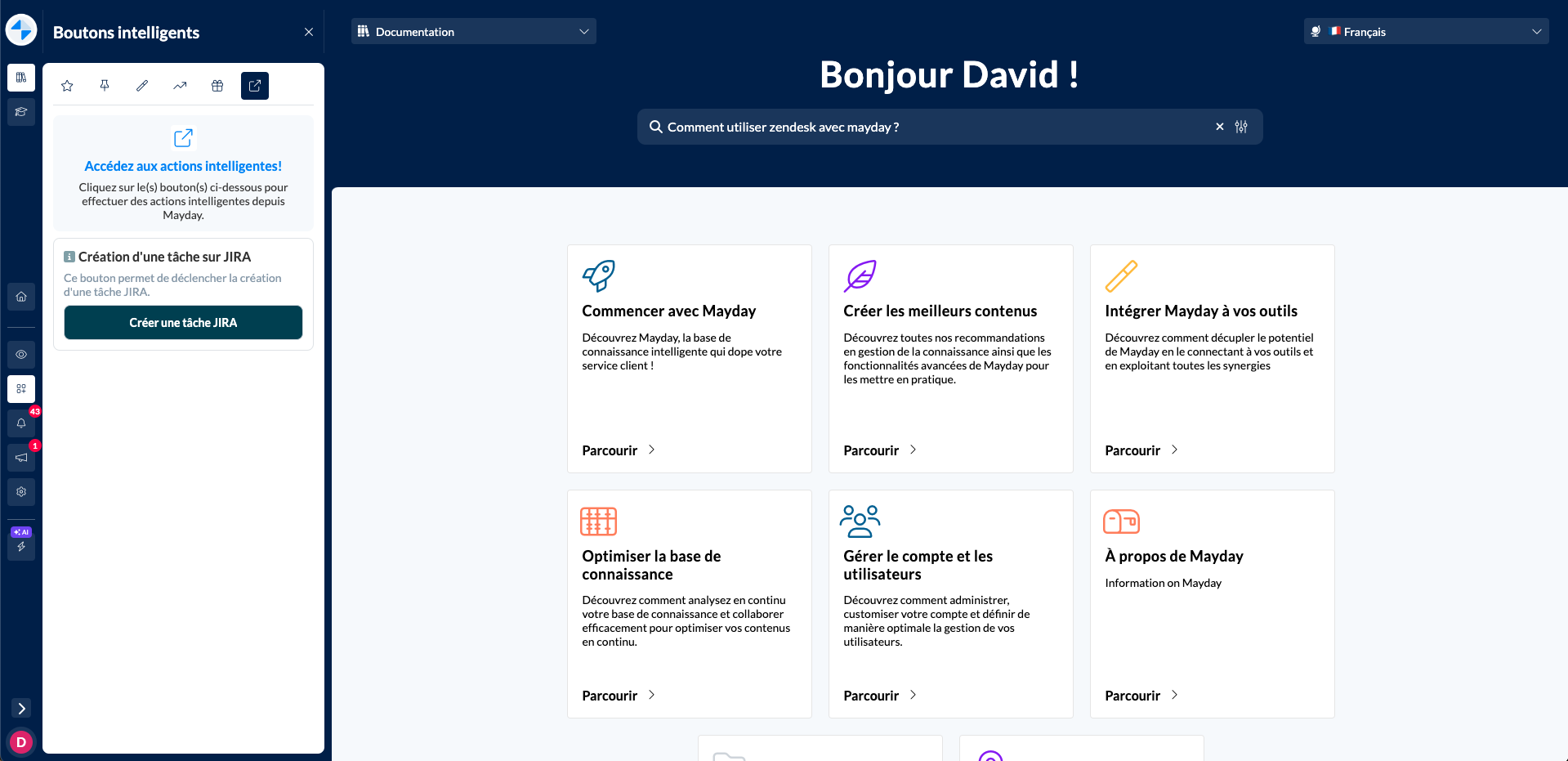
View and trigger intelligent actions from the plugin section
🪄 Use cases
⚡You want to help your agents quickly trigger actions to meet your customers' needs
1⃣ You want to centralize these actions on a single tool for more speed and productivity
🚀 Optimizations & Improvements
Mayday Admin | Opening content in a new tab
On the Mayday administration center, you can now open content in a new tab using the cmd + click shortcut.
This shortcut is valid everywhere on the administration center and allows you to open any content in a new tab.
Mayday Admin | Customizing collection colors
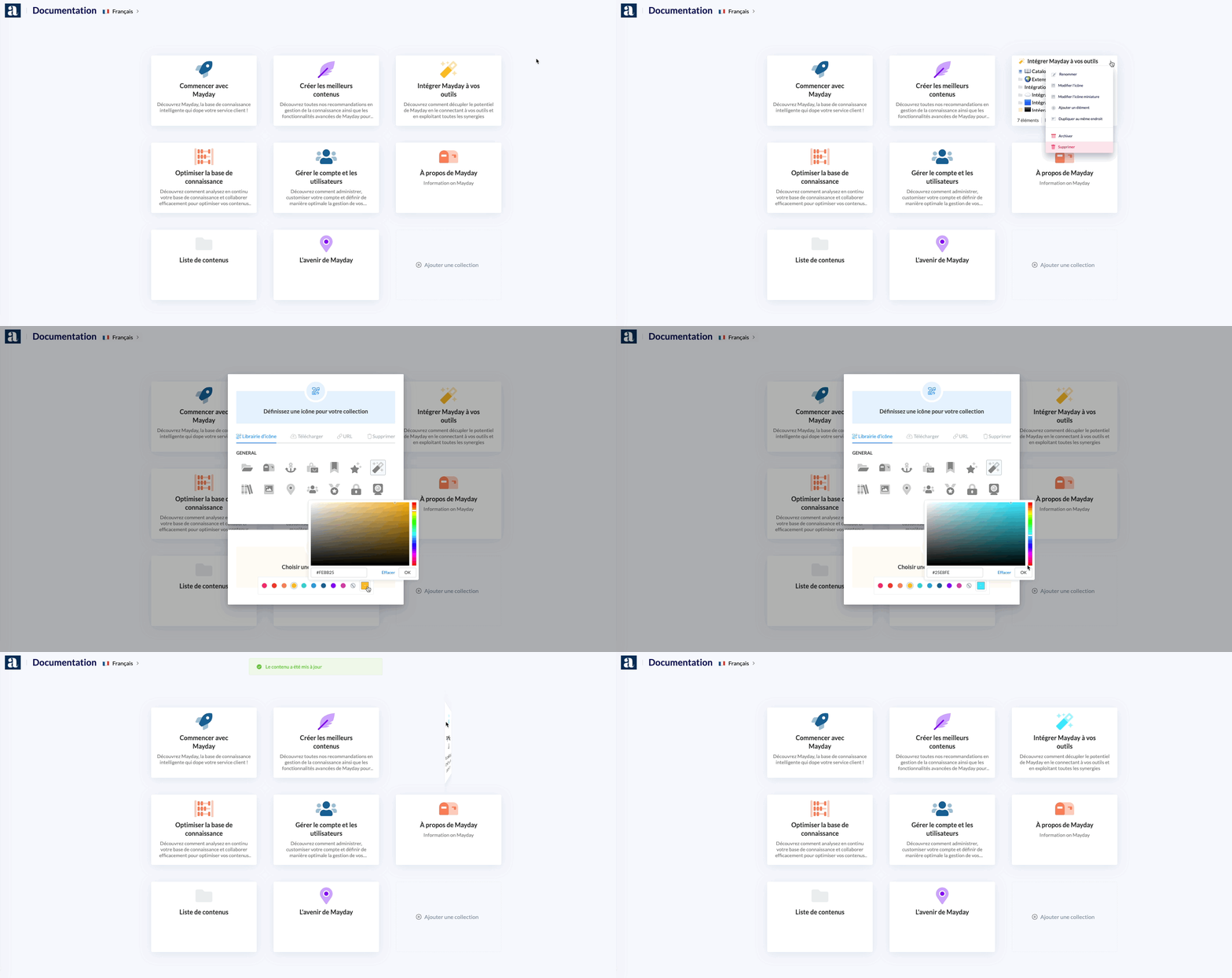
Now you can customize the color of a collection's icon and thumbnail.
You can choose from a palette of colors or define a custom color according to your preferences and branding.
Mayday Admin | Deleting a knowledge base
Now you can delete a knowledge base from the preferences of the administration center. 24 hours after the request, the knowledge base will be deleted.
This gives you 24 hours to contact your Mayday CSM if you want to cancel the deletion.
🪲 Bug fixes
👉 We have fixed the following bugs:
Creation of a guide step: Guide steps could no longer be created on monolingual knowledge bases.
Consultation on the Mayday Widget: The content consulted on the Mayday Widget was sometimes lost when changing tabs.
Mayday tables: Some bugs had been reported following optimizations of the tables, which we have fixed.
Feedback: The list of responsible persons on Hub tasks returned an empty list, making it impossible to assign a task to another user.