👋 Introduction
Hey everyone 👋
Ready for the latest Mayday updates? This month, we're taking a big step forward in AI management and optimizing your workflows.
Here's what's new: AI agents now available on your Selfcare FAQs, simplified content management, and ultra-precise tracking of your AI agents’ usage.
On the agenda ⭐:
📊 AI Dashboard: Easily monitor your AI agents’ usage with comprehensive KPIs and charts, plus advanced filters.
⚡ Usage Optimizations: We’ve refined your daily tools for smoother performance:
🗓 Scheduled publishing for pending versions: You can now schedule your pending versions to go live on a specific date.
🔍 Dynamic filtering: The search engine now smartly keeps your current collection filter as you browse.
🤖 Public AI Agents: Now enjoy AI agent mode on your Mayday Selfcare!
Let’s discover it all 👀
🤩 Global Updates
📊 Monitor AI Agent Usage and get insights with the AI Dashboard!
—
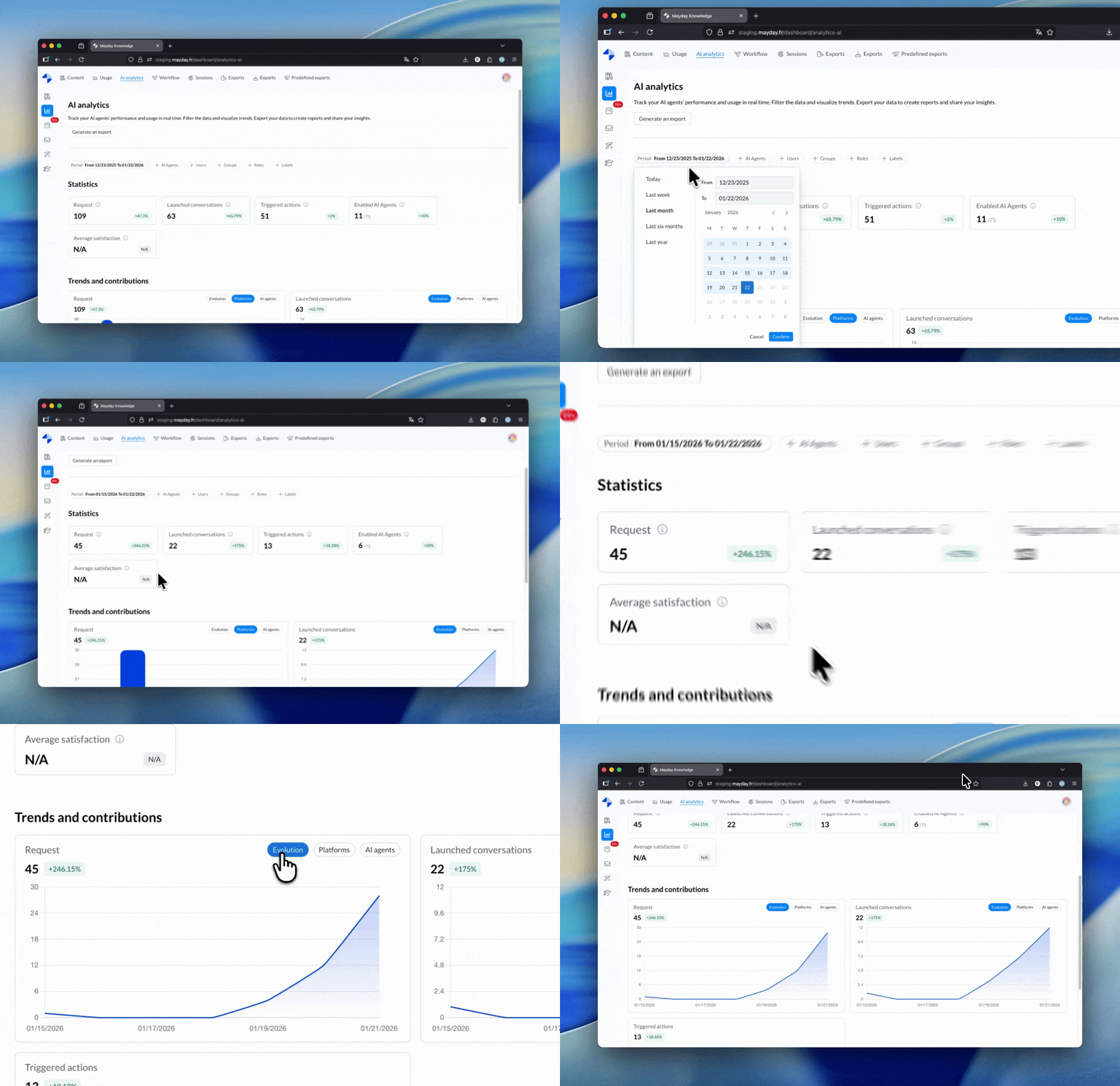
Last year, AI agents integrated into Mayday to transform your daily life, both for administrators and agents. After making your data accessible via export, we are moving up a gear: the analysis of your AI agents' usage is now directly integrated into your interface.
No more Excel files. Instantly visualize the value generated by AI with a complete and intuitive dashboard.
An ultra-fine segmentation: Don't settle for an overview. Use advanced filters (period, specific agents, groups, roles or user labels) to precisely isolate the data that matters to you.
Your strategic KPIs at a glance: Track in real-time the volume of queries, conversations launched, actions triggered and average satisfaction rate to identify the most used agents, the most triggered actions...
The power of visuals: Turn numbers into insights with dynamic graphs. Analyze trends over time or compare performance by platform and agent to identify your success factors.
👉 What's in it for you? You'll gain a clear understanding of how your teams are adopting AI, usage trends, and clear actionable insights.
Access
The tab is accessible to all users with Dashboard access through their user role, as long as AI is enabled for your company. This global visibility also applies to collaborators who do not personally have access to AI agents, as long as they do have a Dashboard access.
Have a look at the dedicated documentation to learn more about this new feature:
📚 Mayday Knowledge
✍ Administrators on Mayday
😄 One Key Optimization!
📅 Plan the publication of pending versions
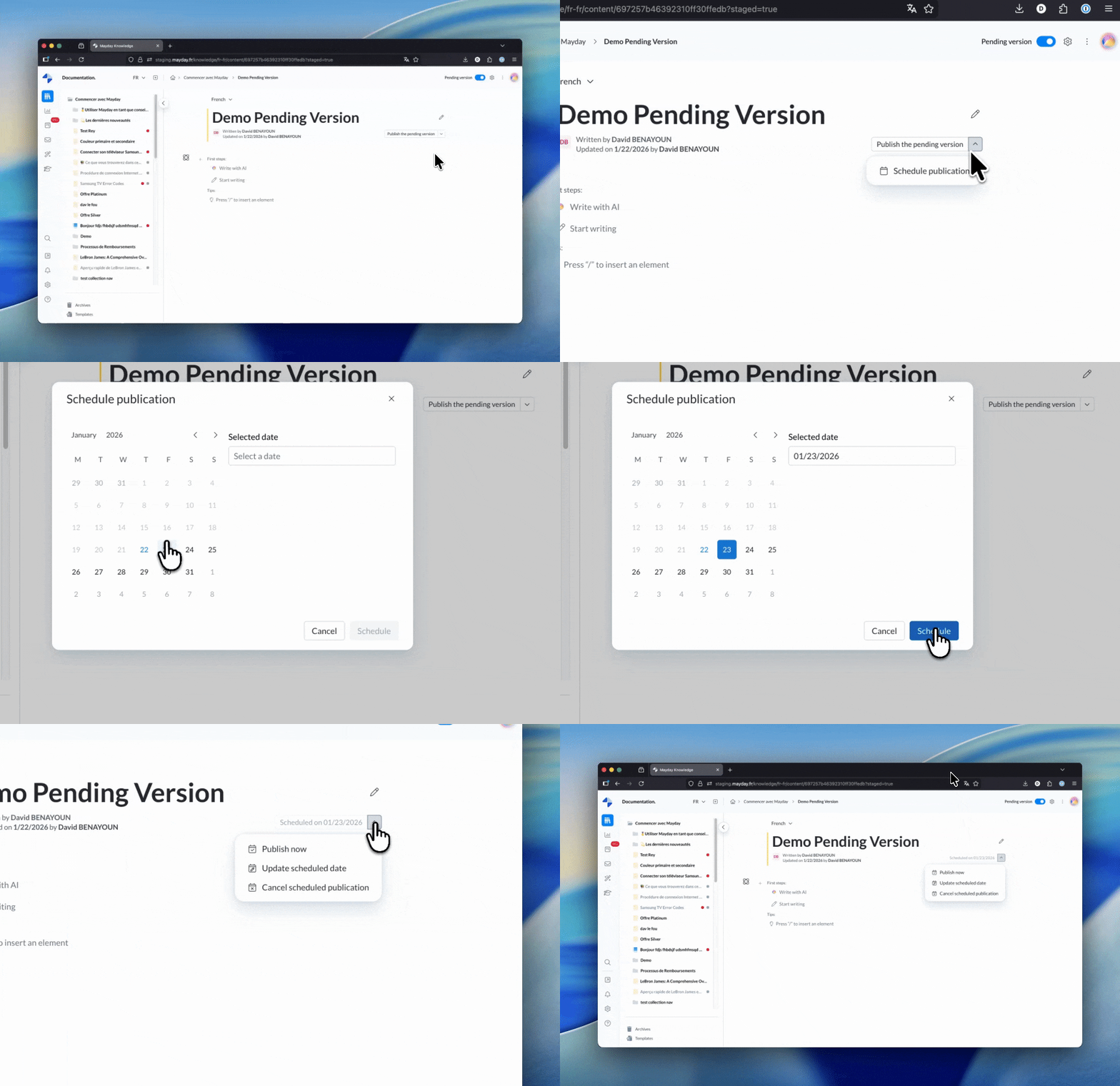
Last year, pending versions allowed you to edit your content with peace of mind, without impacting the version visible to your agents.
Now, you can schedule the publication of your pending versions just like classic content. On the chosen date (8:00 CET), your pending version will be automatically published and replace the production version in all languages.
Of course, you maintain full control: modify the date, cancel the scheduling or publish instantly according to your needs.
Have a look at the dedicated documentation to learn more about this new feature:
👥 Agents on Mayday
😄 One Key Optimization!
🔍 ‘Current Collection’ filter retention
Your filter retention preference now extends to the current collection. The search engine now intelligently adapts to your navigation for increased relevance:
Automatic filtering: As soon as you view a collection or content, the search engine automatically restricts to this collection.
Dynamic adaptation: If you switch collections, the filter updates instantly to match your new location.
Free navigation: Outside of a specific collection, the filter naturally deactivates to broaden your search.
The benefit: A more contextual and fluid search, without any manual action on your part.
🐞 Some fixes!
We have fixed the following bugs:
Zendesk: Resolution of a macro execution conflict when several tickets are opened simultaneously, now ensuring the macro is triggered on the correct ticket.
Salesforce: Fixed an intermittent display issue of the Genius button (Answer Generator) within the Salesforce text editor, allowing the AI agent to insert the generated response directly from it.
Action bar: The action bar was overlapping content, blocking access to the guides steps.
Search engine: Labels related to content that had been deleted continued to mistakenly appear in the results.
🌐 Mayday Selfcare
🤖 Create and Customize Public AI Agents for your Selfcare!
You can now access the AI agents hub from your administrator preferences > AI Agents to create, configure, and personalize your public AI agents 🤖.
These agents are accessible on your Selfcare spaces and connected to your public knowledge bases 📚.
With this new feature:
Benefit from a more intuitive and more efficient AI, integrating the latest developments of our Mayday AI RAG, for even more relevant and effective responses ✨.
Also enjoy a more advanced level of customization for your public AI agents 🎨.
Find the data of your public agents in your AI Agents and users export 📊.
Consult the dedicated documentation to discover this new feature:
ASK Selfcare Migration to Agent Mode
(for clients who already have an active ASK Selfcare) 🔄
Rest assured: the migration will be completely transparent for your end users 👍.
Administrator side:
An AI agent will be automatically created and preconfigured in the agents hub from your existing ASK Selfcare ⚙
This agent will replace your current ASK
It will resume all existing customization, if applicable
The agent configuration will now be done exclusively via the agents hub, and no longer from the “ASK Selfcare” section of the administrator settings
By default, the name defined for your agent (displayed to your end users) will be your brand. Of course, you can change it at any time.