👋 Introduction
Welcome everyone ✨
Good news! Our teams have worked on new features that you have been eagerly awaiting. Discover the key new features for the Mayday Academy and Mayday Knowledge:
👩🏫 Blended Learning on the Mayday Academy: You can now create and schedule synchronous workshops with a group of learners. Manage your training sessions in person or remotely, with a facilitator directly on the Mayday Academy.
🚀 New Mayday x Zendesk: gain control over the insertion of macros for your agents.
🌍 Mayday adapts even better to the management of your languages, on the interface and in emails.
Finally, you are all waiting for it, and it will be available very soon to revolutionize your daily life... The Mayday AI Copilot and its personalized AI agents! 🎉
Our intelligent assistant will accompany you in all your tasks and adapt to your needs to save you time and increase efficiency.
To keep you waiting, here is an exclusive preview of our famous Mayday AI Copilot, designed to help you boost your productivity daily:
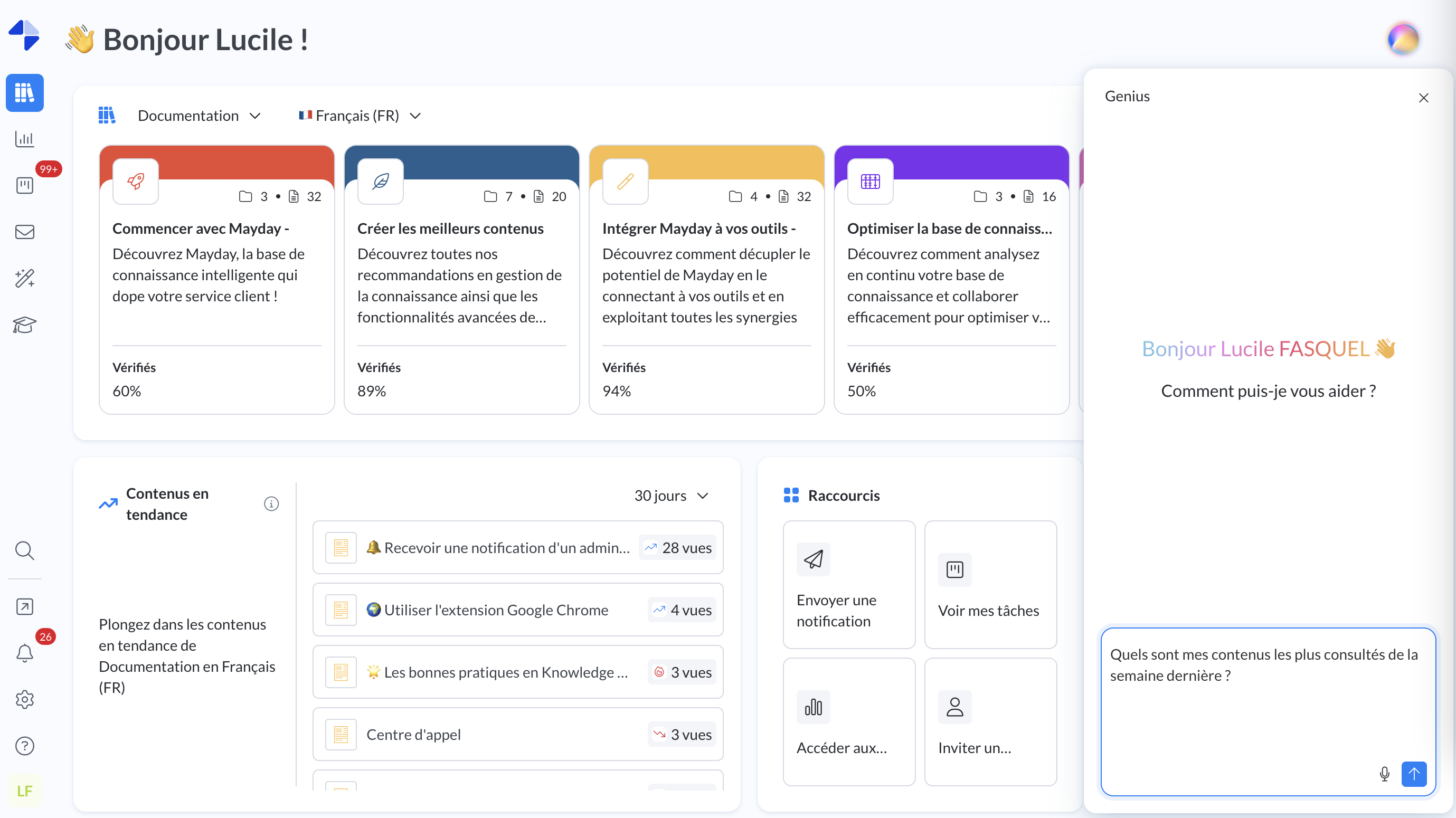
Mayday Copilot - Administrator Interface
📚 Request insights on your content: view consultation data, related feedback, and much more!
💬 Track your tasks and feedback from the Mayday Hub: summaries, urgencies, key trends... all at a glance!
❓ Generate your Academy quizzes in seconds and automatically integrate them into your training modules.
Available very soon!
In the meantime, let's discover together the latest updates 👇
📚 Mayday Knowledge Updates
⚙ Mayday Admin
 More control over Zendesk macro insertion!
✨ NEW FEATURE | Choose whether you want Zendesk macros to be triggered automatically!
You now have the choice: activate or deactivate the automatic triggering of Zendesk macros according to your needs.
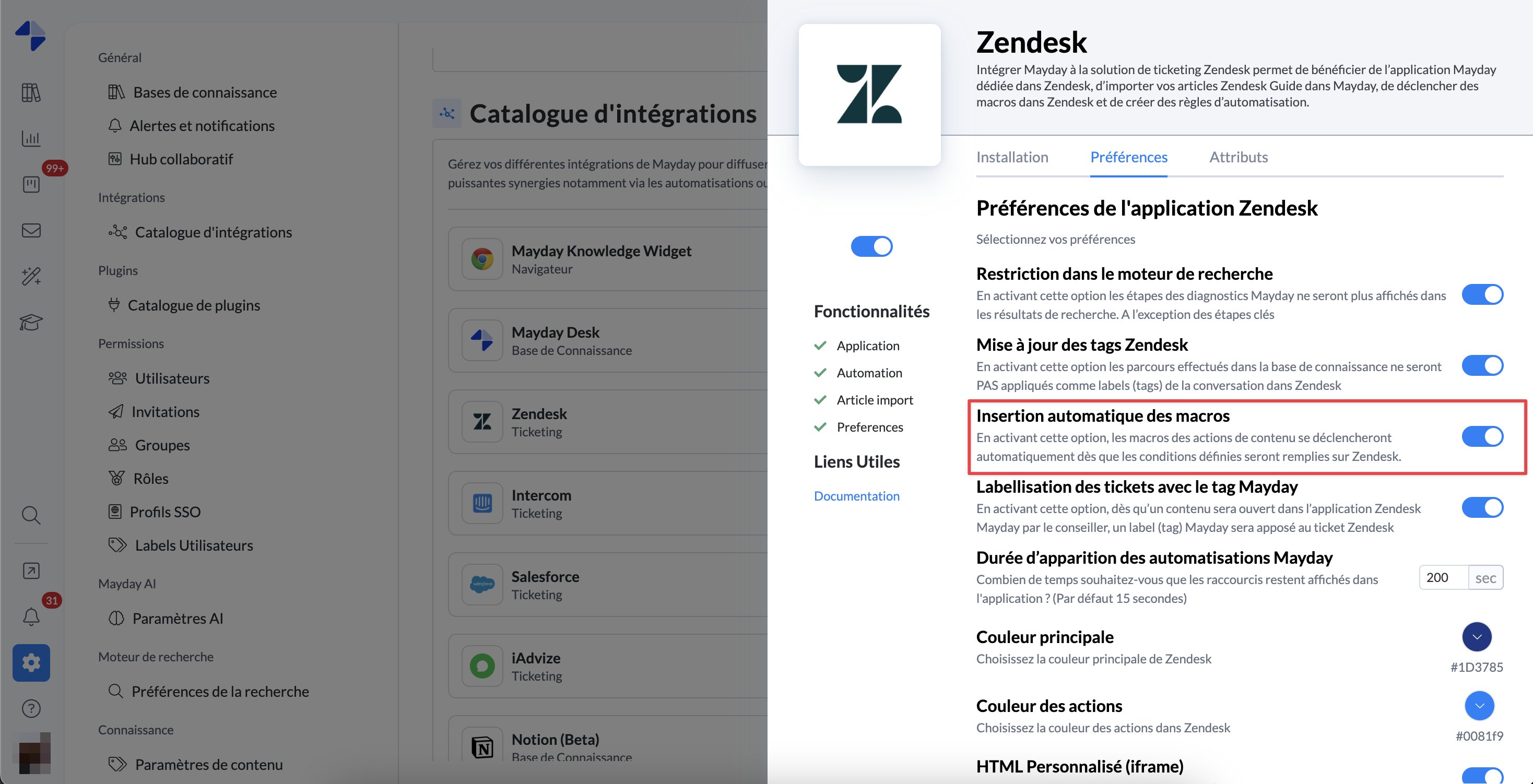
By default, this preference is enabled.
🤔 How to use this feature?
By default, suggested responses are always inserted automatically
A new option “Automatic macro insertion” allows you to disable this automatic triggering.
If you disable this option, you will then need to manually trigger a macro from the Zendesk application or the Mayday Widget.
This preference is global and will apply to all your agents.
⚙ Where to configure this option?
Go to the Zendesk integration preferences on the admin center to activate or deactivate it according to your needs.
🌍 Mayday adapts even better to your languages!
✨ NEW FEATURE | You can now designate an official language for your company in addition to the language chosen by each user!
From now on, your Mayday account has a default language, which will be applied to all new users. Subsequently, they can modify it to select their preferred language!
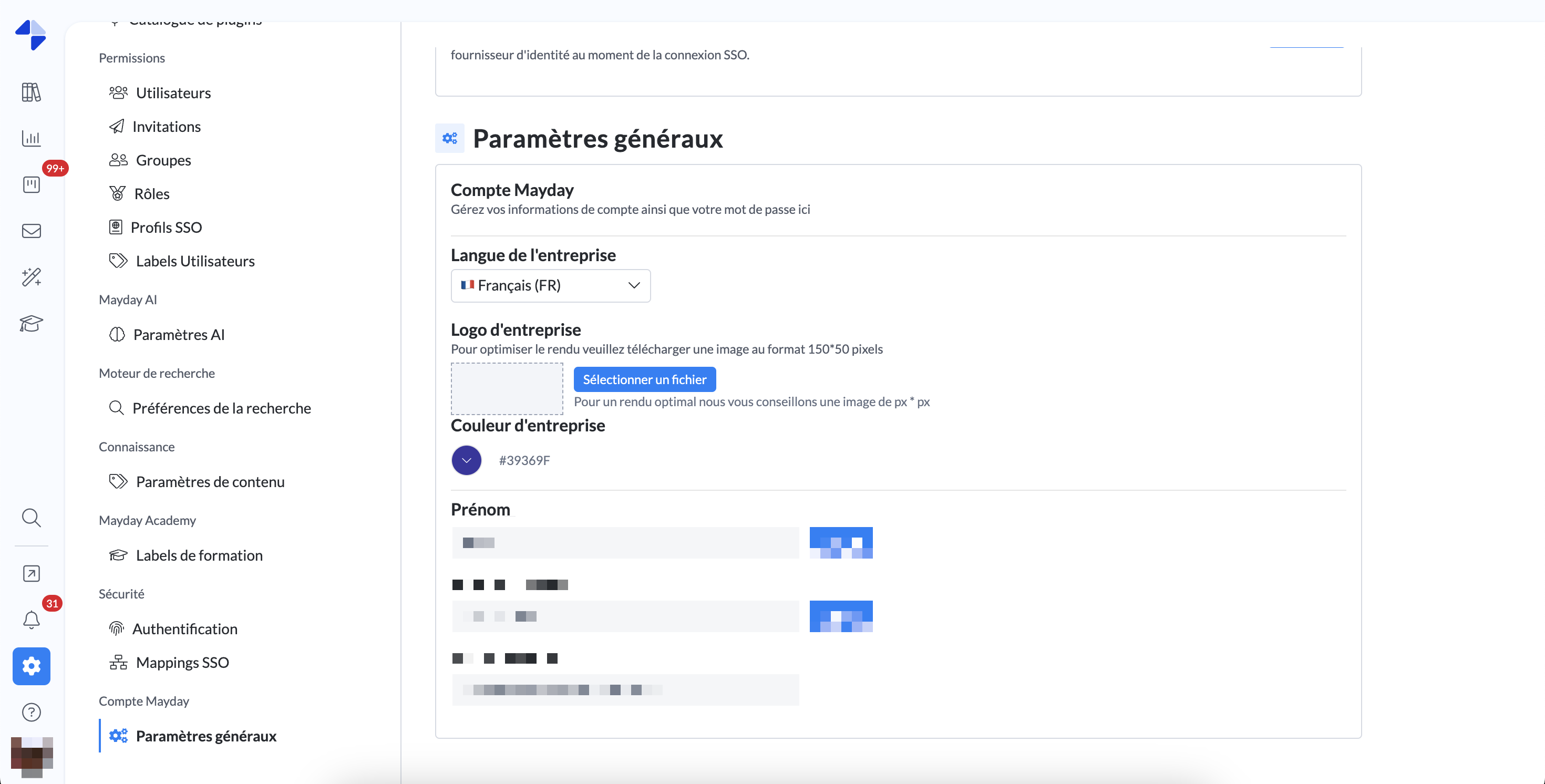
Choose the company language, between French and English
🤔 How to use this feature?
In the last section of the admin center preferences, a field titled 'Company Language' is now available.
This language (FR or EN) will be applied by default to all users who have not changed their language on Mayday, as well as to all new users upon their first login.
Subsequently, if a user changes their language, it will prevail on the interface.
Similarly, all 📥 emails received by the user will be:
In their personal language if they have modified it on Mayday.
In the company language, otherwise.
We have thus removed the old email language field in the admin center preferences.
🪲 Fixes
👉 We have fixed the following bugs:
Salesforce Attributes: In some cases, Salesforce attributes enabled in preferences were not accessible from actions related to content (suggested response, etc.).
Content Templates: When a content template created in a knowledge base A was used by a user who did not have access to this base for another knowledge base B, the template was accessible but the content did not display.
Notification Display: In the admin notification center, some notifications were not accessible by click and a white square was displayed instead.
Notification Read Rate Calculation: When users were added or removed massively from notifications, read rate calculations were incorrect, with rates sometimes exceeding 100%.
Latency in Knowledge Base Tree: In the admin center, the content navigation bar on the left sometimes loaded very slowly or did not load at all.
User Mention: It was impossible to mention a user in certain places, such as the discussion thread of content.
User Invitations: It was impossible to renew multiple invitations at once, resulting in a process failure.
Content Linked to a Task: If content linked to a task was deleted or became inaccessible to the user, it was not signaled and a click resulted in opening a blank page.
🎓Mayday Academy Updates
⚙👩🏫 Mayday Admin and Desk
👩🏫 You were waiting for it, Blended Learning is now available on the Mayday Academy!
Create and schedule workshops in-person or remote synchronous with a group of learners and a facilitator on the Mayday Academy.
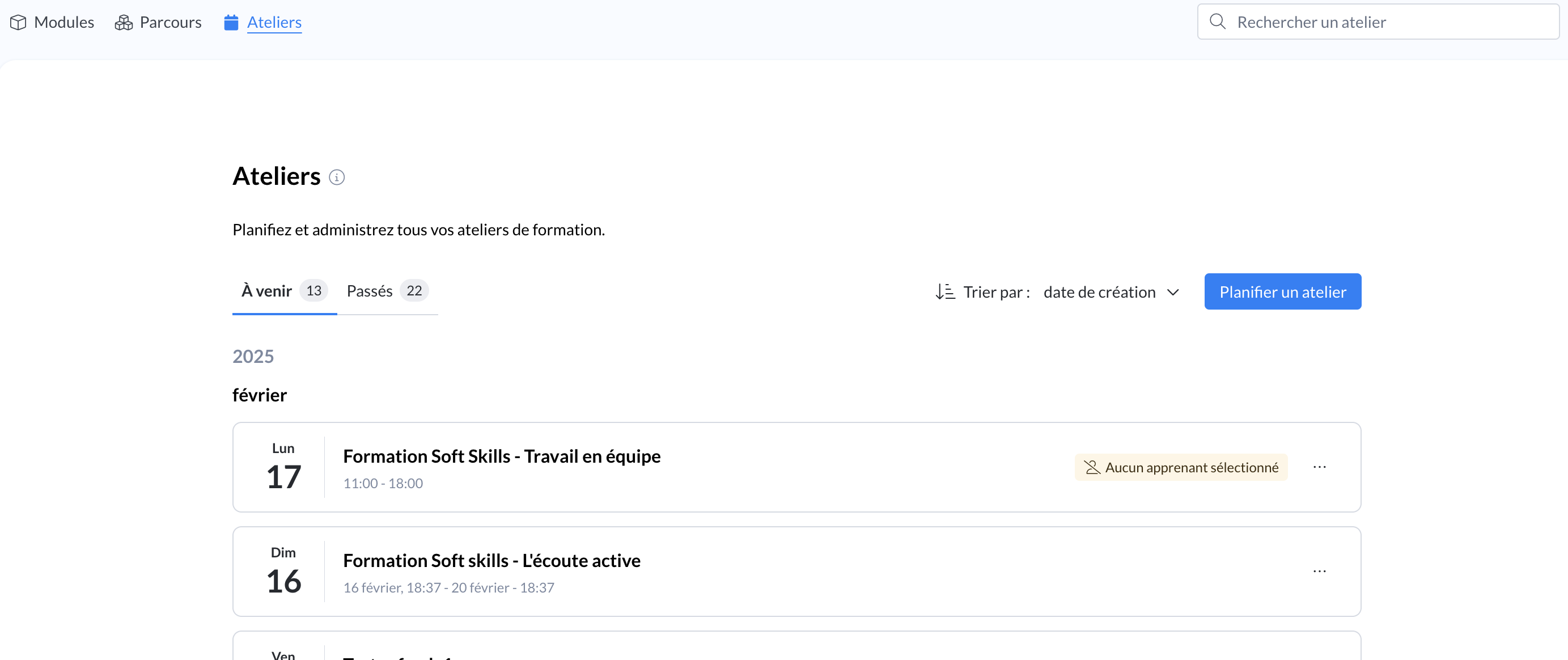
Tab “Workshops” on the administrator interface
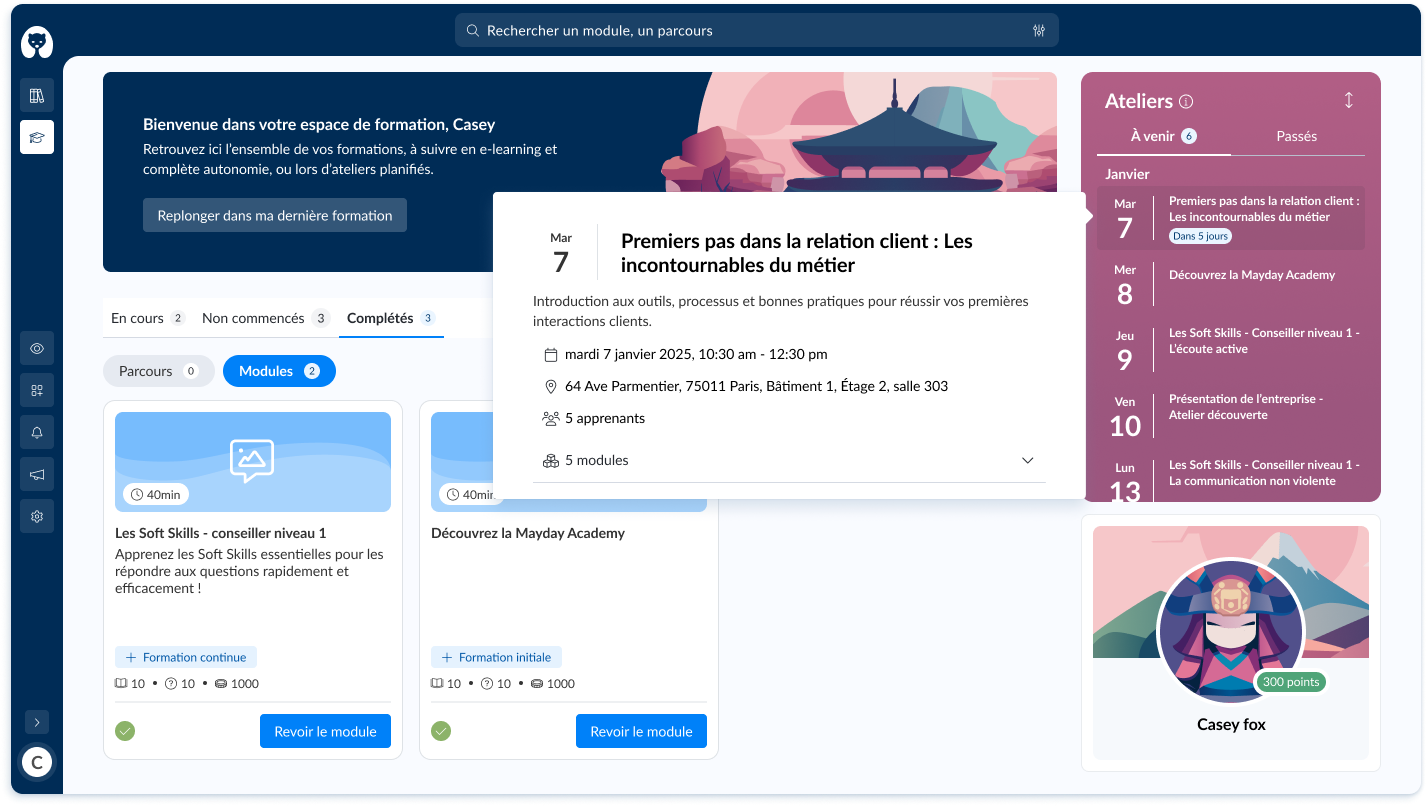
Desk Interface - “Workshops” section
👉 What is a workshop?
A workshop is a live training session, scheduled for a specific date, and intended for one or more participants.
Workshops allow you to train your learners on synchronous sessions, which can be facilitated by a trainer.
👩🏫 Workshops simplify the planning of your in-person training:
Deploy with the Mayday Academy a blended learning by combining your in-person training but also your e-learning modules to be completed independently.
Take advantage of the benefits of each modality to offer a more flexible, engaging, and effective learning experience!
🤔 How to use this feature?
1⃣ On your Mayday Academy interface, click on the “Workshops” tab next to the “Courses” tab
2⃣ Complete the information related to your workshop:
The title
A description
The date and time
The location (room or address, for example)
The link to the video conference if there is one
3⃣ Add the training content you wish to deliver during the workshop (1 or more modules)
4⃣ Select the users you wish to invite to the workshop
5⃣ Notify if you wish the people you have added to the workshop
6⃣ Learners invited to the workshop see the workshop appear on their interface in the top right section “Workshops”.
They can access the modules by clicking on the workshop in question and then on the icon next to the module title.
For more details on how to use this new feature, click here:
🪲 Fixes
👉 We have fixed the following bugs:
Admin Interface - Courses: the content of the course displayed is indeed that of the course being viewed.
Desk Interface - Courses: the modules within a course are indeed accessible, including from a notification or a shared link.
Admin Interface - Archives: the name of the author of a module is indeed the one who created it for past versions, and clicking on a previous version of a module allows viewing the version without error.
Assignment Notification via Widget - the redirection link to a module received via a notification via the Mayday widget correctly redirects to the module in question.