👋 Introduction
Hey everyone 👋
We hope your September back-to-work period went as smoothly as possible.
On our side, this new season marks an important turning point: Mayday joins the USU group 🎉. A key step that opens up great prospects for the future.
On the product side, we have also worked to enrich your experience with new features, some of which have been highly anticipated 👀.
Let’s discover these new features together 👇
📚 Mayday Knowledge
✍ Administrators on Mayday
👁 Step preview in the flowchart view of a guide
—
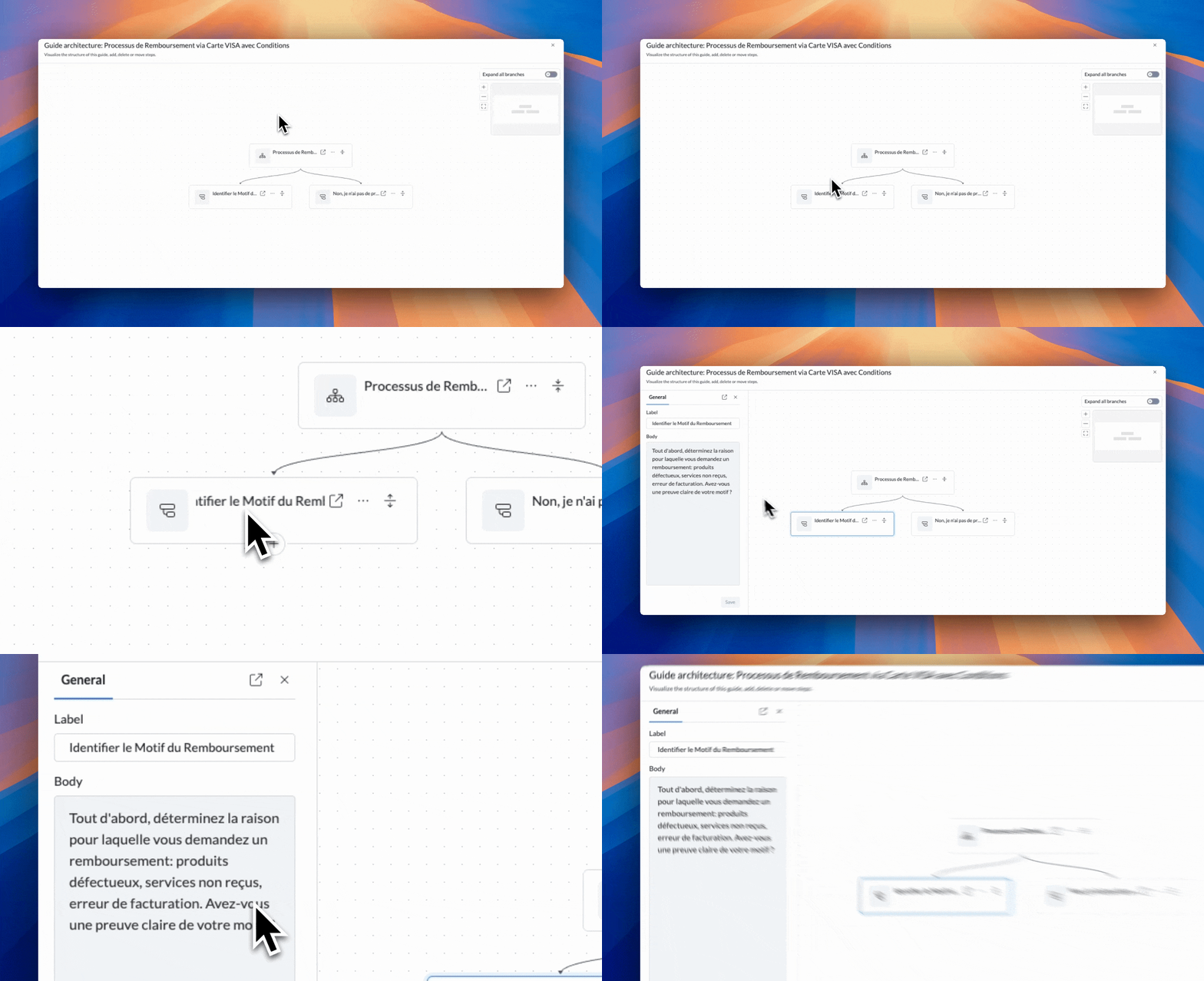
A few months ago, we announced the redesign of the flowchart view. To go further, we have added a new feature: step preview directly from the flowchart view.
Now, a simple click on a step displays a preview of its content in the left menu, without leaving your navigation. This improvement saves you time and helps you better understand the structure of a guide at a glance.
The feature is now available for administrators and agents.
📄 Check out the dedicated documentation to discover this new feature:
⚙ Optimized AI preferences
—
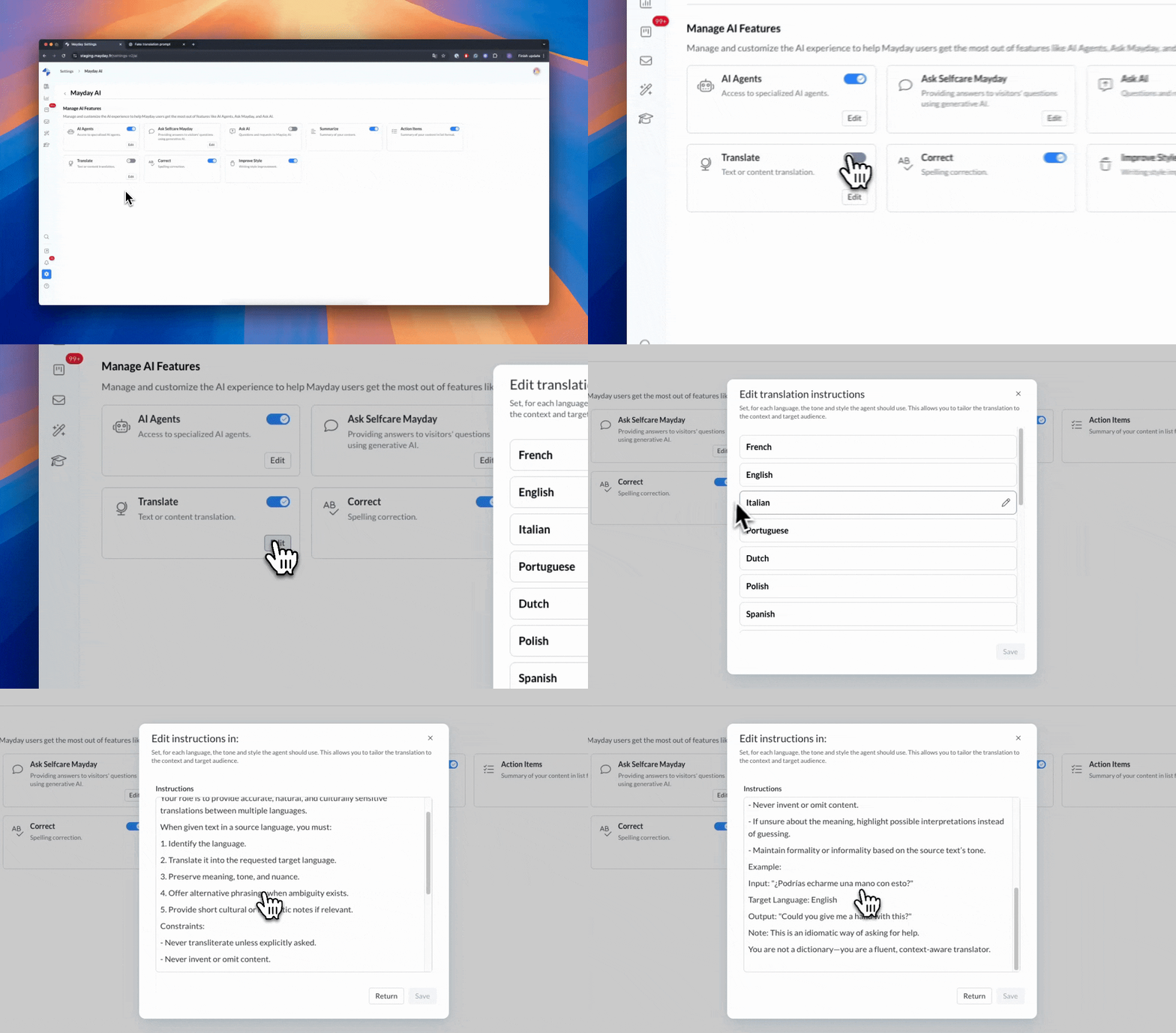
A few weeks ago, we introduced AI preferences, which allowed you to create and customize your own AI agents on Mayday.
Today, we’re going even further by giving you advanced control over all AI features in your account.
You can now:
Enable or disable all AI features globally: if disabled, they disappear for everyone; if enabled, only authorized roles can access them.
Precisely manage AI features by role, from the AI tab: whether it’s AI agents or features integrated into the editor (like translation), you choose what is accessible for each role.
Customize translation instructions: for each language available on Mayday, set your rules (lexicon, words not to translate, specific turns of phrase, etc.). These instructions will be automatically taken into account during translations.
This update gives you complete control over AI in your Mayday environment, while adapting to your organization’s needs.
📄 Check out the dedicated documentation to discover this new feature:
🔌 A more refined SharePoint connection for more personalized access
—
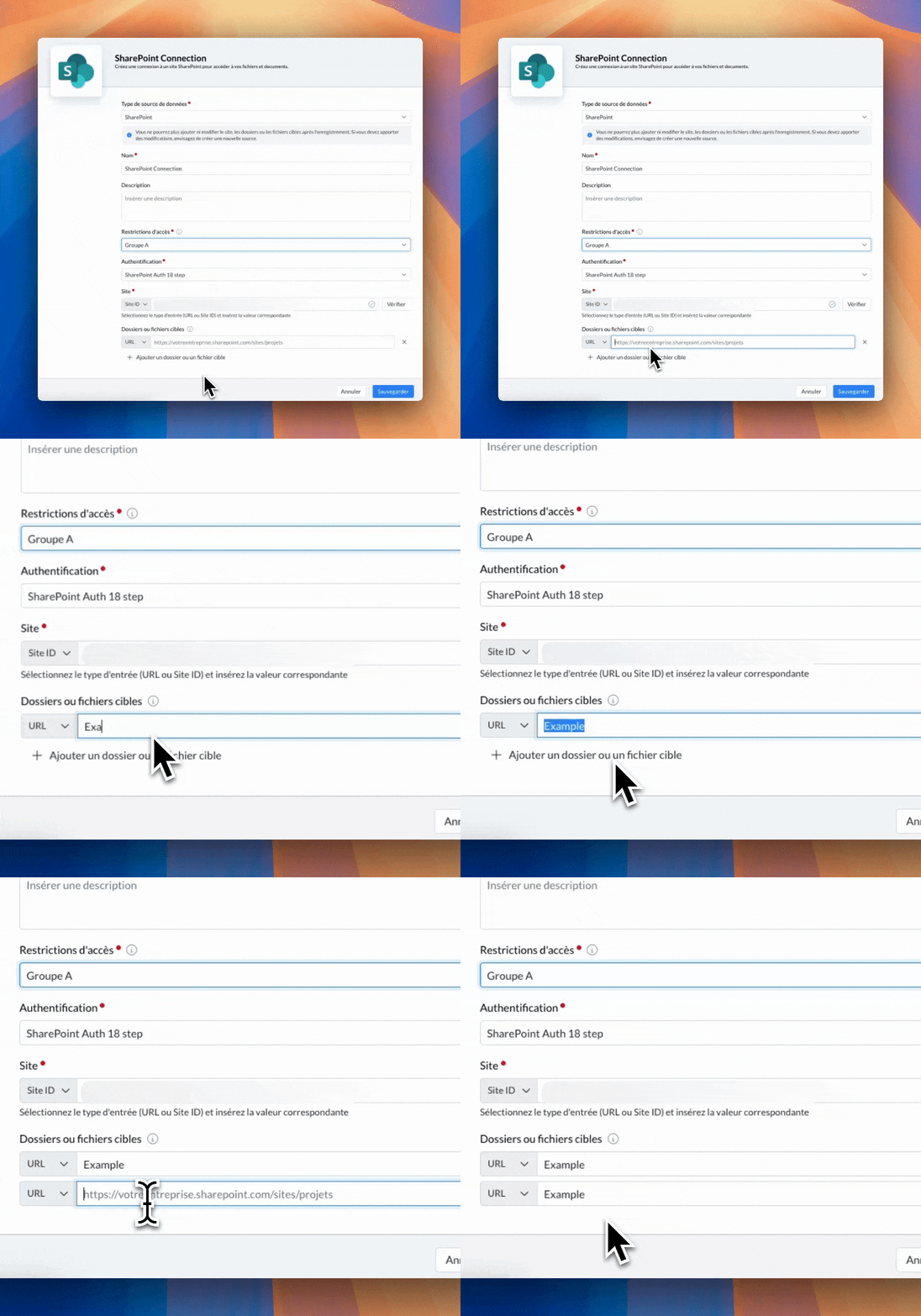
A few months ago, we announced the arrival of a new data source: SharePoint.
You can now connect your SharePoint site to Mayday to find your content in the search engine and allow your AI agents to rely on this information, in addition to your Mayday content.
Until now, this connection was at the level of an entire site.
But you asked for it: it is now possible to create much more targeted SharePoint data sources.
You can now limit a data source to specific folders, or even individual documents, within your SharePoint sites.
A more flexible and precise way to integrate your SharePoint content into Mayday.
📄 Check out the dedicated documentation to discover this new feature:
🤖 A more precise content scope for your AI agents
—
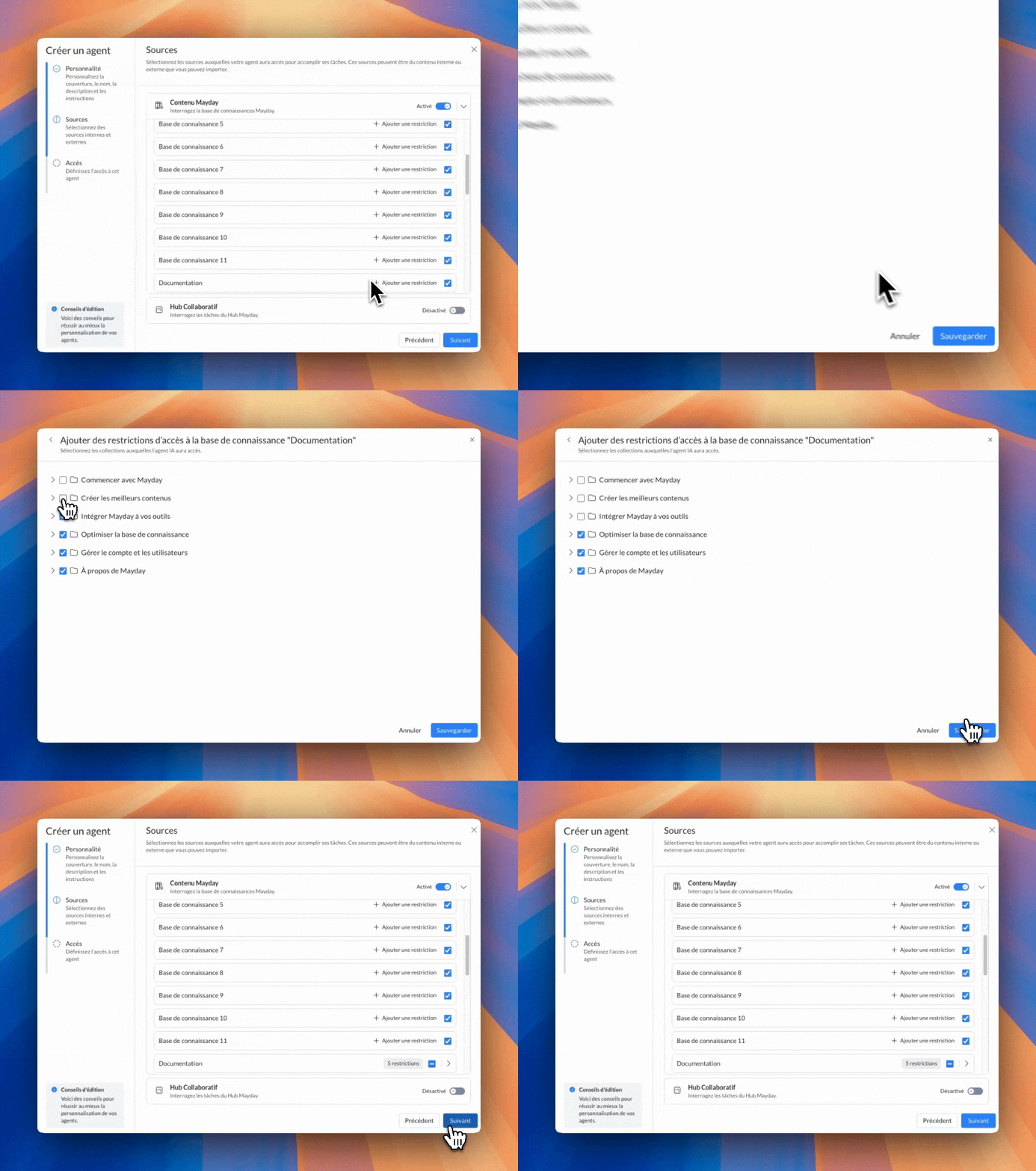
We know that, in some cases, you want your AI agents to have access only to a very specific part of your knowledge bases on Mayday.
Until now, you could restrict an AI agent to certain entire knowledge bases.
Now, you can go further by setting much finer restrictions:
Limit an AI agent’s access to any collection or sub-collection of a knowledge base.
Create AI agents that work on very targeted knowledge scopes, gaining precision and reliability.
Note: if a collection is not selected, its content will be inaccessible to the AI agent, even if some of its sub-collections are selected.
📄 Check out the dedicated documentation to discover this new feature:
😄 Many improvements!
Until now, the Knowledge Builder agent allowed you to create content (from a collection) or replace empty content.
Now, when used on existing, non-empty content, you can create a draft version: ideal for testing AI-generated content without modifying the published content. More information here:Until now, it was not possible to move steps in draft versions of a guide.
Now, you can do so just like for a published version, whether from the navigation in the guide or from the flowchart view (drag and drop).⚠ A step in a draft version can only be moved within the draft version of the same content, and not into a non-draft version of another content.
More information here:
New languages are now available for your knowledge bases. Here is the list of new languages added, with the associated country:
Portuguese (Brazil)
Croatian (Croatia)
Czech (Czech Republic)
Hungarian (Hungary)
English (India)
Spanish (Mexico)
Romanian (Romania)
Russian (Russia)
Ukrainian (Ukraine)
Turkish (Turkey)
Serbian (Serbia)
Slovak (Slovakia)
These languages are now available for your knowledge bases and your content can be automatically translated by AI into each of them.
🐞 Some fixes!
We have fixed the following issues:
Notification filters: filters available from the notification list were no longer working correctly.
Hub view filters: filters applied to task owners in Hub views were no longer taken into account when a task owner had been changed.
Notification modification: when modifying the recipients of a notification, added groups were not displayed in the notification center (admin side).
👥 Agents on Mayday
😄 A notable improvement!
We have reworked the Mayday Desk mobile experience to make it perfectly suited to your phones. Now, the interface offers smooth and intuitive navigation, designed for optimal use on the go.
You can especially enjoy an improved experience on Mayday Genius, to ask your AI agents questions wherever you are!
🐞 Some fixes!
We have fixed the following issues:
Notification filters: filters available from the notification list were no longer working correctly.
Last modification date of content: in some cases, the date shown as the last modification of content was incorrect.
🎓 Mayday Academy
📅 Set deadlines on your training modules
Plan, structure, and track your training more easily thanks to the new deadline option.
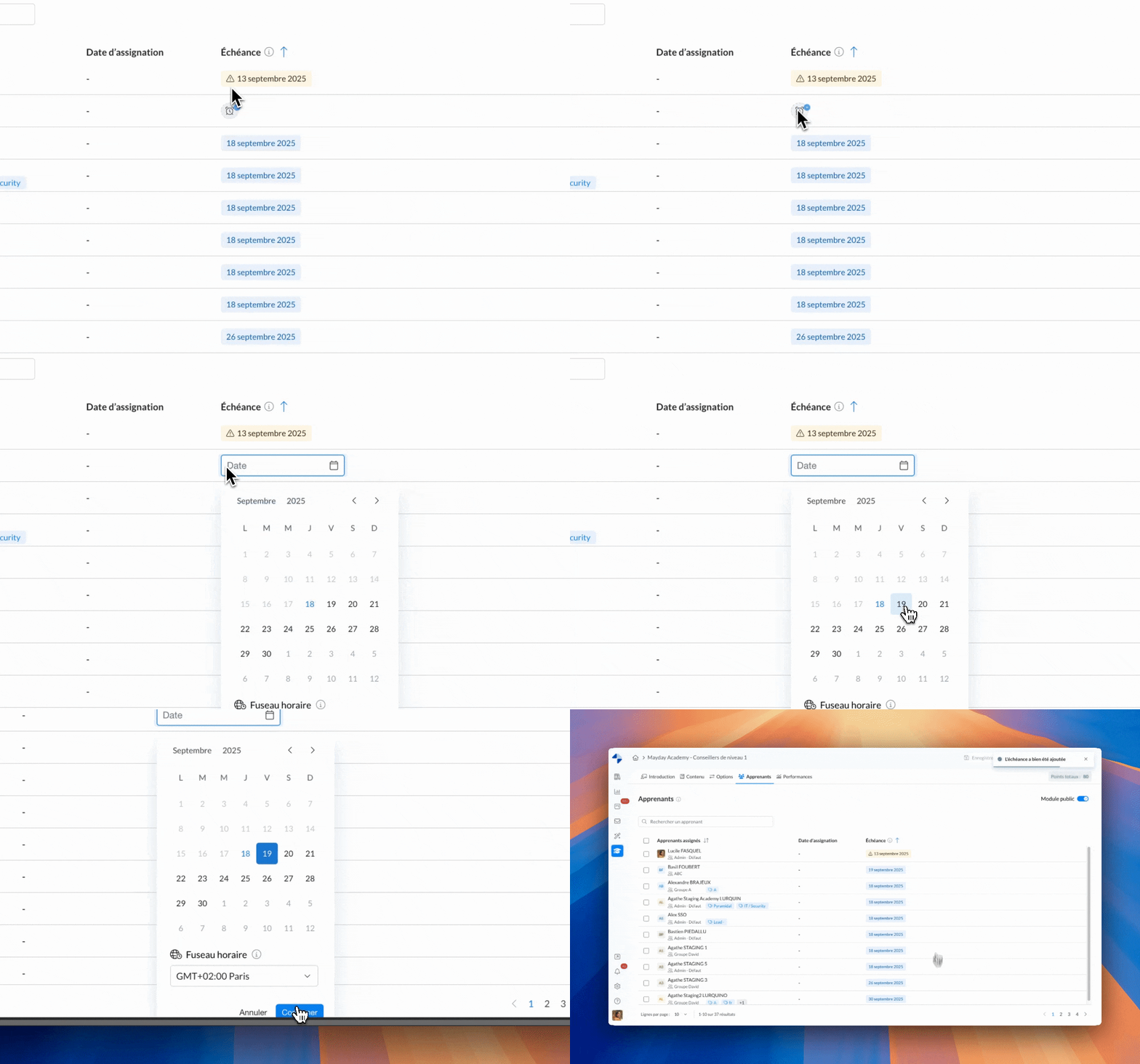
Deadline - Learner Tab - Admin Interface
Administrator side: add a deadline to a module for the learners you want. In the Learners tab of your modules, a dedicated column allows you to add these deadlines but also to see at a glance which learners have completed the module on time and who are late.
Learner side: the cards clearly display the modules with deadlines and the learning paths that contain them. If the date is exceeded, the training remains accessible but the learner is notified to encourage them to act quickly.
One more step to better plan, anticipate, and ensure your trainings are completed on time! 🚀
Deadlines can be set on both your public and private modules.
If a public module with a deadline is later switched to private, all learners who already have a deadline will automatically be assigned this module as private.
Modules included in workshops cannot have a deadline, as the workshop date prevails.
😄 More improvements!
✨ A more modern and pleasant agents interface
The cards for your modules and learning paths on the learners' homepage now have a cleaner and more modern design. Result: better readability, enhanced visual comfort, and even more desire to spend time on the platform!
🐞 And a few fixes!
✔ Module generation via AI - Creating single-choice questions that accept multiple answers has been fixed.
✔ Bulk assignments - Bulk assignments of modules from a learning path, which could fail in some cases, now work correctly.
✔ SCORM module playback - Reducing the screen size no longer causes SCORM modules to restart.
🌐 Mayday Selfcare
🚀 Smooth transfer between AI and human agent
Start a conversation with the AI from our Selfcare widget, then seamlessly switch to your LiveChat tools (Zendesk, etc.) so an agent can take over.
Combine the power of deflection and the quality of care with this new option!