👋 Introduction
Our latest production release is live — and it's packed with powerful new features. ✨
The perfect way to kick off the summer: fresh updates are ready for you right now!
But that's just the beginning... 👀
In the coming weeks, you'll be able to create and customize your own AI agents on Mayday.
A major leap forward to handle all your specific use cases with unmatched flexibility. More on that very soon. 🔥
Here’s what’s new right now 👇
⚡ Automatically generate the structure of your Mayday guides using AI, thanks to our new “Knowledge Builder” agent.
🕘 A redesigned version history: easily compare changes between versions and rename them for better organization.
📣 An improved feedback form in Selfcare, clearer, more flexible, and designed to collect precise, actionable insights on your content.
📁 Smarter “Ask AI” functionality: you can now restrict answers to a specific collection in a Selfcare, right from the root.
🤩 And of course, a host of behind-the-scenes improvements for faster, smoother performance.
Let’s take a closer look! 👇
🤩 Global New Features
🚀 Optimizations & Improvements
🌍 Display of Language on Content Mentions
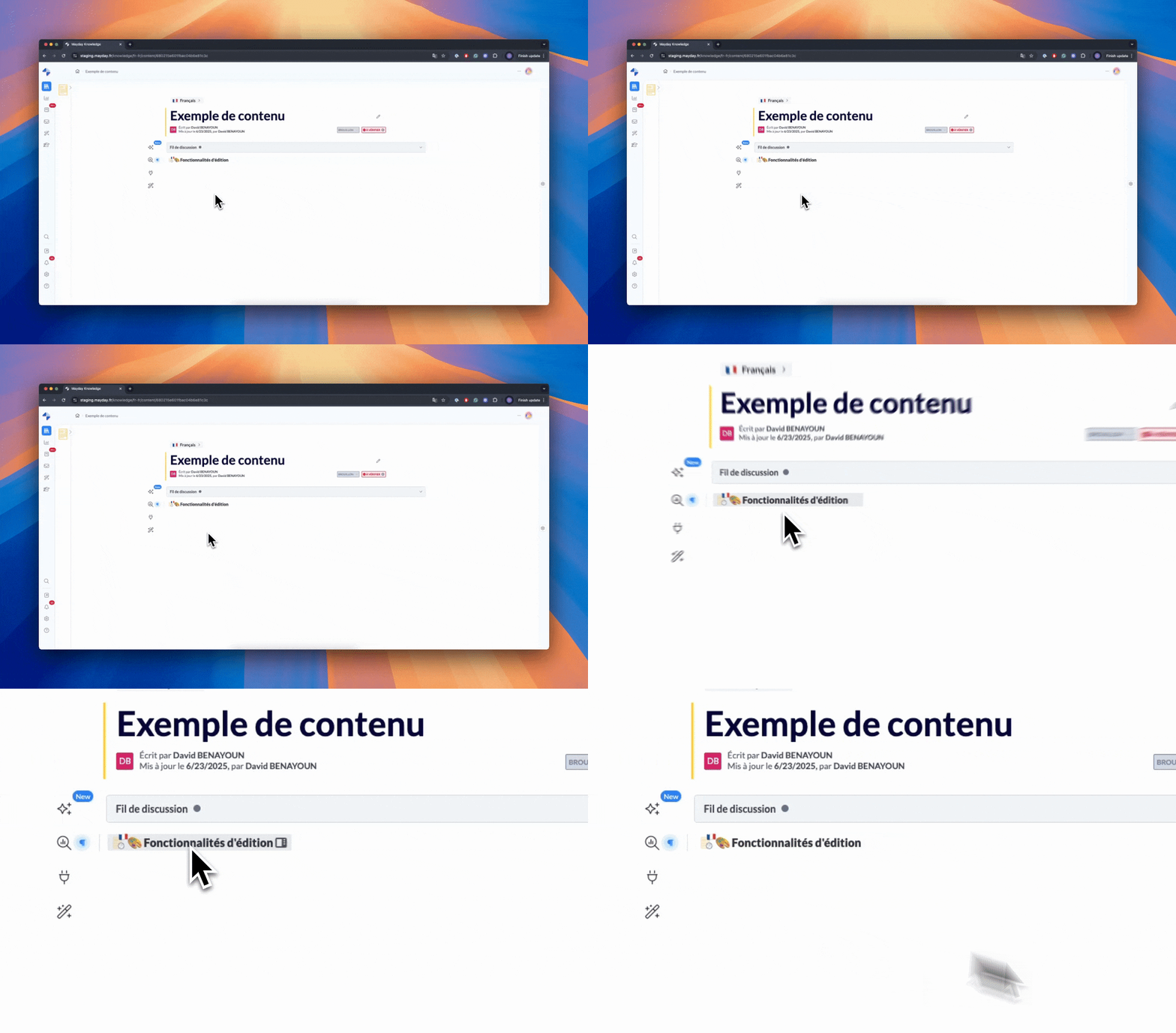
Currently, a content mention does not indicate the language of the referenced content. Since knowledge bases are now multilingual, we have improved the system to display the language of the content directly on the mention.
📚 Mayday Knowledge New Features
⚙ New Features for Mayday Administrators
✍ Generate Mayday guides using AI!
✨ NEW FEATURE | Generate your guides in seconds with the agent Knowledge Builder.
Some time ago, we introduced the feature “Ask AI”, which already allowed you to generate text within your Mayday content.
But we know that creating a guide — and even more so its complete structure — can be long and complex.
That's why we're going further: you can now automatically generate the structure of a guide using AI.With one click, the agent Knowledge Builder builds a structured guide for you, ready to use!
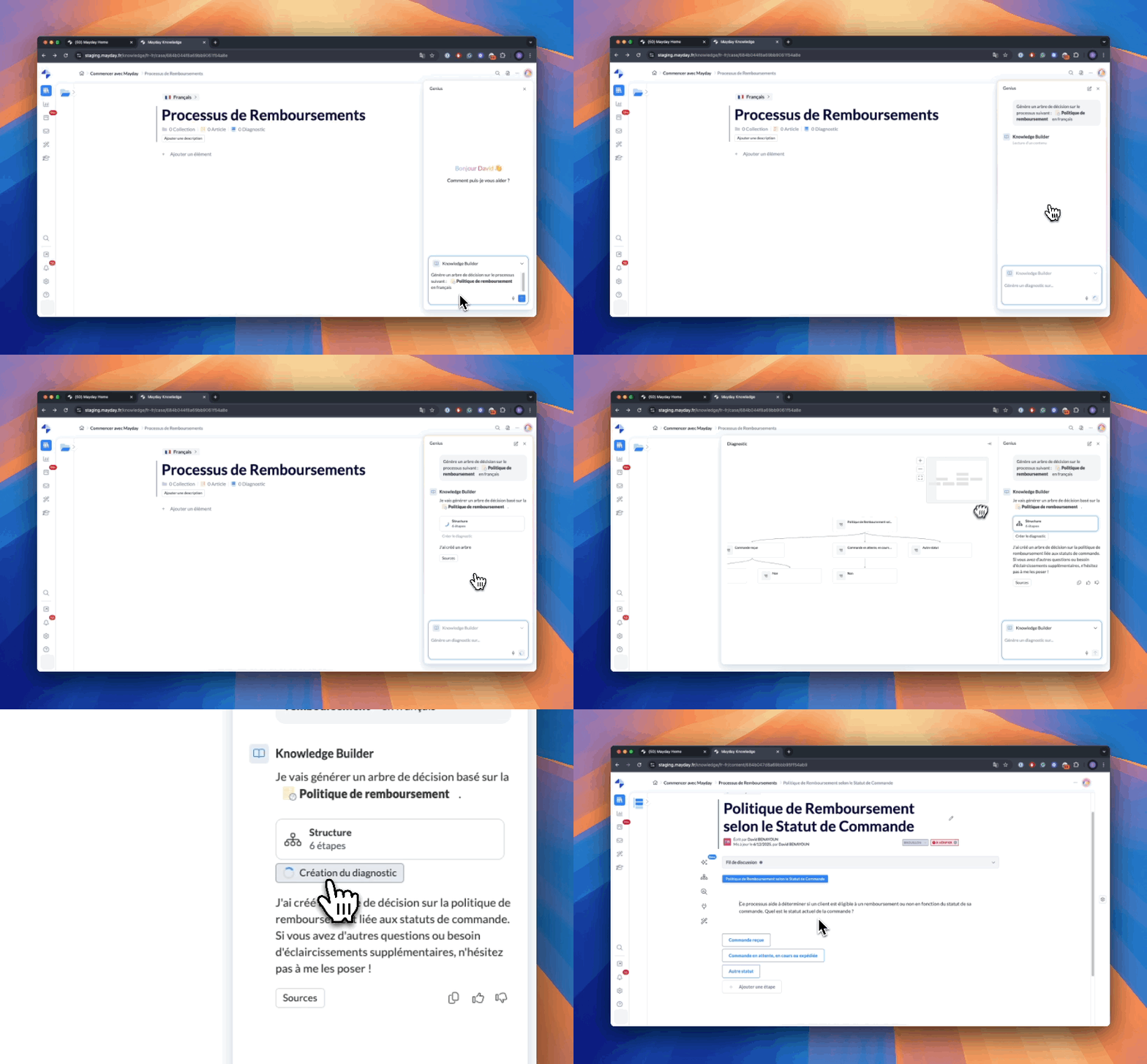
Ask the agent Knowledge Builder to generate a guide and create it in seconds!
🎯 Why this AI guide generation feature?
Content creation remains an essential task, but often time-consuming. This is especially true for guides, which require defining a detailed structure with steps, sub-steps, and logical sequences — well before even starting the writing.
Your goal: maintain a clear, complete, and up-to-date knowledge base while optimizing your time.
👉 Thanks to this feature, save valuable time: the agent Knowledge Builder generates a relevant guide structure in seconds.
🤔 How to use this feature?
To take advantage of it, you must have Mayday Genius, and more specifically access to the agent Knowledge Builder.
Here's how to proceed:
Ask the agent to generate a guide on the topic of your choice.
It can rely on:existing Mayday content,
connected sources (SharePoint, etc.),
or imported documents (PDF, Word, PPT…).
Analyze the proposed structure.
Check that it meets your expectations.Refine if necessary.
You can interact with the agent to adjust the structure:"Add more steps", "Make the steps more detailed", etc.
Use this structure to create or replace an empty guide.
ℹ Good to know:
The generated guide will be created only if you are in one of the following two cases:
From a collection: the guide will be created in this collection, in the active language.
From an empty guide (without steps): it will be automatically replaced by the one generated by the agent.
In all other cases, first go to a collection or an empty guide to use the generated guide.
⏭ And very soon, even more features:
Other developments are already in preparation:
🛠 Generation of complete guides, with automatically written steps.
📝 Creation of articles via the agent Knowledge Builder.
🔁 Intelligent modification of existing content, to assist you both in the creation and updating of your knowledge base.
🤩 Benefit from an improved version history!
✨ NEW FEATURE | Identify changes on each version and rename your content versions!
You can now visualize the changes made to each version of a content, and as a bonus, rename each version for better organization.
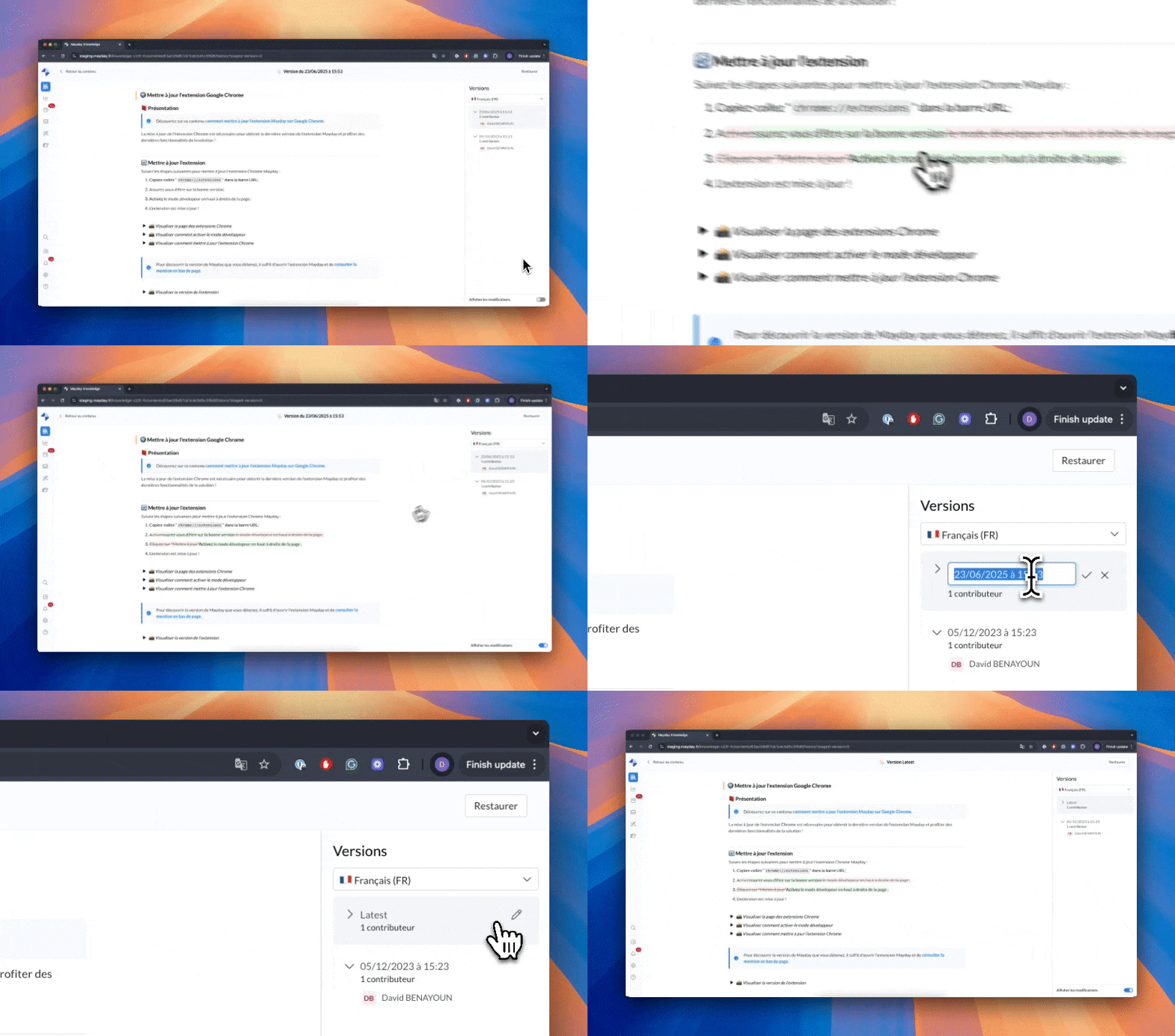
Identify changes on each version and rename your content versions!
🎯 Why this feature?
A few weeks ago, we launched a visual redesign of the version history to facilitate collaboration on content. Today, we are going further.
Until now, it was not possible to clearly identify the differences between two versions. However, for good editorial collaboration, it is essential to know who changed what, and when.
This new feature addresses a simple but key need: to be able to precisely track the evolution of your content.
🤔 How to use this feature?
To visualize the modifications of a version:
Click on “Show modifications” at the bottom right.
The added elements are highlighted in green.
The deleted elements appear in red strikethrough.
A simple and visual way to track all changes!
To rename a version:
Hover over the concerned version in the menu on the right.
Click on the brush icon.
Enter the new name, then save.
And there you go! Your version is renamed and identifiable at a glance.
🚀 Optimizations & Improvements
🖼 Send an image to an AI agent
On all our AI agents, you can now enrich your messages by adding one or more images.
Our AI agents are now capable of understanding and analyzing the visual content you provide them — whether it's screenshots, documents, illustrations, or photos.
They can thus adapt their responses based on the images, to provide you with even more relevant and contextual explanations or suggestions.
🪲 Fixes
👉 We have fixed the following bugs:
Access restrictions to knowledge bases: some access restriction rules were not correctly applied, allowing unauthorized users to access restricted knowledge bases.
Manual automations on articles: manual automations were no longer executing on content of type article, while they continued to work normally on guides.
Sources of the agent Knowledge Insider: the agent sometimes did not return the correct information or provided incomplete responses (e.g., incorrect number of consultations, erroneous order in a requested list, etc.).
🗣 New Features for Agents
🚀 Optimizations & Improvements
🔎 Find your keywords even in dropdown lists
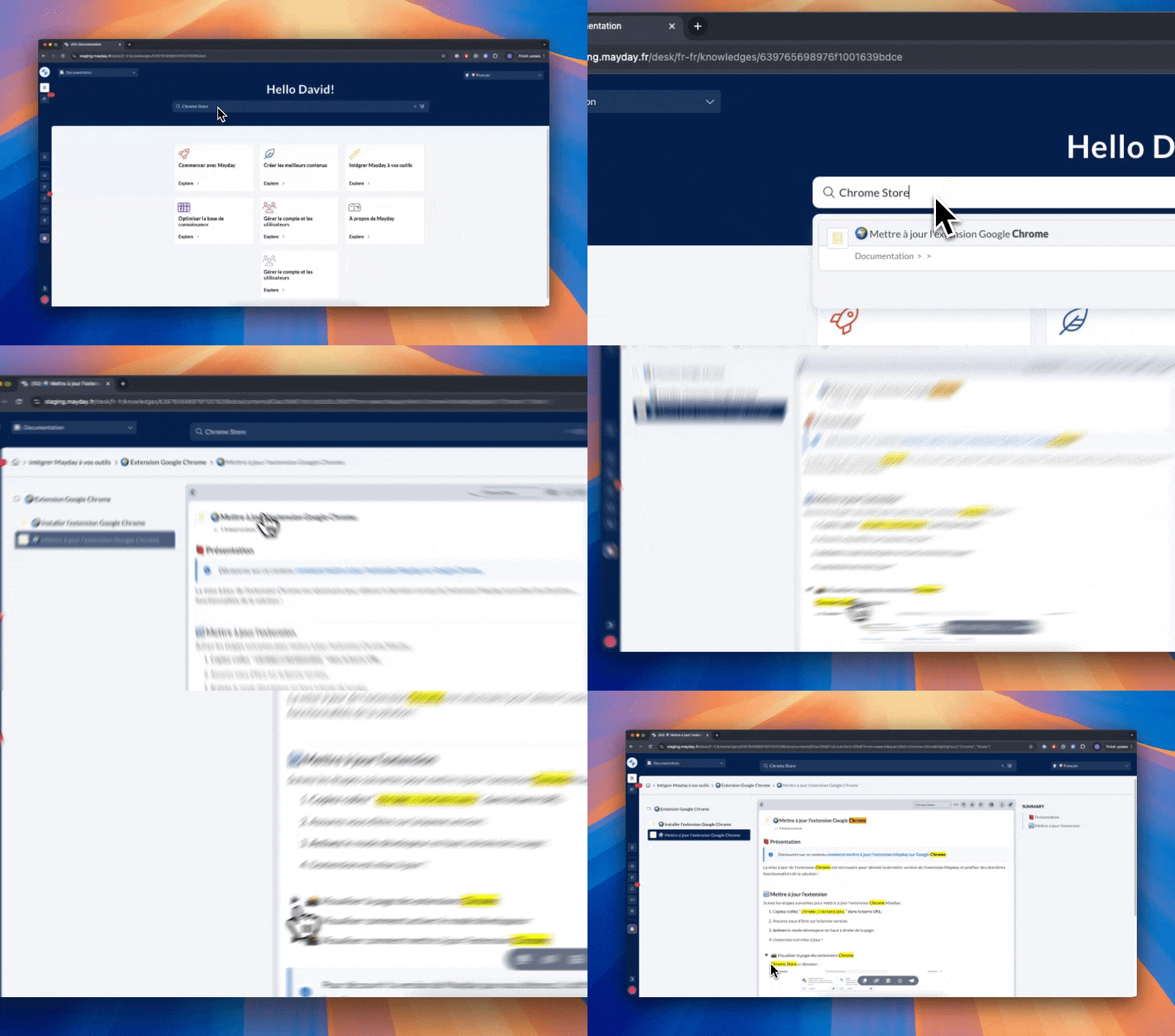
This feature is currently only available from Mayday Desk.
Until now, when a keyword appeared in a dropdown list of a content, it could be difficult to understand why this content appeared in the search results — the list remained closed upon opening, making the keyword invisible at first glance.
Now, if a keyword is detected in a dropdown list, it opens automatically when the content is opened from the search.
Result: no more confusion, you immediately see where the keyword is, even if it was hidden in a collapsed list.
🪲 Fixes
👉 We have fixed the following bugs:
Filters on labels: the filter supposed to display only content without label also returned content already labeled, making the results inconsistent.
🌐 Mayday Selfcare New Features
🧠 Better feedback on your Selfcare content
We have redesigned the feedback form on Selfcare content to make it clearer and more useful:
No more confusion: the form is not for contacting support, but for evaluating content
In case of negative feedback, the user is invited to explain the reason (incomplete content, not up to date, too complex, etc.)
They can also leave a free comment (optional)
Find these feedbacks in your task hub!
🎯 Objective: better understand the needs of your users to continuously improve your content!
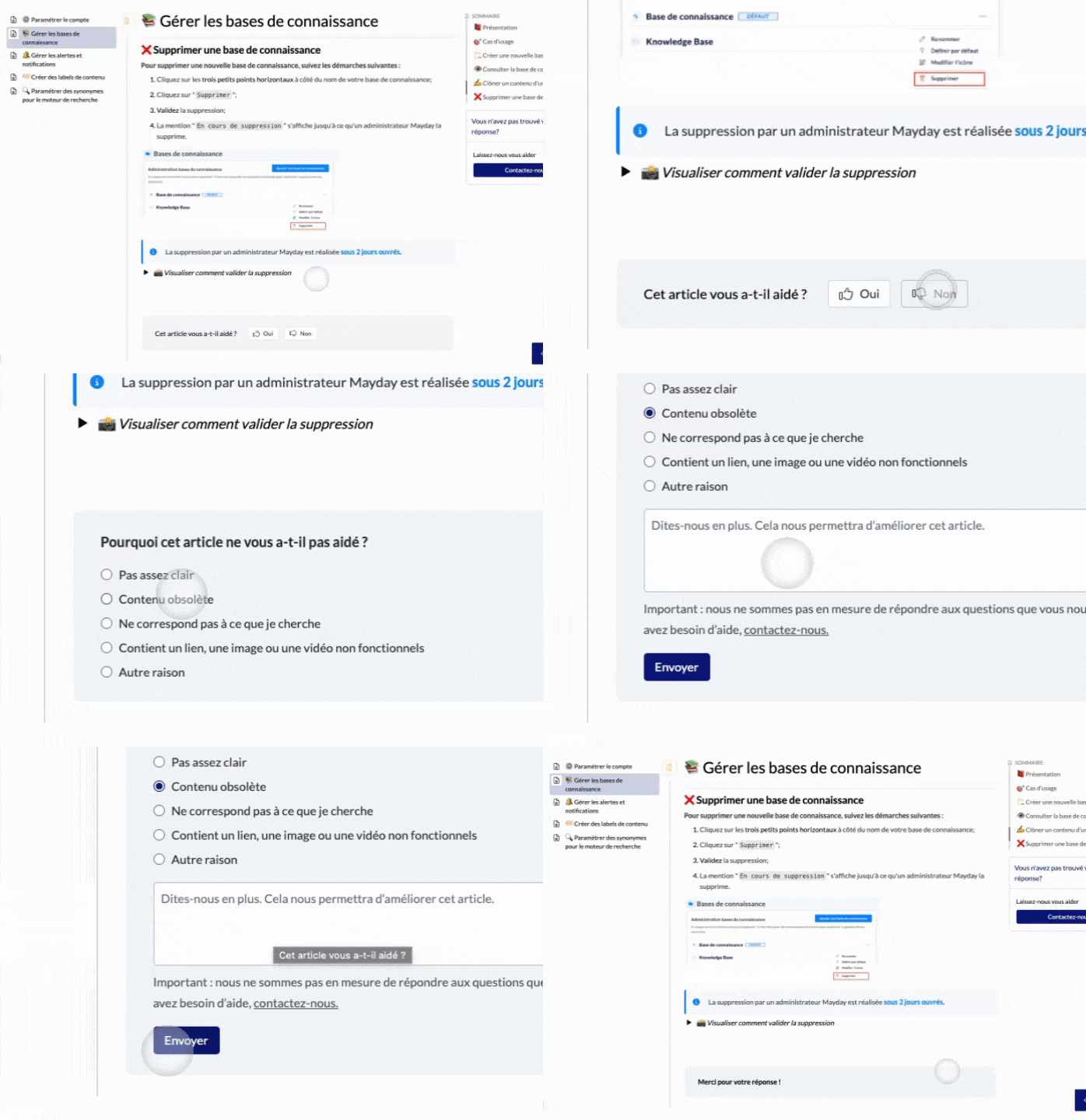
Mayday Selfcare - Feedback form
🎛 It's up to you!
In the settings, you can now enable or disable:
Feedback collection on Selfcare content
Collection of reasons in case of negative feedback
The free comment field
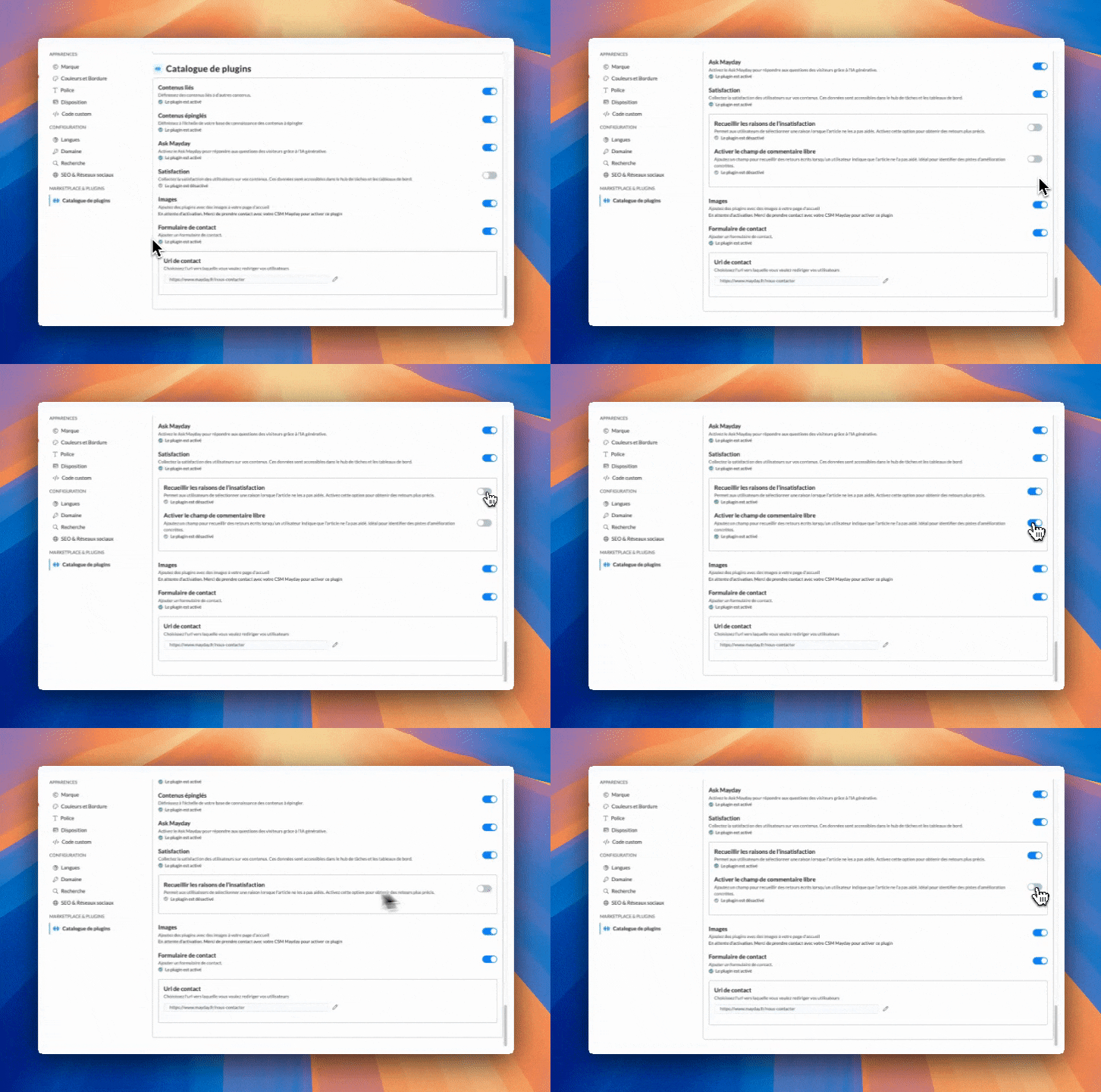
Mayday Admin - Settings
🎯 “Ask the AI” becomes more contextual and gains precision
The AI can now limit its responses to content from a specific collection selected at the root.
👉 Concretely, this means that the AI now adapts its responses to a specific context, for more relevance and clarity.
A key step for FAQs shared between multiple targets!
🙌 Result: more precise and personalized responses, adapted to the context of each end client.
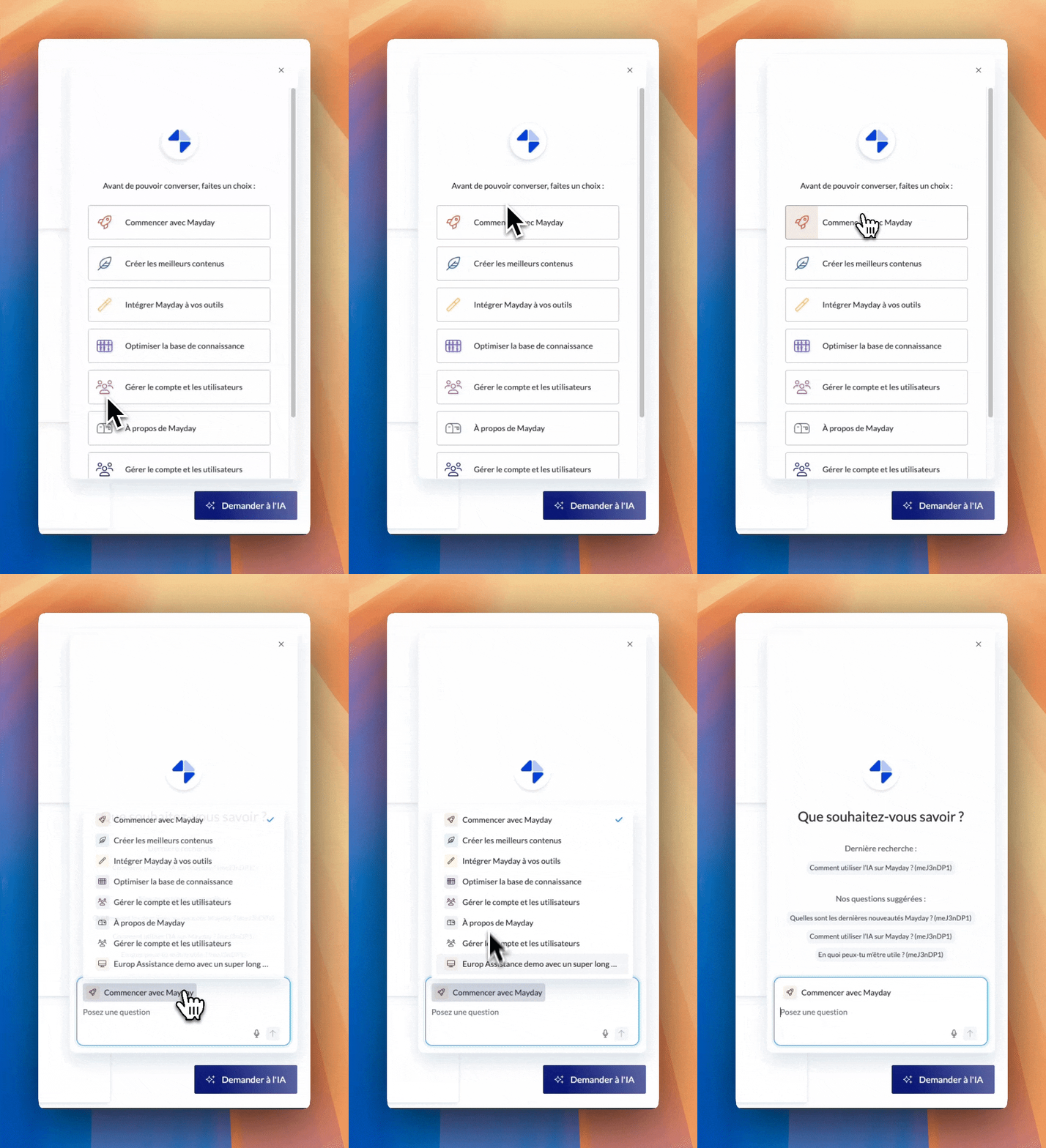
Mayday Selfcare - Ask the AI
This feature is also available on the “Discussion” tab of the Selfcare widget.
🪲 Fixes
👉 We have fixed the following bugs:
A blue border appears on encapsulated blocks on Selfcare: the fix makes the encapsulation transparent again.