👋 Introduction
Our new production release is now available, with a host of developments that we are happy to present to you. 🎉
On the menu : highly anticipated features, discreet but powerful optimizations, and tools designed to save you time on a daily basis.
What to expect 👇
🎓 Transform your articles and guides into training modules in just two clicks.
📂 Discover a brand new interface to view the version history of your Mayday content.
🌍 Automatically translate your content mentions and redirection steps with our intelligent translation system.
🤩 Enjoy numerous optimizations, such as a significant improvement in the response time of our AI agents.
We'll show you all that 👇
🤩 Global News
🚀 Optimizations & Improvements
🧠 Even more relevant AI responses thanks to a better understanding of nested content
To improve the quality of responses provided by our AI agents — notably Ask Mayday — we have enhanced their analytical capabilities.
Now, our agents are able to search for information within encapsulated or block-displayed content in another content.
Specifically, if a content A contains a content B (displayed in block or encapsulated), and the AI identifies content A as relevant to answer a question, the information from content B will also be taken into account.
✅ Result: if you structure your content with other content included inside, our AI agents will understand and correctly exploit them in their responses.
📚 Mayday Knowledge News
⚙ News for Mayday Administrators
📂 New interface for version history on Mayday!
✨ NEW FEATURE | Enjoy an enriched collaboration experience with a brand new version history!
At Mayday, we know how essential collaboration between editors is. To work with confidence, it is crucial to be able to precisely track who modifies what, and when.
Until now, the version history was limited, which could hinder smooth and serene editing.
That's why we are happy to present a brand new interface dedicated to version history: clearer, more complete, and designed to facilitate your daily editing work.
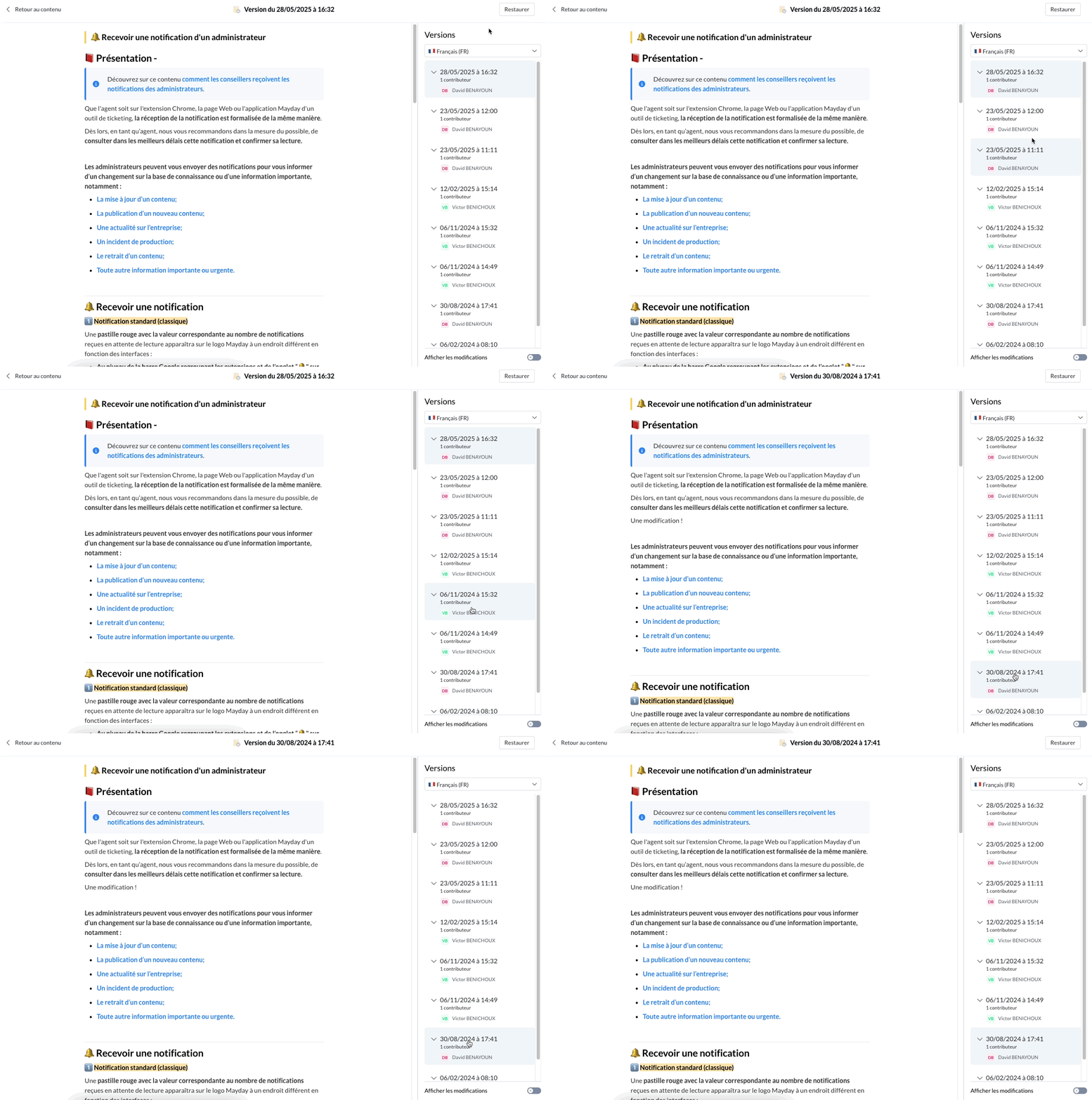
Navigate among the versions of a content with ease!
🎯 Why this new version history interface?
Content creation and editing are at the heart of the Mayday experience. Because collaboration between editors is essential, it is crucial to be able to track, for each content, all the modifications made over time. This allows for analyzing the evolution of an article, correcting potential errors, retrieving past information, or restoring a previous version with ease.
Until now, the version history was limited, with an aging interface that no longer met user needs.
That's why we are happy to unveil our brand new version history interface: redesigned to offer smoother navigation, better tracking of modifications, and an ever more efficient editing experience on Mayday.
🤔 How to use this new version history interface?
This new interface replaces the old one and remains accessible at the same location, directly from each content.
It now occupies the entire page, for better readability and optimized navigation.
You can now:
Access the latest version of the content by default
Browse the complete list of versions, from the most recent to the oldest
Identify the contributor of each version
Consult the associated modification date
Navigate between versions in the language of your choice
View the content of any version
Restore a previous version with one click
⏭ And very soon, even more features:
Display the precise details of modifications between two versions (additions, deletions, modifications)
Easily identify what has changed from one version to another
Rename versions to better find your way in the history
🌍 Optimized content translation on Mayday!
✨ NEW FEATURE | Save even more time with automatic translation of content mentions and redirection links!
Last year, the automatic translation of your Mayday content allowed you to simplify the management of your multilingual databases.
Today, we go even further: you can now choose to automatically translate, in one click, all content mentions and integrated redirection links in your articles and guides.
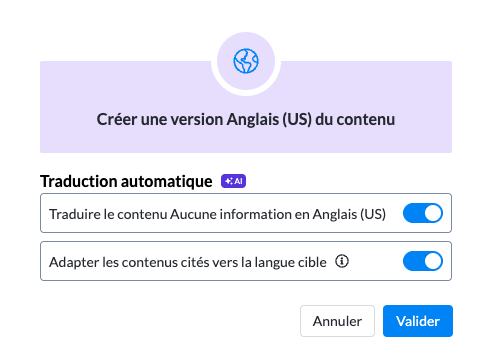
When translating a content, choose to translate the mentioned content into the target translation language!
🎯 Why this optimization?
Until now, when you translated a content from one language to another — for example from French to English — the content mentions remained in their original language.
Result: in the English version, the references continued to point to content in French, for example.
The same goes for redirection steps in guides: they also remained in the initial language, requiring manual modification to ensure multilingual consistency.
🎯 We know this process made you lose valuable time — this is precisely what this new evolution aims to resolve.
🤔 How to use this optimization?
To fully benefit from this improvement, simply activate the automatic translation when creating a content in a new language.
A new dedicated option then allows you to also translate content mentions and redirection steps (in the case of a guide).
🔧 This option is enabled by default, but you can disable it at any time.
If you disable it, mentions and redirections will remain in the original language.
If you leave it enabled, then:
✅ Content mentions and redirections will point to their equivalent in the target language, if it exists.
✅ Otherwise, they will continue to point to the original language in the case of content mentions.
💡 Result: your content remains consistent, your links always functional, and you save valuable time on your multilingual translations.
⚠ What are the limitations to know?
If you use automatic translation to convert a guide from language A to language B, be careful: if the content targeted by the redirection steps does not exist in language B, the translated guide will still try to redirect there.
👉 To ensure smooth navigation after translation, make sure that all content to which the steps redirect indeed exist in the target language before launching the automatic translation.
🚀 Optimizations & Improvements
⚡ Even faster AI agents!
The Mayday Genius, which encompasses all our AI agents, is now available — and we have great news to share with you.
The response time has been halved, going from about 8 seconds to less than 4 seconds. A major improvement for a smoother and more responsive experience.
🚀 And this is just the beginning: we are actively pursuing optimizations to offer you ever more relevant responses... in record time!
🪲 Fixes
👉 We have fixed the following bugs:
Redirection steps: When setting up a redirection step, an error message was sometimes displayed, even though the redirection creation was successfully taken into account.
Consulting content with a table: Sometimes, when consulting content on the administrator side and this content contained a table, automatic scrolling would bring the user back to the top of the page when reaching the level of this table.
"Consult the task" button: In the notifications of the administration center, the "Consult the task" button on notifications related to Hub tasks was no longer displayed.
Verification rights: Some users with verification rights in their role could no longer verify content.
Bullet points: Using bullet point lists could be complicated with unstable line breaks, depending on what was typed in the list.
"Ask the AI": The "Ask the AI" button located in the AI actions at the content level no longer did anything when clicked.
🗣 News for agents
🪲 Fixes
👉 We have fixed the following bugs:
Ask Mayday: Some users were unable to put spaces between words when used in the Mayday widget, overlaying certain specific sites.
Content preview: The button to preview content in the left pane had disappeared.
🎓News from the Mayday Academy
🤯 Transform the articles and guides of your knowledge base into training modules in 2 clicks!
Start from the content of your knowledge base and transform them into training modules with our AI agent "Module Generator".
Trust it, module structure and content of lesson slides and quizzes, it takes care of everything!
✅ The AI offers you to validate a structure for your module based on the selected content, which you can adjust.
✅ Is it good for you? Create the module and automatically generate the content of your slides with the AI!
Mayday administrator - Agent Module Generator
🚀 Test this new feature today and gain productivity
👉 How to access it from your knowledge base?
1⃣ From the 3 little dots on a content in the left section of your Knowledge interface:
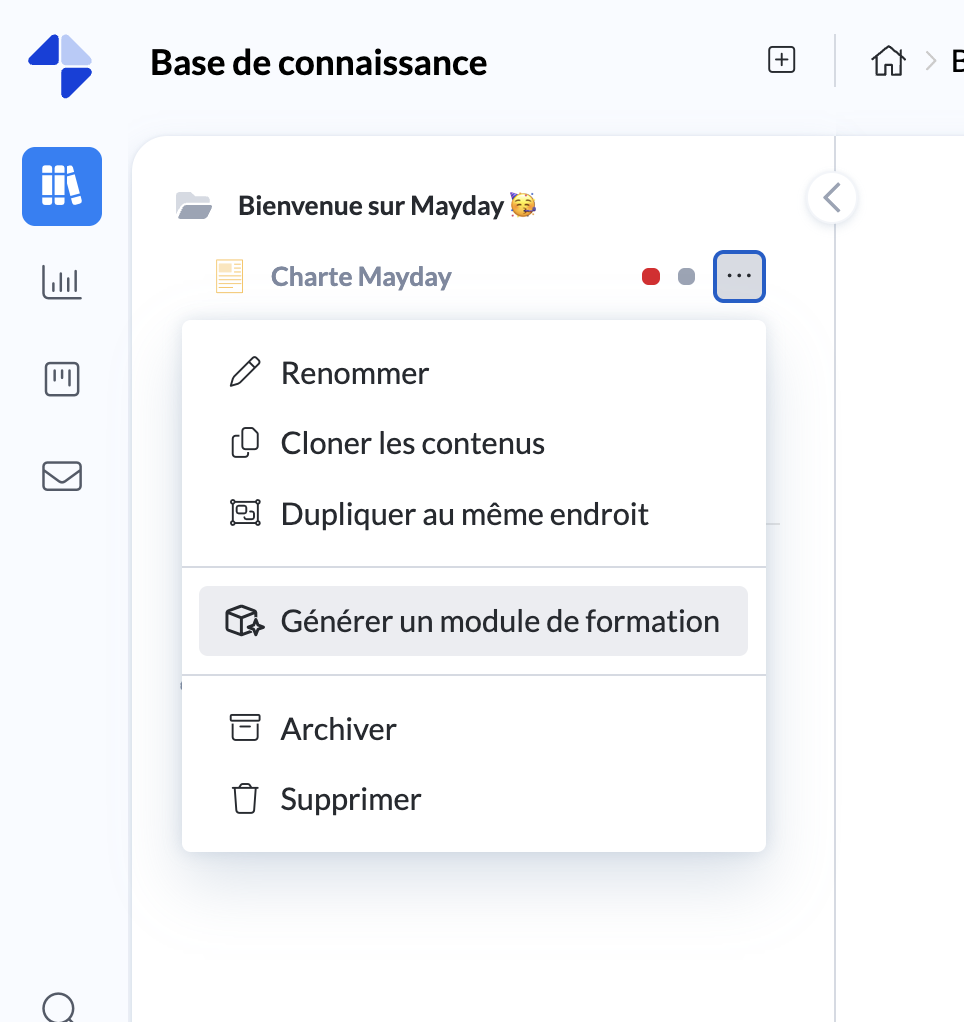
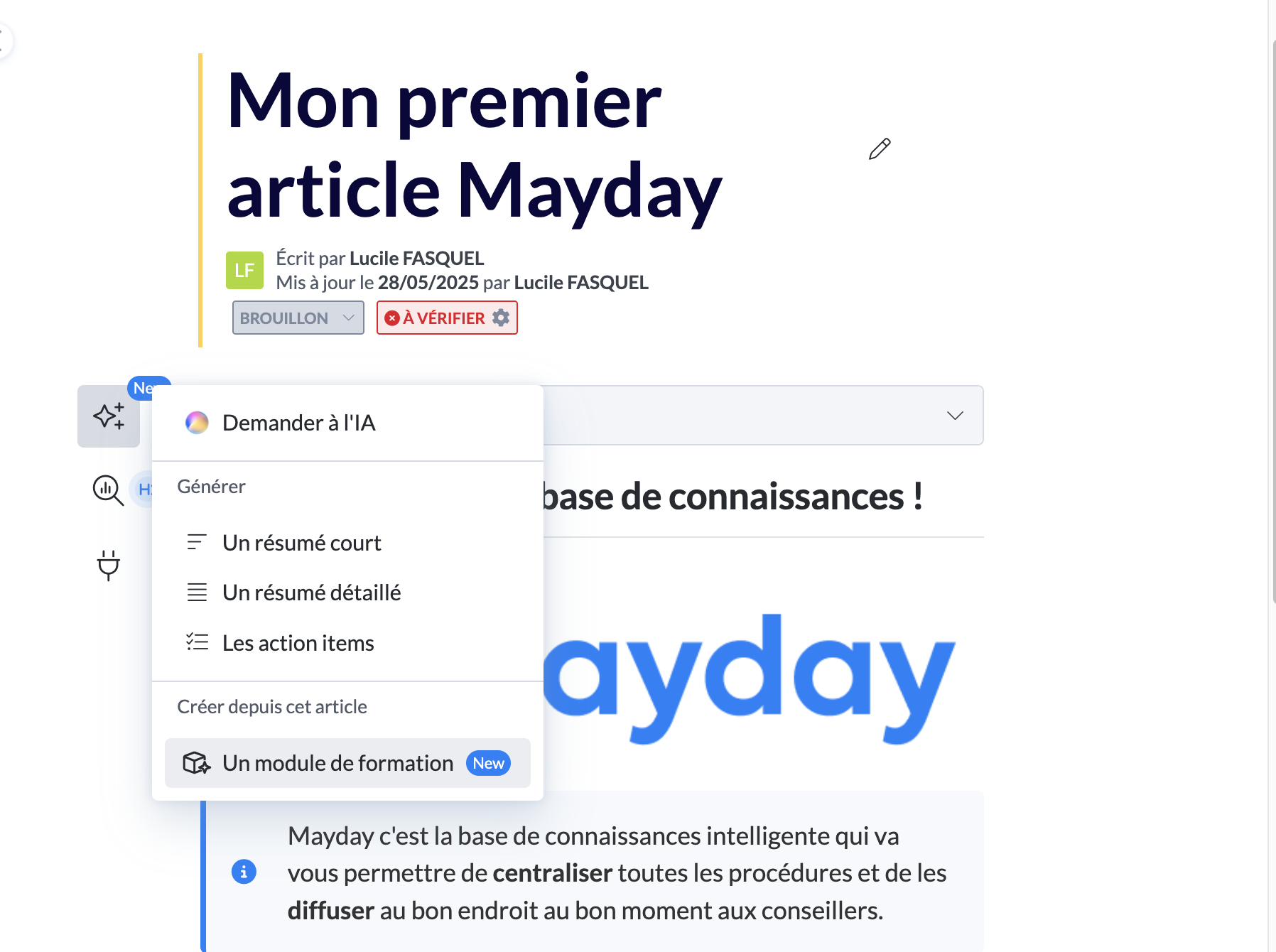
2⃣ Or from the AI actions button when you are already on a content:
You can also generate training modules by the AI directly from your Mayday Academy:
Via this new button on your interface by clicking on "Create a module" :
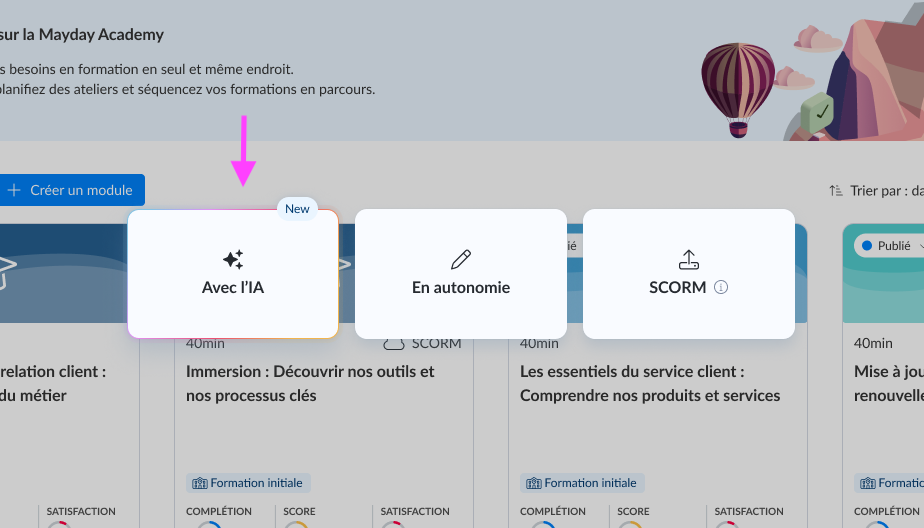
Finally, you can find this feature directly via the sphere icon at the top right of your administrator interface:
1⃣ Select the agent "Module Generator"
2⃣ Ask it to create a module from your internal, external content or a simple textual brief
You don't want to automatically write the entire content of the module by the AI?
Use the command "/ask the AI" to help you write your "Lesson" slides on a case-by-case basis, or the agent "Quiz Generator" to assist you in creating your Quiz slides.
🪲 Fixes
👉 We have fixed the following bugs:
Review the module - Learners cannot see all the slides for modules with more than 10: this bug has been fixed, it is now possible to scroll and click on all the slides
Import of certain SCORM files failing: optimizations have been implemented to more optimally manage SCORM files according to their size to avoid failure during import.
Inline contents not clickable in synchronized blocks: users can now click on elements (links/images) encapsulated via the "display in block" feature