👋 Introduction
A new, feature-rich production release designed to enhance your Mayday experience!
Agenda:
A revolutionary source filter for Mayday Genius that transforms the quality of your AI agents’ responses
A new article generation capability in the Knowledge Builder to accelerate your content creation
Labels to organize your tasks on the hub
A new default export hub
A more intuitive display on the learner's homepage
An optimized learner assignment flow
A homepage for your Selfcare widget!
Plus, numerous optimizations to make your daily work smoother and more enjoyable.
Ready to take a look?👀
🤩 Global Updates
⬇ Default Export Hub
—
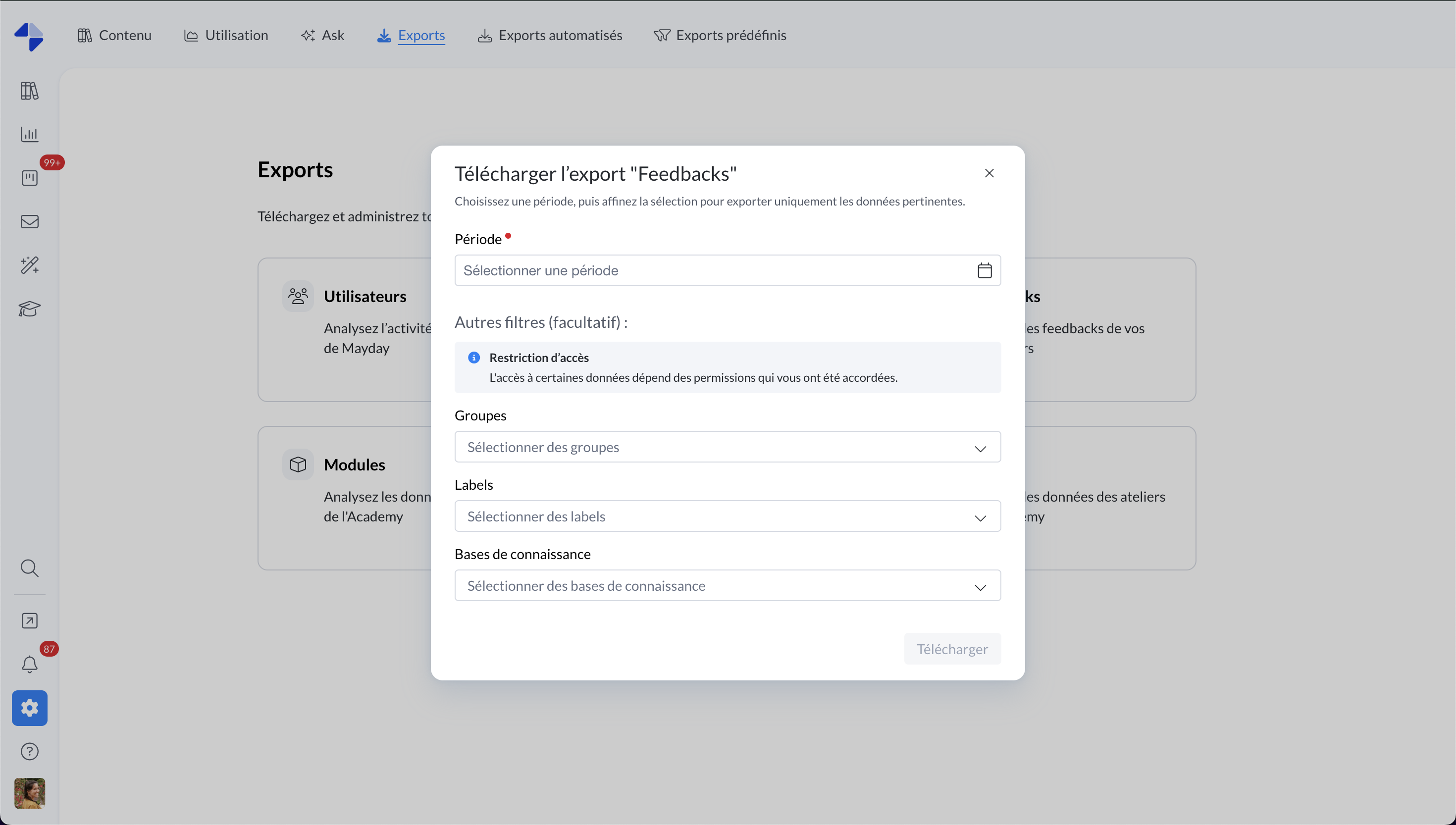
You now have a dedicated hub in the "Exports" tab, grouping exports offered by Mayday. These exports will be added progressively.
✔ First available export: the export of Feedbacks.
Choose the desired period.
Filter by groups, user labels, or knowledge bases to refine your analysis.
✔ Access management by role:
Set restriction rules from the Dashboard tab.
Authorize (or not) users of a role to access the hub
For each default export, define an optional access perimeter (knowledge bases, groups, labels).
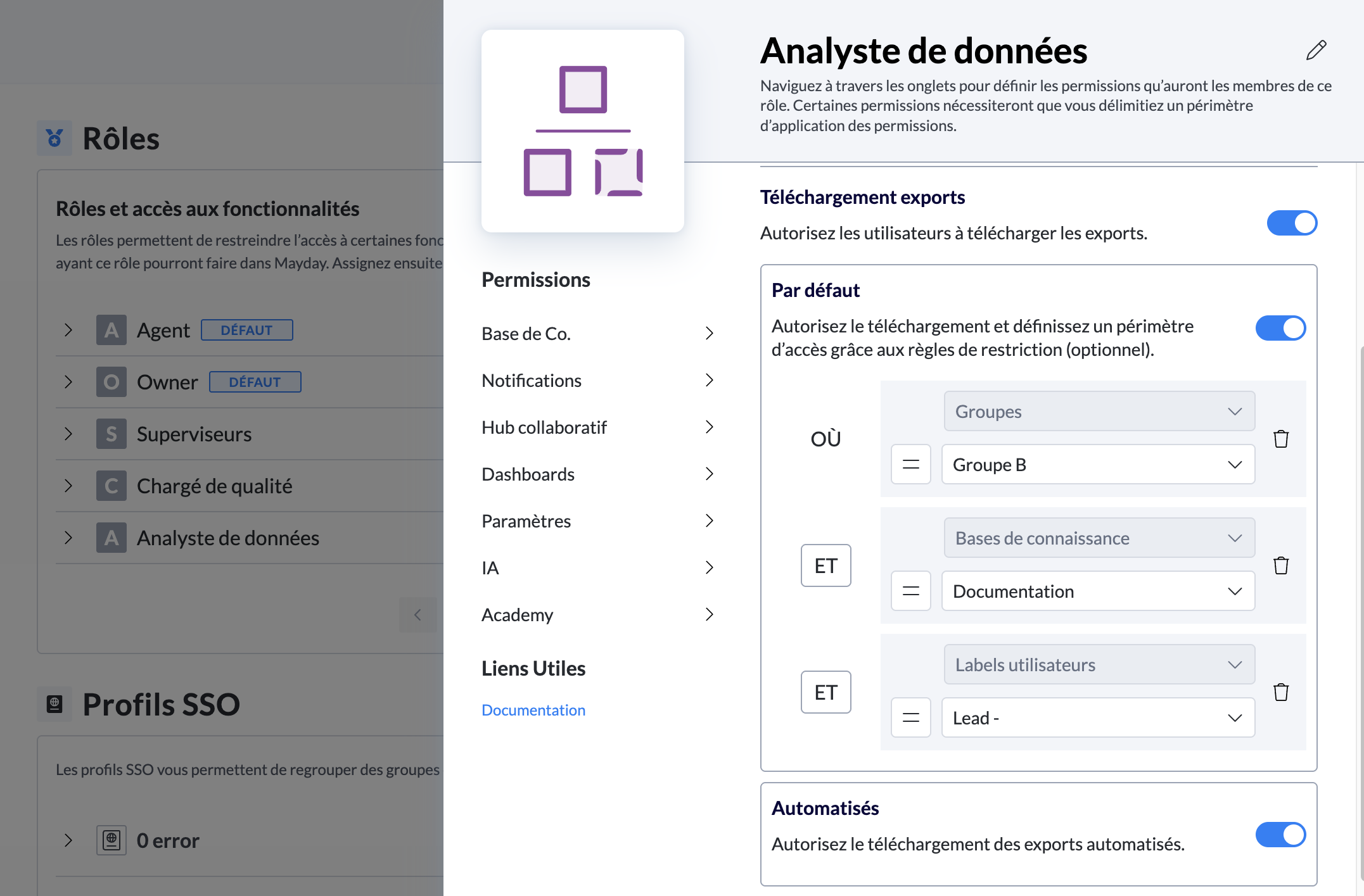
Administrator Interface - Settings - Role - Dashboard
By default, the restriction is disabled. Make sure to enable it for the relevant roles so these exports are accessible.
📚 Mayday Knowledge
✍ Administrators on Mayday
📝 Article Generation in the Knowledge Builder
—
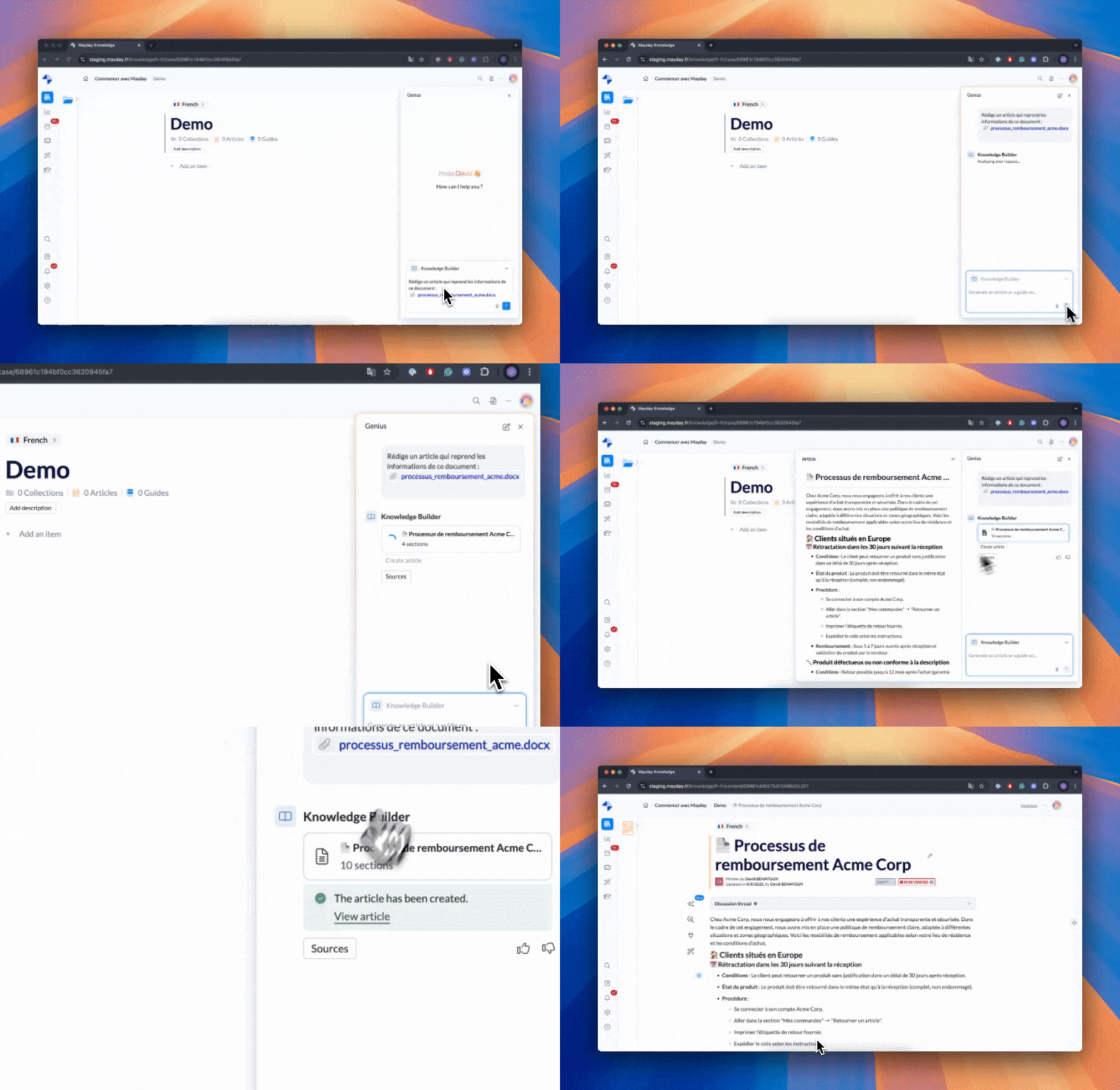
The Knowledge Builder has reached a new milestone with the introduction of article generation, completing the guide construction and revolutionizing content creation.
Simply submit your request: if you specify the desired content type, the agent instantly understands it; otherwise, it suggests choosing between a guide or an article. Once your choice is made, the article is generated and can be previewed, edited, and then directly created or inserted into an existing empty article.
This evolution has a clear goal: saving you considerable time by allowing you to create articles from texts, existing content, external files, or even connected documents such as those from SharePoint.
📄 Consult the dedicated documentation to discover this new feature:
🏷 Labels for your tasks in the Mayday Hub
—
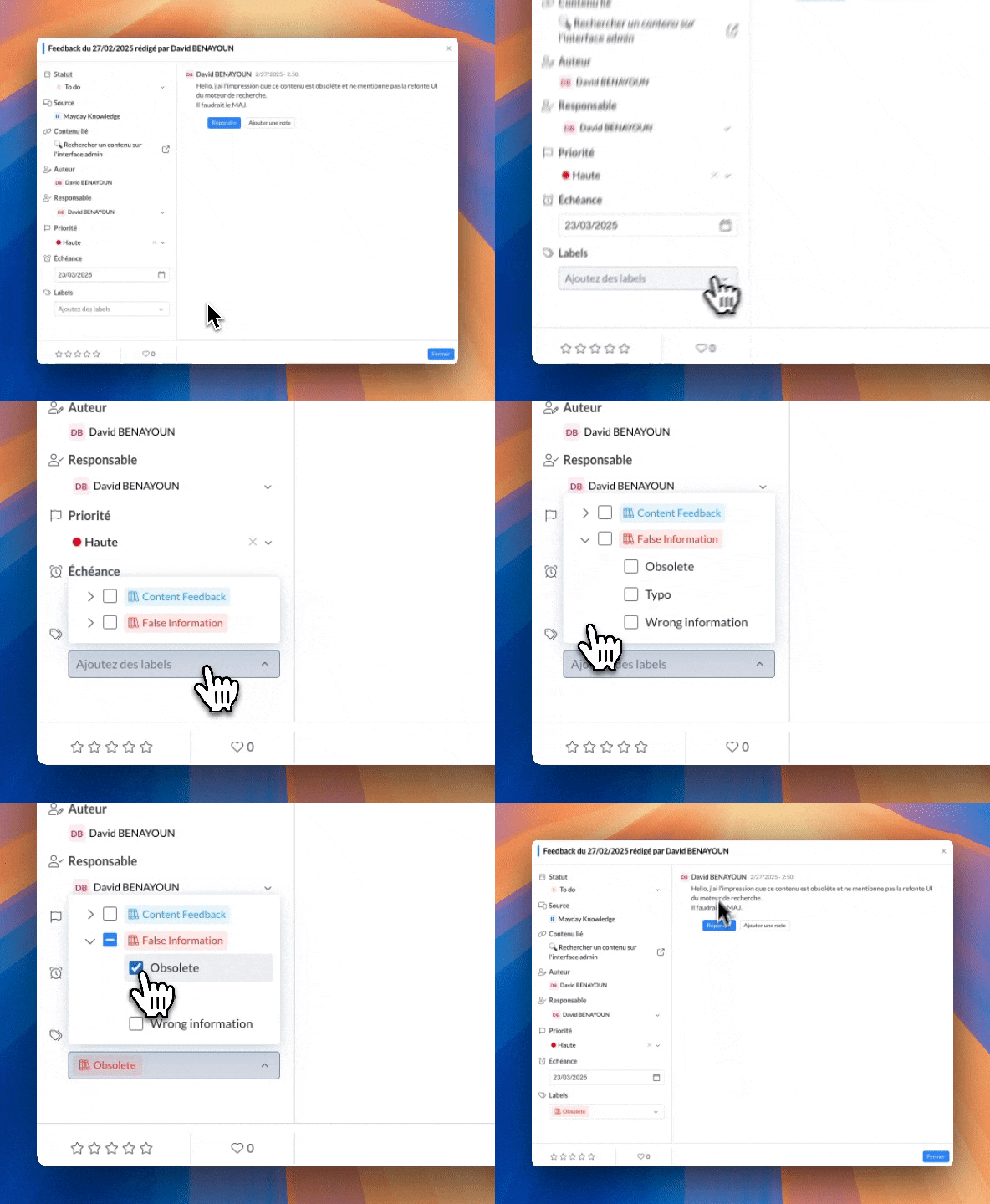
Until now, the Mayday Hub did not allow precise classification of your tasks (feedback or others). Now, this is possible thanks to task labels.
Create your labels in administrator preferences — just like user or content labels — then apply them to any task from its view. You can then filter the Hub by label to quickly find what's essential and better organize your follow-ups.
In summary: tailored categorization, faster searches, and reports by task type... all in just a few clicks.
📄 Consult the dedicated documentation to discover this new feature:
🔔 Notifications: choose your targeting logic (OR / AND)
—
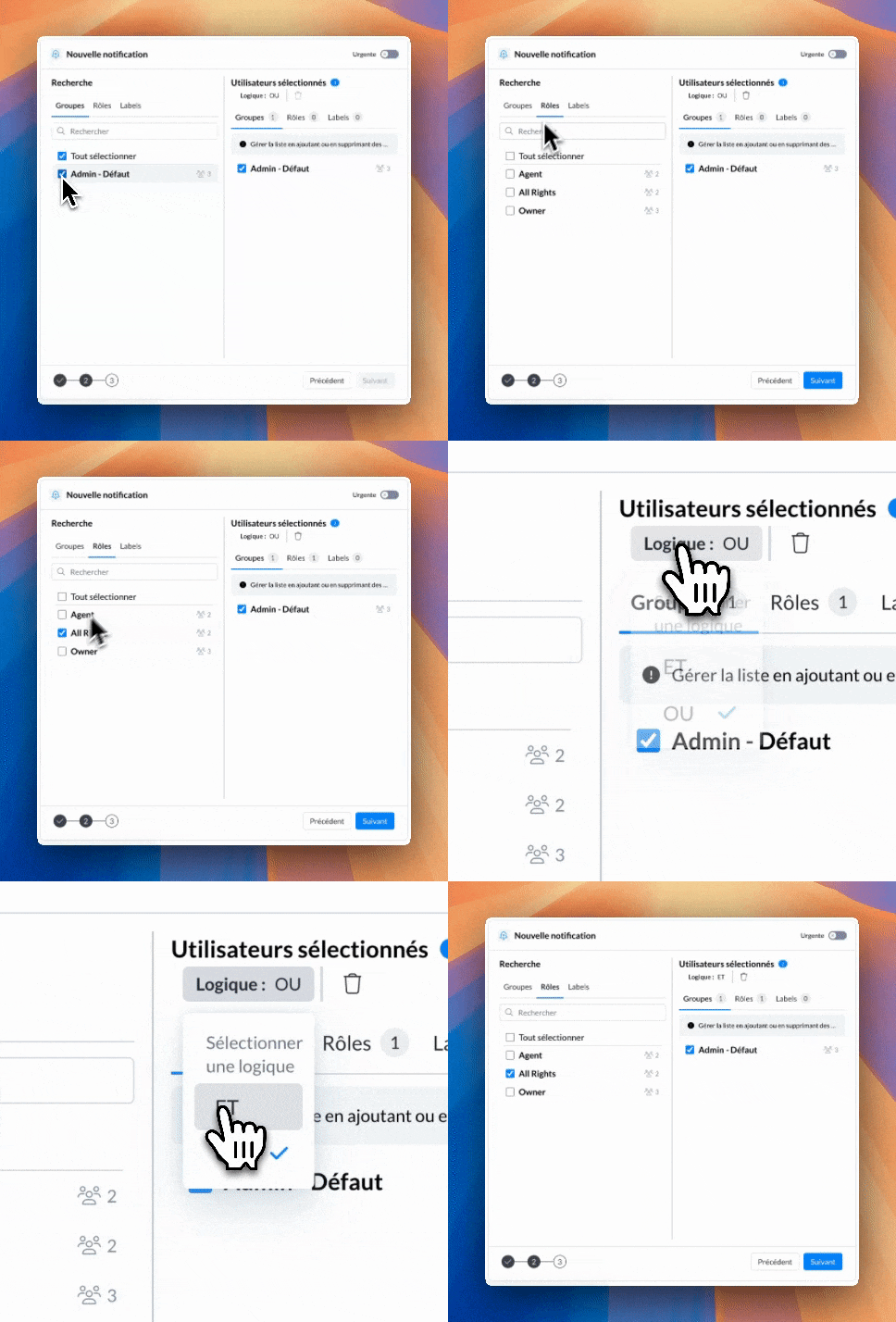
When sending a notification, you can now choose the targeting logic for recipients: OR or AND.
With OR (the default), anyone who matches any of the selected criteria (roles, groups, labels) will receive the notification.
With AND, only users who meet all the selected roles, groups, and labels will receive the notification, allowing for highly targeted communication.
Result: more control over your segments, less noise, and notifications that reach exactly the right people.
📄 Check out the dedicated documentation to learn more about this new feature:
😄 Lots of Improvements!
Improved editing of AI agent prompts with titles (H1 to H4), lists, and other formatting options to make instructions clearer and more visually appealing.
Bulk selection of groups when configuring a data source, with the ability to select or deselect all groups in one click.
The archiving and deletion permissions for content are now separated by roles: you can grant one without the other for more precise control, and all roles that previously had deletion will automatically receive both permissions (archiving and deletion) after this update.
In AI agent customization, the source formerly called "Copilot" is now "Customer Ticket Analysis". When enabled, your AI agent benefits from all ticket analysis features on Zendesk, Salesforce, Intercom, and iAdvize (if the integration is active on your Mayday account): ticket analysis, mood detection, summaries, content recommendations, and response generation. More information here.
On Mayflow, you can now expand steps one by one to view sub-steps, thanks to a button that appears on hover. More information here
In the notification center, you can now export the list of readers and non-readers of a notification. This allows for more detailed analysis of who reads (or doesn't read) your notifications — export available for individual notifications only. More information here
🐞 Lots of Fixes!
Synonyms: It was impossible to add a synonym with multiple words without each word being registered separately as a synonym.
Genius: Bug fixes on Mayday Genius (display of custom agents, retention of output formats during agent duplication, etc.).
Content Cloning: Cloning always created content in the default language instead of the language used for cloning.
Notification Modification: Modifying a notification linked to content caused the associated content and attachments to be lost.
Order of Collections: The order of the collection tree structure was not respected on the administrator homepage.
👥 Agents on Mayday
🎯 Source Filter on Mayday Genius
—
The Mayday Genius now includes a source filter, available on all agent platforms: Desk, Widget, Zendesk App, and iAdvize App.
This feature lets you target AI agent responses by knowledge base, collection, or specific content.
You can now directly query a collection or specific content, which greatly increases the chances that the AI provides the exact answer you're looking for.
Result: more relevant interactions, and a more precise and optimized AI experience every time.
📄 Check out the dedicated documentation to explore all the details:
😄 Lots of Improvements!
Lists in the text area of Mayday Genius, with bullets or numbers to better organize and prioritize your messages.
On Mayflow, you can now expand steps one by one to view sub-steps, thanks to a button that appears on hover.
🐞 Lots of Fixes!
Insertion of AI responses: On Zendesk, Intercom, and Salesforce, AI-generated hyperlinks inserted in the response field now correctly keep their clickable link format.
🎓 Mayday Academy Updates
✍ Administrators on Mayday
🎯 New Learner Assignment Flow
—
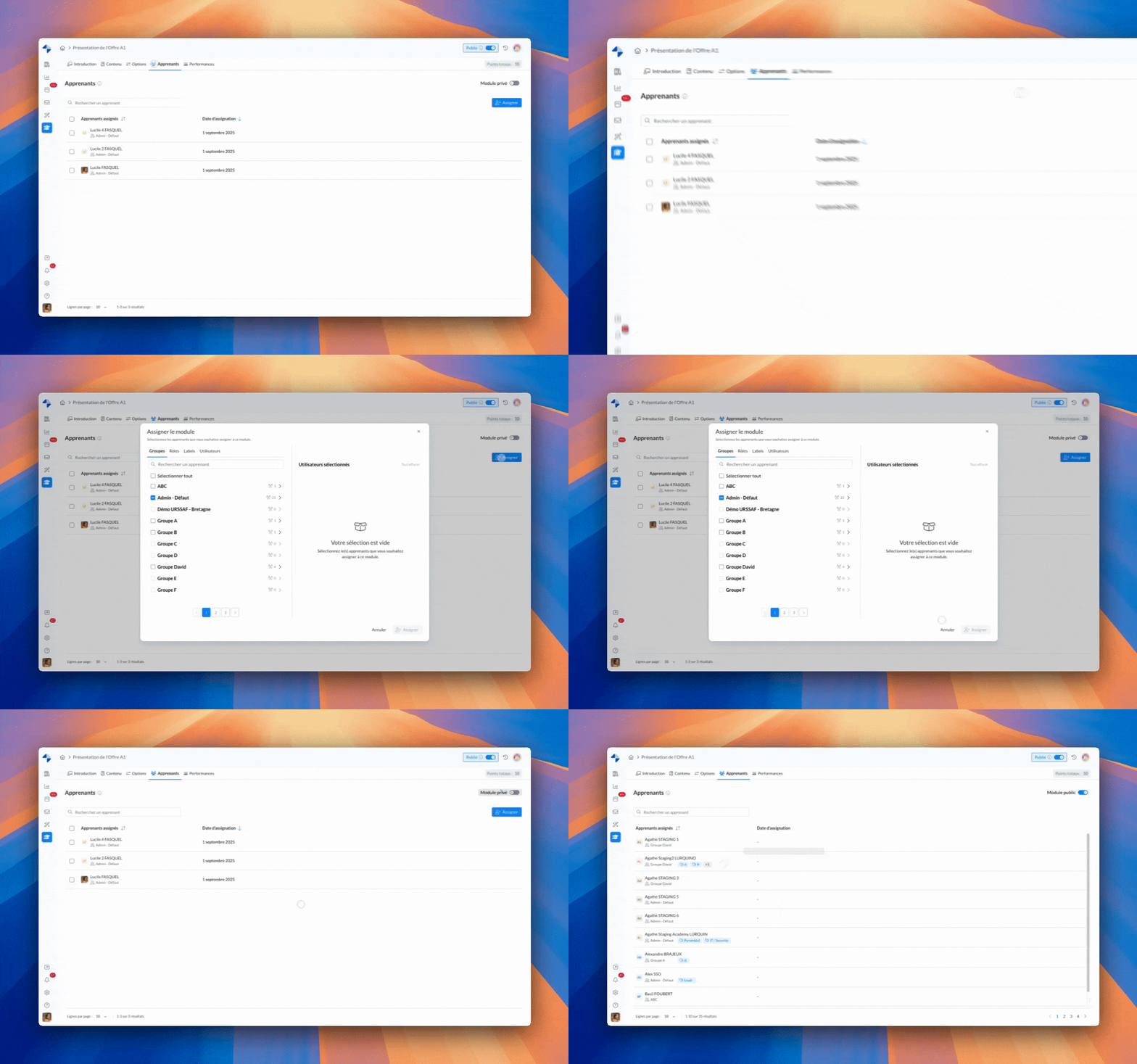
Learner assignment to modules and paths has been updated for greater simplicity:
👉 A clearer and smoother process to assign or unassign your learners.
👉 Instantly see all learners assigned to your public modules.
👩🎓 Agents on Mayday
🥳 Improved Navigation for Agents
—
👉 Vertical scrolling is now available on the platform for easier and more intuitive navigation.
👉 Under the main tabs Not Started, In Progress, and Completed, two new sub-tabs — Modules and Paths — make it easier to display and find all your trainings.
😄 Lots of Improvements!
✔ Workshops: You can now modify past workshops (add/remove learners) to update the attendance sheet.
✔ SCORM:
SCORM playback is now possible in full screen, for greater comfort and immersion.
The Finish button is now always available to prevent blockages and improve data quality in the Performance tab.
A message informs the agent that they must complete the module entirely to validate it.
New status abandoned when a module is exited without being completed, visible to administrators in the performance section.
🐞 Lots of Fixes!
Optimized Performance
✔ Reduced loading times for modules and paths: smoother and faster navigation for agents.
🌐 Mayday Selfcare
💫 The Selfcare Widget Gets a Homepage!
—
Give your clients an even clearer and more intuitive experience with the new homepage of your Selfcare widget.
👉 Highlight key options: chat with AI, search the FAQ, or contact directly.
👉 Showcase your pinned content and most frequently asked questions.
👉 Easily guide your clients to the right choice so they can quickly find the information they need—or the information you want to highlight.
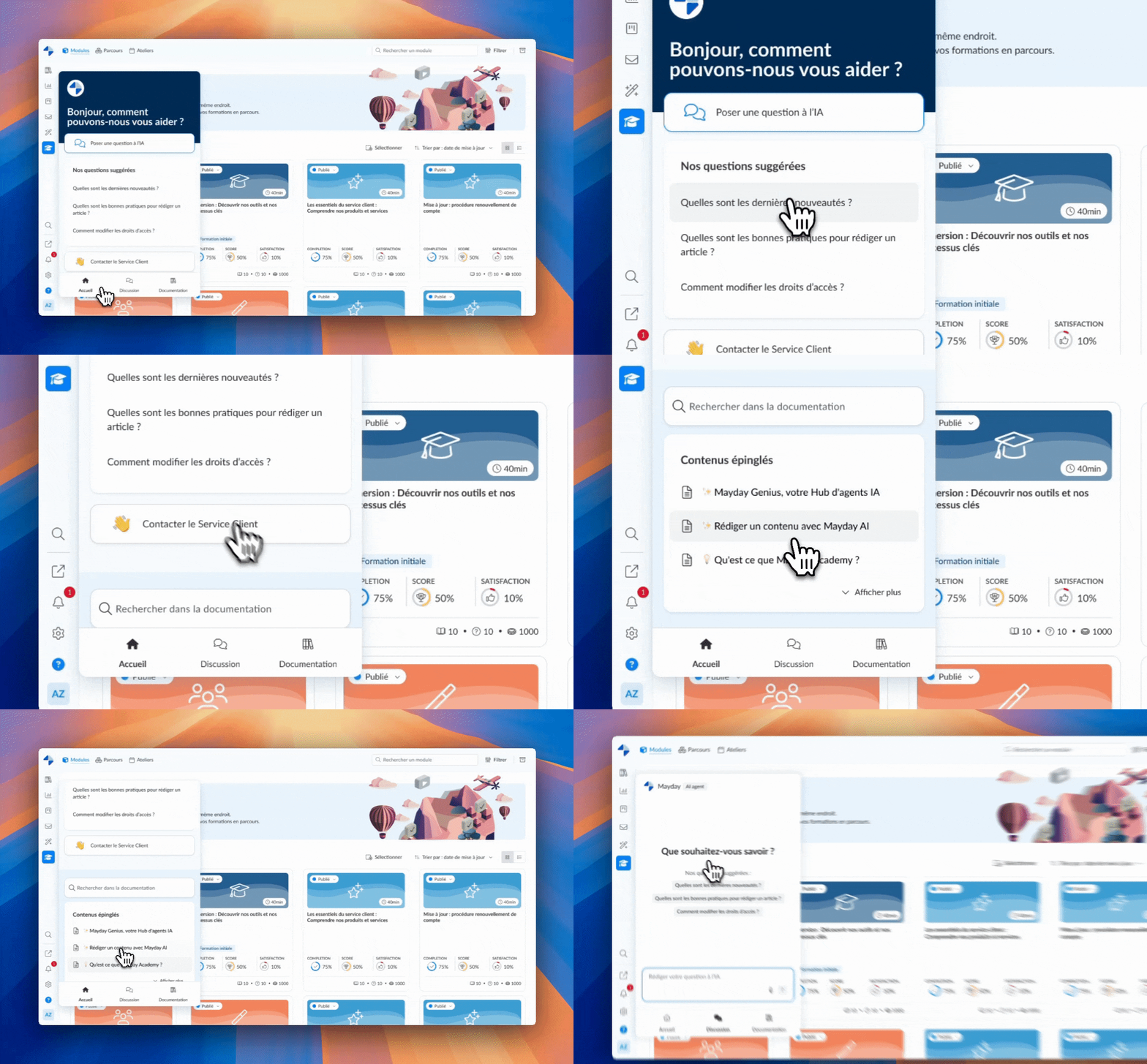
Selfcare Widget - Mayday Administrator
🐞 Numerous Fixes!
✔ The error message now displays correctly when incompatible CSS code is uploaded.
✔ Long articles no longer automatically scroll to the top, and clicking on a section in the summary (H2) now positions the article correctly.