👋 Introduction
Over the past two weeks, we have focused our efforts on two essential priorities:
Optimizing recently launched features
Developing new features to save you even more time on a daily basis.
We are excited to present our latest innovations, and we have many more exciting features coming very soon on Mayday 👀
On the agenda 👇
Automatically generate your training modules with AI ✨: generate the training structure that suits you and then create it in 1 click in your Academy!
The new Flowchart View 👀: a simplified visualization and construction of guides for administrators.
The new Selfcare Widget 🆘 : 3 smart options at the end of your articles to proactively help your users.
The Genius Copilot 🤩 : now available directly on Zendesk and iAdvize applications.
And of course, many optimizations to further enhance your experience!
Let's have a look 👇
📚 Mayday Knowledge Updates
⚙ Updates for Mayday Administrators
👀 A new flowchart view for your guides!
✨ NEW FEATURE | Build your Mayday guides even more efficiently with the flowchart view!
Two weeks ago, we introduced the brand new flowchart view, designed to offer agents a clear visualization of the structure of a Mayday guide.
Today, we are pleased to announce that this feature is now accessible to administrators! In addition to being able to visualize the guides, you can now build and modify them directly from the flowchart view — for a more intuitive and faster creation of your journeys.
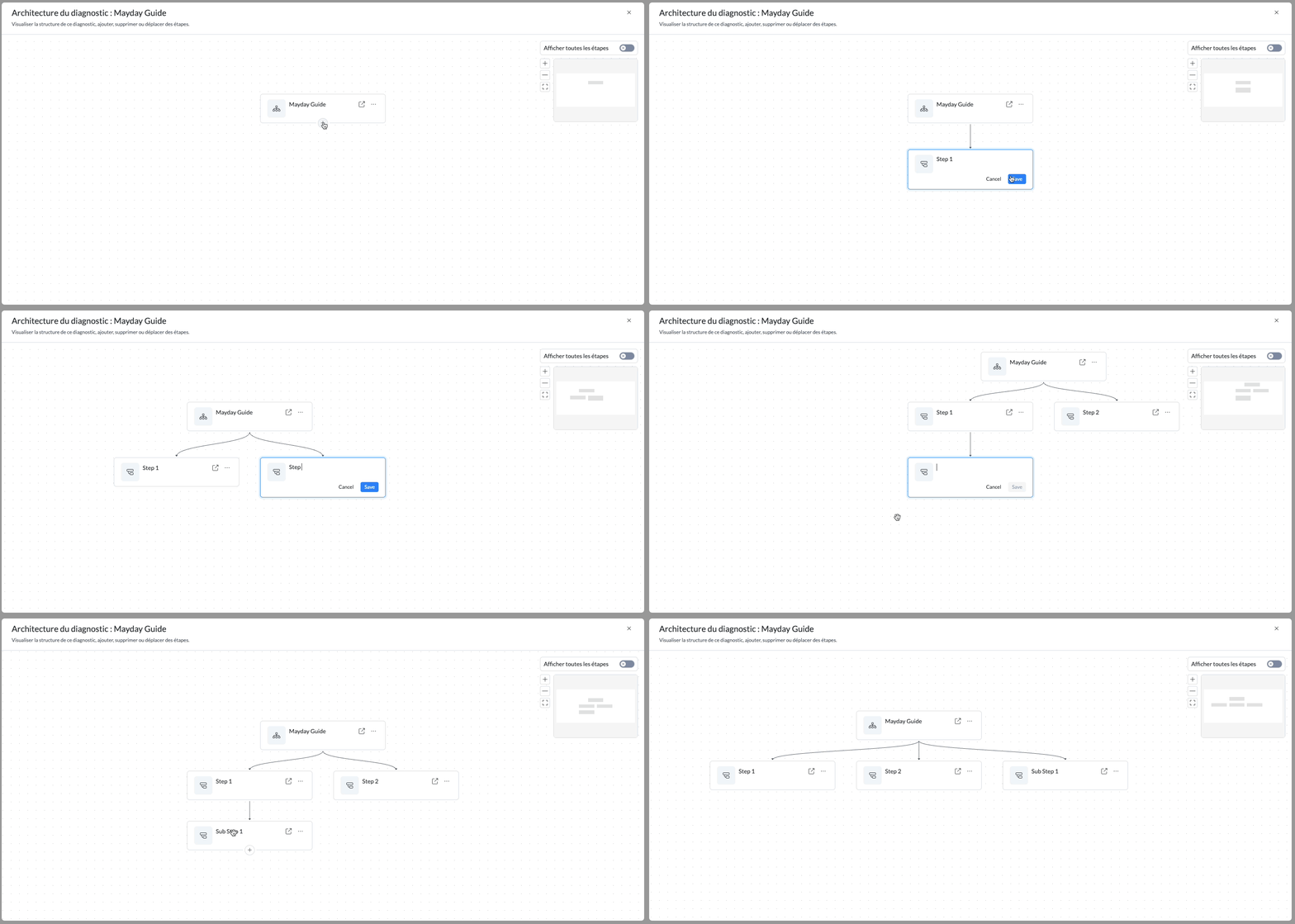
Add, move, or archive steps from the flowchart view!
🎯 Why this new flowchart view?
One of the first challenges we wanted to solve was clarity. The old flowchart view did not allow for a clear vision of the structure of a guide, making its reading sometimes complex.
But beyond simple visualization, another essential need emerged: being able to create and modify a guide directly from this view. Until now, this was not possible. However, building a guide intuitively naturally involves a visual representation of its structure.
👉 This is now a reality: you can add, delete or move steps with ease, directly from the flowchart view.
🤔 How to use this new flowchart view?
The new flowchart view replaces the old one and remains accessible in the same place: directly from a guide.
🤩 What you can now do:
✅ Easily visualize the complete structure of the guide.
✅ Navigate to any step in one click from the flowchart.
✅ Add a step or sub-step, wherever you choose.
📸 Discover how to do it
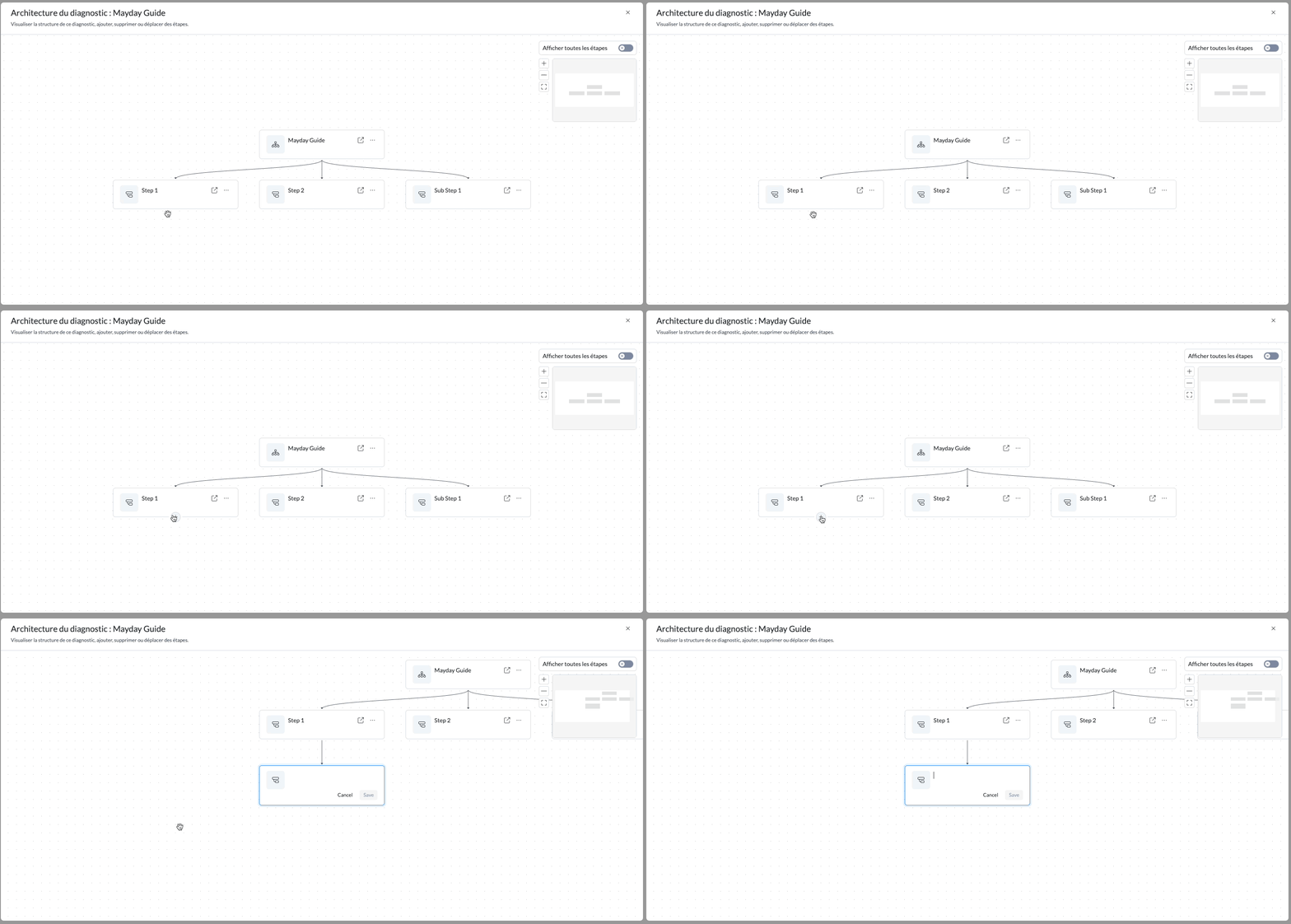
✅ Archive a step or sub-step, directly from the view.
📸 Discover how to do it
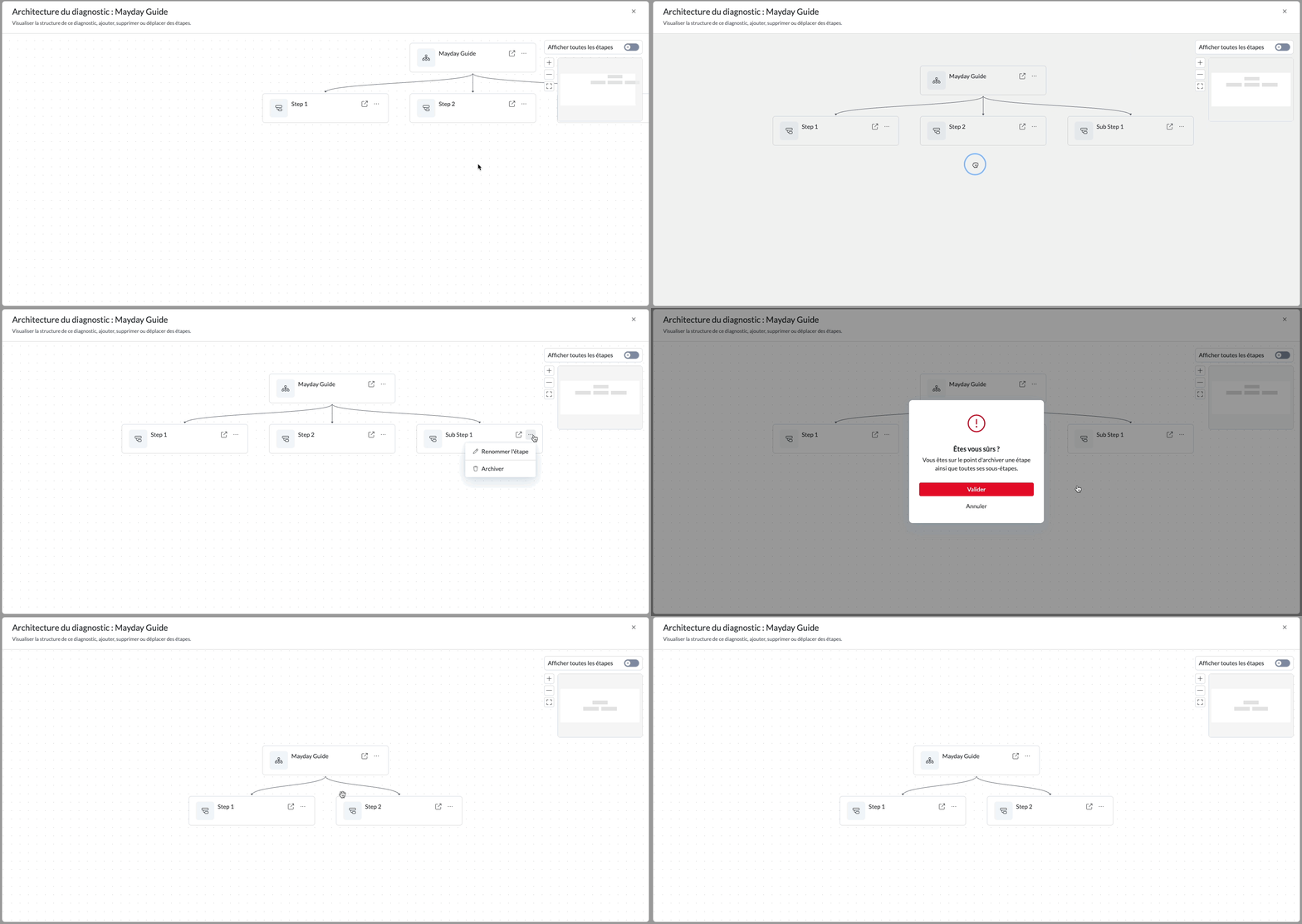
✅ Move a step or sub-step to reorganize your guide.
📸 Discover how to do it
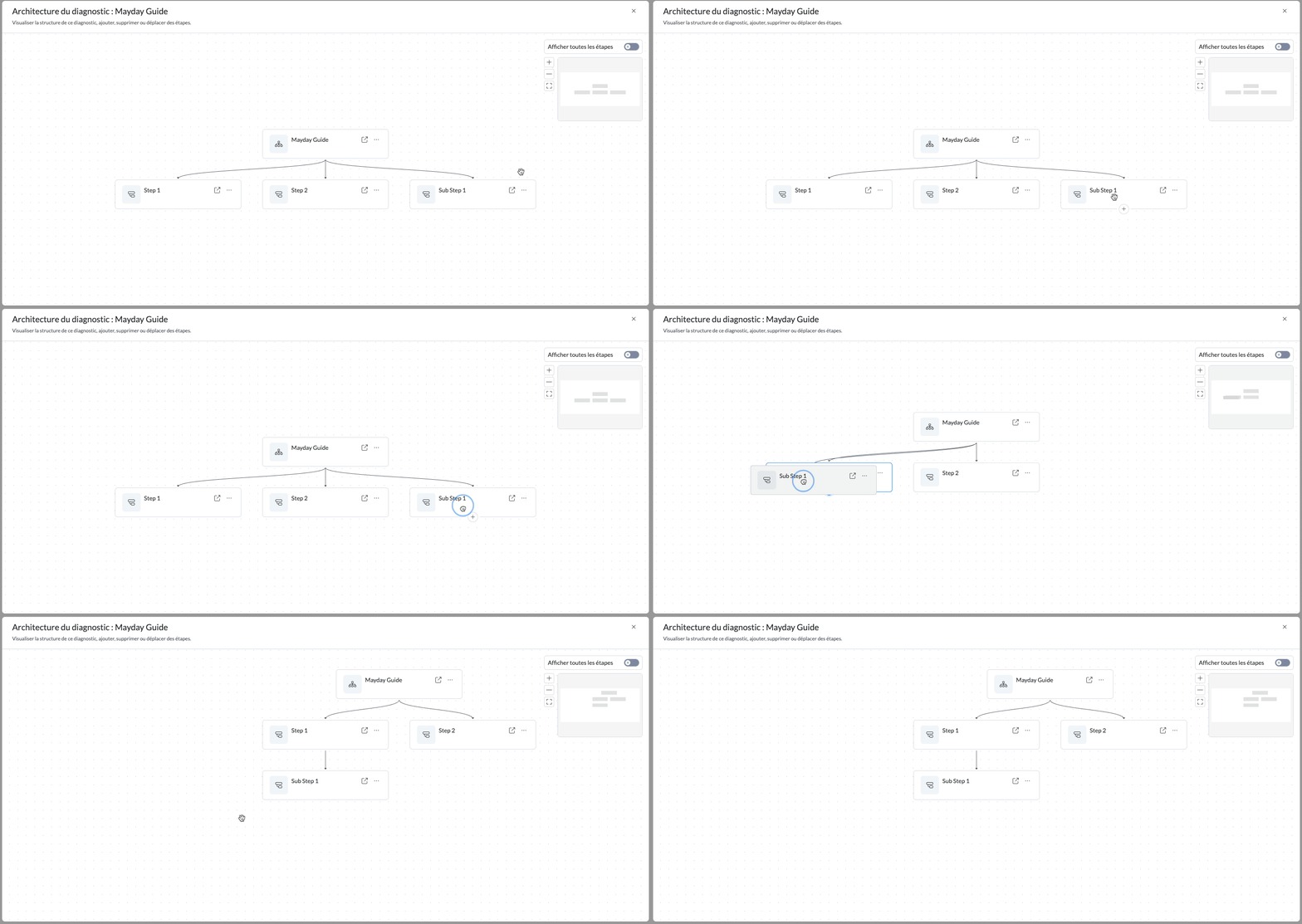
🔵 Bonus: the internal redirects between steps are now represented by a blue dotted line, for a more intuitive reading of the journeys.
⛔ What is not possible to do from the flowchart view:
❌ Add, modify or delete the content of a step.
You need to open the concerned step directly.
❌ Consult the content of a step or sub-step.
Again, go to the step.
❌ Create a redirect link from a step.
Again, go to the step.
❌ See or modify the aliases, actions or metadata of a step.
Again, go to the step.
🚀 Optimizations & Improvements
🎨 Discover the new AI settings interface!
With the rise of artificial intelligence features on Mayday, we have decided to refresh the AI settings interface. And this is just the beginning: these settings will continue to evolve to offer you even more refined and personalized control of your AI features.
🪲 Fixes
👉 We have fixed the following bugs:
Latencies on the synonym dictionary: when your company has many synonyms, the dictionary on the administration center experienced very long loading times.
Long PDFs poorly managed via "Ask the AI": when asking the AI to use a long PDF, it did not take into account the entire document.
"Consult the task" button in notifications: the "Consult the task" button had disappeared from the notification panel when an alert concerned a task from the Hub.
User Export: in some cases, a user's groups or roles were displayed multiple times in the export.
Modification of a scheduled notification: when modifying a scheduled notification, it was created in duplicate.
Mention on the Hub: it was no longer possible to mention certain users, even though they had access to the Mayday Hub.
🗣 Updates for agents
 The Mayday Genius now available on Zendesk and iAdvize!
✨ NEW FEATURE | The Genius Copilot arrives on Zendesk and iAdvize applications!
Two weeks ago, we introduced Genius, the new copilot that replaces the old agent copilot on the Mayday Widget.
Good news: Genius is now available directly from your Zendesk and iAdvize applications!
Enjoy all its power, where your teams need it most.
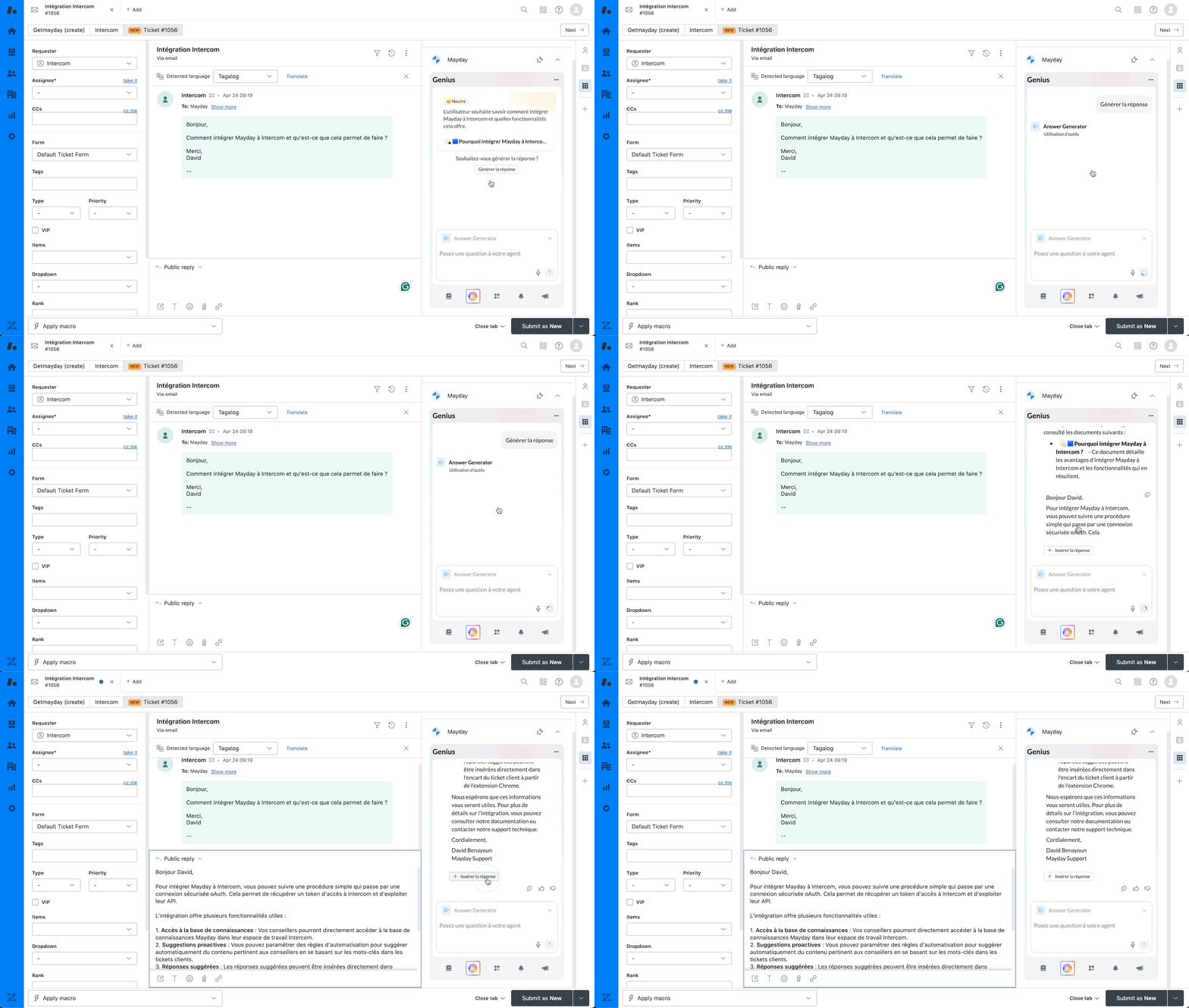
Access the Mayday Genius directly from the Zendesk or iAdvize application!
🎯 Why Mayday Genius in Zendesk and iAdvize?
While the Chrome extension already allows access to these features, our goal is to support agents where they actually handle tickets.
And what better way to do that than to integrate Mayday Genius directly into Zendesk and iAdvize?
✅ With these integrations, your teams benefit from Genius assistance without leaving their work tool.
No need to juggle between multiple interfaces: everything happens in the same place.
🚀 What does Mayday Genius allow? (Reminder)
Thanks to the intelligence of Mayday Genius, you can:
Detect and understand the request on the current ticket
Analyze this request
Summarize the client case and identify the mood of the client
Automatically recommend relevant content, or those manually defined by your administrators
Generate a complete response, based on Mayday content and connected data sources
Interact with the AI agent, refine the response until it perfectly suits you
These features require the prior configuration of your Zendesk and/or iAdvize accounts on Mayday in the administration center, via the integration catalog.
💪 Use Mayday Genius in Zendesk and/or iAdvize
🤔 How to use Mayday Genius on Zendesk/iAdvize?
1⃣ Check that the platform of your choice (Zendesk and/or iAdvize) is properly configured in Mayday on the administrator side.
2⃣ Update the dedicated application on Zendesk and/or iAdvize.
3⃣ Open a client ticket from your usual tool.
Then:
Access the ticket analysis and trigger a response from the Genius tab in the Mayday application.
This option is available only if your company benefits from AI content recommendations.
📸 Screenshot
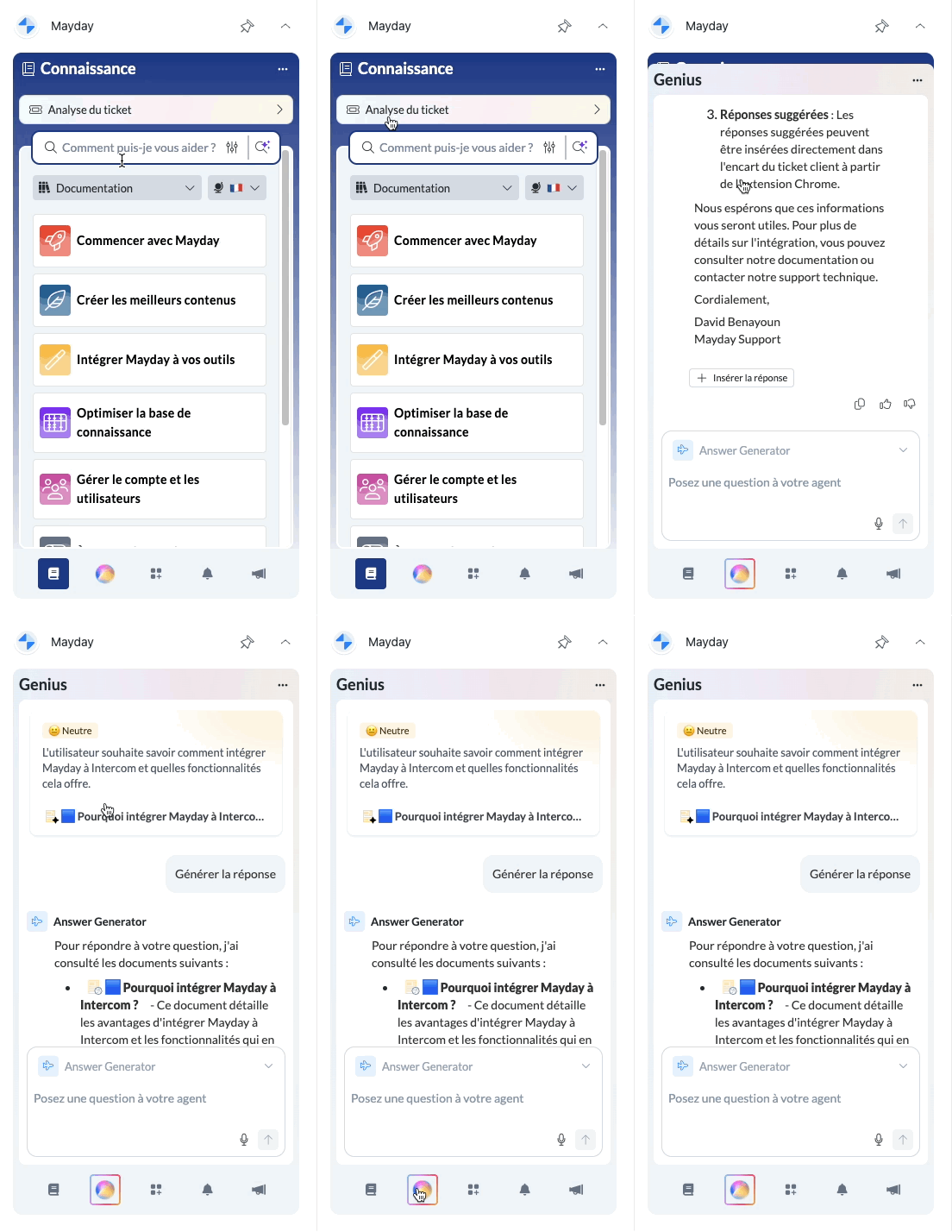
Finally, the operation is the same:
5⃣ Consult the results: ticket summary, detected mood, content recommendations — automatic or defined by your teams.
Good to know: Automatically raised recommendations can be distinguished by an icon ✨
6⃣ Click the generation button to launch the creation of a response by the AI agent.
7⃣ Receive a written response, based on your Mayday content and connected sources.
8⃣ Copy the response as is, insert it directly into the response field or continue the conversation with the AI agent to adjust it to your liking.
🚀 Optimizations & Improvements
🤩 Even more relevant content recommendations!
Mayday Genius assists you in resolving tickets on Salesforce, Zendesk, Intercom and many other platforms.
Among its superpowers: AI content recommendations, which automatically suggest the most relevant resources based on the current client ticket.
🎯 No need to search, the information comes to you — for immediate time savings.
And now, these recommendations are even more precise and contextual, to ensure you never miss the right content at the right time.
🔎 A smarter search engine to distinguish similar content
With some clients, we have noticed that several contents can share the same title or have very similar titles. This happens especially when new content takes up information already present elsewhere, such as an updated newsletter.
Until now, our search engine did not take into account the publication or last modification date, which could bring up obsolete or less relevant content.
Now, these dates are taken into account to highlight the most recent content and make them appear first in the results.
🪲 Fixes
👉 We have fixed the following bugs:
Keyboard shortcuts within the Chrome extension: on some applications, keyboard shortcuts remained active when using the Chrome extension, which disrupted the user experience.
🎓Mayday Academy Updates
🤖 New AI feature: automatically generate your training modules!
Save valuable time with our new AI agent Module Generator, which allows you to automatically generate the complete structure of a training module. This new flagship feature of the Mayday Academy helps you design your journeys in just a few clicks.
🚀 Try it now and boost your efficiency!
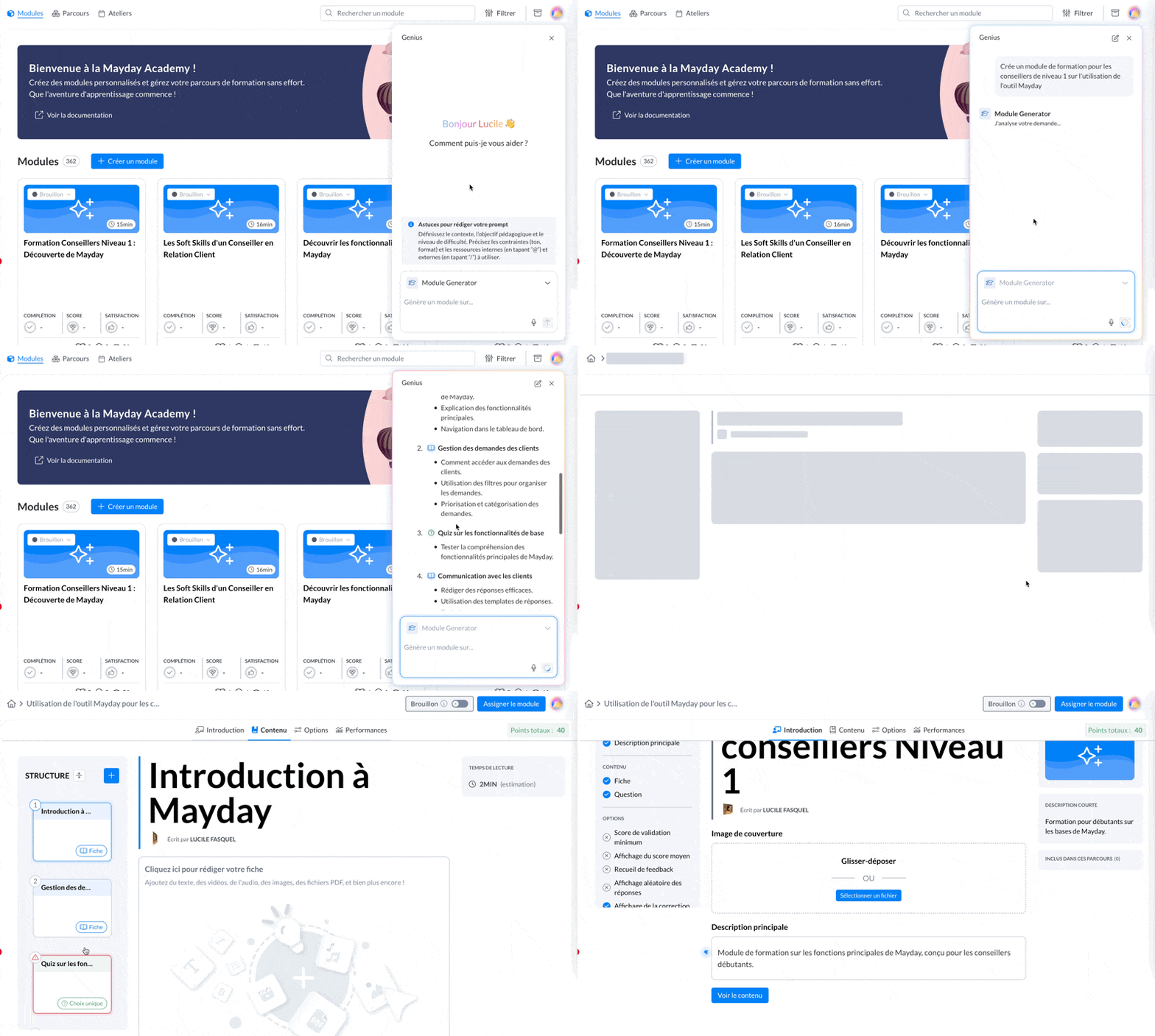
Mayday administrator - Agent Module Generator
💡 How does it work?
1⃣ Click on the sphere icon at the top right of your administrator interface to open the Mayday Genius
2⃣ Select the agent "Module Generator"
3⃣ Ask it to create a module from your internal, external content or a simple textual brief
✅ The AI will automatically propose a personalized module structure, which you can adjust or validate.
Then, one click and the structure of your module is created in your Academy!
🛠 And this is just the beginning...
Soon, you will also be able to automatically generate the content of your slides thanks to AI!
In the meantime, remember to use the command "/ask the AI" to write your "Lessons" slides, or the agent "Quiz Generator" to create your Quiz slides.
🪲 Fixes
👉 We have fixed the following bugs:
Long loading at login on the Academy DESK: loading is back to normal for your agents who log into their Mayday Academy.
Display bug on the performance table: the display could be offset in the first column of the table when a group name was too long. The display now adapts.
🌐 Mayday Selfcare Updates
✨ New Selfcare Widget: 3 Smart Options at the End of Your Articles!
Offer an even smoother and more proactive experience to your users with our Selfcare widget update: three new actions are now available at the end of each article to go further.
🔍 Your continuous help, at the right time.
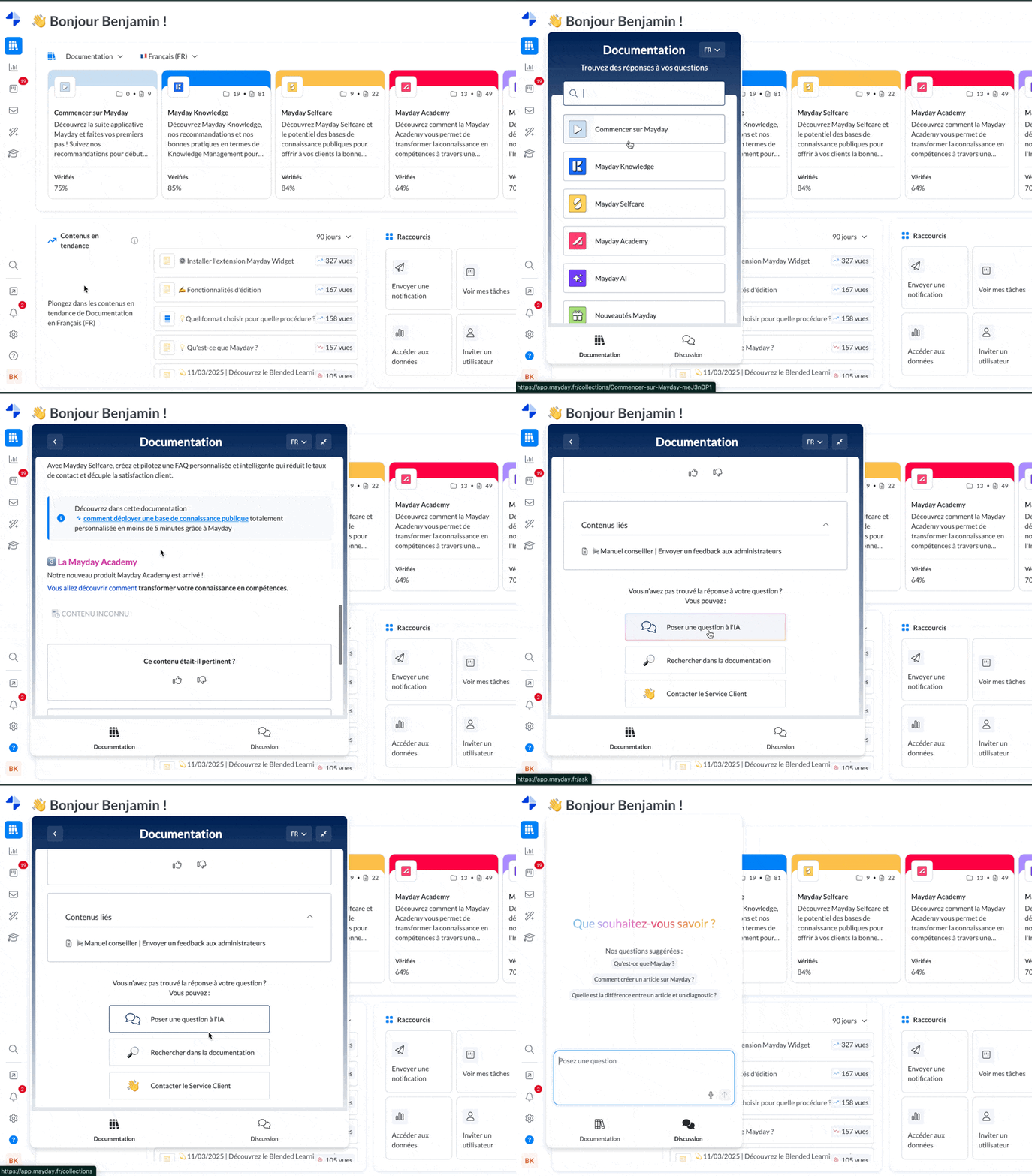
🆕 The 3 New Options Available:
🤖 Ask the AI
Ask a complementary question to the AI agent for an instant response.
📞 Contact Customer Service
Need a human? One click is enough to initiate contact.
📚 Search the Documentation
Directly explore other useful resources and deepen the search.
💡 Thanks to these contextualized actions, your users remain autonomous longer... while always having an open door to more help if needed.