👋 Introduction
Welcome everyone 👋
We are thrilled to reconnect with you to announce a new production release packed with updates to help you centralize and reuse your content using shared elements !
What’s on the agenda ⭐:
📚 Library of shared elements: Create reusable content blocks, insert them into various content pieces, and keep them updated from a central point.
🔍 Search sensitivity: Adjust your search engine’s tolerance to find the most relevant results for your needs.
🔗 New API endpoints: Create, edit, archive, and delete your content directly via the API.
🤖 Improved RAG: The new RAG enables agents to read guide steps and navigate your knowledge bases faster.
Let’s dive into it all 👀
🤩 Global updates
📚 Create once, use everywhere with the library of shared elements!
Do you maintain the same information in multiple places in your knowledge bases? With the new Library of cross-functional elements, create reusable shared elements and insert them into any document, regardless of the knowledge base or collection. Edit an element in the Library, and the update automatically propagates everywhere it is used.
A single source of truth: Write content once and reuse it across all your knowledge bases and collections.
Instant propagation: Any modification to a shared element in the Library is automatically reflected in every document where it is inserted.
Integrated for your agents: Once inserted, a shared element displays exactly like native content. It is indexed by the search engine, usable by AI, and adheres to existing access rules. Access is determined by the host content.
Multilingual: The Library supports all languages configured in your knowledge bases.
👉 The benefit for you? No more duplicates, inconsistencies, or wasted time: manage your shared content from a centralized point, with the guarantee that information is always up-to-date everywhere.
Limitation
Shared elements are not yet supported on Selfcare portals and Academy training sessions. They will neither be visible to your clients nor indexed by search or AI.
A small note of caution
Library access rights are managed by role. Only administrators with the appropriate permissions can create and edit shared elements.
Upon feature release, all users with editing rights will have access to the Library and be able to create and edit shared elements.
Refer to the dedicated documentation to learn more about this update:
✨ Notable improvements
🤖 Improved RAG: Faster, more relevant AI responses
We have made technical improvements to our RAG (Retrieval-Augmented Generation), the system that enables our AI Agents to search and utilize your content. Now, AI Agents can:
Read guide steps for better understanding of your resolution processes and display them as sources
Access all your content more easily and quickly
👉 The benefit for you? Even faster and more relevant responses from your AI Agents, who now leverage the entirety of your knowledge base.
Our CSM teams will contact you directly to activate this new feature for your agents over the next 3 weeks.
📚 Mayday Knowledge
✍ Administrators on Mayday
✨ Notable improvements
🔍 Adjust your search sensitivity!
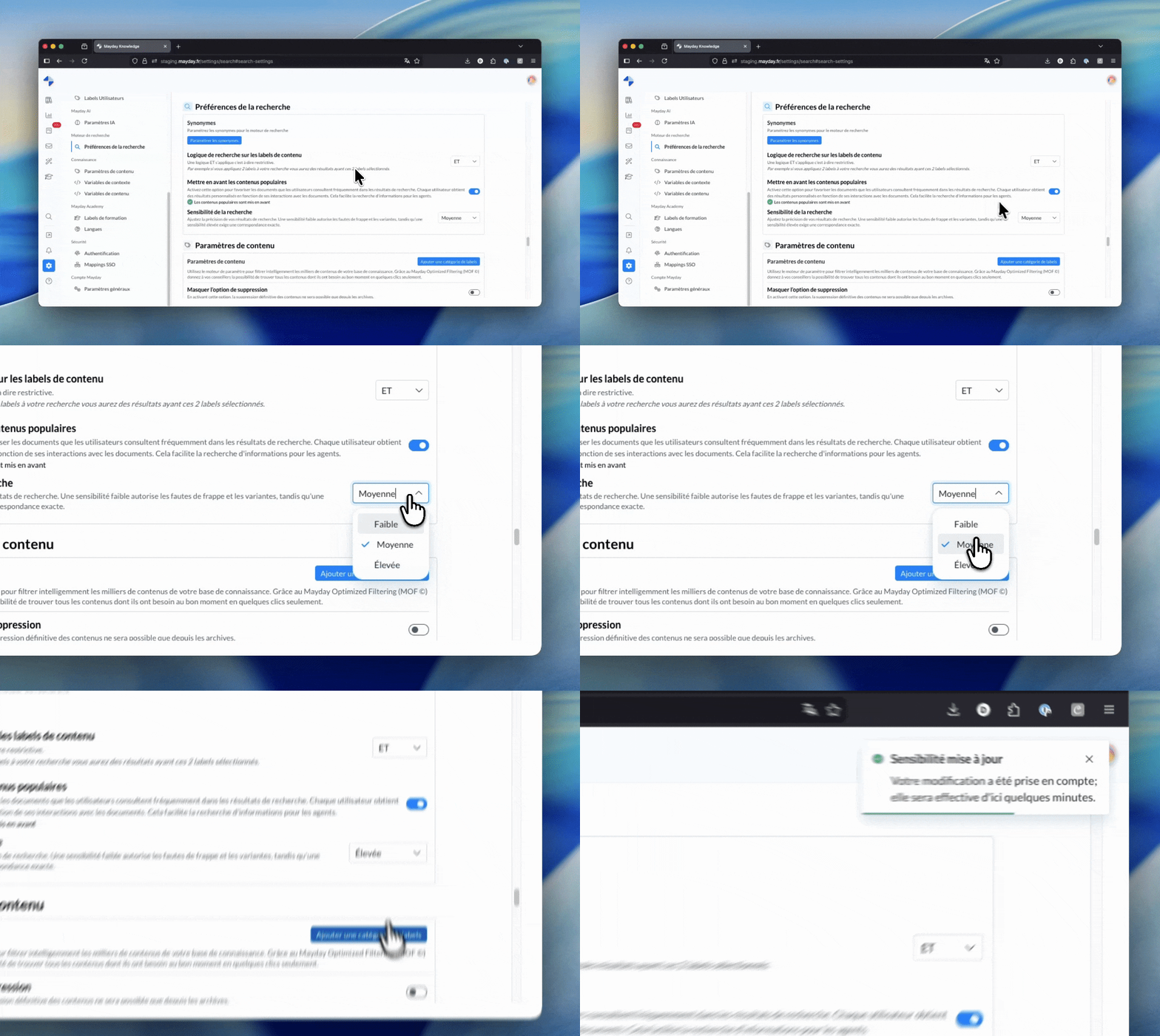
You can now adjust your search engine’s tolerance with the new Search Sensitivity parameter, available in search preferences of Mayday Admin. Three levels are offered:
Low: Tolerates typos and spelling variations for more permissive results.
Medium (default): A balance of flexibility and precision, suitable for most use cases.
High: Requires a more exact match with searched terms, ideal for technical knowledge bases.
👉 The benefit for you? Complete control over the relevance of search results, tailored to the specifics of your knowledge base and user habits.
A small note of caution
This parameter applies to your organization as a whole and impacts all users (Admins, Agents, Widget/Zendesk).
By default, all existing companies are configured to the Medium level.
Refer to the dedicated documentation to learn more about this new feature:
🔌 New API endpoints to manage your content!
The Mayday API is enriched with new endpoints that allow you to manage your content programmatically. You can now:
Create content (articles, guides, steps, key steps), and collections
Edit your existing content (by ID or locale)
Archive and Delete content
Retrieve task types and statuses
👉 The benefit for you? Greater flexibility to automate your content management workflows and integrate Mayday with your internal tools.
Refer to the dedicated documentation to learn about these new endpoints: 🔗 API Documentation
🐞 Some bug fixes!
Public knowledge base tabs: The tabs for AI Analytics, Workflow, Sessions, Exports, and Automated Exports are now visible on public KBs.
Filter retention: The selected KB is now retained when navigating between Dashboard tabs.
Export permissions: The Export tab is now accessible even without Read Dashboard permissions, if permitted by your role.
Key steps: Moving key steps within a guide now works correctly.
Labels on Hub: All assigned feedback labels now display correctly.
Embedded video: Embedded videos now display correctly on the Desk side when clicking "Open to enlarge."
🌐 Mayday Selfcare
🐞 Some bug fixes!
Collection name synchronization: Changes to a collection name in the administration side now correctly reflect on the published Selfcare (widget and full page). Manual republication is no longer required for changes to take effect.
Title color consistency: Content title colors now display identically between the administration interface and Selfcare.