👋 Introduction
Welcome everyone 👋
Here's our new production release, with several new features in the lineup 👀
On the agenda ⭐:
Share your feedback on AI agents' responses through comments 📣
Easily change your scheduled assignment date on the Mayday Academy 📅
Filter your modules and courses by publication status “scheduled” 🔍
Preview live cards of your modules and courses during their creation 🤩
Add an audio track to your quizzes and practical cases 🦻
Integrate public links directly into your articles with an iframe 👁
And many improvements! 🎉
Let's dive into it 👀
🤩 Global New Features
📣 Express Yourself on the Quality of Your AI Agents' Responses
—
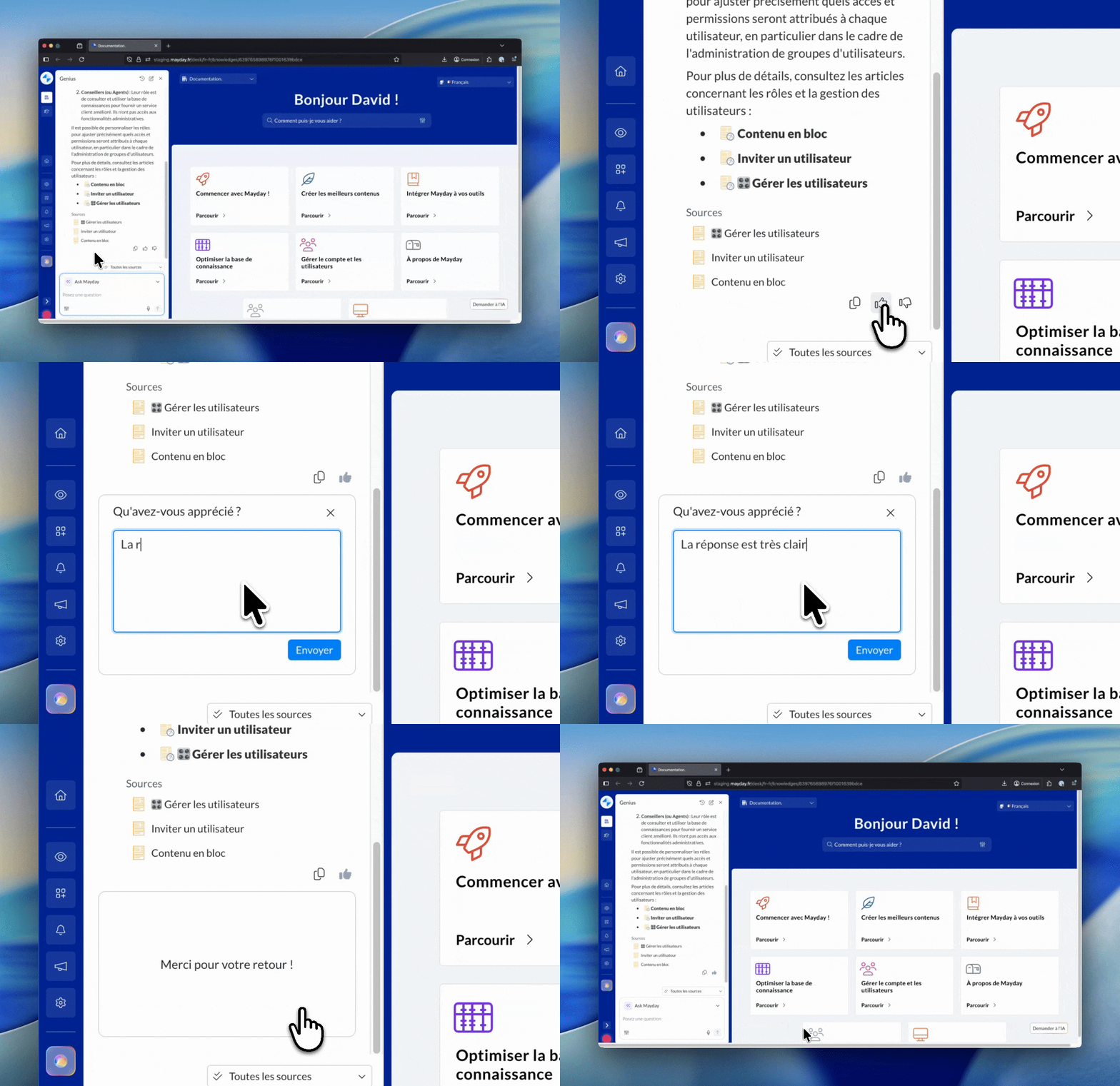
The Mayday AI agents aim to provide the information you're searching for, assist you in your actions, and help with customer support tickets...
Until now, you could give a simple feedback 👍 or 👎 on each response. This allowed us to know if a response satisfied you, but without specifying what you liked or disliked, and without helping administrators understand your needs to optimize the agent.
Now, after clicking 👍 or 👎, you can add a text comment to explain your opinion.
These detailed feedback are then available in the AI agent's export, allowing administrators to:
find your question and the corresponding answer,
understand why the response was satisfactory or not,
adapt and improve the AI agent continuously.
📄 View the dedicated documentation to discover this new feature:
📚 Mayday Knowledge
✍ Administrators on Mayday
😄 Several Improvements!
🤖 AI Agents' Performance
We are continually working on technical optimizations of our AI agents to ensure you benefit from AI agents that are increasingly relevant and efficient.
🌍 Content Translation
It has been possible to automatically translate content into another language via AI for a while on Mayday, whether during the creation of a language or its modification.
Since recently, when creating content in a new language, it's also been possible to automatically adapt the language of mentioned content so they match the target language.
This feature wasn't available when modifying existing content in multiple languages: it is now.
🐞 Some Fixes!
We've fixed the following anomalies:
Displaying and Scrolling of Synonyms: The list didn't display entirely and scrolling was inactive, preventing access to all created synonyms.
Activation of Corporate Favorites: It was impossible to activate this option from administration center preferences, and saving changes failed.
Error Message During Duplication: An error message appeared during content duplication, although the operation was successful.
Data Precision (Dashboard and Exports): Various fixes were applied to resolve data inconsistencies displayed in the dashboard and within exports.
👥 Agents on Mayday
🐞 Some Fixes!
We've fixed the following anomalies:
Text Selection in Tables: Text selected within a table appeared in white, making it unreadable against the background.
Urgent Notifications: The text content of these notifications no longer appeared on screen.
🎓 Mayday Academy
📅 Easily Change Your Scheduled Assignment Date
Since the latest version, you can schedule your training assignments in advance—whether it's a module or a course. It is now possible to change this date with one click directly from your assigned learners' dashboard!
💡 Result: save time in managing and planning your training 🚀
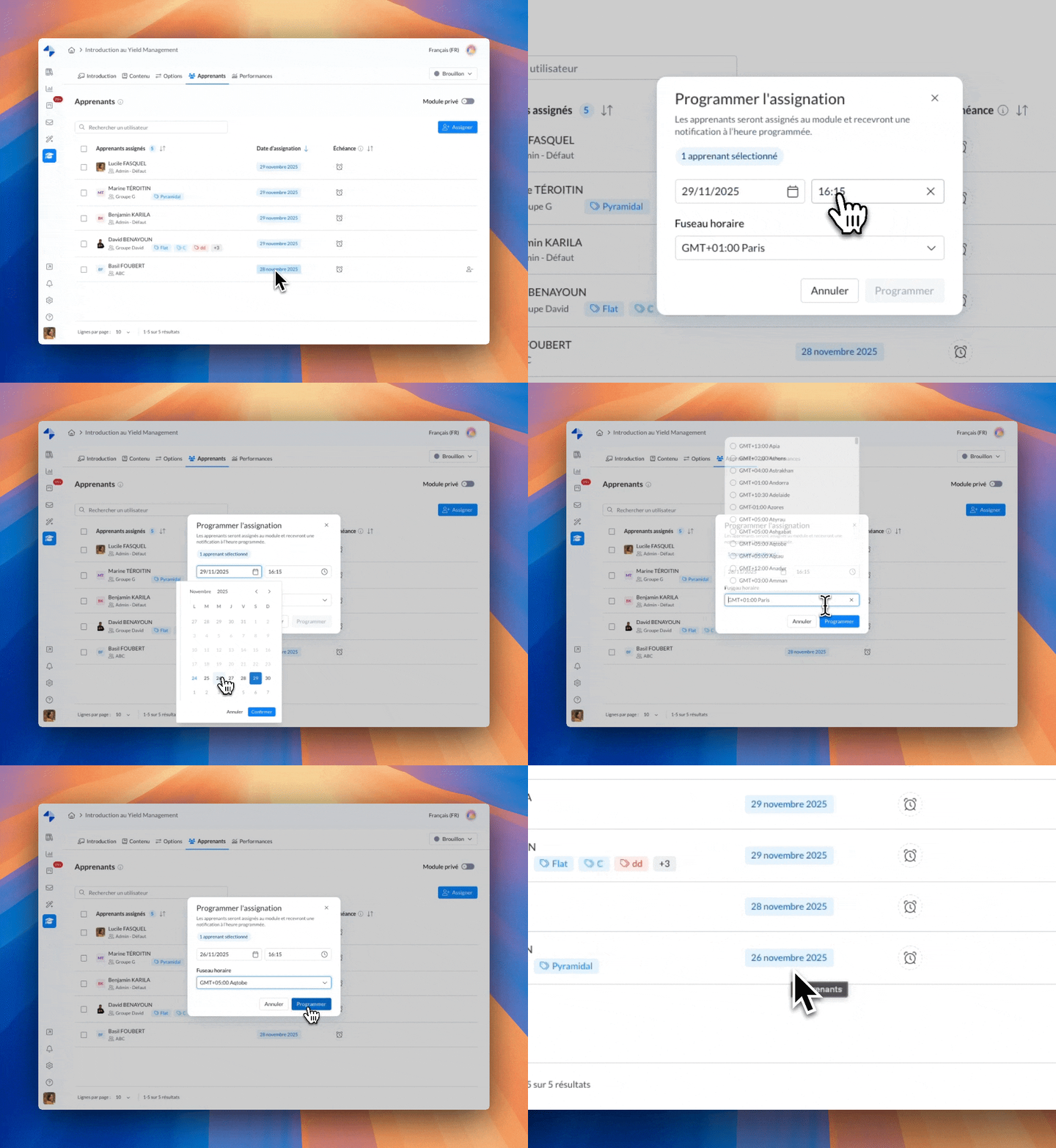
📬 How does it work?
Click on the badge with the assignment date
Select the new desired date/time
Confirm!
🔍 Filter Your Modules and Courses by Publication Status “Scheduled”
From your homepage, you can now only display modules and courses with a publication status set to “Scheduled”.
💡 Result: instantly find the modules and courses you're searching for!
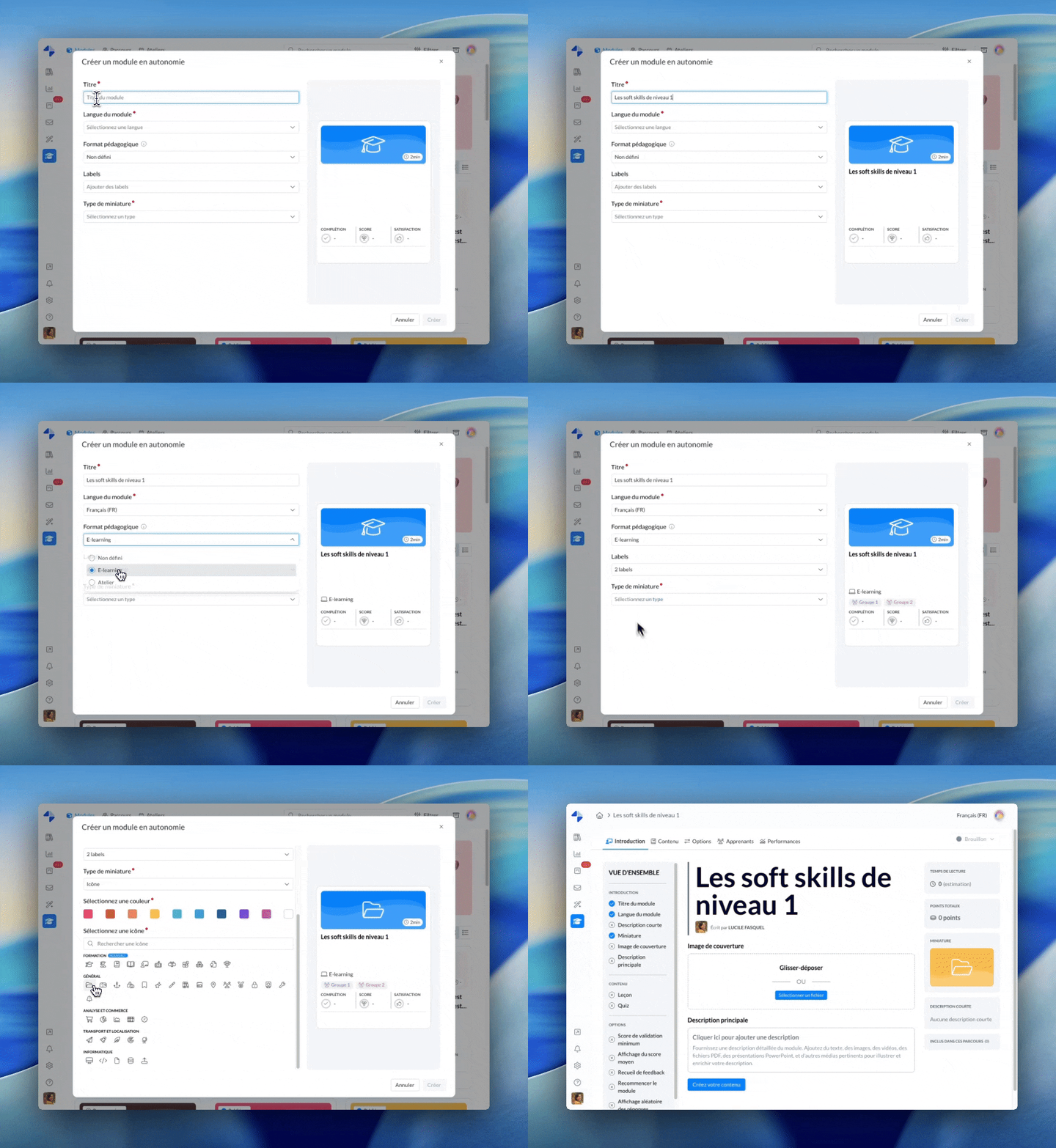
🤩 Preview Live Cards of Your Modules and Courses During Their Creation
While creating a module or course, a real-time preview now appears on the right side of the screen. It lets you see precisely where each piece of information you enter will be displayed.
💡 Result: no more surprises—you immediately see the final rendering and know exactly where to find each piece of information!
🦻 Add an Audio Track to Your Quizzes and Practical Cases
In addition to video files, you can now integrate audio files (MP3, M4A, WAV, FLAC, AAC, etc.) into your instructions, responses, or even corrections.
💡 Result: even more possibilities to personalize your quizzes and practical cases, and train your agents with the most suitable content!
🌐 Mayday Selfcare
Integrate Public Links Directly into Your Articles with an Iframe
The encapsulation feature is now available for public links! You can easily embed existing content, like those from your Selfcare, directly into your articles.