👋 Introduction
Hello everyone 👋
We are excited to announce a new production release with several major updates:
Conversation history in Mayday Genius, making it easier to find and resume your past interactions with AI agents
Enhanced customization of AI agents, especially for analyzing Salesforce, Intercom, and Zendesk tickets
"Users" export now available, so you can analyze user activity in detail with Mayday
Automatic intelligent insights on your Mayday content
Schedule publication of Academy modules & courses
Reminder notifications for upcoming deadlines for an Academy module
Highlighting search keywords in Selfcare Embedded and Widget
And many optimizations to improve your daily experience and efficiency!
Let's explore everything 👀
🤩 Overall Updates
↩ Find your old conversations on Mayday Genius
—
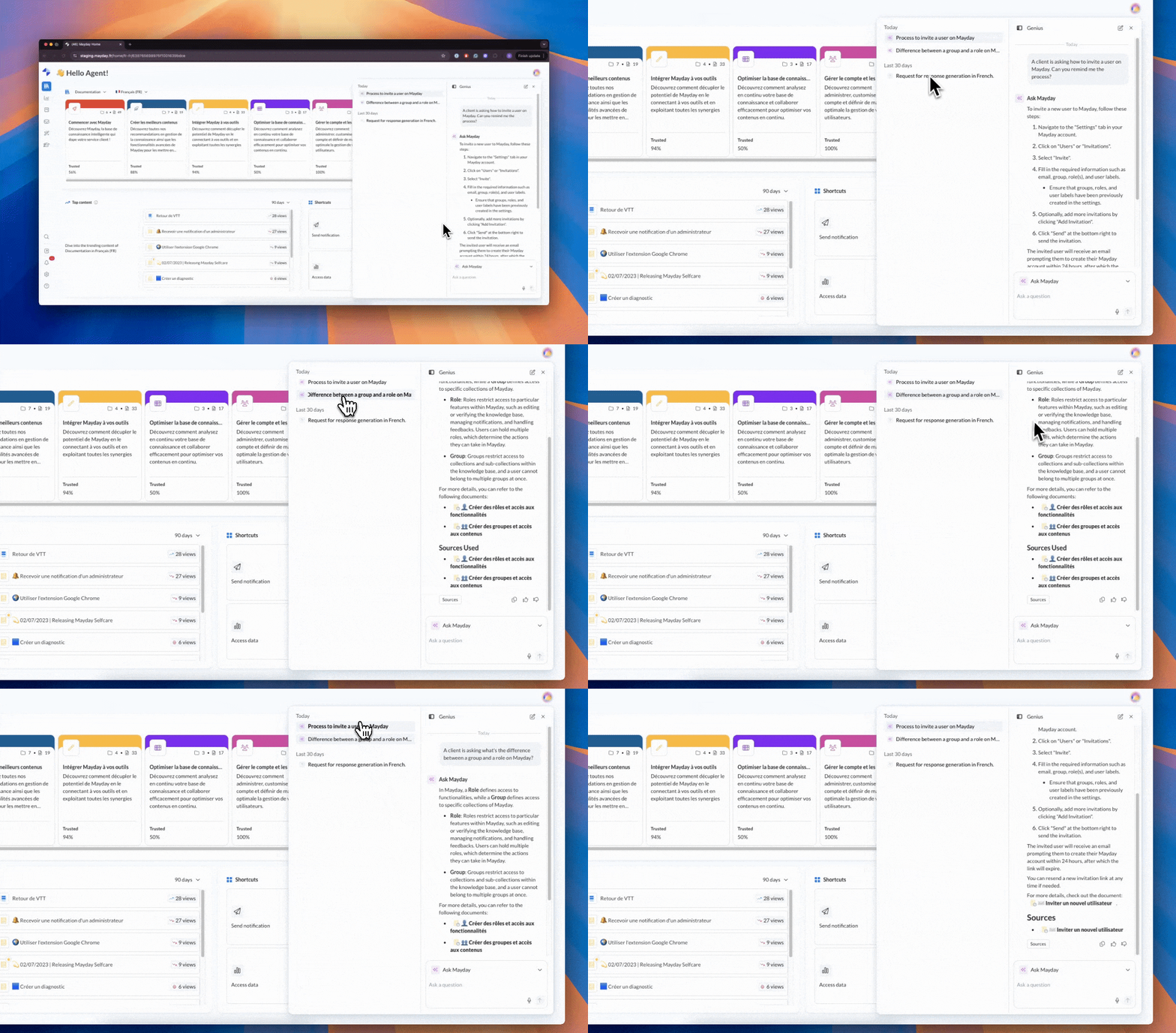
Until now, your interactions with AI agents on Genius were stored, but you couldn't see them.
Good news: now, all your conversations are accessible in your history, and you can even resume them at any time to pick up exactly where you left off.
This feature is available on all our platforms.
Note: if an AI agent is deleted, deactivated, or you no longer have access to it, the agent's name disappears and the conversation cannot be resumed.
📄 Check out the dedicated documentation to learn more about this update:
📚 Mayday Knowledge
✍ Administrators on Mayday
🤖 Enhanced customization of your AI agents
—
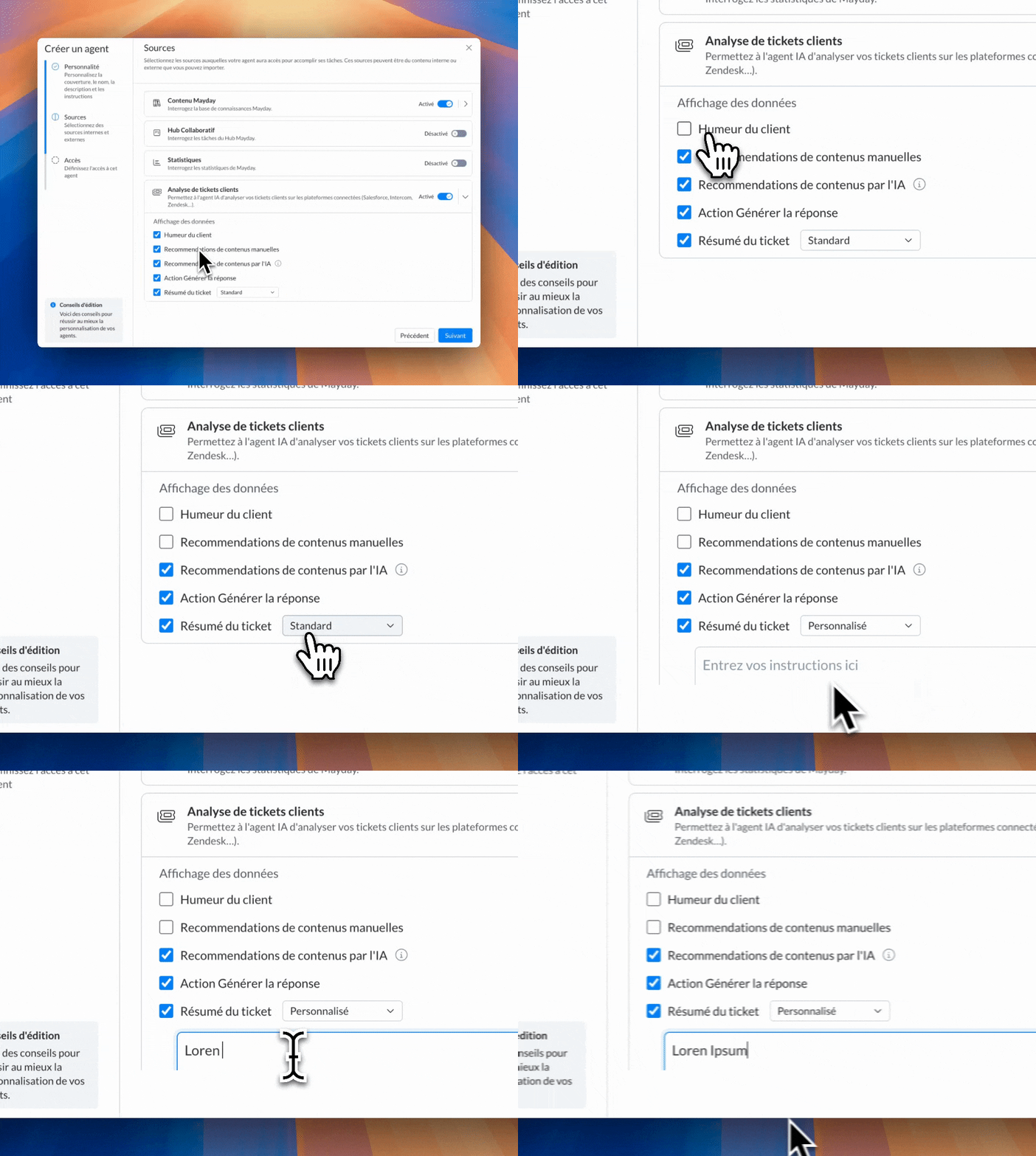
Good news! A new optimization improves the customization of your AI agents.
You can now customize how your AI agents analyze client tickets 🎉
Previously, the analysis was the same for all agents (like the default agent Answer Generator).
Now, each AI agent can have its own analysis configuration, adapting the information and recommendations shown to your needs.
📄 Check out the dedicated documentation to learn more about this update:
💡 Intelligent proposal of insights on your Mayday content
—
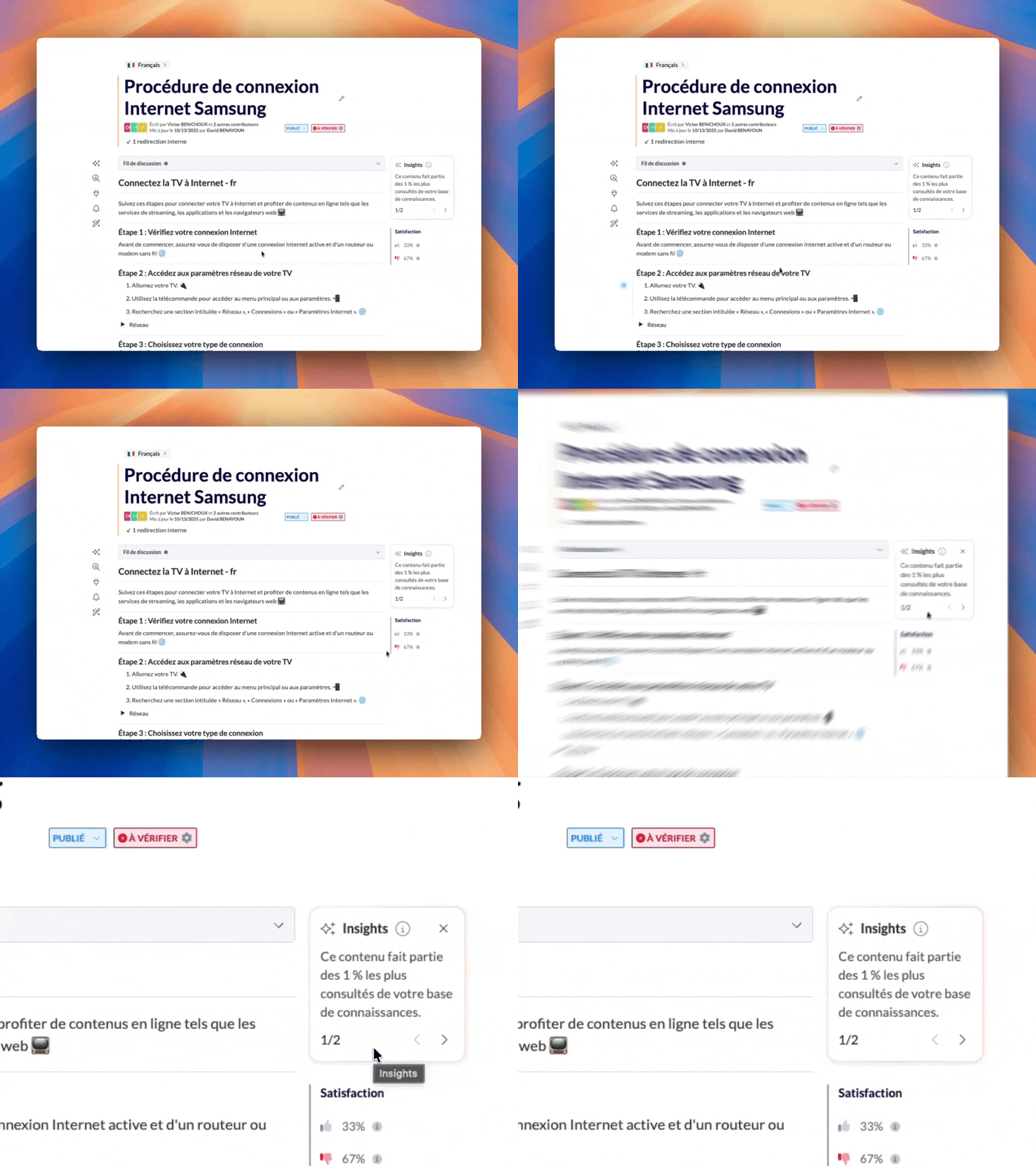
Since the arrival of AI agents, you can explore your Mayday data by asking questions to AI agents.
Now, you don't need to ask questions: Intelligent Insights, automatically provided by the agent Knowledge Insider, directly display key information about your content.
See at a glance the most viewed content, never read, recently commented on, or declining in readership—so you don't miss important signals.
To view these insights, the agent Knowledge Insider must be activated and accessible to you (based on your user role).
📄 Check out the dedicated documentation to learn more about this update:
⬇ "Users" export now available
—
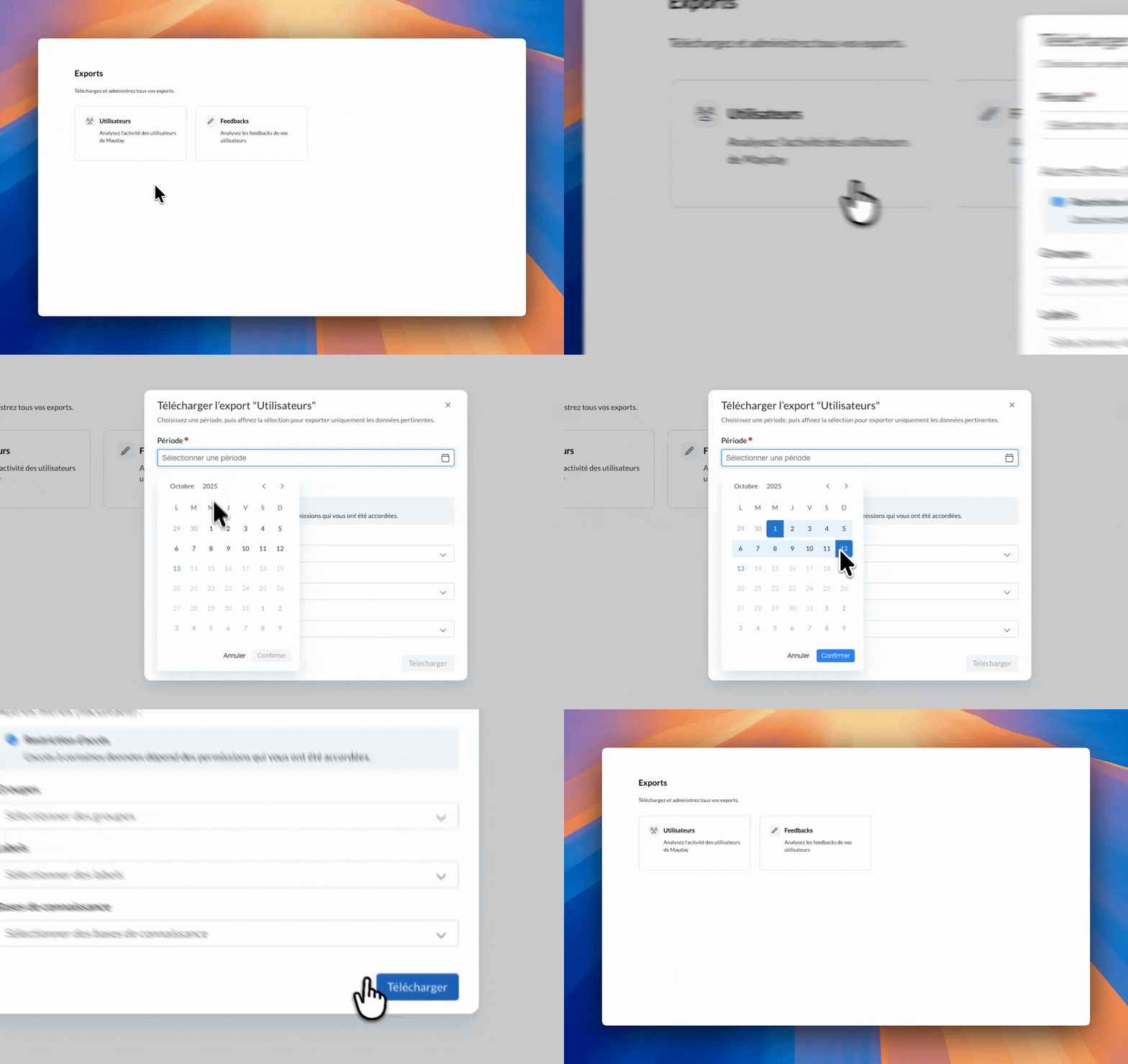
Following feedback exports, the Mayday export center now includes a new "Users" export 🎉
You can now analyze the activity of your agents and administrators: number of views, feedback, content created or edited, modules, and more.
As always, filters by period, groups, labels, and knowledge bases are available.
And this is just the beginning 👀. Upcoming exports will focus on content and Academy training.
😄 Notable Improvement!
New improvement: it is now possible to assign a Hub task to a user role at any time 🎯
Previously, you could assign feedback to a role when sending it.
However, once the task was created, it could only be assigned to individual users.
Now, a task can be assigned to a role at any time, during its creation or afterwards.
The role must have the necessary permission to be assigned.
All users belonging to that role receive notifications related to the task.
👥 Agents on Mayday
🐞 Some Fixes!
We have fixed the following issues:
Notification filters: Filters (unread, etc.) were not working properly in the list of received notifications.
Chrome extension on Salesforce: Navigation in Mayday collections and content had issues.
Zendesk macros: Some macros did not trigger correctly from the Chrome extension or the Zendesk app.
🎓 The Mayday Academy
📅 Schedule publication of modules & paths
As an administrator, you can now schedule the publication of your training sessions in advance, whether for a module or a course, private or public.
📬 How does it work?
Click "Schedule publication" in the upper right corner of your module or course pages.
Set the date and time you want to publish your module or course
You can change the schedule at any time by clicking "Scheduled" then "Modify scheduling".
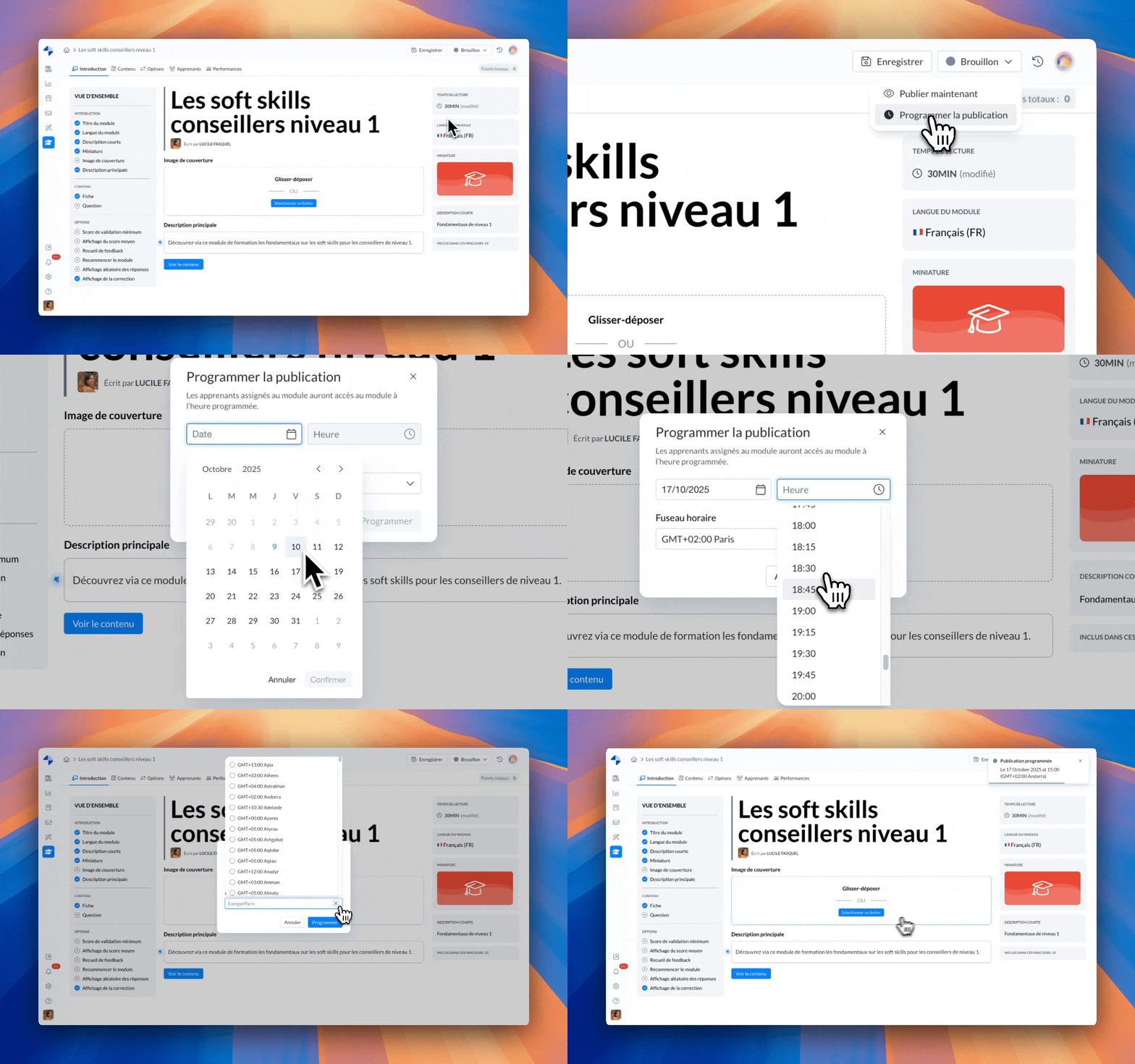
Admin interface - Schedule publication
💡 Result: better organization and planning of your training, as well as perfectly synchronized deployment 🚀
You will now see the "Scheduled" status on the cards of modules and courses on the home page, as well as on the slides of modules within a course or workshop.
⏰ Reminder notifications for upcoming deadlines
Your learners won't miss a deadline!
📬 How does it work?
A first reminder is sent 3 days before the deadline (D-3)
A second reminder arrives on the due date, for those who haven't yet completed their module
💡 Result: no unfinished training, a better completion rate, and teams always up-to-date on the latest procedures 🚀
Notifications will be sent by email and/or in-app.
This choice is set in the alert and notification preferences of the Academy, using the new option "Training deadline reminder notifications".
😄 Additional Improvements!
✨ Workshops: video links from the workshop on the agents side are now clickable!
✨ Learner section of your training:
Simplified unassignment: remove a learner with a single click using the icon at the end of the table row.
Instant global view: see at a glance the total number of assigned learners without having to go through all the table pages.
✨ Export improvements - handling empty files:
When an export contains no data, an explanatory message now appears to clearly indicate the reason for the error toast when attempting to download, to avoid confusion.
🐞 Some Fixes!
✔ Timed questions improved: the wrong answer message no longer appears when a question is not answered within the allotted time.
✔ The import error message is now clear when a SCORM file is in the wrong format, to clearly indicate the cause of the problem and avoid confusion.
🌐 Mayday Selfcare
🔦 Selfcare Embed - Highlighting keywords in search results
To improve the reading experience and make it easier to navigate your Selfcare embed content (Selfcare Widget or FAQ embed), the keywords entered by users during search are now highlighted in yellow in the results and displayed articles.
This update allows your users to:
Immediately identify relevant parts at a glance;
Save time understanding the searched content;
Navigate more effectively through the various results.
A simple yet valuable improvement to make your selfcare journeys more intuitive and efficient.
This feature is only available for FAQ embed and Selfcare widget for now.
😄 Additional Improvements!
✨ Optimization of the IA personalization test environment
You can now choose the Knowledge Base used for your tests. The results will be closer to the real production experience.
✨ Rate limiting for Selfcare IA:
To ensure service stability and prevent any abusive or malicious use of Selfcare IA features, we are implementing a rate limiting mechanism.
Access to IA conversations is temporarily suspended
A message appears to notify the user that sending new messages is temporarily unavailable, and suggests trying again later
🐞 Some Fixes!
✔ ASK IA Selfcare
Language management is now improved: IA responds in the language used by the user when sending a message
The customization recording of ASK IA Selfcare is now error-free
Discussion closure: a text that was automatically added at the end of each conversation with IA Selfcare has been removed, so customizing ASK can now close the conversation as desired.