👋 Introduction
Hey everyone 👋
We are thrilled to announce our latest release, featuring amazing new features to explore 👀
On the agenda ⭐ :
Advanced customization of AI agents thanks to the inclusion of variables ⚙
A new data source, namely public websites 🌐
Two new data exports available, on AI agents and Mayday content ⬇
The ability to schedule assignment to the Mayday Academy's courses and modules 📆
And numerous improvements! 🎉
Ready to dive in? 🚀
🤩 Global updates
🤖 Advanced customization of AI agents using variables
—
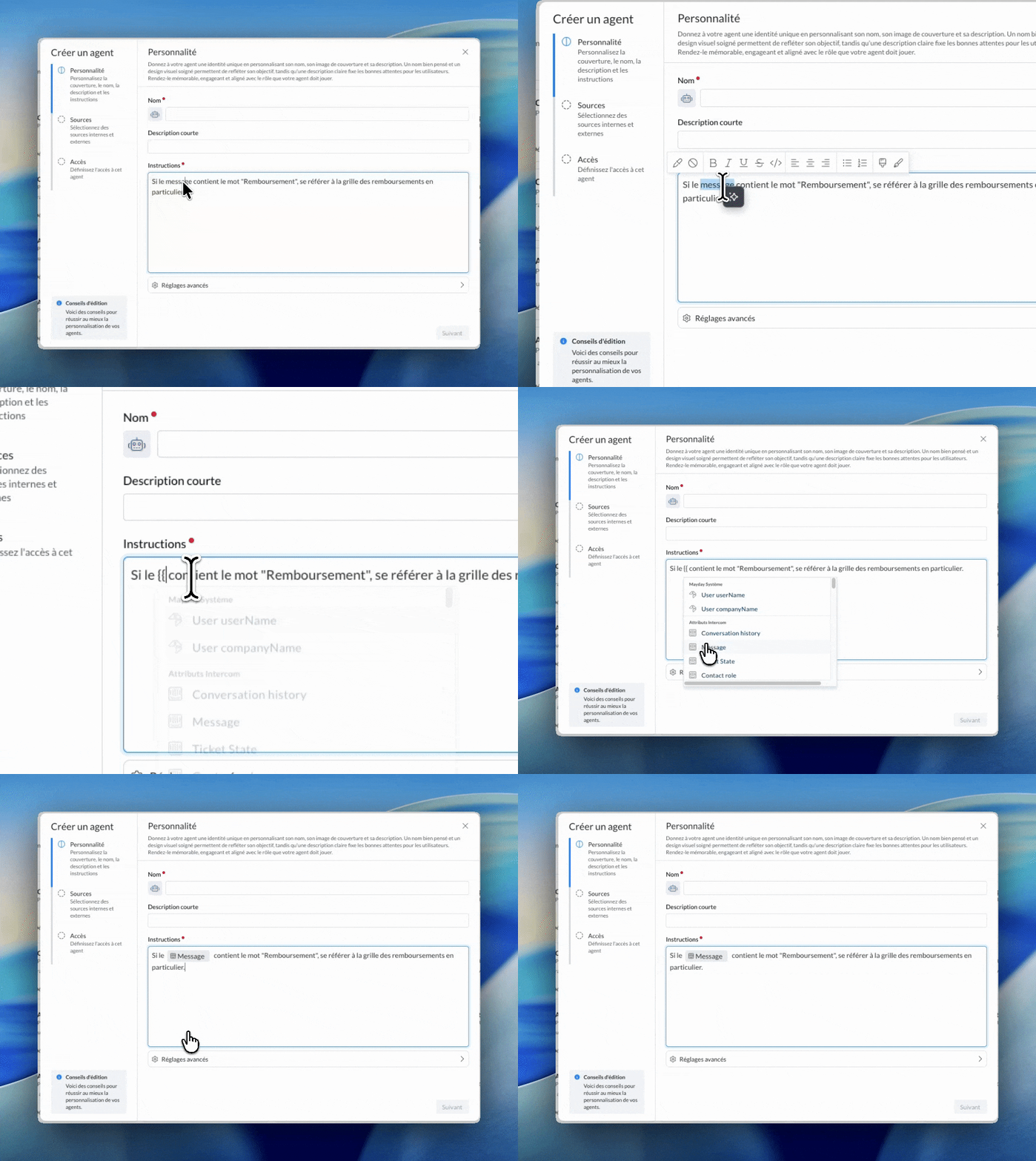
As you know, we are constantly looking to enhance the customization possibilities offered by Mayday's AI agents.
In this context, you can now use variables in the customization prompt of an AI agent.
This update allows you to take customization even further: you can include variables (Mayday information or ticket attributes) so the AI follows rules based on their value.
Some concrete examples
“Always sign the response with {{mayday username}}”: the generated response will be automatically signed by the user utilizing the agent on Mayday.
“Always start the response with ‘Hello {{client name}}’”: the response consistently begins with a greeting using the client's name.
“If {{client location}} is outside Europe, then never offer refunds”: useful for adjusting responses according to the client's location.
“If {{client type}} is type A, then respond in this specific manner”: allows for tailoring responses based on the client type.
This feature is particularly handy for the agent Answer Generator and other similar agents.
📄 Check out the dedicated documentation to discover this new feature:
🔌 Connection of public sites to Mayday
—
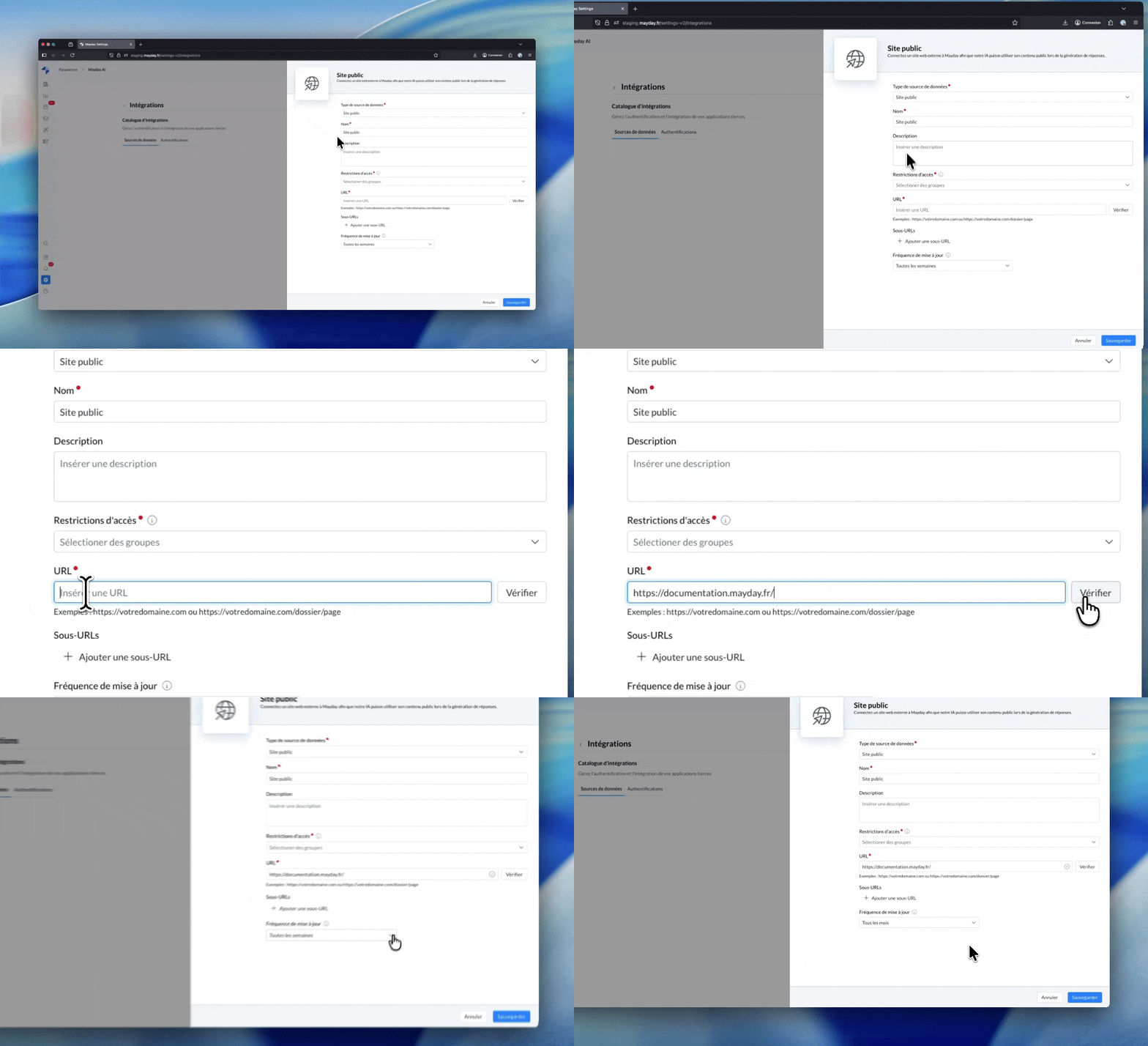
It is now possible to connect a public site to Mayday to allow your users to access the information from these sites via:
the search engine
AI agents, including Ask Mayday
To configure this feature, simply create the data source in the dedicated section, enter and verify the site's URL, then define the update frequency.
Once configured, you can grant access to this site to any AI agent. The agent can then use the site's pages as relevant sources to answer user questions.
Use case example: connect your FAQ site or partners' FAQs so Mayday AI agents can utilize these regularly updated informations.
📄 Check out the dedicated documentation to discover this new feature:
📚 Mayday Knowledge
✍ Administrators on Mayday
⬇ Two new exports available
—
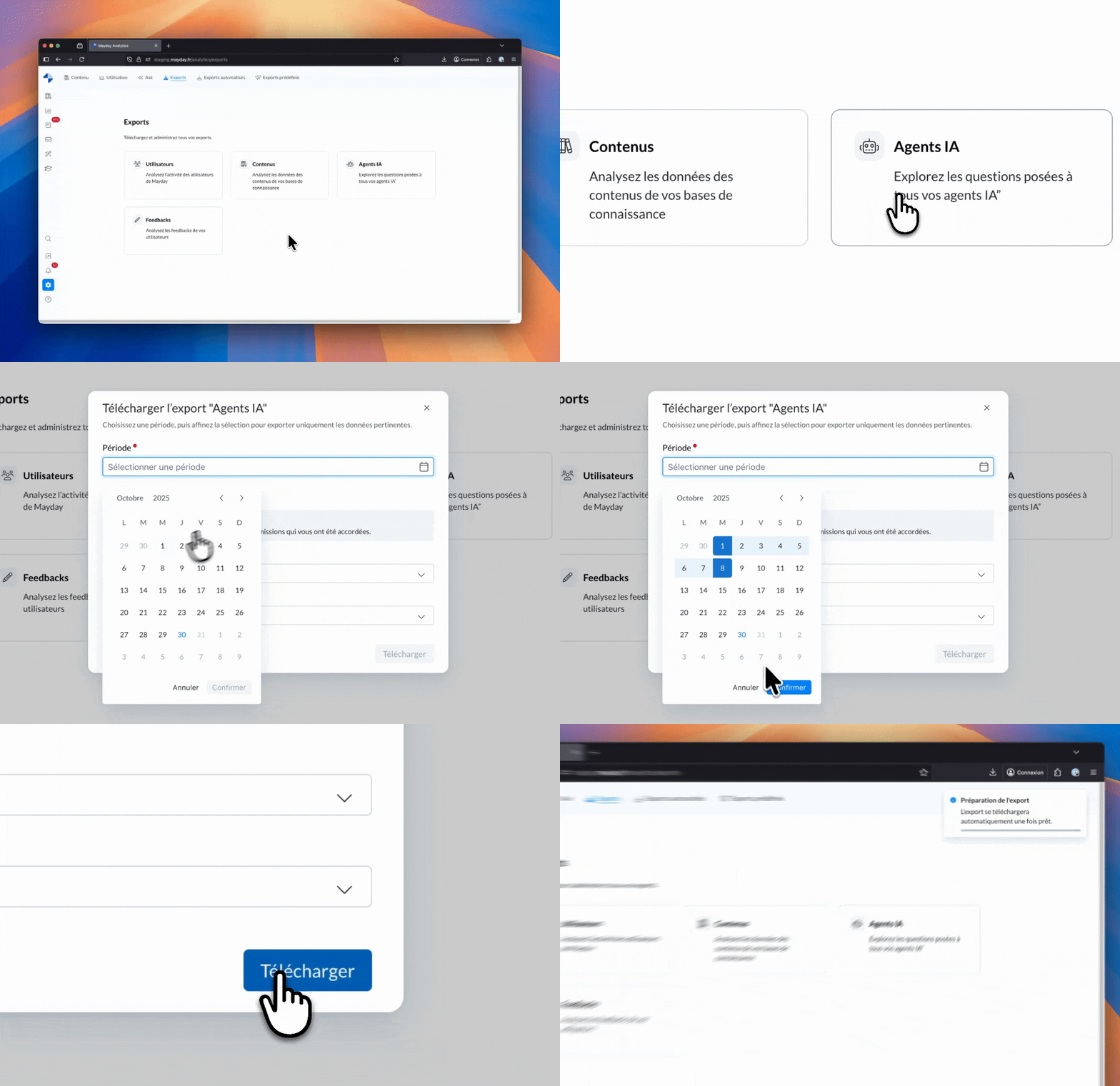
✨ A few weeks ago we launched user and feedback exports.
Today, two new exports join the list:
📄 Mayday Content
Available only for administrators with editing rights via their role.
Export the list of your content with all key data:
Number of views, last editor, creator, SAT, related feedbacks, notifications, etc.
This export allows you to:
📊 Identify the most used and appreciated content
📝 Analyze those generating the most feedback
And many other use cases!
🤖 AI Agents
Available only for administrators with AI agents activated.
Export all questions asked to your AI agents by your users.
Each line includes the message, AI's response, and numerous data: response time, satisfaction, triggered actions, ticket ID, user name, etc.
This export allows you to:
✅ Evaluate the response quality and identify possible improvements
🔍 Observe question trends and user satisfaction
📈 Get a comprehensive view of your AI agents' activity
😄 Noteworthy improvements!
Until now, it was possible to publish all items of a collection in bulk.
If the collection contained sub-collections (and these could themselves have sub-collections), the bulk publication concerned only the contents of the original collection.
Contents of sub-collections, regardless of their level, were not published.
Now, an option allows publishing all contents of all sub-collections in a single operation.
Optimization of block mentions - Two optimizations available or upcoming:
Displaying sections and subsections in block contents
Sections, subsections, and other elements contained in a block integrated into another content did not appear in the table of contents or summary (Mayday Desk, Selfcares, etc.).
This created "holes" in the table of contents and summary, even if the block appeared as normal text when reading.
Now, all sections and subsections of block content will appear in the table of contents and summary exactly like other content sections, across all Mayday reading platforms (Selfcares, Desk, Widget, etc.).
Coming soon:
We are actively working on optimizing this feature with the goal of providing synchronized blocks (and not content) that can be reused across all your Mayday content and knowledge bases 👀
🐞 A few fixes!
We have corrected the following anomalies:
Content synchronization: In some cases, when a user consulted content while another edited it, the last edited version was replaced by the previous version, even after refresh. This issue is now corrected.
Content actions on templates: It was possible to add content actions to a template, like a message or macro trigger. However, when creating new content from this template, the action was not retained. This anomaly is now resolved.
👥 Agents on Mayday
🐞 A few fixes!
We have corrected the following anomaly:
Label filters on Genius Mayday content: In some cases, the list of labels was truncated at the bottom of the interface, making some labels impossible to select in filters. This issue is now resolved.
🎓 Mayday Academy
📅 Scheduling module & course assignments
As an administrator, you can now schedule your training assignments ahead of time, whether for a module or a course.
💡 Result: save time in managing and scheduling your training, and automate skill improvement for your agents 🚀
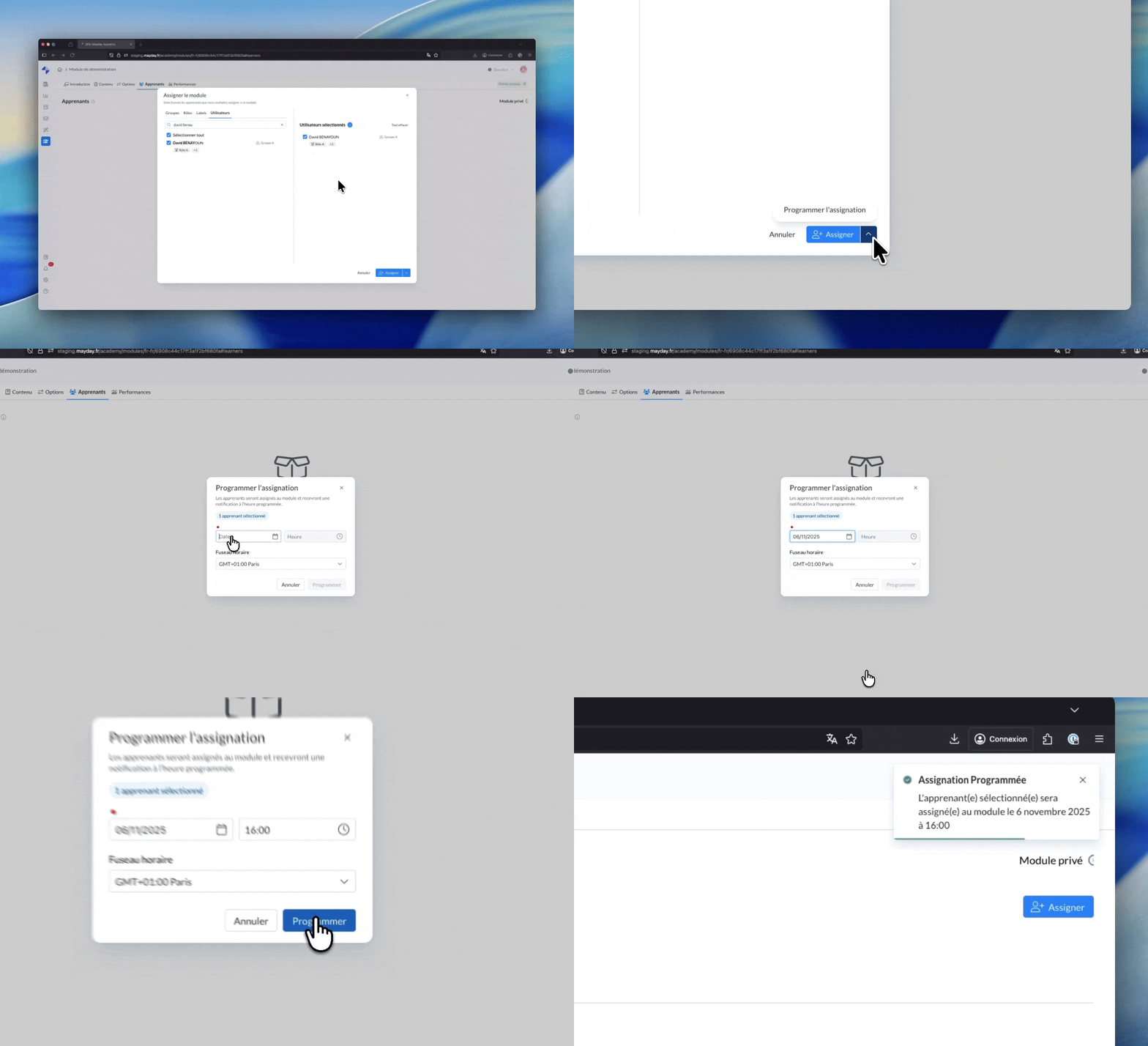
📬 How does it work?
Click “Assign the module” or “Assign the course”.
In the window that opens, click the arrow to the right of the "Assign" button.
Select “Schedule assignment”.
Choose the desired date, time, and time zone to initiate the assignment.
🧠 As with a classic assignment, you can target one or more users, a group, a role, or a user label.
😄 A notable improvement!
✨ AI agents exports: also track the usage of your AI agents dedicated to the Academy such as the quiz generator, module generator, or your custom agents!
🌐 Mayday Selfcare
😄 A notable improvement!
✨ The ASK Selfcare feature allowing your users to ask their questions directly to the AI is now available on your embedded FAQs!