👋 Introduction
Our latest production release is live, and it comes with a major revolution for your teams! ✨
Today marks a decisive turning point in the history of Mayday: you can now fully create and customize your own AI agents. 🎯
Gone are the days when you had to settle for generic agents. Create tailor-made AI agents, adapted to your teams, your processes, and your specific needs. Define their roles, data sources, instructions... and make them accessible to whoever you want, wherever you want.
Unprecedented freedom to cover all your use cases! 🔥
Here’s what to expect 👇
⚡ Create your own AI agents: fully customize your AI agents or start from scratch for 100% tailor-made agents.
🎯 Control access: precisely define who can use which agents, on which platforms.
🗣 Genius accessible to agents: your AI agent hub is now available on all agent platforms.
↩ Retry Option: allow your agents to retry their training modules
🙋 Attendance management: Record attendance after your training workshops
⚙ And of course, many optimizations on various features.
Let’s have a look 👀
🤩 Global new features
⚙ New features for Mayday administrators
🎨 Create and customize your AI agents on Mayday!
✨ NEW FEATURE | Create tailor-made AI agents and fully control their access!
Today we are taking a major step: you can now fully create and customize your AI agents!
This feature meets a fundamental need: having AI agents perfectly adapted to your different teams, processes, and specific use cases.
Watch the video to discover how to create an AI agent on Mayday!
🎯 Why this revolution?
Until now, you had to settle for generic agents, effective but not always aligned with your precise needs.
Today, everything changes: create tailor-made agents for each team, each process, each audience.
Translation agent in all languages, generic Q&;A AI agent, AI agent specialized in questions during customer calls... each agent can have its own personality and data sources.
🛠 How does it work?
AI preferences have been completely redesigned to give you total control:
Customize default agents:
Edit the instructions, role, and behavior of agents created by Mayday
Adapt them to your context without starting from scratch
⚠ Note: the sources of these agents cannot be modified
Create your own agents:
Define their instructions, role, data sources
Build AI agents 100% aligned with your needs
Total freedom of configuration
Control access:
By interface: choose on which Mayday platforms each agent will be available
By user role: precisely define who can access each agent
Global activation: activate or deactivate an agent with one click
📋 Access conditions for your users:
An AI agent is accessible to a user if:
AI is enabled for the company
The AI agent in question is enabled
The AI agent is accessible at the user's role level
The AI agent is enabled on at least one platform the user has access to
🔄 Migration of your Ask Mayday assistants:
Good news: your existing customizations on Ask Mayday assistants have been automatically migrated!
Private assistant → find your instructions in the agent “Ask Mayday”, within the instructions.
Copilot → find your instructions in the agent “Answer Generator”, within the instructions.
Important note: The public assistant for your FAQs is not yet an agent. Its customization remains accessible at its usual location.
🔑 Manage AI access from user roles
✨ NEW FEATURE | Precisely define access to AI features for each user role!
It is now possible to define access to AI features directly at the user role level, to limit each agent to its intended audience!
Watch the video to discover how to limit access to AI agents on Mayday via user roles!
🎯 Why this feature?
Each team has different needs. Depending on the seniority, tenure, or scope of the agents, the relevant AI agents may vary. Until now, an AI agent was either accessible to the whole company or to no one.
Now, you can limit access to an AI agent based on Mayday roles. This allows you to assign each user profile only the AI agents that are truly useful to them.
This granularity allows you to create tailor-made experiences for each type of user.
🤔 How to use it?
Access the settings of a user role
Select the AI agents that this role will have access to
Very soon, you will also be able to define other AI features accessible to each role (in addition to agents)
⚠ Points of attention:
If you give access to an AI agent via a role, make sure that this agent is enabled and available on at least one platform used by these users
Automatic migration: all existing roles by default have access to default AI agents (as before)
New agents: you will need to manually define the roles that have access to them — by default, no role will have access
New roles: they will not have access to any AI agent by default, remember to configure their access
🚀 Optimizations & Improvements
🧠 Improved relevance of AI agents
We have deployed many optimizations to improve the quality and relevance of the answers provided by our AI agents.
And this is just the beginning: more improvements will be rolled out throughout the summer, to offer you agents that are always more efficient and useful every day!
🗣 New features for agents
🎯 Mayday Genius arrives on all your agent platforms!
✨ NEW FEATURE | Access all your AI agents from Desk, Widget, Zendesk, and iAdvize!
Mayday Genius, our AI agent hub, is now accessible on the agent side on all Mayday platforms!
Watch the video to discover how to access AI agents on Mayday agent platforms!
🎯 Why this evolution?
AI agents are no longer reserved for administrators!
Until now, only Mayday administrators could use AI agents. Today, you too, as an agent, can benefit from them. These powerful tools can transform your experience on Mayday by helping you handle customer requests faster and more efficiently, thanks to many smart features.
And that's not all: your administrators can now customize existing agents, or even create them from scratch, so they perfectly meet your needs.
💡 Have a specific idea or need? Talk to your administrators!
🤔 How does it work?
Open the Mayday Genius section — it replaces the old Ask Mayday section
Choose the AI agent best suited to your request
Ask your question with ease
Continue the conversation as long as necessary
Switch agents at any time if your need changes
⚠ Access conditions:
Have access to AI features
Have access to at least one AI agent (configurable by administrators in the AI agent preferences), on the platform used
📍 Available platforms:
Mayday Desk
Mayday Widget
Zendesk Application
iAdvize Application
🔄 Evolution of Ask Mayday:
Ask Mayday becomes an AI agent integrated into Genius, while retaining all its usual features.
⚠ Important note:
The Answer Generator agent remains accessible, but only when you are working on a customer ticket.
📚 What's new in Mayday Knowledge
⚙ New features for Mayday administrators
🚀 Optimizations & Improvements
🔍 Deleted or archived content better identified
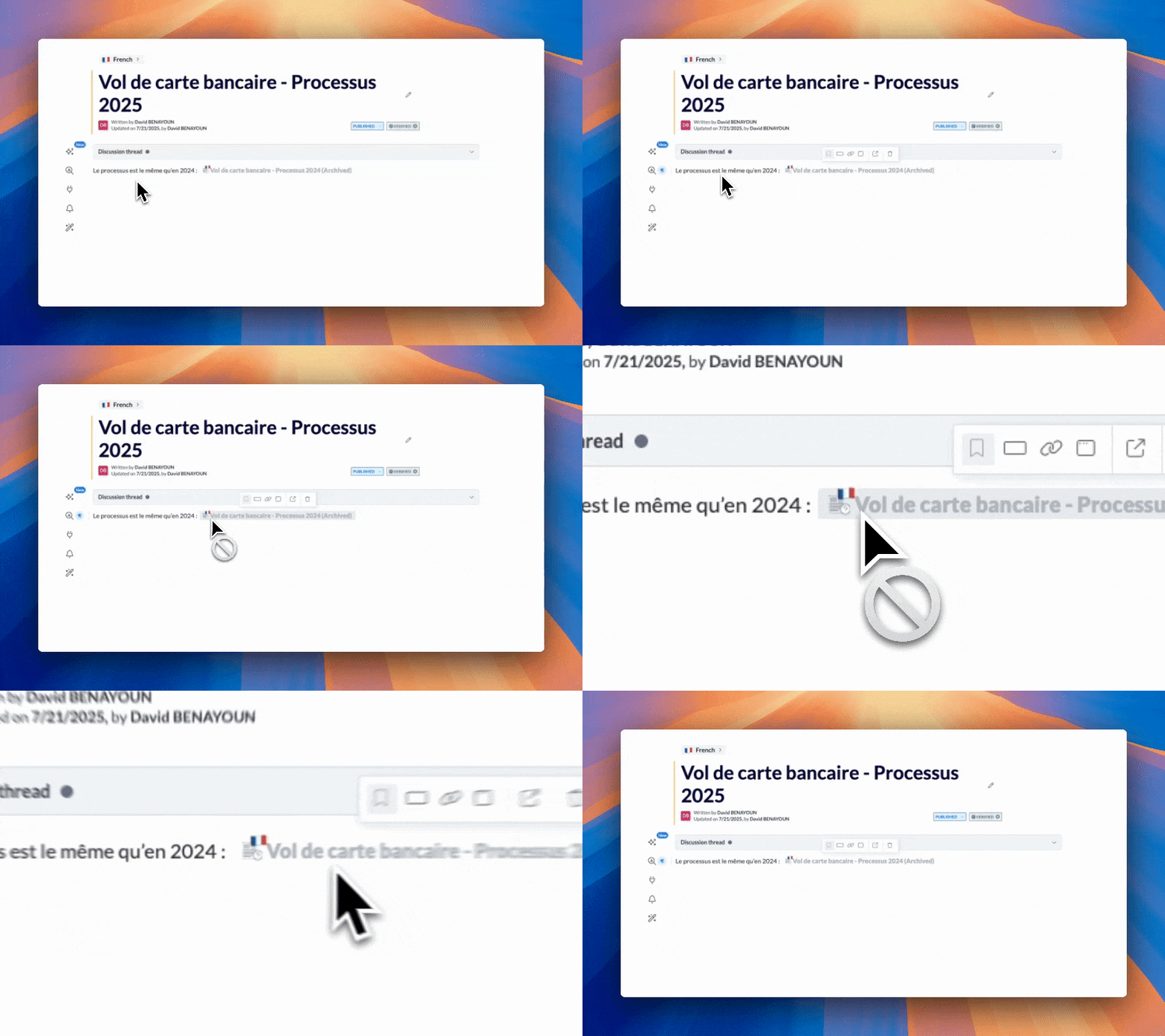
We have improved the way inaccessible content is displayed, to help you better understand why a content is not available.
Before: the mention "Unknown content" was always displayed, whatever the case.
Now: the messages are more precise:
Deleted content: "Content title (Deleted)"
Archived content: "Content title (Archived)"
Content without access: "Content not found" (unchanged)
This distinction helps you quickly identify the situation and act accordingly (reactivate, request access, etc.).
🪲 Bug fixes
👉 We have fixed the following bug:
Verification policy: Now, if the verification date set is today and draft mode is enabled, the content immediately goes to draft after the policy is validated.
🗣 New features for agents
🚀 Optimizations & Improvements
🔍 Filter by data sources in the search engine
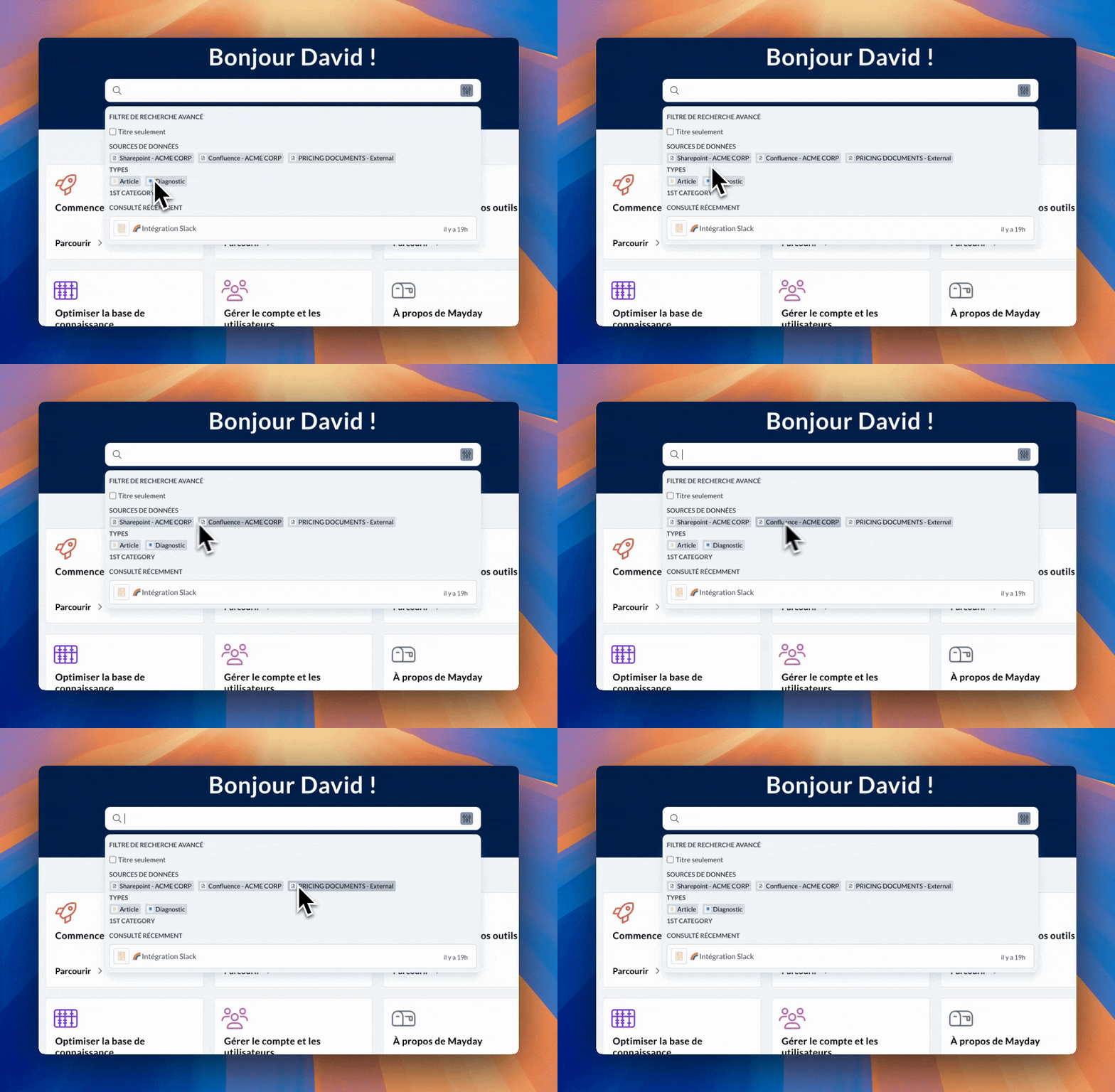
You can now filter the Mayday search engine according to the data sources connected to your space (such as SharePoint, for example).
🎯 Why this improvement?
If your company has connected external sources, it could be difficult to target your searches on this specific content. The search engine returned all results without clear distinction.
Now, you can search only in the source you are interested in, to gain precision and avoid wasting time navigating irrelevant results.
🤔 How to use it?
Go to the Mayday search engine
Use the new "Data sources" filter
Select the desired external source
Start your search to get targeted results
A real efficiency gain to quickly find your content, without having to juggle multiple tools.
🎓 What's new in the Mayday Academy
↩ Retry a training module (Retry option)
Do you want to ensure your modules are well understood and your agents achieve the expected validation scores?
Give them the opportunity to replay a module by enabling the “Retry” option, an optional feature, ideal for key content that deserves to be well mastered!
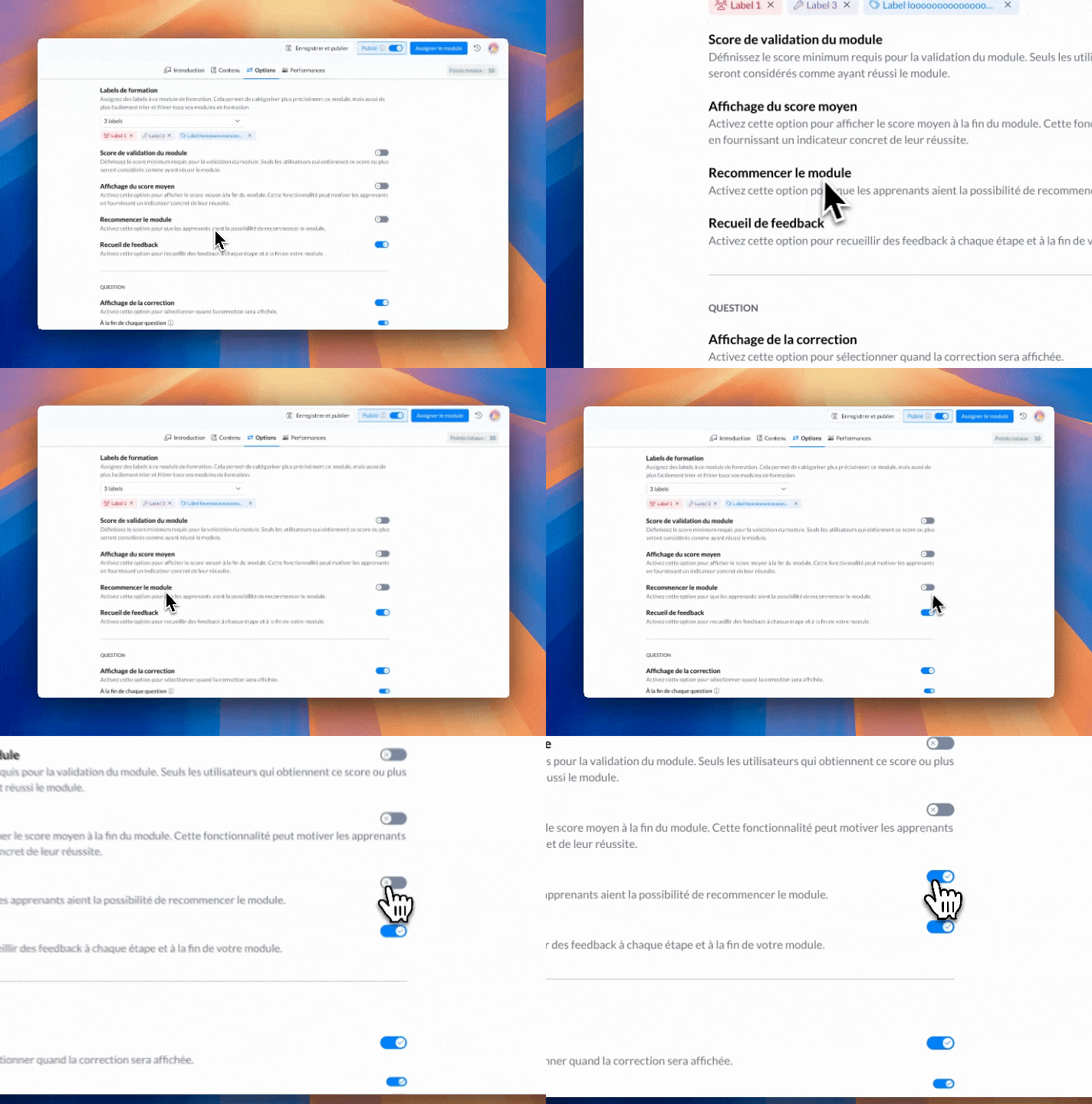
🛠 Administrator side:
The “Retry module” option can be enabled module by module, from the edit settings in the “Options” tab.
Once completed, the learner will be able to retry their module as many times as they wish.
🧑🏫 Learner side:
An arrow-shaped pictogram appears on the module cards indicating that it can be retried.
At the end of their module, a new “Retry module” button is now available.
The impact on points and badges is controlled: these are awarded only once per module version. The results of the last attempt will be counted for their acquisition.
📊 Reporting side:
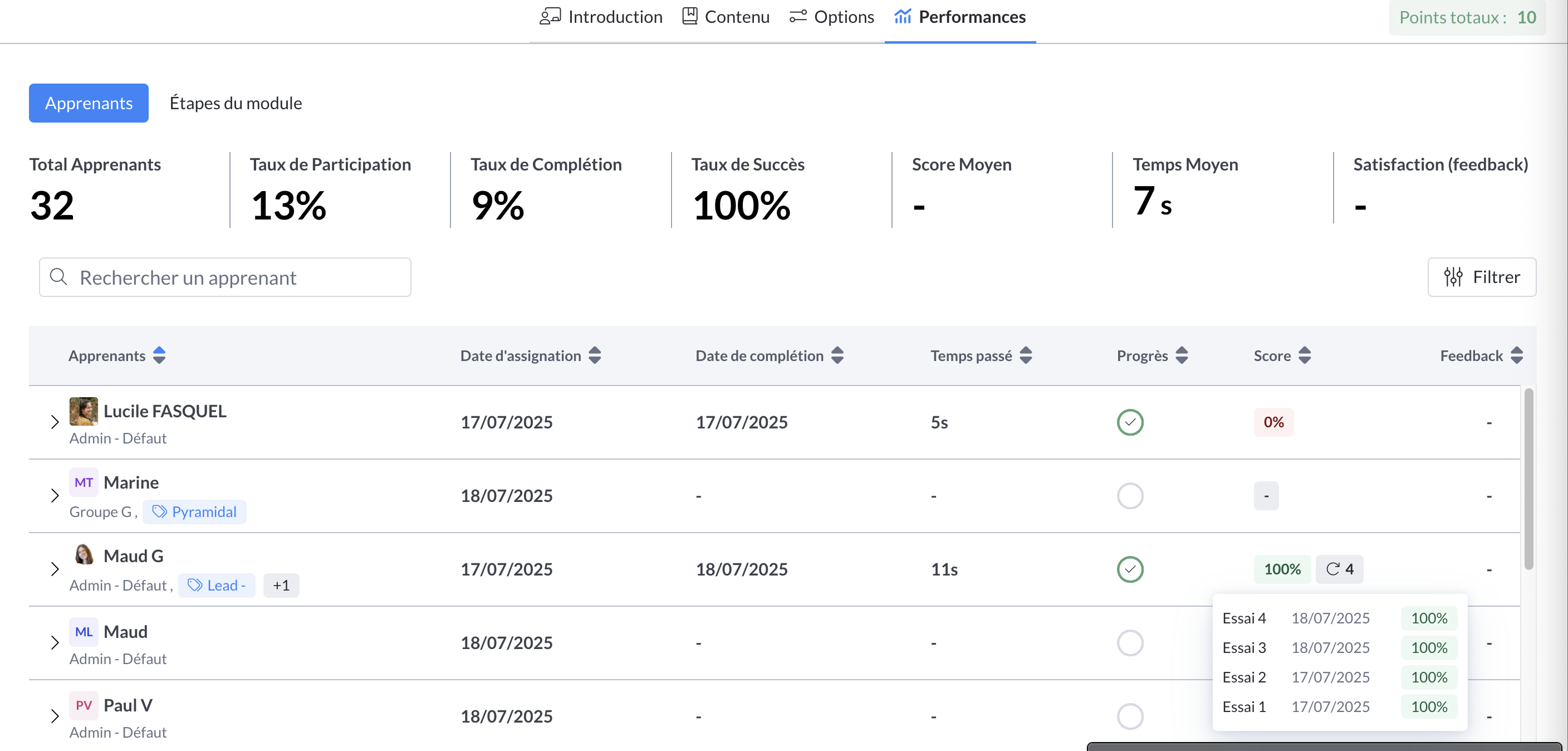
Each new attempt is recorded with its own score.
The data from the last attempt is highlighted.
You also have access to the total number of attempts made, as well as the details of each attempt: date and score obtained.
📸 Screenshot
👉 To enable this option on your existing and published modules:
Check “Retry module” in the settings, then save and publish the new generated version.
⚠ For learners who have already started or completed the module to access this new version, it will be necessary to unassign then reassign the module.
This feature allows you to encourage continuous skill development, while keeping clear traceability of your teams' efforts.
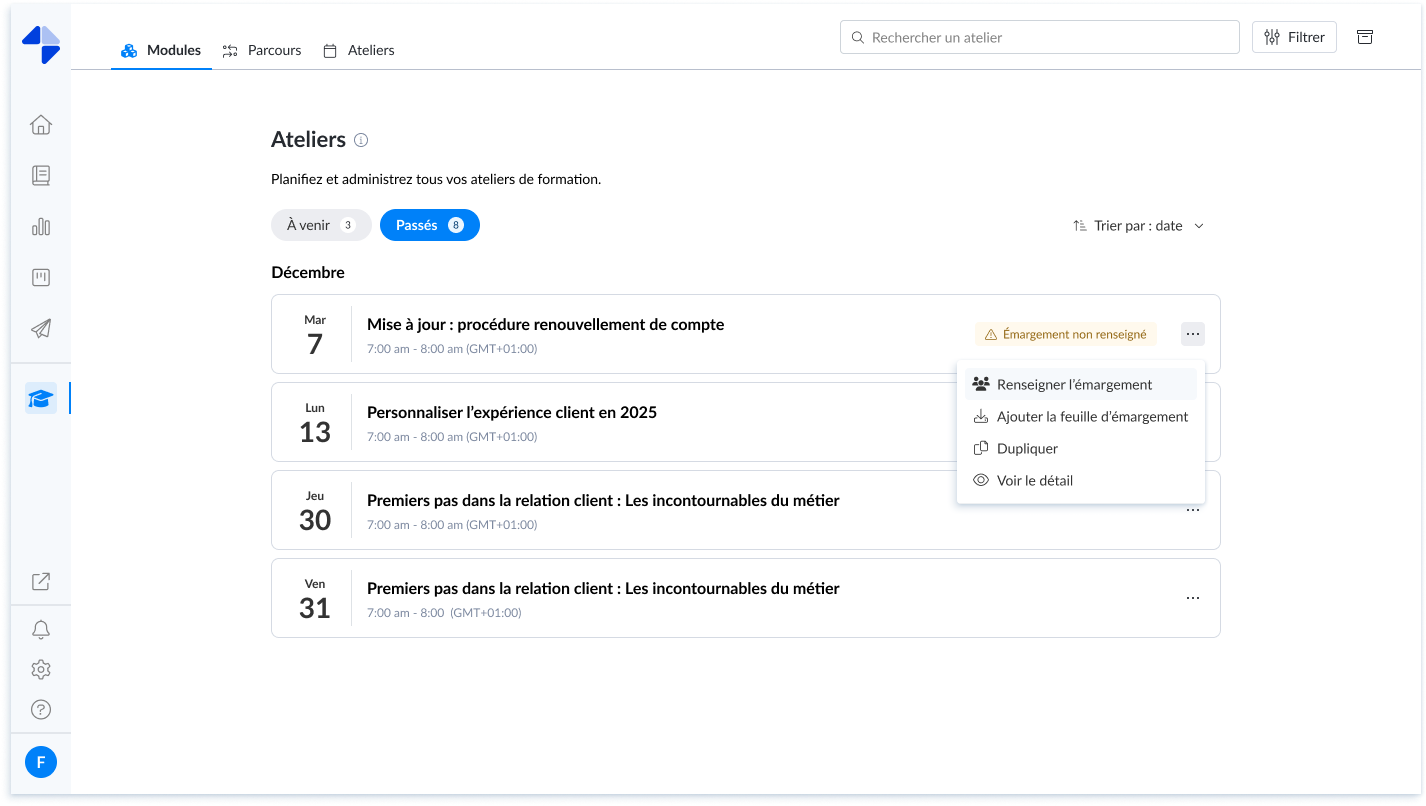
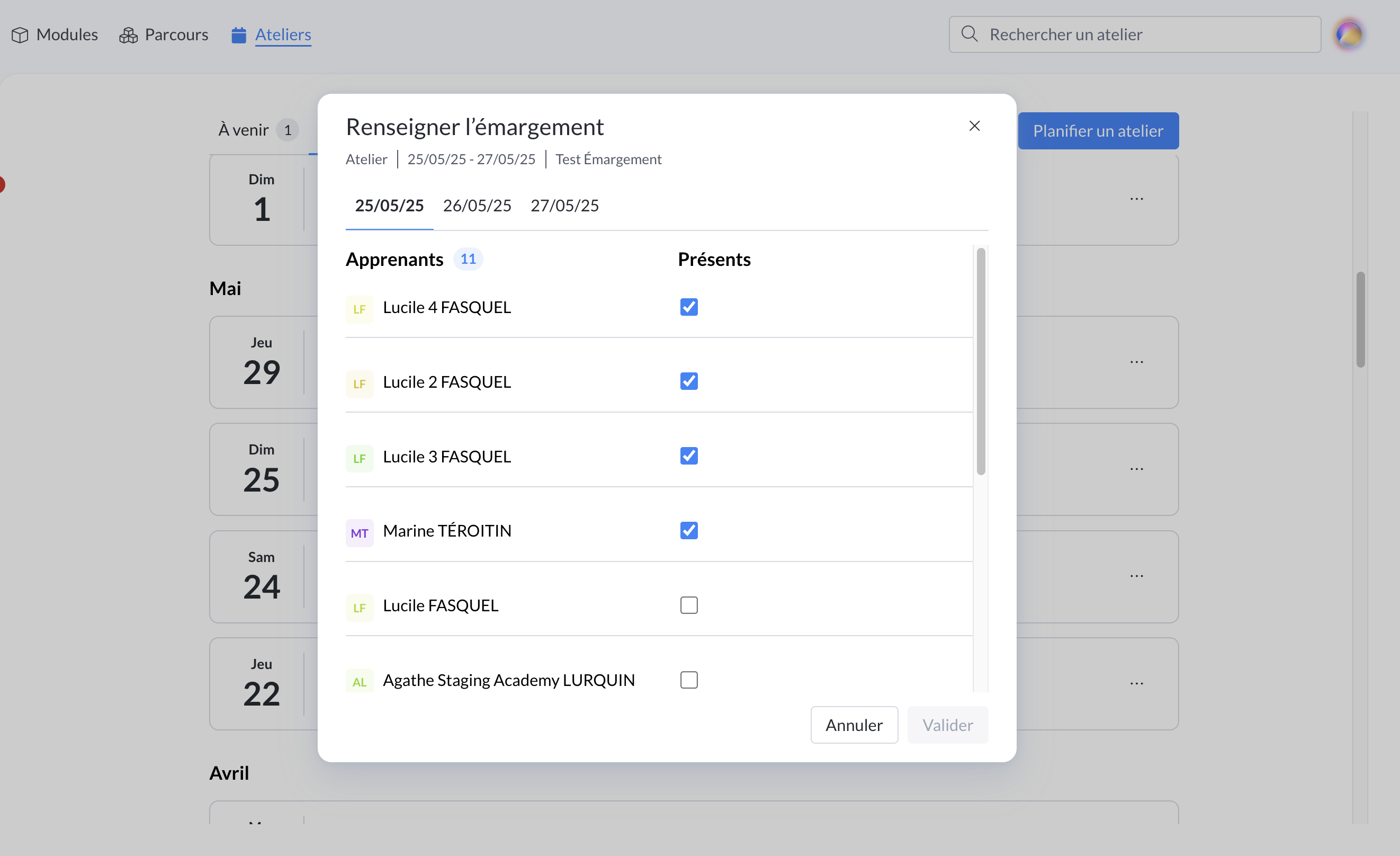
🙋 Record attendance for your past workshops
Simplify your training tracking! You can now record attendance for past workshops, directly from your admin interface.
A simple way to keep a reliable record of participation, even if the entry could not be made on the day.
👉 How to do it?
On your administrator interface, in the Workshops tab, click on the three dots of a past workshop, then select “Record attendance”.
Mark the presence or absence of participants:
By training slot
Or by half-day, for workshops taking place over several days
Indicate a non-working half-day (in case of public holiday, weekend, or half-day not dedicated to training)
🔁 Modifiable at any time: need to correct an absence, adjust a non-working half-day? You can do it whenever you want.
🪲 Bug fixes
👉 We have fixed the following bugs:
Impossible to change the estimated duration of a module sheet or a module: you can now modify the estimated duration on your modules and slides again.
The “Additional elements” section appeared on the slides of a module on the learner side even when it was empty: this section now only appears when it has been completed by the administrator
🌐 What's new in Mayday Selfcare
🪲 Bug fixes
👉 We have fixed the following bugs:
When a link is inserted on an image, it does not open when clicking the image from Selfcare: it is now possible to be correctly redirected when clicking the image.
Reporting: a session was counted at each consultation, which led to an overestimation. This error has been identified and corrected. A fix will soon be deployed to adjust past data and reflect the real values.