👋 Introduction
Welcome everyone 🎉
First of all, on behalf of the entire Mayday team, we wish you a wonderful year 2025, full of success and pleasant surprises ✨.
That's great because 2025 promises to be a year full of new features at Mayday! 🎉
👉 This year, we are introducing major innovations to transform your experience on Mayday:
🤖 Customizable AI Agents: Take advantage of customizable AI agents, allowing you to get the most out of artificial intelligence according to your needs.
⬇ Synchronization of external sources: Integrate and synchronize sources such as Sharepoint, with documents accessible via the search engine or as a source for Ask Mayday.
📚 Selfcare Mayday 2.0: Deploy our assistance solutions wherever you need them – on a dedicated site, directly on your website, or even in bot format – for a reduction in contacts everywhere.
🔌 Integrations with your customer support tools: Share Mayday knowledge across your ecosystem (CRMs, telephony tools, etc.).
🎓 Enhanced the Mayday Academy: Enjoy an even more fun and personalized learning experience, and track the performance of your agents for informed decisions.
Continuous Optimizations: Benefit from long-awaited optimizations such as simultaneous editing in the Mayday editor, improvements to the Chrome extension, and much more.
🚀 And this is just the beginning: many surprises await you in 2025!
In the meantime, many improvements and features are already available 👀.
Let's dive into all these new features together 👇
🌐🎓 📚 The new features for all products
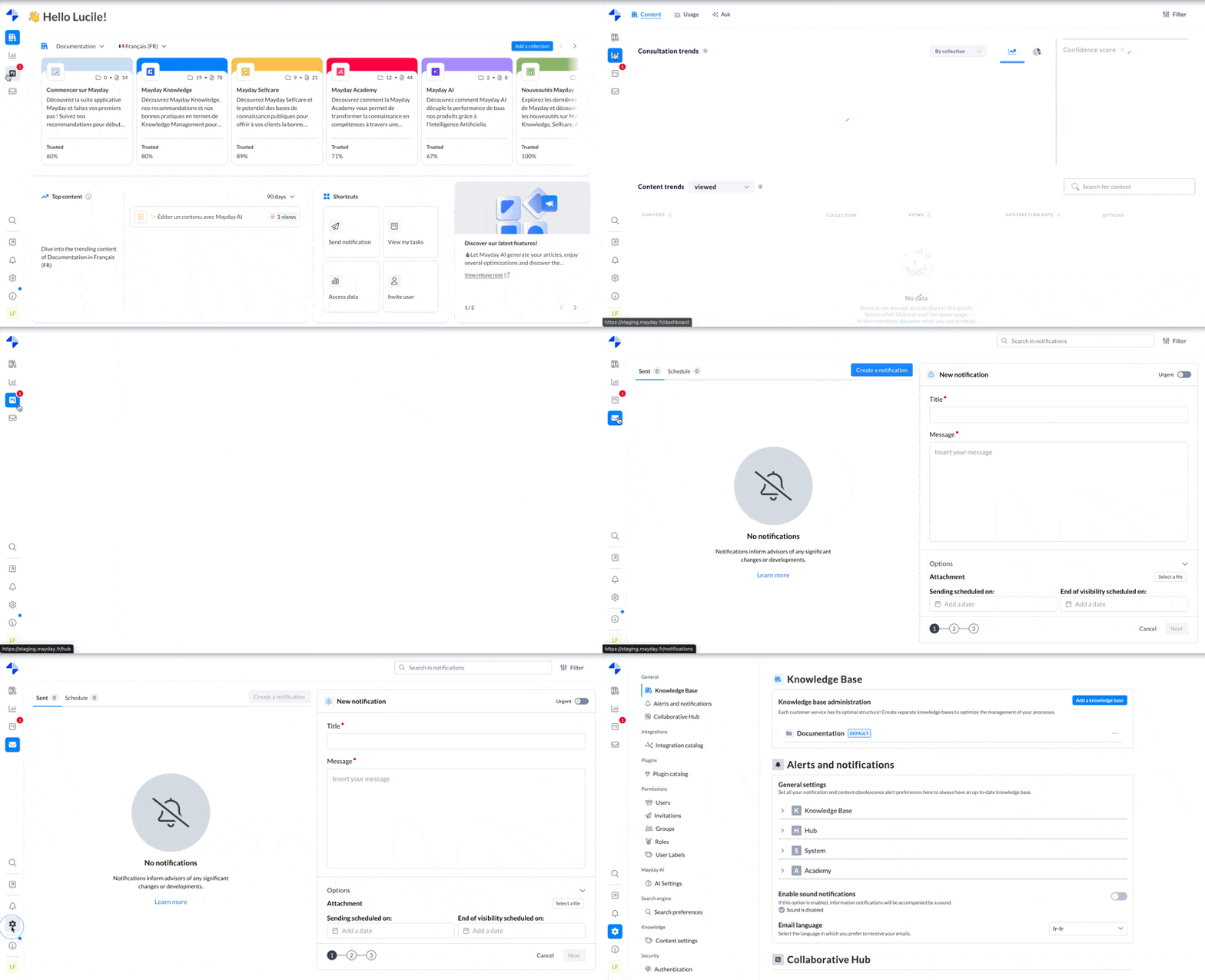
🎨 New layout on Mayday Administrator
To start the year 2025 off right, we are offering you a modern Administrator interface with harmonized design across all sections and screens! 🥳
📚 The new Mayday Knowledge features
⚙ Mayday Admin
⬇ Export your articles in PDF format
✨ NEW FEATURE | Export your articles with a single click
With this new feature, you can export your articles in PDF format for easy internal sharing. Simplify the dissemination of important information to your teams while preserving layout and content clarity.
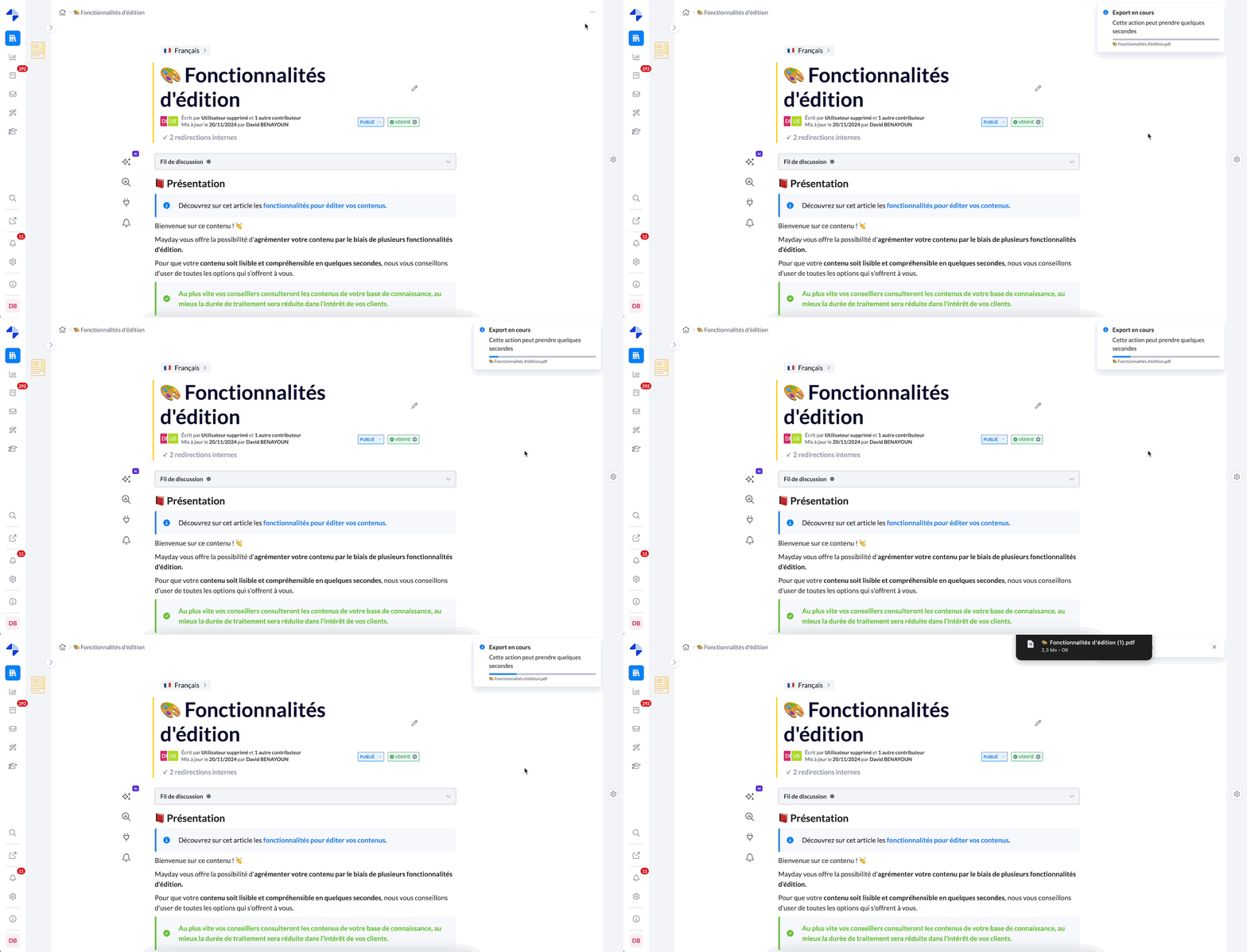
Triggering PDF export and download.
Important: This feature is not available for guides.
🎯 Why use this feature?
Facilitate knowledge sharing: Provide your teams with clear and easily accessible support, in paper or digital format.
Strengthen internal alignment: Ensure everyone has the right information presented uniformly.
Save time: Directly export your content in seconds, without a manual formatting process.
💡 Use cases
Key information dissemination: Share instructions or processes with your field teams or in meetings.
Document archiving: Keep a downloadable version of your articles for offline access or future reference.
🤔 How to use this feature?
On an article, open the options menu at the top right: “...”.
Click on “Export to PDF”.
Wait a few seconds: the download will start automatically in your browser. ✅
📝 Integrate a suggested response within an article
✨ NEW FEATURE | Add suggested responses directly to your articles!
You are all familiar with the “Suggested Responses” feature on guides, allowing agents to quickly access tailored suggestions for their interactions. Today, we are pleased to announce the evolution of this feature: suggested responses are now available directly on articles.
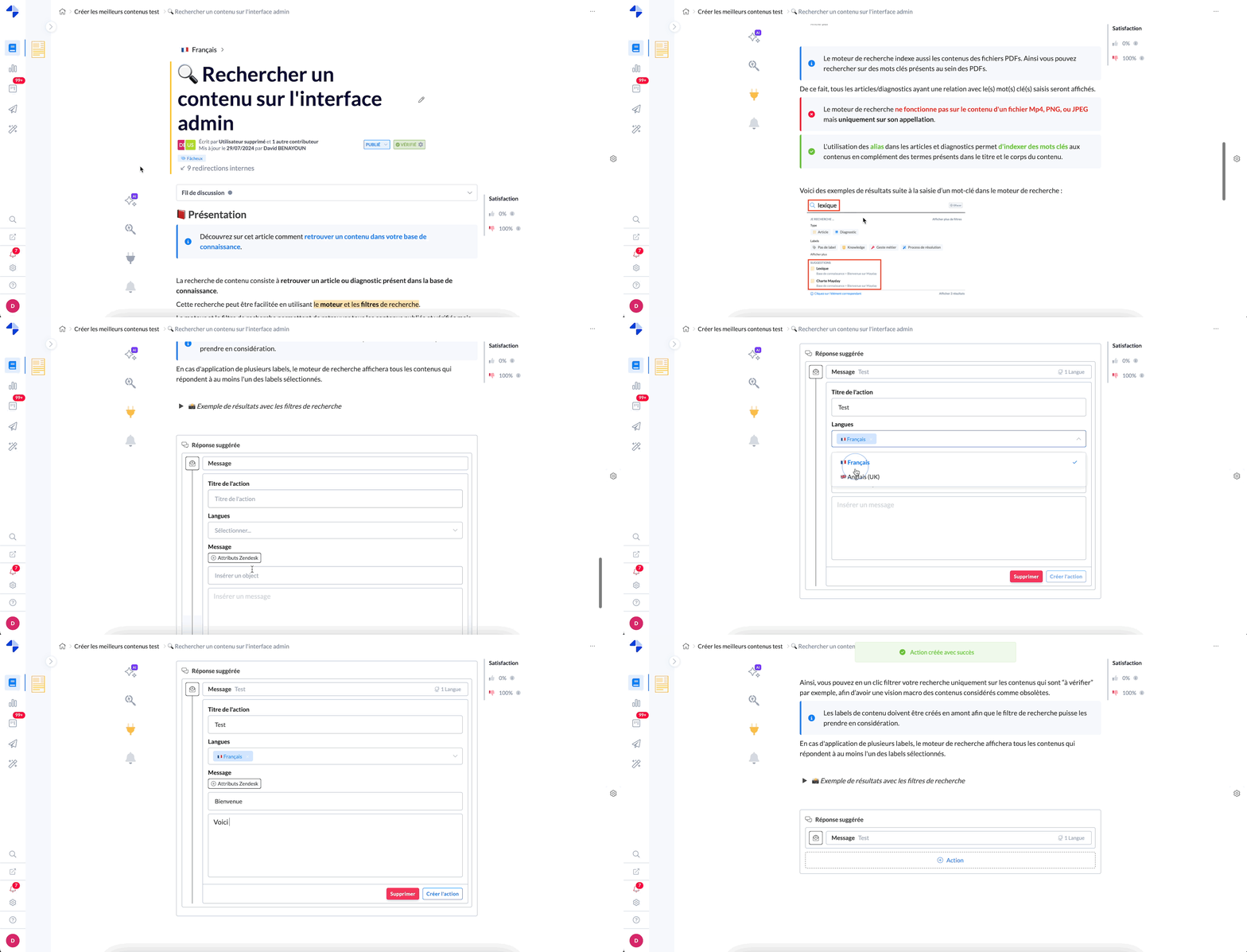
Creating and saving a suggested response within an article.
🎯 Why use this feature?
Conversations with your agents have helped us identify a clear need: to offer suggestions directly in articles to help them respond quickly and efficiently.
When an agent consults an article, the suggested responses are now accessible, just like on a guide.
💡 Use cases
✍ Simplify agents' work: Offer ready-to-use responses directly in articles so they can use or adapt them with a single click.
🔗 Increase speed: Allow agents to respond faster with pre-configured suggestions, without having to search for information in the article.
📄 Ensure response consistency: Maintain uniformity in responses by providing suggestions that conform to your organization's guidelines and tone.
🤔 How to use this feature?
On an article, click on the 🔌 button in the list of actions on the left of the content.
The suggested responses panel will automatically appear at the bottom of the article.
Simplified use: The operation is identical to that of guides – nothing could be easier!
📚 To learn more
Please refer to our documentation on suggested responses within guides:
🚀 Optimizations & Improvements
💾 Display of modification save status
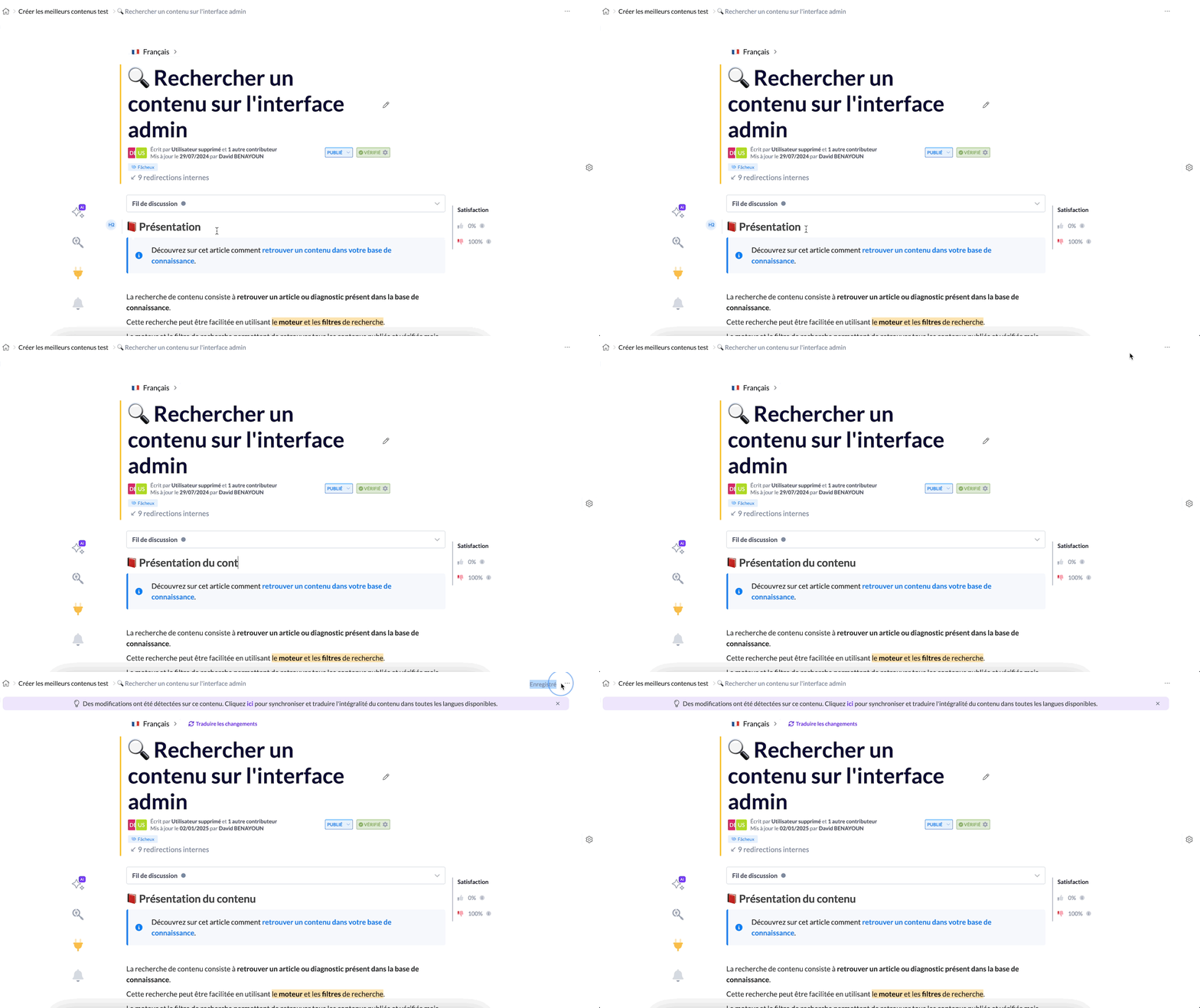
When you edit content on Mayday, a message "Saved" now appears at the top right of the screen for a few seconds to confirm that your last modification has been saved ✅.
🎯 The goal? Ensure that your modifications are always securely saved.
And if there is ever a problem, an error toast 🚨 will appear to notify you that a modification could not be saved.
👤 Mention of the user's name who assigns you to a task
From now on, when a user assigns you a task from the Mayday Hub, the name of that person will be mentioned in the notification you receive, so you can know who assigned you the task.
🎨 Redesigned AI feature layout in the editor
The artificial intelligence features in the Mayday editor now benefit from a revamped design. This update provides a smoother, more intuitive, and modern experience, making your interactions with AI tools even more enjoyable and effective.
🔌 New endpoints on the Mayday API
The complete documentation for our API is available here: Mayday API.
Two new endpoints have been added to the Mayday API to simplify task management:
GET /tasks: retrieve the complete list of tasks available on the Mayday Hub, along with all associated information. Filters are also available to refine your searches.
GET /tasks/{publicId}: access the details of a specific task using its ID.
These endpoints allow you to create automations if you wish, such as creating tasks on a third-party application from Mayday tasks.
👁 Preview of draft versions
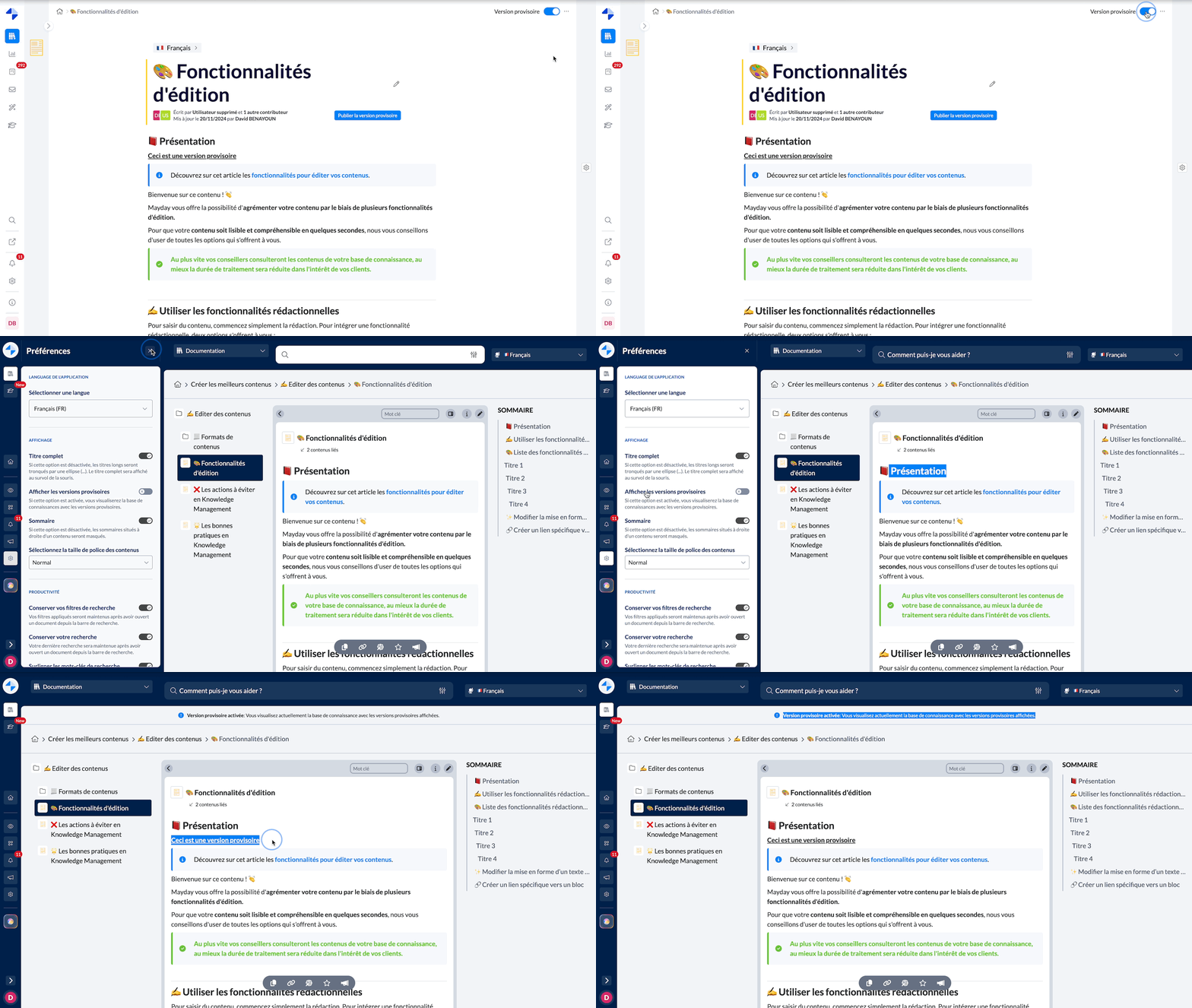
A few weeks ago, we introduced draft versions, allowing you to modify published content without these changes being visible to agents. Now, you can enable preview of these versions on the agents' side via a preference in the settings.
🤔 How to enable preview of draft versions?
Make sure you have editing permissions on the knowledge base.
Go to Mayday Desk or Widget.
Enable the “Show draft versions” preference in the settings.
⏭ What happens next?
For content with a draft version: the draft version will be displayed instead of the production version.
For content without a draft version: the production version will remain visible.
☑ Multiple restoration from archives
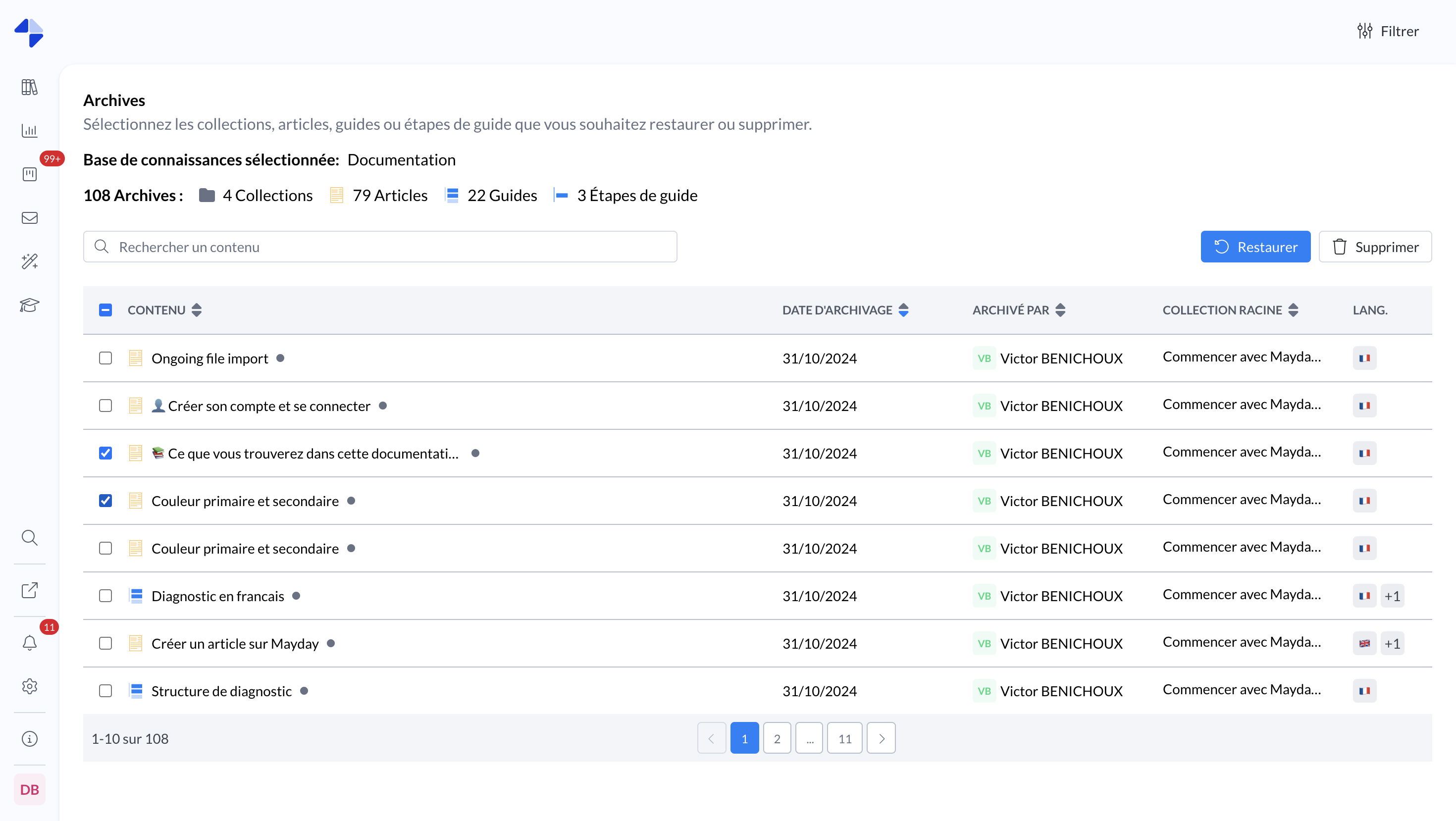
It is now possible to restore multiple contents simultaneously from the archives, greatly facilitating the management and recovery of archived articles and guides.
Important limitations:
You cannot restore guide steps simultaneously with guides or articles.
A guide step cannot be restored if its parent guide has been deleted or archived.
🇯🇵 Add the Japanese language to a knowledge base
The Japanese language is now available for your multilingual knowledge bases. Here's how to take advantage of it:
Add Japanese in your knowledge base settings.
Once activated, you can create content directly in Japanese.
✨ Tip: Use the “Ask the AI” feature to automatically translate your content into Japanese.
🪲 Fixes
👉 We have fixed the following bugs:
Draft versions: The guide steps added and published from a draft version were not visible to agents.
Home Page: Access restrictions were not applied correctly. Upon login, collections sometimes did not appear, or an unknown page message was displayed.
Filtered views of the Hub: Some tasks did not appear in a filtered view of the Hub, even when the defined filters matched.
Settings: It was impossible to modify or delete a filtered view of the Hub.
Content Editors: When a user edited content, the information under the title (author, last editor, date) did not update correctly.
Feedback-related content: In some cases, content associated with feedback could not be opened.
Notifications:
Editing features within notifications were disabled.
The writing area was sometimes truncated.
Read rates were sometimes miscalculated, with values sometimes exceeding 100%.
The cursor could no longer be positioned at the chosen spot within a notification content being created.
Cloning a guide: Cloning guides with many steps failed in some cases.
Obsolescence alerts: Some alerts were sent twice.
User invitations: Labels associated with invited users were displayed incorrectly.
User list: It was difficult to add user labels without removing others.
Date formats: Date formats varied by section, causing inconsistencies.
👥 Mayday Agent
🤖 The new Ask Mayday: Faster, smarter, smoother!
✨ NEW FEATURE | Ask Mayday evolves with instant answers, a conversational mode, and the ability to ask questions vocally, offering lightning-fast and intuitive experience for agents
Ask Mayday, your natural language search tool, takes it to the next level with three major new features:
Conversational: Talk to Ask as if it were an assistant, asking multiple successive questions in a smooth exchange.
Ultra-fast answers: Ask now responds in less than 2 seconds, for instant interactions.
Voice command: Use the microphone button to ask your questions orally, without typing a word.
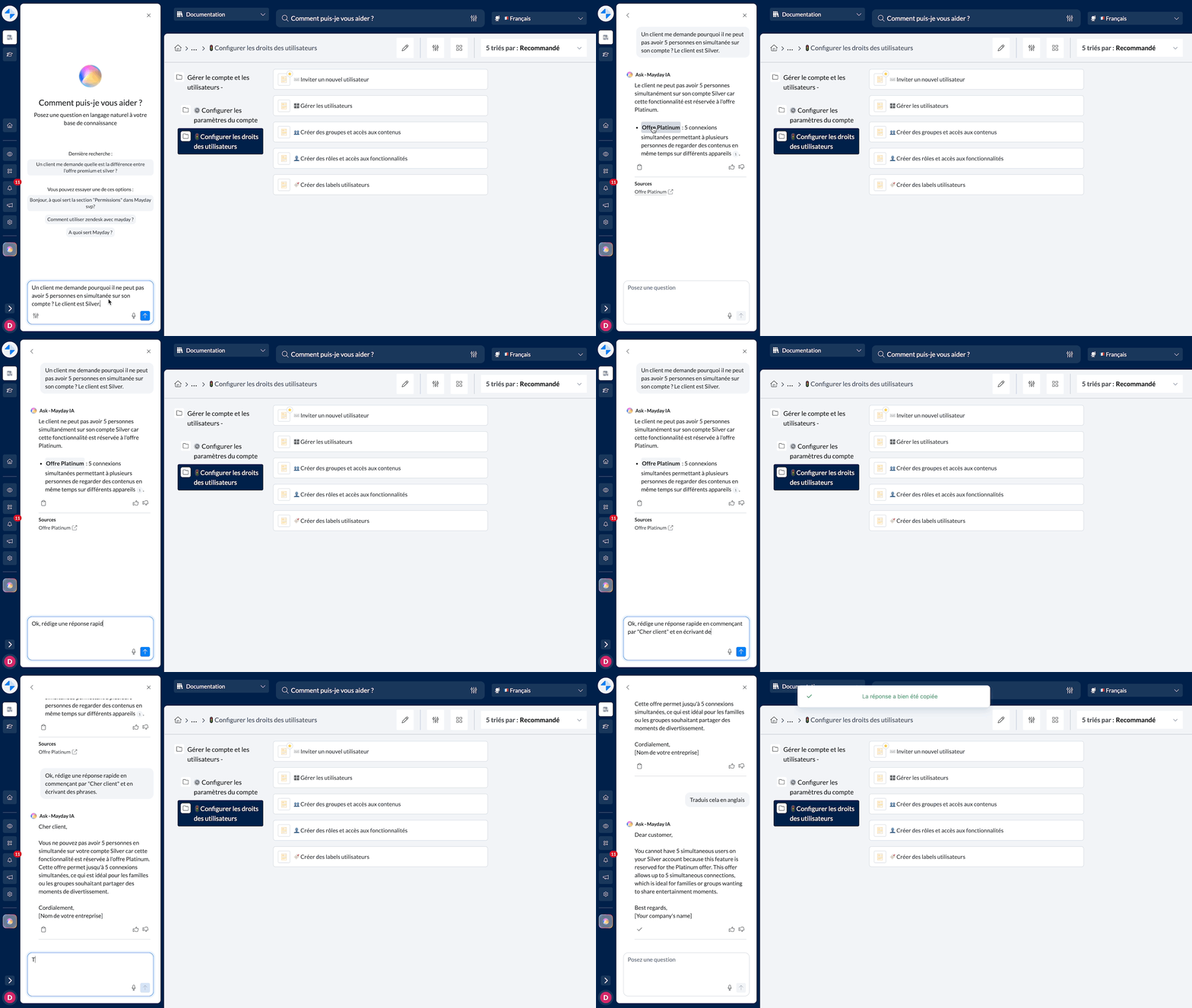
Enjoy a complete conversation with Ask Mayday.
🎯 Why use this feature?
Find the right information quickly: Get clear and precise answers in record time.
No more time wasted searching for content: Ask the AI what you're looking for and get the information in seconds.
Save time on writing: Ask Ask to directly formulate an appropriate response for a ticket or a client on the phone, ready to be copied or read.
💡 Use cases
Client ticket responses: Find and copy ready-to-use responses to answer client requests, according to your needs and queries.
Phone support: Find the information you want and provide a response to your client on the phone in record time.
Quick training of new agents: Allow new agents to get all the answers they need independently, simply by asking their questions to Ask Mayday.
🤔 How to use this feature?
Access Ask on Mayday Desk, Widget, or the Zendesk app.
Type your question or press the microphone button to speak.
Continue the conversation if necessary: Ask follows you step by step and adjusts its answers in real-time.
Copy the response or read it directly to answer your clients. ✅
This new version of Ask Mayday transforms the way agents solve client cases, allowing them to be faster, more efficient, and autonomous!
🚀 Optimizations & Improvements
Hide the table of contents of a content on Mayday Desk
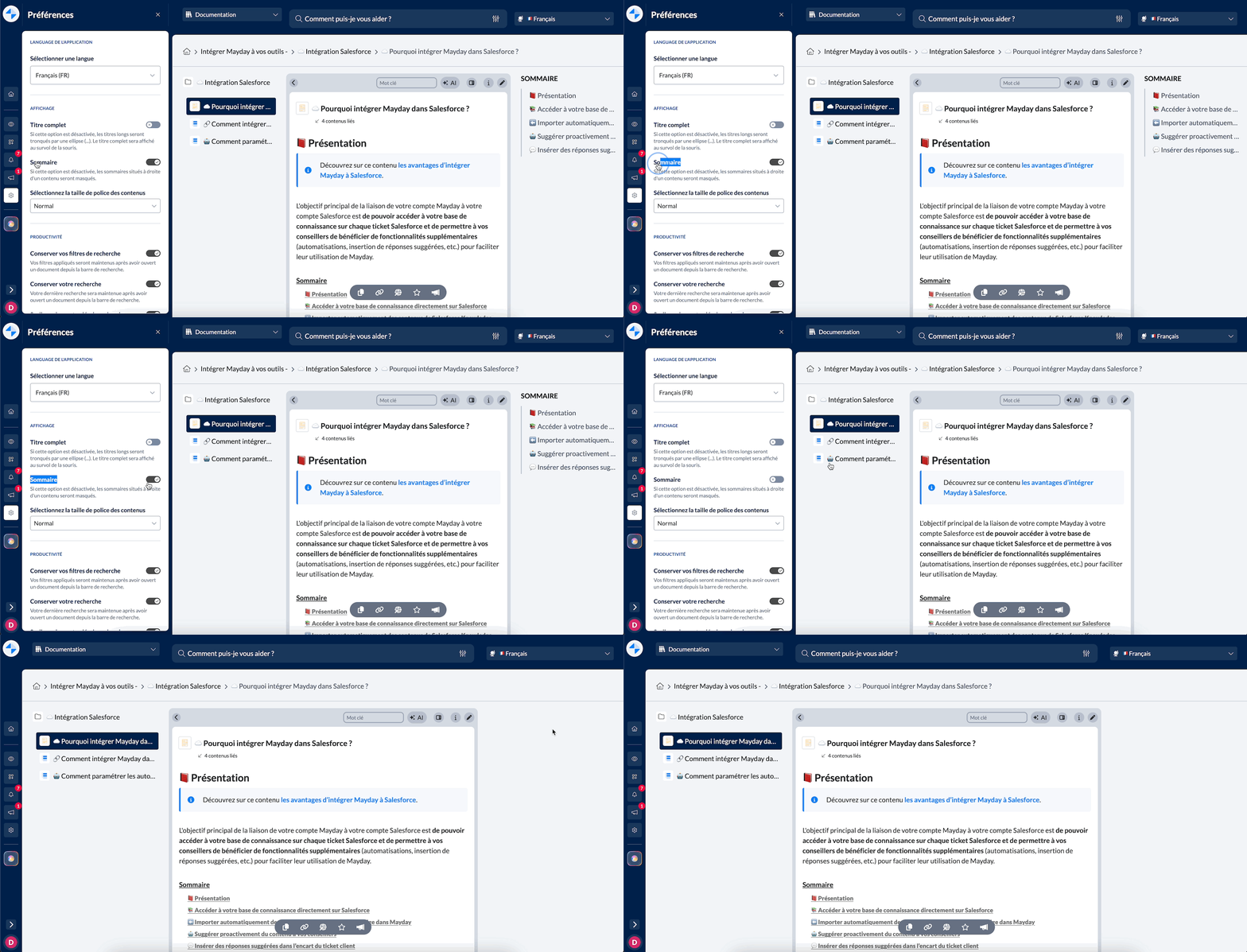
A highly anticipated feature is finally here! 🎉
You asked for it, we made it! As you know, on Mayday Desk, the table of contents of the content you view automatically appears on the right side of the screen.
Now, you can customize this experience by disabling the table of contents display from your preferences. Just disable the “Table of Contents” option.
Note that this preference is only available on Mayday Desk and does not apply to other platforms like Widget or Zendesk.
🎓 The new the Mayday Academy features
⚙ Mayday Admin
⭐ Mayday AI features available on the Academy!
Already available on your Knowledge editor, you can now use these features on the Academy to save time and increase efficiency!
“Ask the AI”: save time and increase efficiency with our open prompt Mayday AI within your Academy editor
✨ NEW FEATURE | Mayday AI helps you write educational content within a sheet, a module description, and/or instructions and corrections for your quizzes and practical cases.
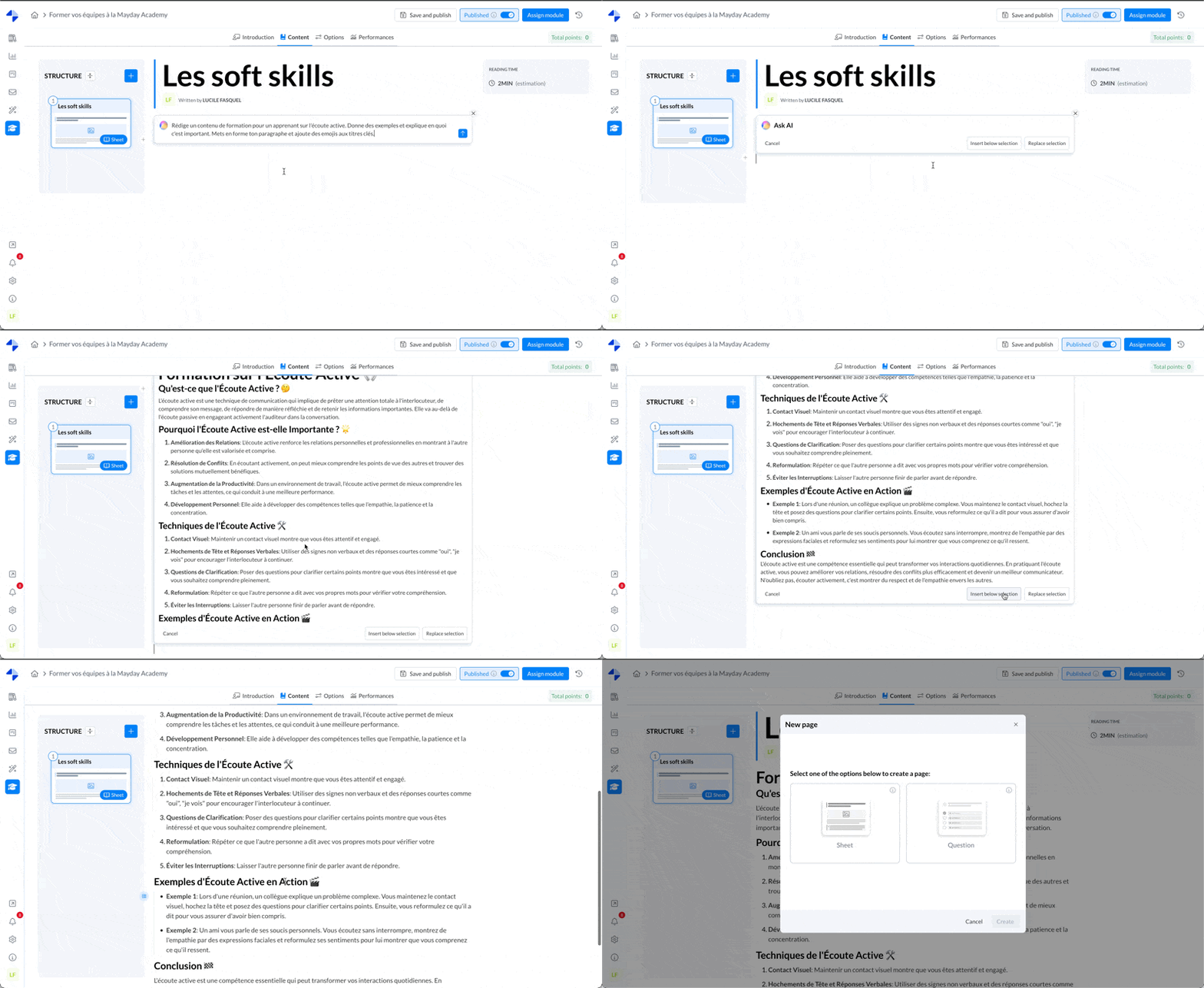
Admin interface - Module - content
Tone improvement, translation, and correction features
✨ NEW FEATURE | Mayday AI allows you to correct, translate, or improve the tone of your educational content on the Academy admin editor with one click.
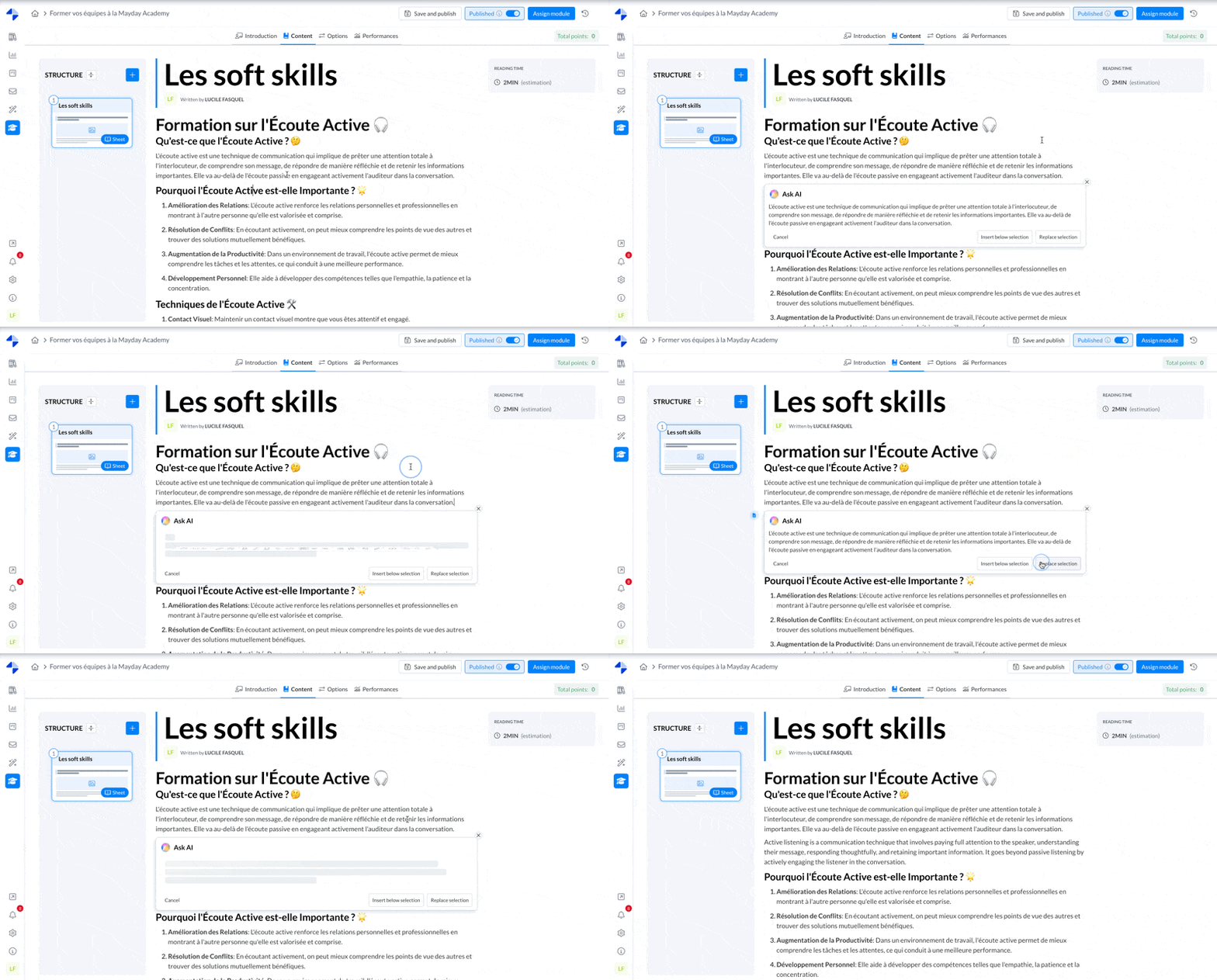
Admin interface - Module - content
🎨 Optimizations
SCORM Modules & Gamification
Your SCORM format modules now benefit from our badge earning feature! 🎉
Motivate your agents with the gamification feature of the Mayday Academy!
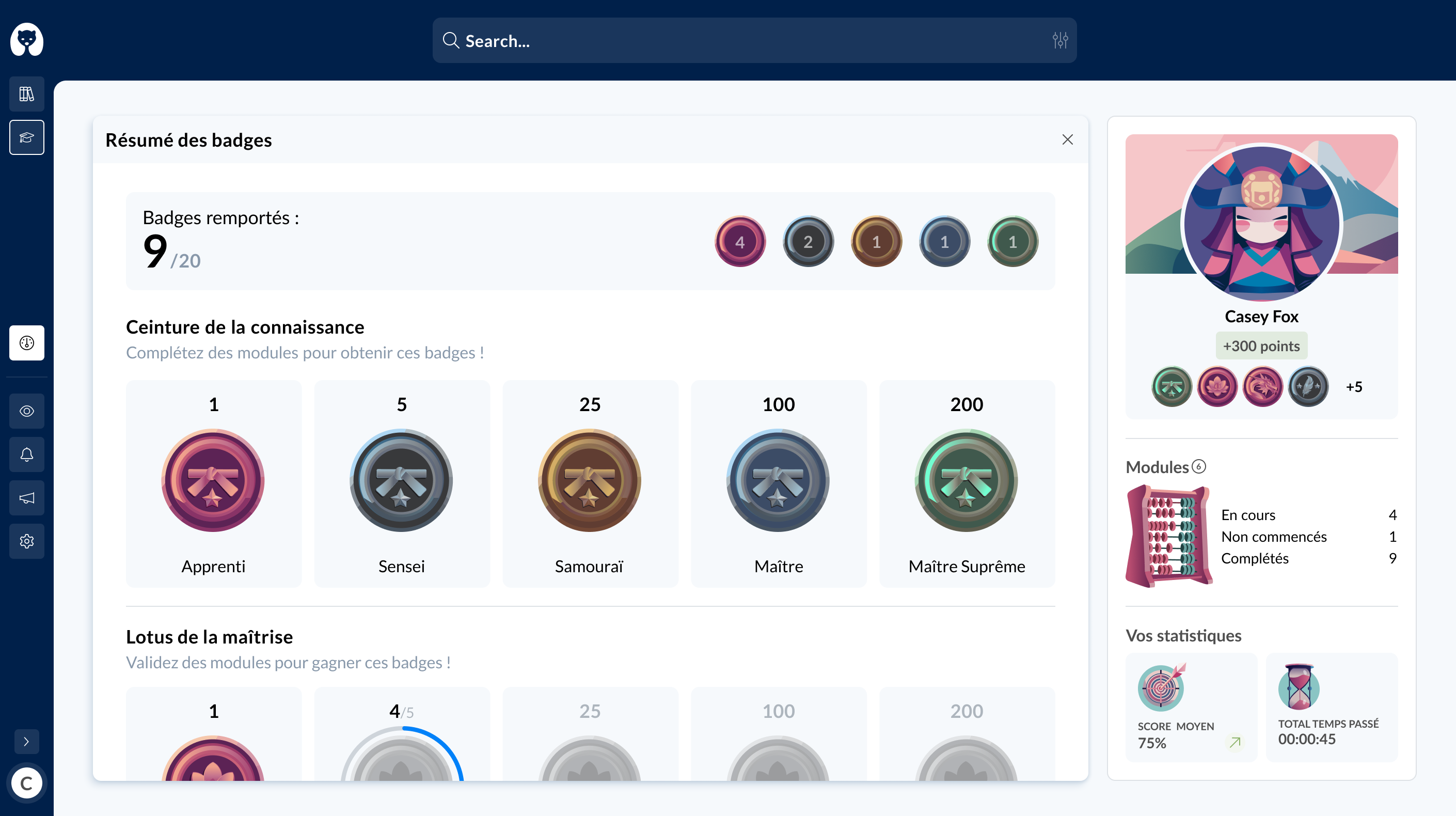
Admin interface - badges
Find our documentation on the badge feature here:
🚀 Coming soon
Our teams are actively working on the Blended Learning feature. 👩🏫
Soon you will be able to create and schedule workshops in-person or synchronous remote sessions with a group of learners and a facilitator.
🪲 Fixes
👉 We have fixed the following bugs:
Course creation: some modules did not integrate correctly and blocked access to the course
Learner search for de-assignment: it was no longer possible to correctly search among the list of assigned learners to unassign them from a module
Module duplication: duplicated modules were displayed as content within the same courses as the initial module
🌐 The new Selfcare features
🪲 Fixes
👉 We have fixed the following bugs:
Embedded Selfcare: the content not found mention appeared for feedback from visitors
🚀 Coming soon
Our teams are actively working on adding conversational capability to our Selfcare widget available on the Mayday admin interface. ✨
Soon you will be able to ask all your questions if you do not wish to search the documentation!